Triax Armored SR920W User manual

These watches are really slick. They have a number of features not found
on most analog watches. Some of these features you may never use.
That’s OK!
Turn the crown so that the mode is set to TIME. As long as your watch
is set here, it will show the time of day.
2
ENG
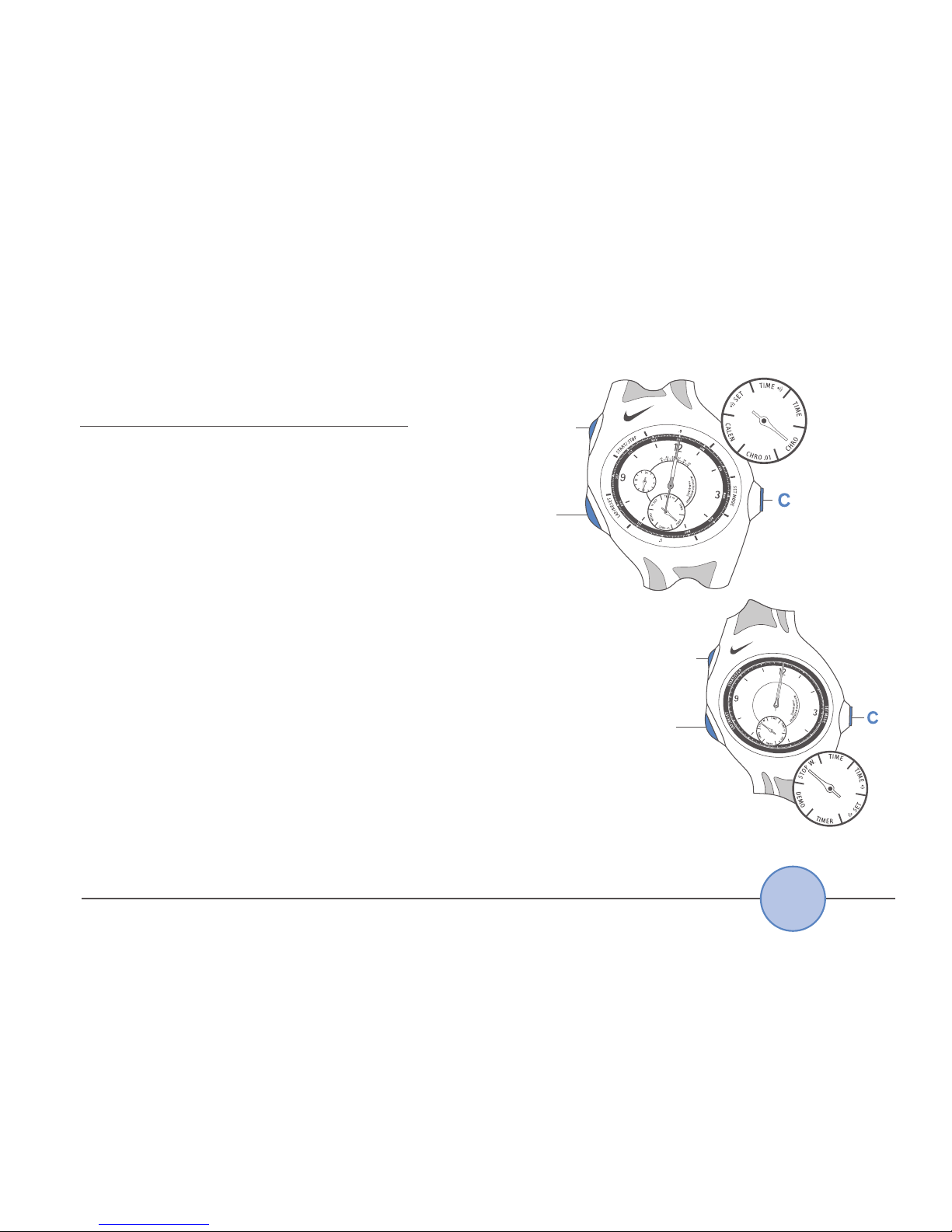
This manual is for 2 different watches:
Armored
Triax
Super
Armored
Triax
Regular
Armored Triax
Super
Mode Select
Armored Triax
Regular
Mode Select

ENG
3
Watch Diagrams . . . . . . . . . . . . . . . . . . . . . . . . . . . . . . 4
TIME • TIME . . . . . . . . . . . . . . . . . . . . . . . . . . . . . . 6
CALENDAR . . . . . . . . . . . . . . . . . . . . . . . . . . . . . . . . . 7
CHRONO • STOP W. . . . . . . . . . . . . . . . . . . . . . . . . . . 8
.01 CHRONO . . . . . . . . . . . . . . . . . . . . . . . . . . . . . . . 10
Demonstration . . . . . . . . . . . . . . . . . . . . . . . . . . . . . . . 12
TIMER . . . . . . . . . . . . . . . . . . . . . . . . . . . . . . . . . . 13
SET . . . . . . . . . . . . . . . . . . . . . . . . . . . . . . . . . . . . . 14
Adjusting the Hand Position . . . . . . . . . . . . . . . . . . . . . 15
Specifications . . . . . . . . . . . . . . . . . . . . . . . . . . . . . . . 17
Warranty . . . . . . . . . . . . . . . . . . . . . . . . . . . . . . . . . . . 18

ARMORED TRIAX SUPER Watch Diagram
4
ENG
A-START/STOP
B-LAP/RESET
C-SET MODE
(Crown)
D - Hour Hand
E - Minute Hand
F - 1/100 Second Hand
G - Second Hand
H - 24 Hour Hand

ARMORED TRIAX REGULAR Watch Diagram
ENG
5
A-START/STOP
B-LAP/RESET
C-SET MODE
(Crown)

In TIME or TIME mode you can set the time.
If at any point the hands become out of sync,
reset them to the 12 o’clock position.
See Adjusting the Hand Position to reset them.
1. Pull the crown (C) out
2. Press Arepeatedly to set the minute hand
3. Press Brepeatedly to set the hour hand
4. Push the crown (C) back into normal
position
TIME
6
ENG

In CALEN mode the month and date are indicated.
How to Read the Calendar
• The month is indicated by the hour and
minute hands
• The date is indicated by the second hand
How to Set the Calendar
1. Pull the crown (C) out
2. Press Ato set the desired month
• It advances one month with each press of A
• The hands move quickly if Ais held for 2 seconds.
• The calendar automatically adjusts for odd and even
months except February of leap years
3. Press Bto set the desired date
• It advances on day with each press of B
• After 31, the hands automatically return to 1
4. Push the crown (C) back into normal position
CALENDAR (Super only)
ENG
7

In CHRO mode you can measure up to 23
hours 59 minutes and 59 seconds.
In STOP W. mode you can measure up to
60 minutes in 0.2 second intervals.
Lap time measurement is also possible in
CHRO mode.
The watch measures in 1/10 (0.1) second
increments for the first hour, and in one
second increments thereafter.
“Lap time” refers to an elapsed time required to
cover a distance from the start to a given point.
The chronograph and stopwatch must be stopped to
reset.
The CHRO and STOP W. will continue running if
you switch to a different mode.
CHRONOGRAPH (Super) • STOP Watch (Regular)
8
ENG
START/
STOP
LAP/
RESET
START/
STOP
LAP/
RESET

In CHRO and CHRO .01 modes, the hands indicate
different time units depending on the mode in
use and the elapsed time.
How to Read the Hands
• After 1 hour, the 24-hour hand
indicates the elapsed hours
• After 10 minutes have elapsed, the
1/10 second hand pauses at the 12
o’clock position while the second and
minute hands are moving
• When the measurement is stopped or lap time
is measured, the 1/10 second hand indicates
the 1/10 seconds measured
• When the measurement is restarted or lap time
measurement is released, the 1/10 second hand
returns to rest at the 12 o’clock position
CHRONOGRAPH (Super) • STOP Watch (Regular)
ENG
9

START/
STOP
LAP/
RESET
START/
STOP
LAP/
RESET

In CHRO .01 mode you can measure in
1/100 second increments.
Split time measurement is also possible.
The elapsed 1/100 seconds are indicated
by the tail of the hour hand.
How to Read the Hands
Measurement of less than 10 Minutes
• The 1/100 second hand pauses at the
12 o’clock position while the 1/10 second
and second hands are moving
• When the measurement is stopped or split time is
measured, the 1/100 second hand indicates the 1/100
seconds measured
• The 24-hour hand does not represent the lapse of time
• After 10 minutes has elapsed the 1/100 second and 1/10 second hands pause
at the 12 o’clock position while the second hand keeps moving
1/100 (.01) second CHRONOGRAPH (Super only)
10
ENG
START/
STOP
LAP/
RESET

• When the measurement is stopped or split time is measured, the 1/100 second
and the 1/10 second hands indicate the 1/100 and 1/10 seconds measured
• When the measurement is restarted or the split time is released, the 1/100
second and 1/10 second hands return to rest at the 12 o’clock position
• Before changing the mode to CHRO to determine the measured hours and
minutes, be sure to read the measured 1/100 seconds, 1/10 seconds and
seconds in the CHRO .01 mode
• After the measurement exceeds 12 hours, read the 24-hour hand to determine
the elapsed hours
If the mode is changed to CHRO while the split time is measured, the split
time measurement will be released.
1/100 (.01) second CHRONOGRAPH (Super only)
ENG
11
This manual suits for next models
1
Table of contents