© TQ-Systems GmbH. All information contained in this documents have to be treated strictly confidential. The transfer of presentations and know-how to third parties
requires the prior written consent of TQ-Systems GmbH.
2.2.1.1 Multiple Flight ID selection
If multiple Flight IDs are configured a selection menu is displayed.
2.2.1.2 Normal operation
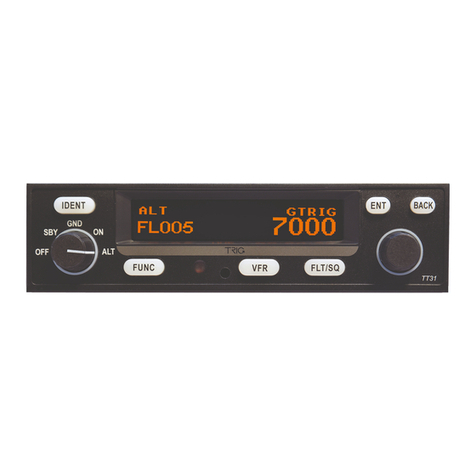
The normal operation always starts in standby mode. The normal operation display is shown as follows:
Figure 5: Normal Operation screen
Note:
The Flight ID is not shown if no valid Flight ID was configured.
2.2.2 Transponder-Modes
The currently active mode is displayed at the lower left corner of the display.
Note:
ADS-B out is only supported if “Extended Squitter ADS-B out” feature is enabled (unlocked).
For information on enabling (unlocking) “Extended Squitter ADS-B out”: see chapter 3.4.6.
The ADS-B out function is automatically enabled if a GNSS device is configured (see chapter
3.4.2.1.3.4).
Transponder is switched on
but
does not
respond to any interrogation.
ADS-B out is inactive.
Transponder responds to Mode S interrogations.
ADS-B out is active (Surface Squitter).
Transponder responds to all interrogations, but altitude is not transmitted.
ADS-B out is active.
Transponder responds to all interrogations.
ADS-B out is active.
Table 3: Transponder Modes
During the flight the Mode “ALT”should always be set, unless the ATC gives other instructions.
While rolling on the ground the transponder should be set to “GND”.
If the installation includes a weight on wheels switch and it is correctly configured then the mode is
changed automatically.