
TONE WEAL UT64 User manual

PROFESSIONAL AUDIO USB INTERFACE & STANDALONE
MIC-PREAMP WITH AD/DA CONVERTER
UT64 is a 6-input channel portable USB audio interface designed as having mobile
recording at any moment
USB bus power, within a durable and compact case.
ENTW

dusty environment, to prevent possible
damages.
through the components inside.
unit before cleaning.
unit.
storms or when unused for long periods of
on or pinched.
Tone weal. Warrants this product to be
free of defects in material and
original retail purchase.
replace, free of charge, any product that
This warranty does not cover claims for
personnel and is limited to failures arising
during normal use due to defects in
*** Please be Register on our website for
warranty record or please let the Retail
store with Tone weal or its authorized
service representave make stamp date.
www.toneweal.com2
IMPORTANT SAFETY
INSTRUCTIONS Tone weal Limited Warranty

Windows.
Macintosh.
Standalone Mode.
2
3
3
4
4
6
8
9
11
12
12
13
14
16
17
18
CONTENTS
performance
Mic-preamps
balanced input and output
control
FEATURES
3

AC/DC adaptor
USB cable
Owner's manual
This is the manual you are reading.
+48V Phantom Power LED
you are not sure whether your mic
You must leave the phantom power
Supplying phantom power to a dynamic
Supplying phantom power to a dynamic
CONTENTS OF THE PACKAGE FRONT PANEL
1
4
24765
13
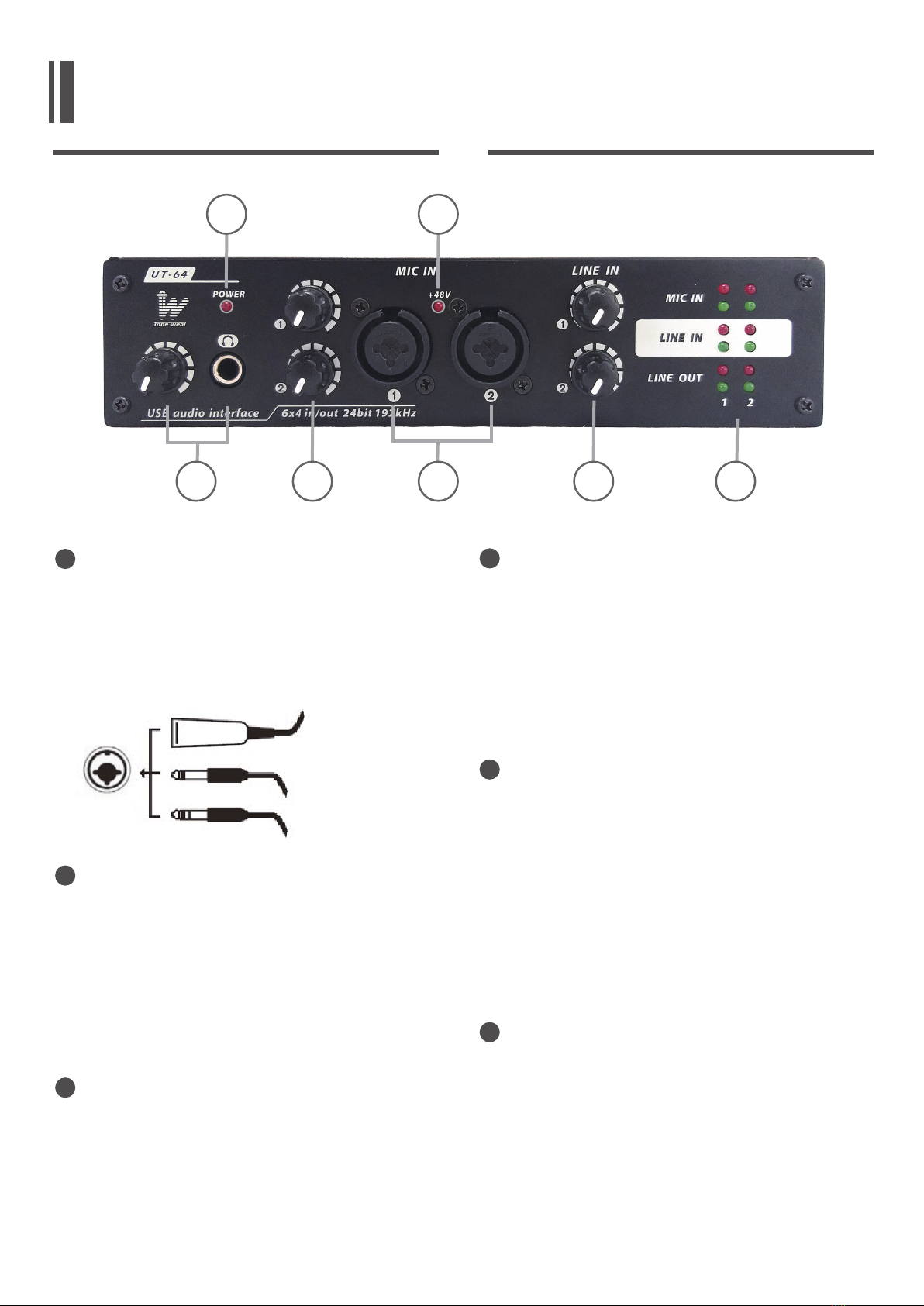
Headphone Output Jack and Control
computer could be monitored using the
control.
Power LED Indicator
means that your UT64 is on running.
Mic Gain Knob
care that applying gain to ensure Mic
XLR plug
TRS phone plug
Phone plug
2
3
4
Combo input jacks
mic preamps. They accommodate either
balanced or unbalanced signals may be
connected.
Line in Gain 1&2
located on the rear panel. Turn then
lower the input levels.
can easily match your input levels.
Sig / Clip Indicators
when their analog and mic inputs and
outputs are receiving a signal and when
to the signal being dynamically clipped,
FRONT PANEL
5
6
7
5
24765
13
REAR PANEL
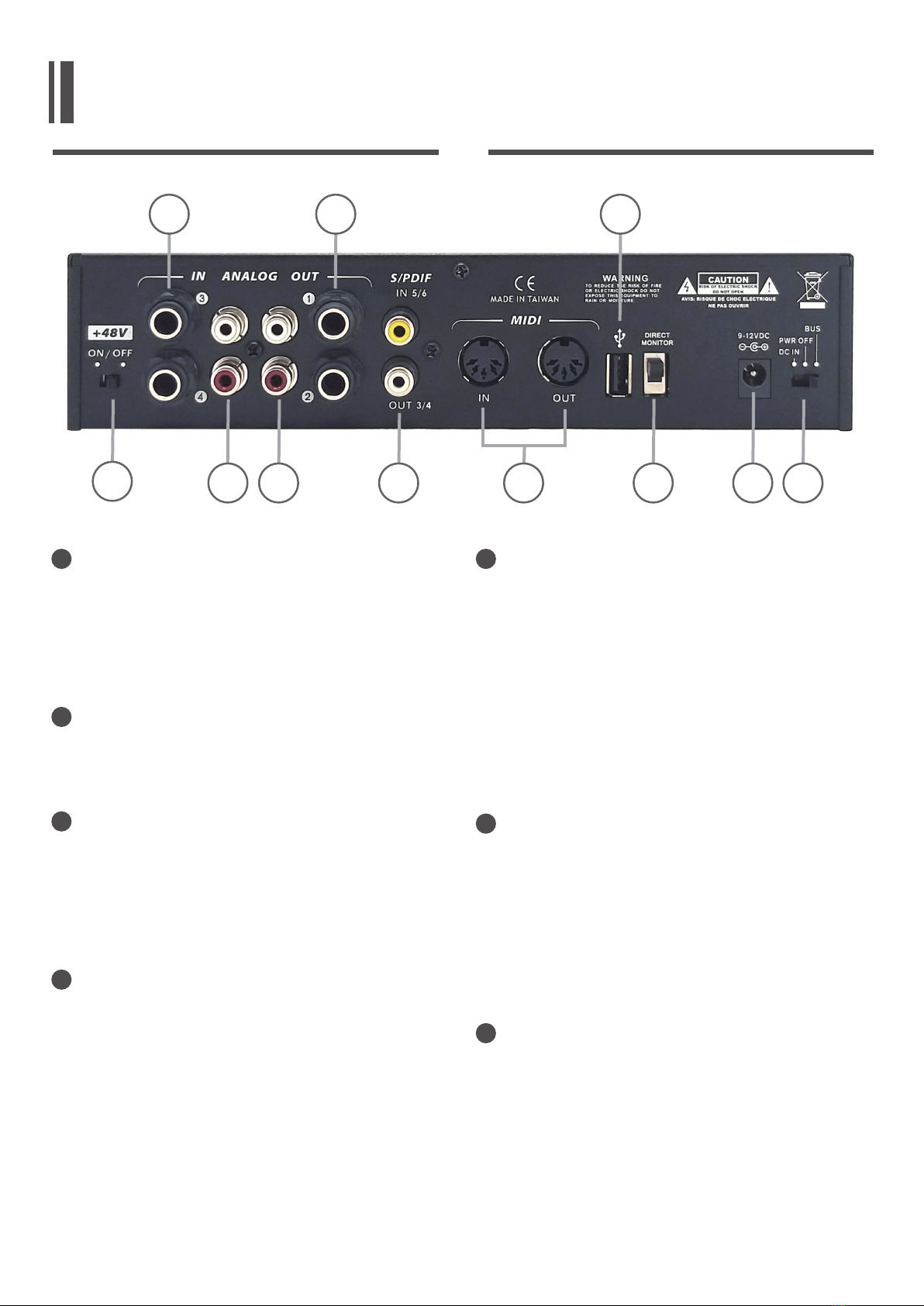
Phantom power switch
panel.
Analog 1/4” TRS Inputs 1 and 2
connect any line output device.
Analog RCA Inputs 1 and 2
recorders, turntables, and even
Analog RCA Outputs 1 and 2
external recording device with this
8
9
10
11
12
13
14
Analog 1/4” TRS Outputs 1 and 2
-
puts with line in level signal
output channel and connect them to
You could also use them with several
signal processor or any external devices.
S/PDIF In/Out
-
MIDI In/Out
performing your computer through the
UT64.
6
810 11 13 14 16 17 18
12 15
9
REAR PANEL
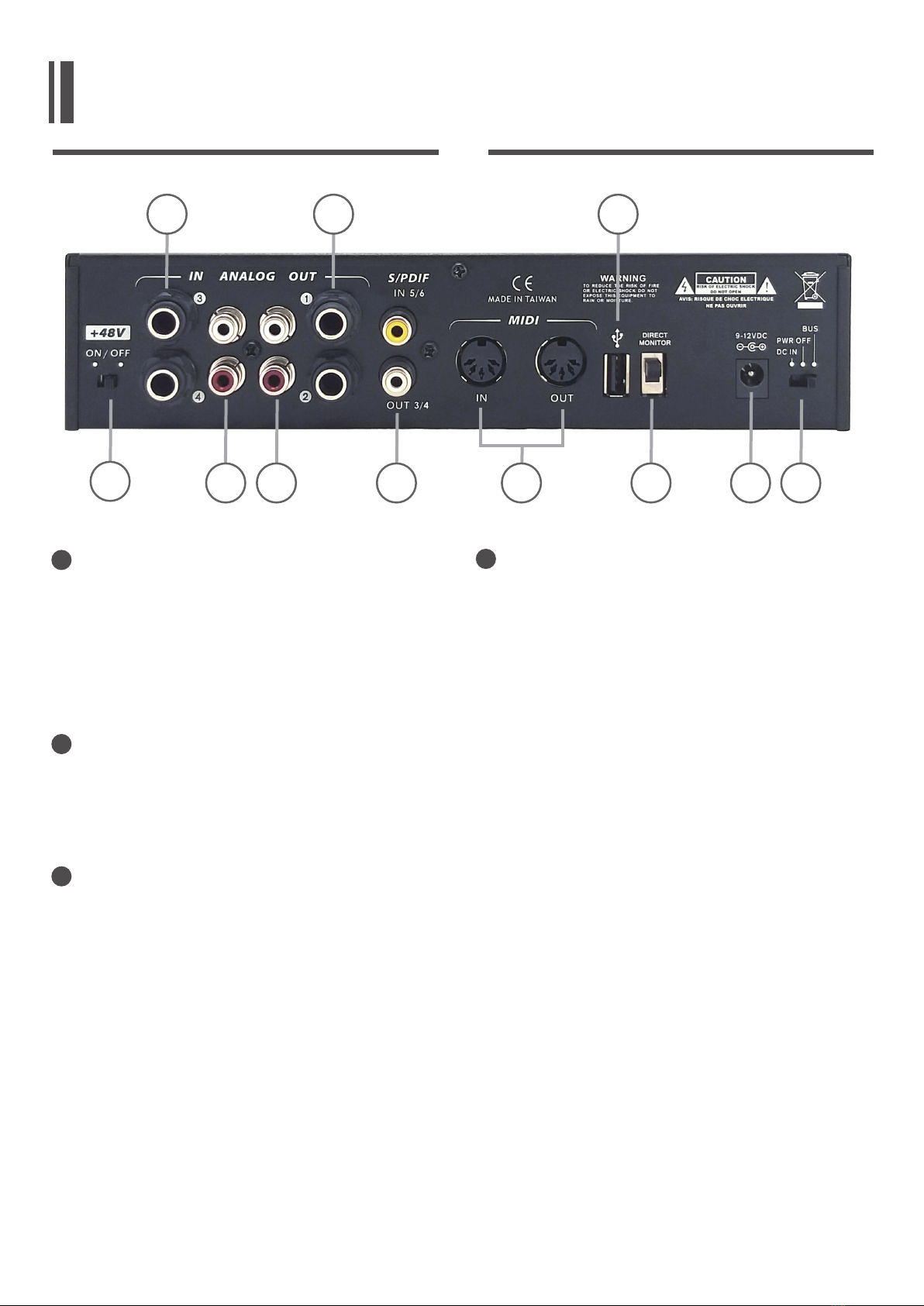
USB Ports
female that you can use to connect to
your computer. This allows user to send
their audio signal from the UT64 to the
Direct monitor switch
12V DC Input Power Jack
reason, your converter gets lost or
damaged and you need a new
one please contact your local dealer. This
-
15
16
17
18 Power Selector Switch
provided through the USB cable
7
810 11 13 14 16 17 18
12 15
9

INSTALLATION AND SETUP
System Requirements
may get lagging of audio and possible
Before you install UT64 driver, you must
connect UT64 to your computer and
power it on. You should use a USB cable
and audio data are transferred both
through the USB cable. You can monitor
sound from an instrument or any audio
device connected to the UT64 by
8
or
HEADPHONES
AMPLIFIED
SPEAKERS
DESKTOPLAPTOP
USB

INSTALLATION AND SETUP
-
-
-
appears from Windows, regarding of
Windows
9
UT64 Control Panel
available from your system tray.
Click on the UT64 Control Panel Icon to
open the control panel.

the input and output mixing
INSTALLATION AND SETUP
You may be able to solve the pop noise
The lower the value that can be set for
This column is connected with the
Windows volume console to control the
synchronously
10
Table of contents


