Titan T750 User manual

1
TITAN T750
6-Quart Backpack Vacuum
User’s Guide
2 - 3 Safety Instructions
3 Product View
4 - 5 Operations
6 Maintenance & Care
7 Troubleshooting
8 Parts List
9 Warranty

2
IMPORTANT SAFETY INSTRUCTIONS
When using an electrical appliance, basic precautions should be observed, including the following:
READ ALL INSTRUCTIONS BEFORE USING THE T750
Always connect to a polarized outlet (left slot is wider than right). Unplug from outlet when not in use and
before conducting maintenance.
Carefully read the Safety Instructions
in this manual. It is important to follow
the instructions to PREVENT THE
POSSIBILITY OF FIRE, ELECTRIC
SHOCK, BURN, OR INJURY to the
user and/or DAMAGE to the T750.
Risk of INJURY
• TURN OFF all controls before plugging or unplugging
the T750 or before connecting or disconnecting
motorized nozzle.
• DO NOT allow children to operate vacuum cleaner
or use as a toy. Close attention is necessary when
used by or near children.
• To reduce the risk of inhaling toxic vapors, DO
NOT vacuum up toxic or hazardous material
(chlorine bleach, ammonia, drain cleaner, paint
thinner, etc.).
• To avoid injury, DO NOT operate the T750 in bare
feet or when wearing open-toe shoes or sandals.
Keep hair, loose clothing, ngers, and all parts of
body away from openings and moving parts.
• Use extra care when cleaning stairs to avoid injury
by falling or tripping.
Risk of FIRE
• DO NOT leave vacuum cleaner unattended when
it is plugged in.
• Keep cord away from heated surfaces.
• DO NOT use the T750 in an enclosed space lled
with, ammable dust, or other explosive vapors.
• DO NOT put any object into openings or use with
any opening blocked. Keep openings free of dust,
lint, hair, and anything that may reduce air ow.
WARNING: • Sparks inside the motor can ignite ammable vapors
or dust. To reduce the risk of re or explosion, DO
NOT pick up ammable materials (lighter uid,
gasoline, kerosene, etc.) or use in presence of
explosive liquids or vapors.
• DO NOT pick up anything that is burning or smoking,
such as cigarettes, matches, or hot ashes.
Risk of SHOCK
• DO NOT use outdoors or on wet surfaces. Use
only on DRY, INDOOR surfaces.
• DO NOT use with damaged cord or plug.
• If appliance is not working as it should, has been
dropped, damaged, left outdoors, or dropped
into water, have it repaired by an authorized
technician.
• DO NOT unplug by pulling on cord. To unplug,
grasp the plug, not the cord.
• DO NOT handle vacuum cleaner or plug with wet
hands.
Risk of DAMAGE
• DO NOT use without lter or dust bag in place.
• DO NOT pull or carry by cord, use cord as a
handle, close a door on cord, or pull cord around
sharp edges or corners. DO NOT run any part of
the T750 over cord.
• Frequently empty bag when picking up very ne
materials, such as powder, to prevent the T750
from overheating.
• DO NOT vacuum up hard or sharp objects such as
glass, nails, screws, coins, etc. as they may cause
damage to the hose, vacuum bag, or the motor.
• Use ONLY manufacturer’s recommended attachments.
• DO NOT use for any purpose other than described
in the user’s guide.

3
PRODUCT VIEW
SAVE THESE INSTRUCTIONS
THIS MODEL IS FOR COMMERCIAL USE
This appliance MUST be connected to a
grounded wiring system. If it should malfunction
or break down, grounding provides a safe path
of least resistance for electrical current, reducing
the risk of electrical shock.
The cord for the T750 has an equipment-
grounding conductor and a grounding plug. It
MUST ONLY BE PLUGGED into an outlet that is
properly installed and grounded in accordance
with all local codes and ordinances.
Improper connection of the equipment-
grounding conductor can result in a risk of
electrical shock. Check with a qualied electrician
or service person if you are not sure if the
outlet is properly grounded.
DO NOT MODIFY THE PLUG. If the plug will
not t the outlet, have a proper outlet installed
by a qualied electrician. The T750 is designed
for use on a nominal 120-volt circuit, and has a
grounding attachment plug that looks like the
plug in the drawing on the right. Make certain
that the T750 is connected to an outlet having
the same conguration as the plug. No plug
adapter should be used with the T750.
GROUNDING
INSTRUCTIONS WARNING:
4
1. Release the two latches and lift off the lid to
ensure that the micro lter cloth bag and the
disposable bag are inside. Once checked
replace the lid back and lock the latches.
2. Both the micro lter cloth bag and disposable
bag lter the air while holding all debris. The
micro lter cloth bag with its rubber top provides
the seal for the vacuum while also ltering the
air. Replace or empty each as necessary.
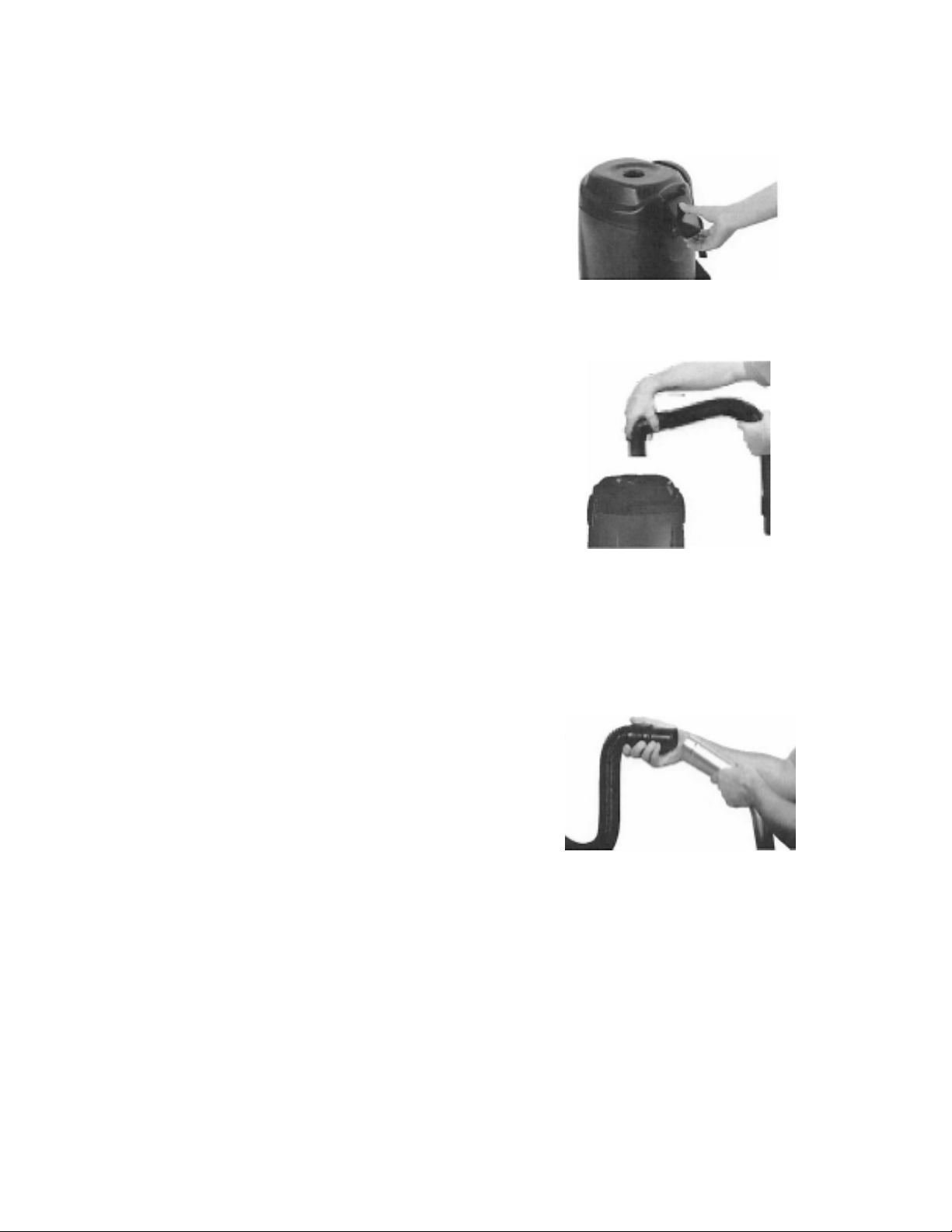
3. Make sure lid is locked on the vacuum. Take the
vacuum hose and push it into round opening on
top of lid.
4. Connect the extension cord to the power cord
located by the switch box.
5. The receptacle on the switch box can be used
with the optional powerhead for deep cleaning.
6. Put backpack on and adjust shoulder straps
and waist belt until backpack is comfortable.
The harness is made for a custom t.
7. Attach hose to commercial wand. Attach desired
tool to bottom of wand by loosening nut and
pushing in tool. Tighten nut until tool is in
place. Tool will swivel when using side to side
motion.
NOTE: Never take nut off wand or risk losing
metal ring inside nut. The metal ring
holds tool in place in its slotted groove.
8. Plug the extension cord into a properly
installed outlet.
9. Press the power switch located on the switch
box to “ON” or “OFF” position to operate.
OPERATIONS

5
10. When vacuuming, use a forward and
backward motion.
11. The TITAN T750 comes with many different
tools:
A. Crevice tool — to clean tight spot areas
B. Bare oor tool — to clean oors, walls
and ceilings
C. Rug tool — to clean rugs
D. Dusting brush — for dusting and cleaning
walls
E. Upholstery tool
F. 2-piece Aluminum wand
OPERATIONS (continued)

6
To reduce the risk of re,
electric shock, burn, or injury, turn
power OFF and disconnect
plug from electrical outlet
before performing maintenance
or troubleshooting.
To change the lter bag:
Power cord and storage:
NOTE: DO NOT repair if you are not an authorized technician familiar
with the TITAN T750 Commercial Backback. DO NOT lubricate
motor. It is equipped with sealing bearings.
1. Shut off power switch and unplug all cords
from outlet and vacuum.
2. Check disposable bag to see if it is full.
Always change disposable bag when full,
discard and replace with a new one.
3. Do not reuse the disposable bag — this
affects the ltration of the backpack.
4. Always check the micro lter cloth bag each
time when you replace the disposable bag.
Clean or change it as necessary. Clean the
cloth bag by simply shaking it well.
NOTE: Very ne powders and substances may
clog the cloth bag. Please remember
to empty bag often so the T750 can
efciently operate.
5. Always unwind the extension cord completely before vacuuming.
6. Never stretch or pull cord tightly, this will damage the cord and create a danger.
7. Always unplug the T750 when not in use.
8. Always check condition of all electrical cords before use. Never use cord if it is ripped
or has a tear.
9. Unplug extension cord and wrap loosely when not in use.
10.When backpack vacuum is not in use, always store in a dry area or place.
WARNING:
MAINTENANCE AND CARE

7
Low suction or poor pick up
Vacuum motor is not working
Possible causes
Possible causes
Remedies
Remedies
1. Disposable dust bag is full
2. Wand is not properly installed
3. Tool not working properly
4. Air path obstructed
1. Vacuum is not plugged in
2. Electrical outlet is not working
3. Motor thermal protector activated
due to blockage
4. ON/OFF switch faulty
5. Motor defective
1. Dispose current disposable bag and replace
with new bag
2. Secure wand properly to ensure there are no air
leaks
3. Make sure tool is on the wand properly and
tightly
4. Check for any air ow obstructions
1. Check to make sure vacuum is plugged in properly
2. Check electrical source
3. Allow the T750 to cool down, then check the
vacuum ducts and lter for blockage
4. Contact an authorized technician
5. Contact an authorized technician
To reduce the risk of re,
electric shock, burn, or injury, turn
power OFF and disconnect
plug from electrical outlet
before performing maintenance
or troubleshooting.
WARNING:
TROUBLESHOOTING

8
PARTS LIST

9
DISCLAIMER AND EXCLUSION OF OTHER WARRANTIES
EXCEPT FOR THE LIMITED WARRANTY AS EXPRESSLY SET FORTH IN WRITING
ON THIS PAGE, NO EXPRESS OR IMPLIED WARRANTY WHATSOEVER IS BEING
MADE WITH RESPECT TO THE GOODS, AND ARE HEREBY EXPRESSLY DISCLAIMED,
INCLUDING (A) ANY EXPRESS OR IMPLIED WARRANTY OF MERCHANTABILITY;
AND (B) ANY WARRANTY OF FITNESS FOR A PARTICULAR PURPOSE. THIS
DISCLAIMER AND EXCLUSION OF WARRANTIES INCLUDE WARRANTIES,
WHETHER EXPRESS OR IMPLIED BY LAW, CLAIMED TO ARISE OUT OF COURSE
OF DEALING, COURSE OF PERFORMANCE, USAGE OF TRADE OR OTHERWISE.
THE TITAN T750
LIMITED WARRANTY
WHAT THIS WARRANTY COVERS
Your TITAN T750 commercial cleaner is warranted to be free from all defects in material and
workmanship in normal use FOR A PERIOD OF ONE YEAR. The warranty is granted only to
the original purchaser of the cleaner. The warranty is subject to the following provisions.
WHAT THIS WARRANTY DOES NOT COVER
• Partsofthecleanerthatrequirereplacementundernormaluse,suchasbags,lters,and
belts.
• Damages of malfunctions caused by negligence, abuse, or use not in accordance with the
Owner’sGuide.
• Defects or damages caused by unauthorized service or the use of other than TITAN parts.
A defective cleaner or cleaner part that is covered by this warranty
willberepairedorreplacedatthedistributor’soption.Asamatterof
warrantypolicy,theconsumer’spurchasepricewillnotberefunded.
Internet sales are not recognized. The warranty is null and void if the unit
is purchased on eBay or any other non-authorized Internet site.
For more information or to claim a warranty
register at TitanVacs.com or call 1-844-202-9927.

T
I
T
A
N
T750
©2020
Thank you for your recent purchase.Thank you for your recent purchase.
Table of contents
Languages:
Other Titan Vacuum Cleaner manuals

Titan
Titan 1230 Configuration guide

Titan
Titan T9000 User manual

Titan
Titan T8000 User manual

Titan
Titan 820 Configuration guide

Titan
Titan T9200 User manual

Titan
Titan TTB776VAC User manual

Titan
Titan T500 User manual

Titan
Titan TTB059VAC Installation manual

Titan
Titan 16L 1300W User manual

Titan
Titan TTB774VAC User manual