
Tiptop Audio ECHOZ User manual

ECHOZ
ZVERB
Z5000
www.tiptopaudio.com

01
A user manual for ECHOZ ZVERB Z5000 eect modules
This user manual covers the use of the ECHOZ, ZVERB and the
Z5000 Multi Eects modules. Due to similarities in method of
operation this user manual covers all 3 modules with sections
describing the programs on each afterward.
ECHOZ - Is an FX module fully dedicated to time delay eects from
emulation of tape echoes to early digital delays to complex multi-fx
units. 24 dierent programs cover a wide range of options and
internal signal path structures.
ZVERB - Has 24 dierent types of eects available ranging from
typical reverbs to more complex eects that combine delay and
pitch shifting with reverb. The eects are grouped by decades
based on either the era an algorithm or device was introduced or the
time when the eect was most popular.
Z5000 - The Z5000 is a Multi Eects module, it provides 24 eects
that include reverbs, delays, modulation, pitch and harmonizers. The
eects in the Z5000 were carefully selected to provide both
commonly used delay and reverbs and also some unusual sounding
and experimental eects.
Hardware Features:
- 8hp
- 3 illuminated buttons for bank selections
- 8 program per bank, total 3 banks
- 3 CV inputs for all 3 DSP parameters
- Analog clocking of DSP with CV
- Black version: +12V@130mA -12V@20mA
- White version: +12V@100mA -12V@20mA

02
Let’s get started.
Set the Fidelity to max (CW), turn on power, patch audio into the In
jack, patch the left and right output to your sound system. Make sure
to patch both left and right so you get the full joy of stereo.
Set the following knobs to the center: MIX, IN, TIME, FILTER,
FEEDBACK/MOD.
FILTER TIME FB/MOD
TIME
FBACK/MOD
FILTER
AUDIO SOUND SYSTEM

03
There are 3 buttons on the module, each one lets you scroll through
a bank of 8 eects. Hold down the Left button until it flashes
indicating it is loading this bank into the DSP. Now that you are in
that bank, scroll through the eight eects by clicking the left button.
You will notice that everytime you switch a program the light on the
3 buttons indicate a pattern, the pattern is there for 5 seconds and
then goes o. This light pattern can help you remember a specific
eect you liked. If the pattern light turns o and you would like to
view it again just short click one of the other two inactive bank
buttons.
FILTER TIME FB/MOD
TIME
FBACK/MOD
FILTER

04
While scrolling, once you reach the YELLOW YELLOW YELLOW
pattern you know you are on eect No8, the last eect in that bank.
The bank light will also turn red. One more click and you are back to
eect No1 RED RED RED. Scrolling will continuously load the eects
in a loop 1..2..3…...7..8..1..2..3 etc.
These FX modules were designed on the concept of scrolling and
auditioning the eects live. We recommend scrolling while listening
and stop on the eect you like. The module will remember which
program you last used in a bank so when you switch between banks
you can switch between 3 of your favorite eects, one in each bank.
To switch to the next bank, just hold down the next bank button
down and a new bank will load up into the DSP.
The Eects Program section for each module has the LED patterns
for each eect. It might be useful for the first time using the module
to print or look up the table while scrolling to get familiar with the
type of eects.
1
2
3
4
5
6
7
8

05
Understanding the view modes:
The module has two dierent display modes: default and minimal.
The dierences are listed below:
Default: Shows the program number in binary when changing
programs. Also, pressing an inactive bank button shows the current
preset number. Consult the charts in the eect programs for the LED
combinations for each program. Default also remembers the last
program set in each bank, so switching from the left bank to the
middle or right bank will load the last used program in that bank. For
example, switching from Left bank program 3 to Right bank then
back to Left will recall program 3 again.
Minimal: No display of the program number as shown in the eects
program section. The bank button will be yellow for programs 1-7
and turn red at program 8. Changing a bank will load program 1 each
time. For example, changing from Left bank program 3 to Right will
load program 1 in that bank, and switching back to Left will load
program 1 again.
If you would like to change the mode:
- To select the minimal mode hold down the center button on
power up.
- To select the default mode hold down the right button on
power up.
The selected mode is stored in memory and will be recalled on
future power ups. We encourage you to try both modes and find the
one that is better for you, this is a personal preference.

06
Manual Controls:
Left Button - Hold to access the Left bank of 8 programs
Middle Button - Hold to access the Middle bank of 8 programs
Right Button - Hold to access the Right bank of 8 programs
Time knob - controls the decay time of Reverbs, the Delay time or
the rate of Modulation LFOs
Filter knob - sets the cuto frequency of the low/high or bandpass
filters in the program
FILTER TIME FB/MOD
TIME
FBACK/MOD
FILTER
Left Button
Middle Button
Right Button
FILTER TIME FB/MOD
TIME
FBACK/MOD
FILTER
Time knob
TIME
FBACK/MOD
FILTER
Filter knob

07
Feedback/Mod knob
Fidelity knob
Feedback/Mod knob - changes the amount of feedback in delay
programs or the depth/rate of LFOs in Reverb or Mod programs. Check
the program descriptions for details on what this controls.
Fidelity - Is a DSP manipulation technique developed originally for
the Z-DSP and brought to this line of eect modules as well. Inside
the module is an analog VCO that clocks the DSP chip, the use of an
analog clock (not a digitally generated clock) not only contributes to
the overall organic sound quality of the module, but also lets you
take the eects into new sonic territories with variation of the clock
speed. The Fidelity knob in will alter the frequency of the VCO clock
with sound eects ranging from pitch shifting and down to total
degraded digital noise.
FILTER TIME FB/MOD
TIME
FBACK/MOD
FILTER
FILTER TIME FB/MOD
TIME
FBACK/MOD
FILTER

08
CV Controls:
There are 3 CV control jacks on the module: Feedback/Mod, Time and
Filter. The left and right jacks are dedicated for controlling DSP
parameters mapped to the Mod and Filter controls, the center jack CV can
be routed with the toggle switch to either TIME which is a DSP parameter
or to Fidelity clock control.
The DSP CV controls have a built in slew circuit which limit the speed they
can be modulated. This is part of the design of the DSP chip. The Fidelity
CV is all analog and can be modulated at any speed and even into the
audio range.
In extreme cases where negative voltage CV is applied to Fidelity the DSP
chip might crash, this does not damage anything, just remove the negative
CV, switch a program and the DSP will be back in action.
FILTER TIME FB/MOD
TIME
FBACK/MOD
FILTER
09
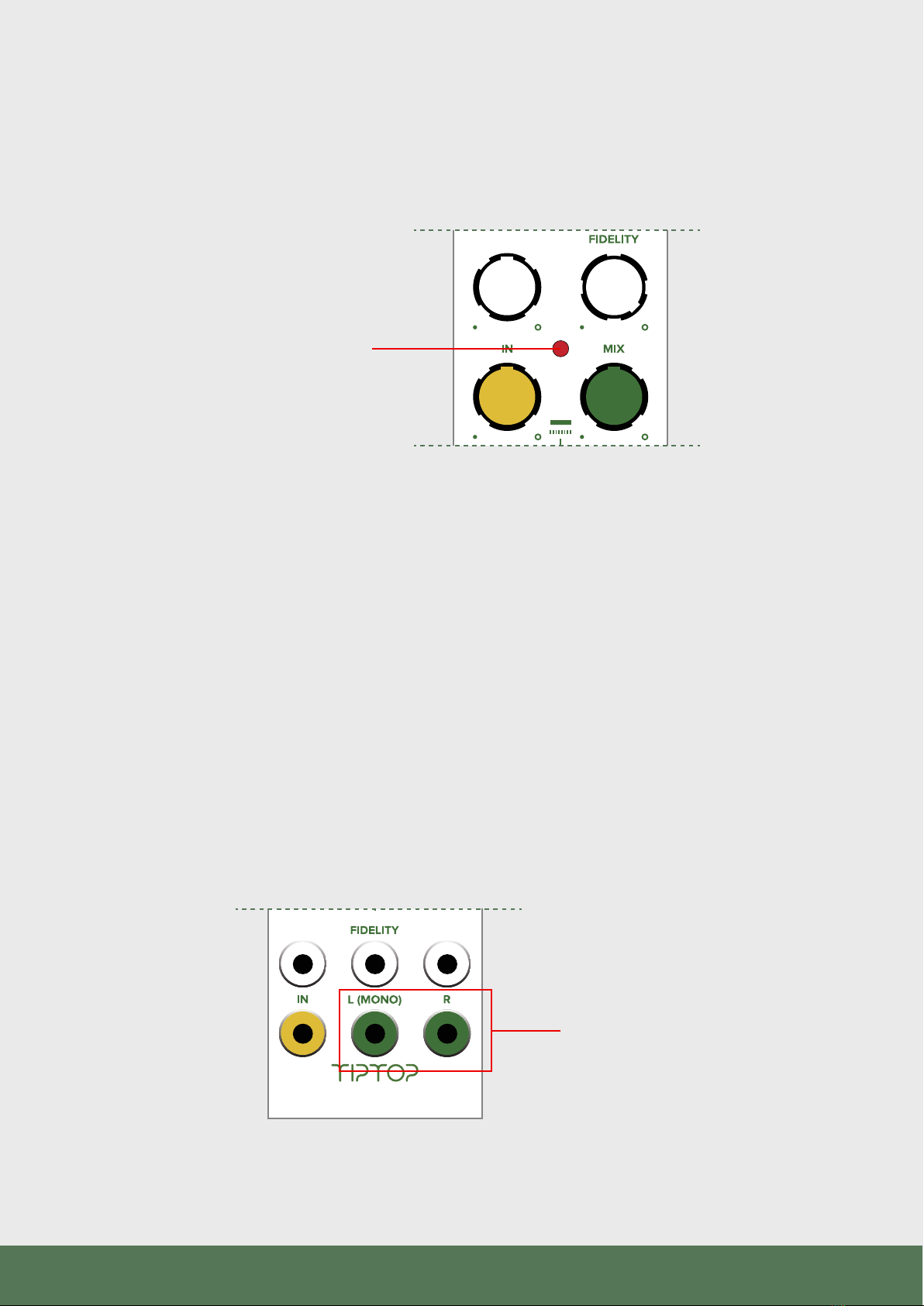
Clipping light indicator:
The clipping light monitors the input and output signal level of the DSP
chip. If a signal level at the input or the output is too high that light will
flash. Some times due to feedback the output signal can grow much larger
than the input signal, in that case reduce the amount of Feedback with the
Feedback knob.
Output gain:
These FX modules were designed to be used mostly at the end of
your synthesizer patch. As such they provide an interface between
your modular and your standard commercial line level studio gear.
The output gain of the FX modules is lower than standard Eurorack
levels but can also be set higher than line levels. When used with
modular levels on the input and the IN knob at 50% and below the
output is closer to line level which provides an easy interface with
your studio gear without risk of clipping.
FILTER TIME FB/MOD
TIME
FBACK/MOD
FILTER
Clipping light indicator
FILTER TIME FB/MOD
TIME
FBACK/MOD
FILTER
Output gain
This manual suits for next models
2
Table of contents
Other Tiptop Audio Recording Equipment manuals



