
Tiiwee Motion Sensor Alarm User manual

Tiiwee Motion
Sensor Alarm
ENGLISH
1

Introduction
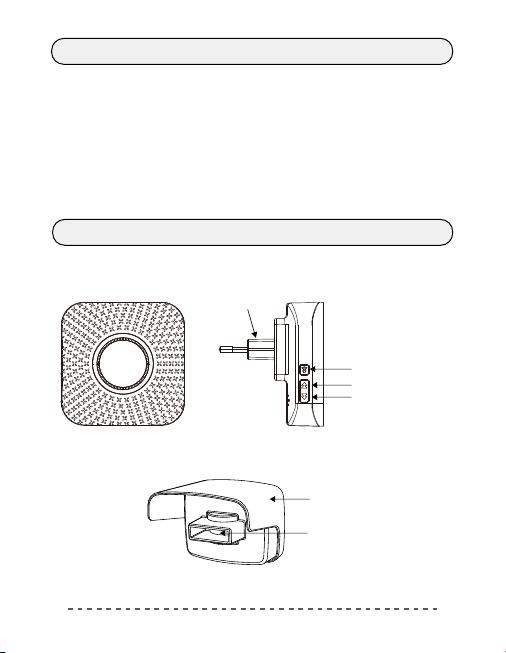
System Overview
Receiver
Motion Sensor
Unpacking and Testing Your Motion Sensor Alarm
Powering the receiver
Powering the sensor
Testing the product
Adjust the sound volume
Changing the ring tone for the sensor
Finding the right location for the motion sensor
Mounting the PIR motion sensor
Low battery notification
Resetting the motion sensor alarm to factory settings
Contents
(deleting sensors from the receiver)
Technical specifications
Customer service
2
Introduction
System Overview
Congratulations with your new Tiiwee Motion Detector Alarm.
Working principle
A wireless signal is transmitted to the receiver when the motion sensor detects
motion. The receiver then emits a sound and will light up.
Intended use
The purpose of the motion detector alarm is to detect people approaching or
entering your house, your garden, your door or driveway.
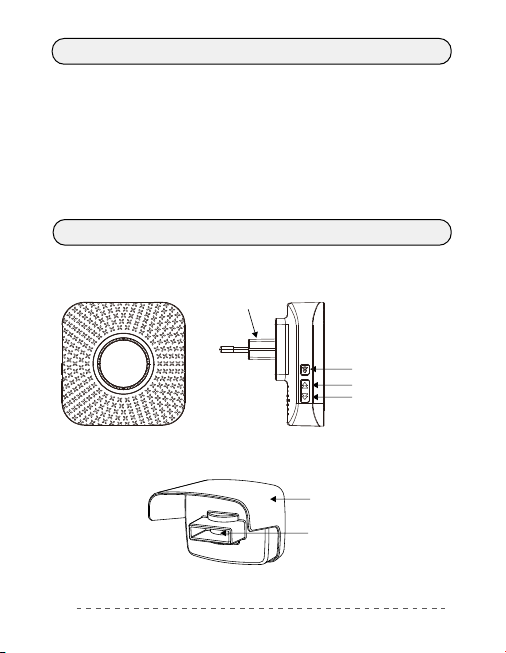
Receiver
AC plug
Volume button
Backward button
Forward button
Receiver
sunshade & back cover
Sensor
3
Unpacking and Testing Your Motion Sensor Alarm
Changing the ring tone for the sensor
Powering the receiver
· Plug the receiver into a 220V power outlet.
Adjust the sound volume
Adjust the sound-volume in 4 steps by pressing the Volume button.
Powering the sensor
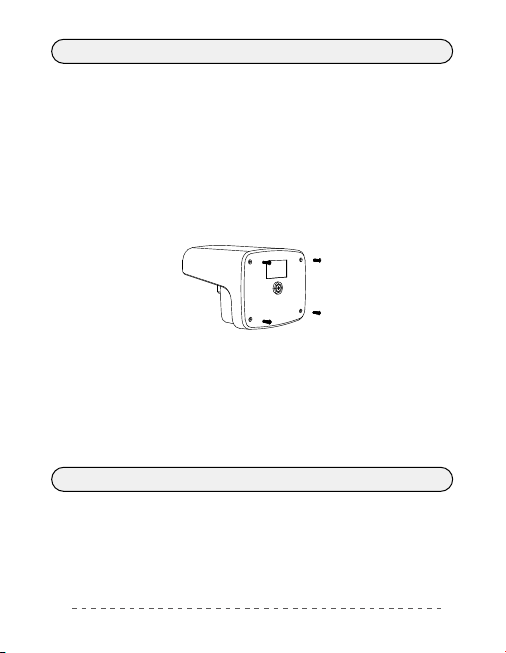
· 4 x 1.5 V AA batteries power the PIR motion sensor.
· To get access to the battery compartment, remove the four screws on the backside
of the motion sensor.
· Insert the 4 included AA batteries ensuring the correct polarity. Before reassembling,
please note the arrow next to the battery slot that indicates which side should be
"UP".Close the sensor again and secure the back panel with the four screws and rubber
plugs.
Testing the product
· Plug the receiver into a 220V power socket.
· Now, wave your hand in front of the motion sensor to generate a signal.
· You will hear the "Ding Dong" sound and the indicator light of the receiver will
flash.
Please note that the ring tone is set to "Ding Dong" as per factory.
Note: Upon arrival, the ring tone has been set to "DingDong". However, there are 52
melodies which can be chosen.
IMPORTANT: As part of the procedure for changing the ring tone, in step 2, the
sensor is disconnected from the receiver and then reconnected in step 3. If no sensor
is connected within the 5 seconds described in step 2, please start over and repeat
steps 1 to 3.
4
Finding the right location for the motion sensor
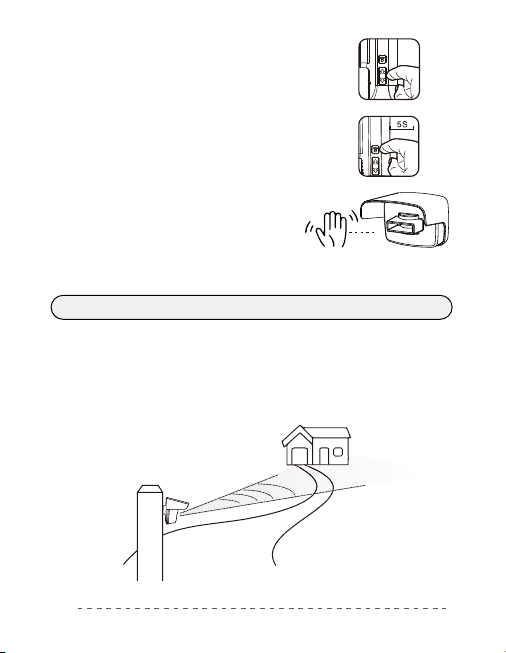
· In an open area, please respect a maximum distance of 75 meters between the
motion sensor and the receiver.
· We recommend mounting the motion sensor at the height of at least 1 meter
above the ground.
· The sensor should be looking towards your home, and it should be covering the
area you would like to observe (see image), to reduce unwanted alarms of
nearby regions and roads.
Note: The receiver will remember its settings when it is unplugged.
1. Press the Forward or the Back button to choose your
favourite ring tone.
2. Press the Volume button for 5 seconds until you hear a
low buzzing sound and the LED indicator flashes - you are
now in pairing mode - you now have 5 seconds to activate
the sensor - The receiver will exit the pairing mode after 5
seconds automatically.
3. Activate the sensor by waving your hand in front
of the sensor. You will hear the selected sound on
the receiver.the receiver. The receiver will vibrate,
and the LED indicator light will flash.
5
Mounting the PIR motion sensor
Low battery notification
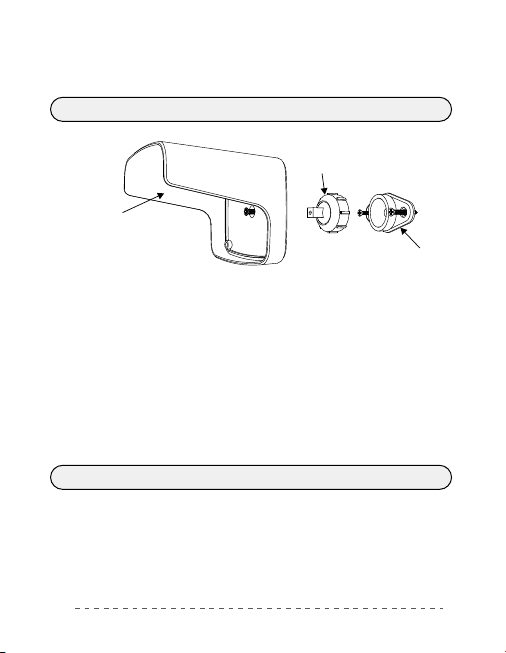
Sun protecion & back cover
Bracket base
Ball & shaft
1. Mark the mounting holes with a pencil.
2. When installing the sensor on a wooden surface, you only need to use the included
screws.
3. When installing the sensor on other surfaces, such as brick or masonry, drill the
pilot holes and tap the dowels into the holes until they are flush with the mounting
surface.
4. Screw the bracket base into position.
5. Screw the sunshade onto the shaft.
6. Screw the sunshade onto the sensor using the four screws.
7. Twist the ball onto the fixed base of the bracket just until tight.
8. Adjust the angle of the sensor as described in "Finding the right location".
9. Tighten the ball onto the fixed base of the bracket.
IMPORTANT: Always test that the sensor is working in your desired position before
installing it. Avoid placing the sensor in a location where sunlight will shine directly into
the sensor because this might cause false and unwanted alarms.
The average battery life of the motion sensor is about 10 -12 months. The motion
sensor features a low-battery indicator. Replace the batteries if the sensor flashes three
times when motion is detected. Please refer to the section "Powering the sensor" for
battery replacement.
6

Resetting the motion sensor alarm to factory settings
· Press the Forward button for 5 seconds.
· You will hear a sound and the LED indicator flashes.
· All sensors have been removed now from the receiver.
· The chime sound is now "Ding Dong".
· You can now pair the sensor again.
(deleting sensors from the receiver)
Technical specifications
Customer Service
If additional support is required, please visit www.tiiwee.com. Here you can find
supplementary support material.
You can also contact us at [email protected]om. We respond within 24 hours, but
mostly still on the same day. We provide a two years warranty on all our products.
Specifications
Power Supply AC 220V
150 meters
433 MHz
adjustable in 4 steps (110dB Max.)
52
<0,3W <10mW
IP55
5 meters distance & 60° detection angle
-15°C - 55°C
4 x 1.5 V AA batteries
Wireless Range
RF Frequency
Sound Volume
Number of Melodies
Power Consumption
Waterproof Rate
Detection Characteristic
Operation Temperature
Plug-in Chime (Receiver) Motion Sensor (Transmitter)
7

Tiiwee
Bewegungsmelder
Alarm
DEUTSCH
8

Einführung
Systemübersicht
Empfänger
Bewegungssensor
Auspacken und Testen Ihres Bewegungsmelder-Alarms
Stromversorgung des Empfängers
Stromversorgung des Sensors
Prüfung des Produkts
Einstellen der Tonlautstärke
Ändern des Ruftons für den Sensor
Finden der richtigen Position für den Bewegungssensor
Montage des PIR-Bewegungsmelders.
Benachrichtigung bei niedrigem Akkustand
Zurücksetzen des Bewegungsmelder-Alarms auf die
Inhaltsverzeichnis
Werkseinstellungen (Löschen von Sensoren aus dem Empfänger)
Technische Daten
Kundenbetreuung
9
Einführung
Systemübersicht
Herzlichen Glückwunsch zu Ihrem neuen Tiiwee Bewegungsmelder Alarm.
Funktionsprinzip
Ein drahtloses Signal wird an den Empfänger übertragen, wenn der Bewegungssensor
eine Bewegung erkennt. Der Empfänger gibt dann einen Ton von sich und leuchtet auf.
Bestimmungsgemäßer Gebrauch
Der Zweck des Bewegungsmelder-Alarms ist es, Personen zu erkennen, die sich Ihrem
Haus, Ihrem Garten, Ihrer Tür oder Ihrer Einfahrt nähern oder diese betreten.
Empfänger
AC-Stecker
Lautstärketaste
Rückwärtstaste
Vorwärts-Taste
Bewegungssensor
Sonnenschutz & Rückwand
Sensor
10
Table of contents
Languages:
Other Tiiwee Security Sensor manuals


