
TEVVA TEV75B 2023 User manual

Quick Start Guide
7.5T
Model: TEV75B

3
Driving Compartment
1.1 Overview ........................................................................ 4
1.1.1 Controls Overview ........................................................ 4
1.1.2 Instrument Panel Overview ....................................... 5
1.2 Entering and Exiting the vehicle .............................. 6
1.2.1 Remote Key ................................................................... 6
1.2.2 Locking and Unlocking .............................................. 6
1.2.3 Access to the Cab ....................................................... 7
Driving Compartment
Overview
4
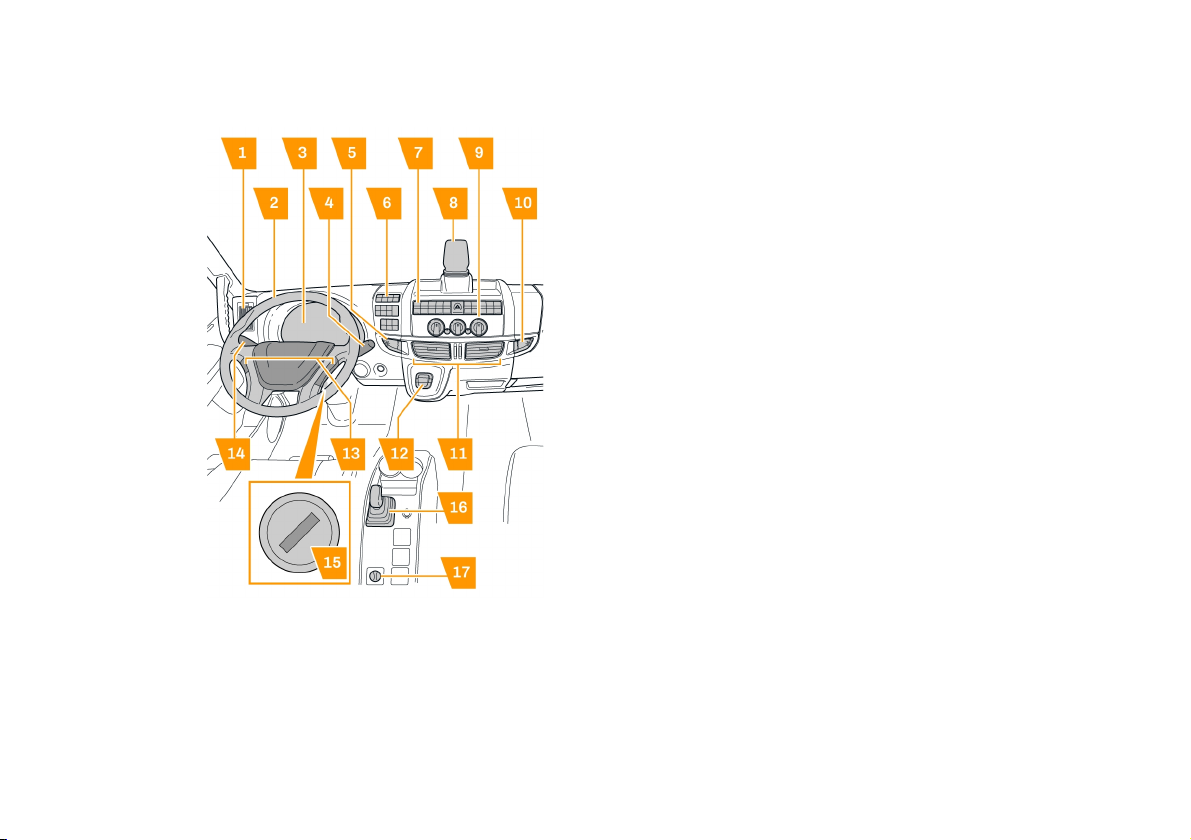
Controls Overview
1. Side air vent.
2. Steering wheel.
3. Instrument panel.
4. Cruise control.
5. Storage compartment.
6. Side dashboard controls.
7. Central dashboard controls.
8. Lane Departure Warning System (LDWS) camera.
9. Heating and ventilation controls.
10. Storage compartment.
11. Central air vents.
12. Gear selector.
13. Steering wheel controls.
14. External lighting, direction indicators, horn, wipers and
washers.
15. Ignition switch.
16. Parking Brake.
17. Differential lock.
Driving Compartment
Overview
5
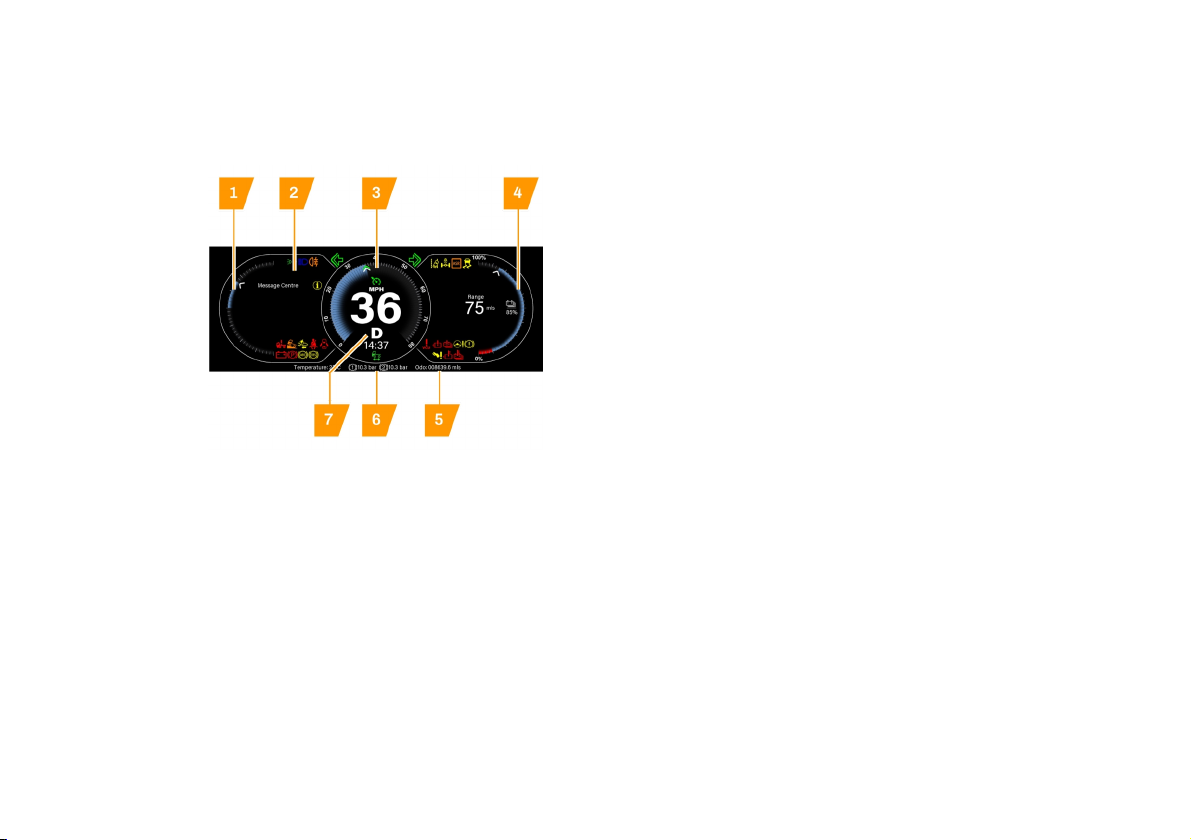
Instrument Panel Overview
The instrument panel consists of the following components:
1. Power demand or regeneration of the HV battery. Red area
shows high discharge, green area shows battery regeneration
under braking.
2. Message centre.
3. Speedometer.
4. Battery state of charge percentage and battery range
estimate in miles/km.
5. Odometer information.
6. Air tank pressure information.
7. Current selected gear.
For more detail on the warning and notification lights, refer to the
relevant section. See "Warning and Notification Lights", page10.
Driving Compartment
Entering and Exiting the vehicle
6
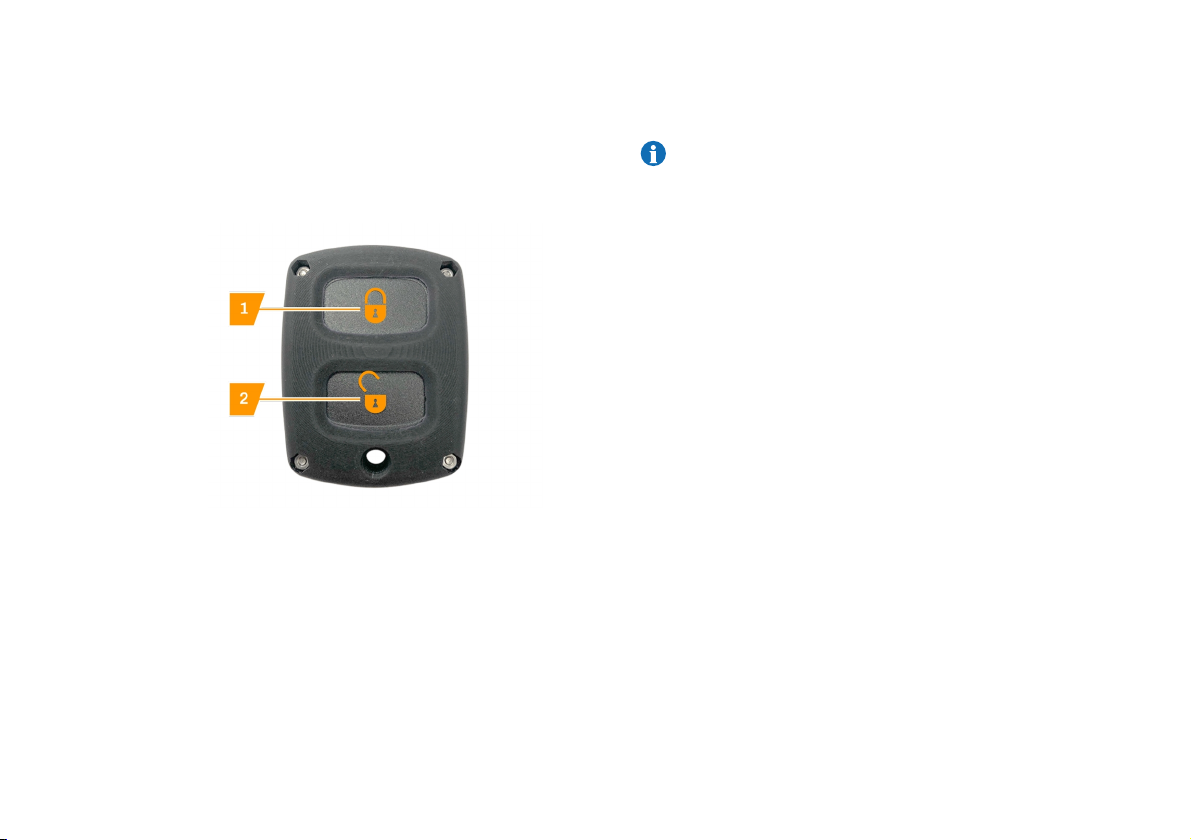
Remote Key
To unlock the doors with the remote key, briefly press the unlock
button (2) while facing the vehicle.
The indicators will flash to signal the doors have been unlocked.
To lock the doors with the remote key, briefly press the lock button
(1) while facing the vehicle.
The indicators will flash to signal the doors have been locked.
Locking and Unlocking
NOTE: To help maintain low voltage battery health; if the
vehicle is not in use, make sure both cab doors are
properly closed. Failure to do so will prevent the battery
isolator from engaging and may result in accelerated
lead acid battery depletion.
The vehicle cab is equipped with two access doors, these have
symmetrical exterior and interior mechanisms for locking and
unlocking.
Driving Compartment
Entering and Exiting the vehicle
7
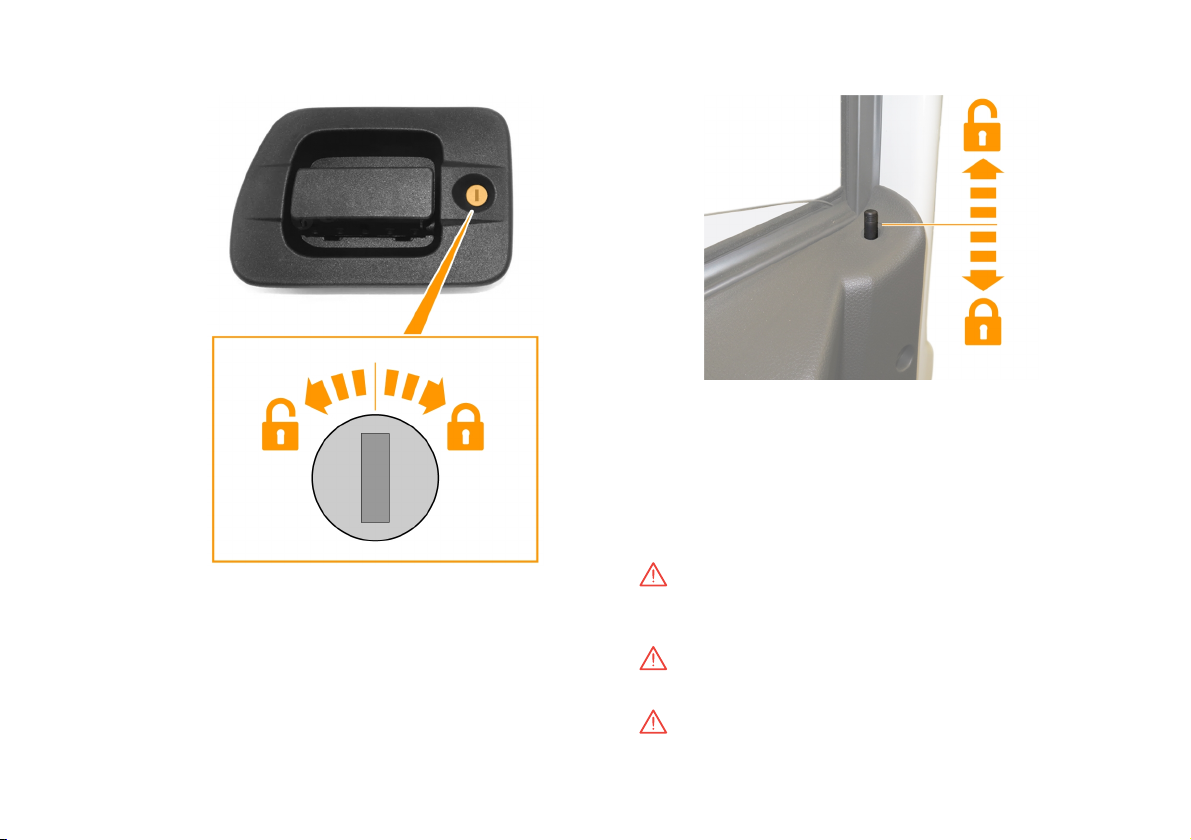
The external handle has a lock and key for locking and unlocking it
from outside the vehicle:
–To unlock the door, turn the key in an anticlockwise direction.
–To lock the door, turn the key in a clockwise direction.
The doors can be locked and unlocked from inside the vehicle as
follows:
–To lock the door, push the button in a downward direction.
–To unlock the door, pull the the button in a upward direction.
Access to the Cab
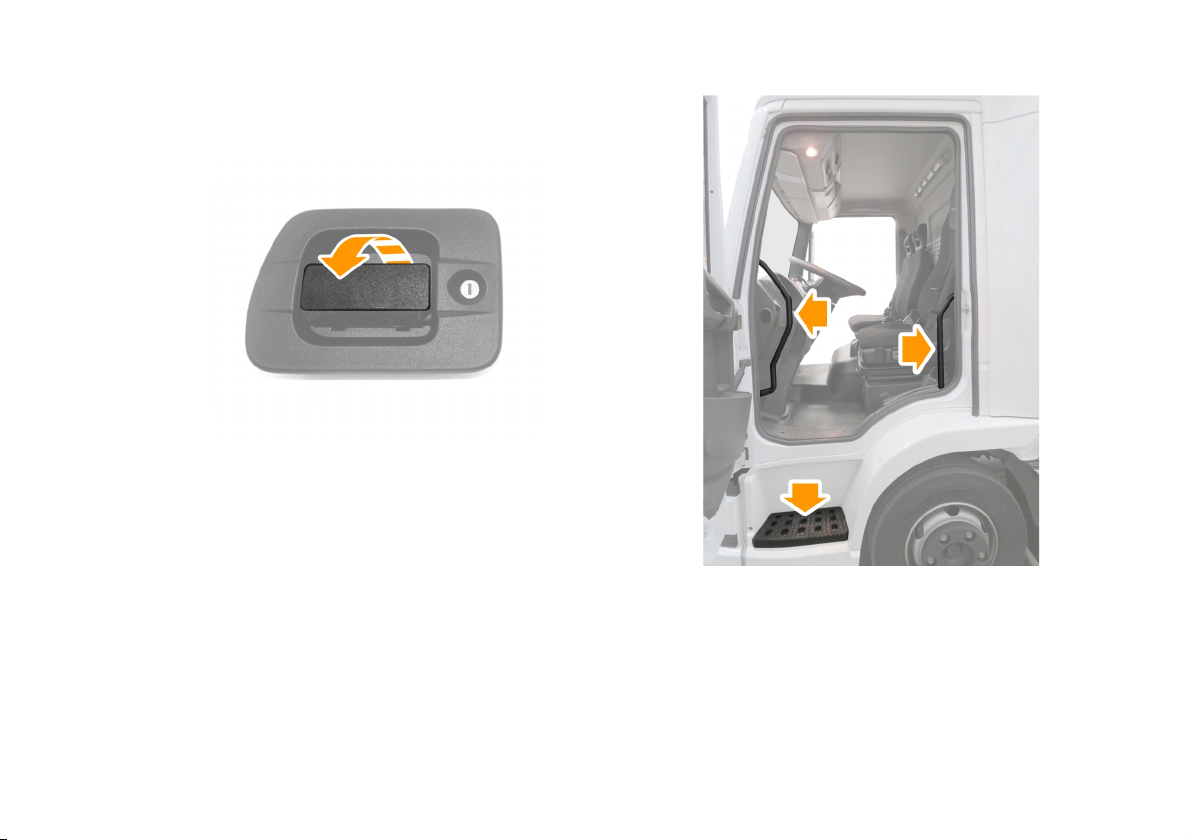
WARNING: Keep the access step and grab handles
clean, free from obstruction and in an appropriate
condition, to prevent slips.
WARNING: Always face towards the cab when you
enter or exit the vehicle.
WARNING: Never jump out of the cab.

9
Driver’s Controls and Instruments
2.1 Instrument Panel ......................................................... 10
2.1.1 Warning and Notification Lights............................... 10
2.2 Seats.............................................................................. 12
2.2.1 Seat Height Adjustment............................................. 12
2.2.2 Seatback Adjustment ................................................ 12
2.2.3 Seat Forward and Rearward Adjustment.............. 13
2.2.4 Seat Base Adjustment............................................... 13
2.2.5 Passenger Seatback Release .................................. 14
2.3 Steering Wheel............................................................ 15
2.3.1 Adjusting the Steering Wheel................................... 15
2.4 Lighting......................................................................... 16
2.4.1 Lighting Control........................................................... 16
2.4.2 High and Low Beam Headlights.............................. 16
2.4.3 Direction Indicators ................................................... 17
2.4.4 Rear Fog Lights........................................................... 17
2.4.5 Hazard Warning Lights ............................................. 17
2.5 Wipers and Washers .................................................. 18
2.5.1 Wiper Controls............................................................. 18
2.6 Horn............................................................................... 19
2.6.1 Operating the Horn ..................................................... 19
Driver’s Controls and Instruments
Instrument Panel
10
Warning and Notification Lights
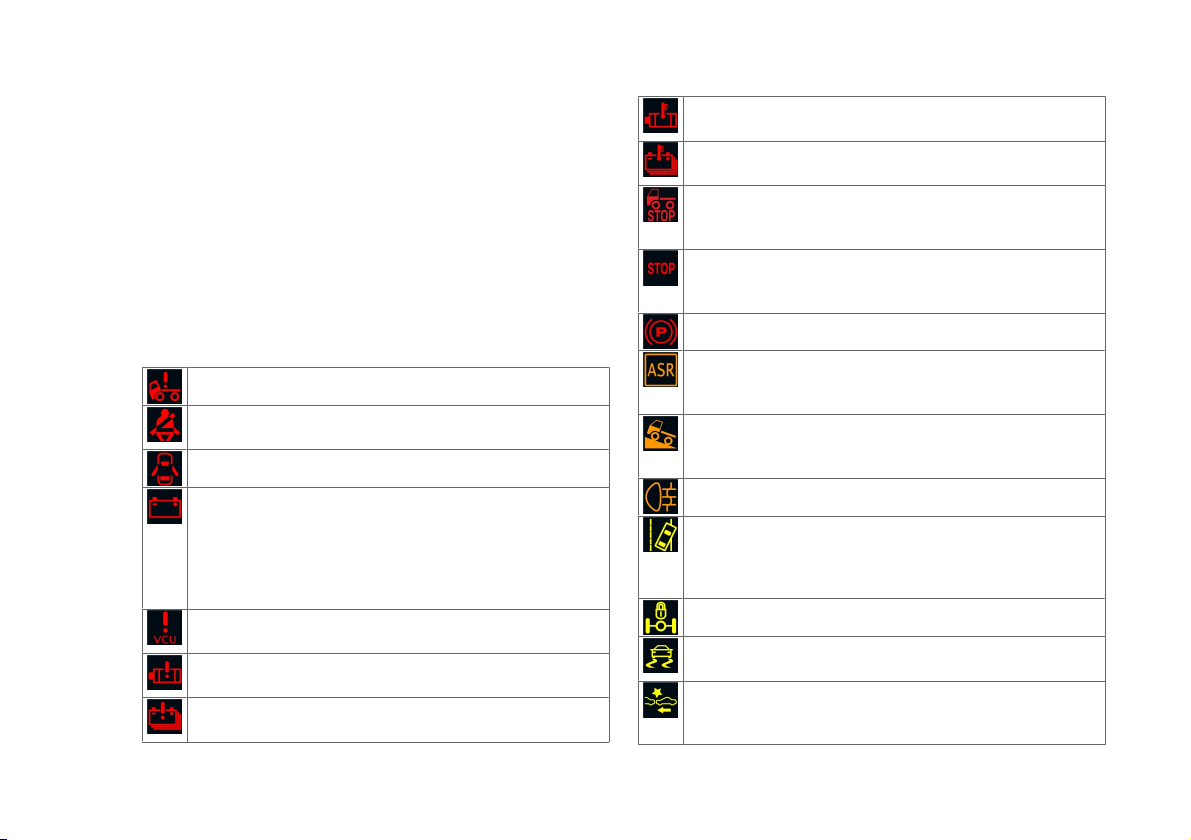
Warning and Notification lights are divided into different colour
categories:
–Red warning or notification lights are primary warnings and
must be investigated immediately by the driver or by a
qualified person, before continuing.
–Amber and yellow warning or notification lights are
secondary warnings. Some indicate that a system is
operating; some indicate that an action must be taken.
–Green warning or notification lights indicate a system's
status.
–Blue warning or notification lights indicate a system's status.
Illuminates when the cab is not locked into position.
Illuminates when a seat is occupied without the seatbelt
fastened.
Illuminates when a cabin door is open.
Illuminates to indicate a fault with the low voltage battery
charging system. The light illuminates when the power
system is switched on as part of a self test and
extinguishes when the system is switched to ready. If the
battery power is low the light illuminates and a message
appears in the message centre.
Illuminates to indicate a fault with the VCU (Vehicle Control
Unit) or fault within the system.
Illuminates to indicate a fault with the motors or inverter
units within the electric drive system.
Illuminates to indicate a fault with the power supply system
or a high voltage battery failure.
Illuminates to warn of abnormally high electric drive motor
temperature.
Illuminates to warn of abnormally high battery
temperature.
Illuminates to show the vehicle is not ready to drive. If the
light illuminates whilst driving, the driver must stop
immediately.
Illuminates at the top of the instrument panel to show a
fault with the vehicle systems. The driver must stop
immediately.
Illuminates to notify that the parking brake is applied.
Illuminates and flashes if the ASR (Anti Skid Regulator)
detects wheel slip. A fault has occurred if the light
illuminates continually.
Illuminates when the hill hold system is engaged. The light
flashes, for two seconds, to notify when hill hold is being
disengaged.
Illuminates to notify that the rear fog lights are on.
Illuminates and flashes if the Lane Departure Warning
System (LDWS) detects the vehicle unintentionally leaving
lane position. A fault has occurred if the light illuminates
continually.
Illuminates if the differential lock is engaged.
Illuminates when Electronic Vehicle Stability Control
(EVSC) or ASR (Anti Skid Regulator) is in operation.
Illuminates when the Automatic Emergency Braking
System (AEBS) activates a front collision warning. A fault
has occurred if the light illuminates continually.
Table of contents
Other TEVVA Electric Vehicle manuals


