TES APM-15 User manual

APM-15
Touch LCD Monitor
User Manual
Version 3.0 2017/11

1
About This Document
No part of this publication may be reproduced, transmitted, transcribed, stored in a
retrieval system, or translated into any language or computer language, in any form or
by any means, including, but not limited to, electronic, magnetic, optical, chemical,
manual, or otherwise without prior written permission of TES Touch Embedded
Solutions Inc..
The information in this document is subject to change without notice. TES makes no
representations or warranties with respect to the contents herein, and specifically
disclaims any implied warranties of merchantability or fitness for a particular purpose.
TES reserves the right to revise this publication and to make changes from time to time
in the content hereof without obligation of TES to notify any person of such revisions or
changes. Windows is a registered trademark of Microsoft, Inc. Other brand or product
names are trademarks of their respective holders.

2
FCC/ IC Statement
This device complies with Part 15 of the FCC Rules and Canadian ICES-003/NMB-003
regulation. Operation is subject to the following two conditions: (1) This device may not
cause harmful interference, and (2) This device must accept any interference received,
including interference that may cause undesired operation.
Warning:
This device generates, uses, and can radiate radio frequency energy and, if not installed
and used in accordance with the manufacturer’s instruction manual, may cause harmful
interference with radio communications. Operation of this equipment in a residential area
is likely to cause harmful interference, in which case you will be required to correct the
interference at your own expense.

3
Usage Notice
Precautions
Please follow all warnings, precautions and maintenance as recommended in this user’s
manual to maximize the life of your unit.
Do
:
Turn off the product before cleaning.
Use a soft cloth moistened with mild detergent to clean the product housing.
Use only the qualified power adapter that comes with your device.
Disconnect the power plug from AC outlet if the product is not going to be used for an
extended period of time.
Don’t
:
Do not use abrasive cleaners, waxes or solvents for your cleaning.
Do not operate the product under the following conditions:
- Extremely hot, cold or humid environment.
- Areas susceptible to excessive dust and dirt.
- Near any appliance generating a strong magnetic field.
! Warning - To prevent the risk of fire or shock hazards, and do not
expose the product to moisture.
! Warning - Please do not open or disassemble the product as this may
cause electric shock.

4
TableofContents
Chapter 1........................................................................................................................5
1.1 Overview....................................................................................................................6
1.2 Feature ......................................................................................................................6
1.3 Specifications.............................................................................................................6
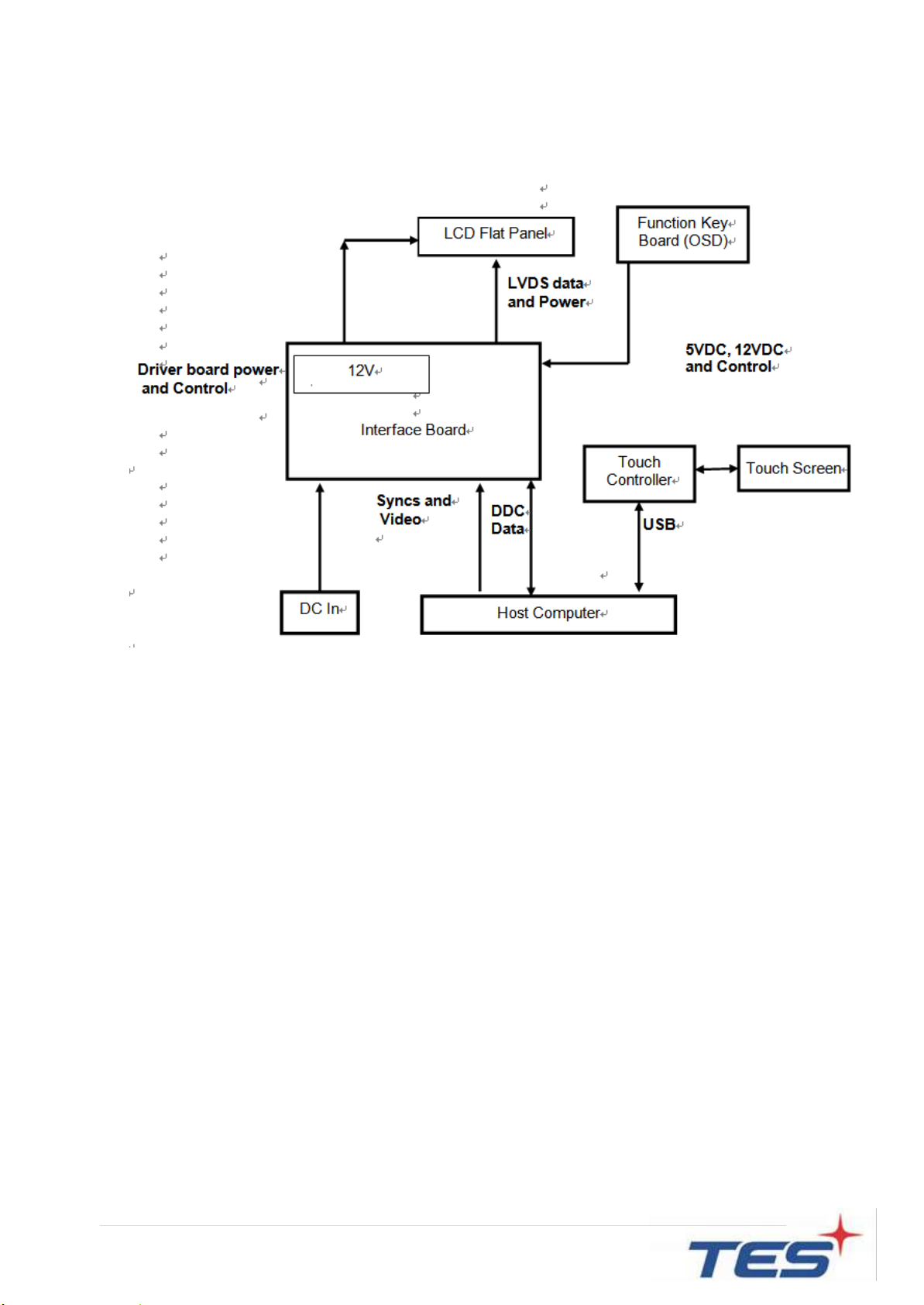
1.4 Block Diagram............................................................................................................7
1.5 Interface Connectors..................................................................................................8
1.5.1 Power Connector....................................................................................................8
1.5.2 Video Signal Connector ..........................................................................................8
1.6 Package Overview...................................................................................................10
Chapter 2......................................................................................................................11
2.1 About VESA Mount..................................................................................................12
2.2 About Wall Mount.....................................................................................................13
2.2.1 Landscape ............................................................................................................13
2.2.1 Portrait..................................................................................................................14
2.3 On-Screen Display...................................................................................................15
2.3.1 OSD Function Description ....................................................................................18
2.3.2 Timing Table Chart ...............................................................................................19
2.3.3 EDID Data.............................................................................................................19
2.4 Dimension................................................................................................................20
2.4.1 Front View........................................................................................................20
2.4.2 Side View.........................................................................................................20
2.4.3 Rear View ........................................................................................................21
Appendix ......................................................................................................................22

5
Chapter 1
Product Introduction

6
1.1 Overview
The APM-15 series is a 15” touchscreen monitor that builds to withstand commercial
grade open frame monitor, with stylish thin cable management bracket and versatile
design APM-15 is an exceptional choice for applications for all business sectors and well
suited for point-of-sales, point-of-information, point-of-service and interactive signage.
1.2 Feature
Cable management bracket design for easy organize cable.
1.3 Specifications
LCD Touch Panel
Size
15” TFT LCD
Brightness
350 cd/m2(Non-touch screen)
315 cd/m2 (P-CAP)
Number of Pixels
1024 (H) × 768 (V)
Touch Type
P-CAP/ 10 points
Environment
Certificate
CE、FCC
Compliance
IPX0
Operating Temperature
0C ~ 50C
Storage Temperature
-20C ~ 60C
Operating Humidity
10% ~ 95% RH, non-condensing
Mounting
VESA 100 mm x 100 mm
Dimension (W x H x D)
290.93 mm x 364.03 mm x 41.35 mm
Net Weight
2.98 kg
Gross Weight
4.25 kg
7
1.4 Block Diagram

8
1.5 Interface Connectors
1.5.1 Power Connector
The AC/DC converter shall have an IEC320 type male power receptacle for connection
to AC mains power. The power cord, exact type to be supplied in the appropriate Option
Kit, shall be length of 1.8 0.05 meters, and PC99 compliant.
1.5.2 Video Signal Connector
The video signal input via D-type 15-pin female connector.
Connector Pin Assignment:
Pin
訊號
1
Red video signal input
2
Green video signal input
3
Blue video signal input
4
NC
5
DDC ground for the VESA DDC2B function
6
Analog signal ground for the red video
7
Analog signal ground for the Green video
8
Analog signal ground for the blue video
9
+ 5V: Input from host system for the VESA DDC2B function
10
Signal ground
11
NC
12
SDA signal input for the VESA DDC2B function
13
Horizontal signal input from host system
14
Vertical signal input from host system
15
SCL signal input for the VESA DDC2B function

9
Pin
Signal
Pin
Signal
1
ML_Lane 0(p) Data0 +
11
Signal ground
2
Signal ground
12
ML_Lane 3(n) Data3 -
3
ML_Lane 0(n) Data0 -
13
Signal ground
4
ML_Lane 1(p) Data1 +
14
Signal ground
5
Signal ground
15
AUX_CH(p) AUX + Signal for
Auxiliary Channel
6
ML_Lane 1(n) Data1 -
16
Signal ground
7
ML_Lane 2(p) Data2 +
17
AUX_CH(n) AUX - Signal for
Auxiliary Channel
8
Signal ground
18
Hot Plug
9
ML_Lane 2(n) Data 2 -
19
DP_PWR Return
10
ML_Lane 3(p) Data3 +
20
DP_PWR
Pin
Signal
Pin
Signal
1
TMDS Data2+
11
TMDS Clock Shield
2
TMDS Data2 Shield
12
TMDS Clock–
3
TMDS Data2–
13
CEC
4
TMDS Data1+
14
Reserved (N.C. on device)
5
TMDS Data1 Shield
15
SCL
6
TMDS Data1–
16
SDA
7
TMDS Data0+
17
DDC/CEC Ground
8
TMDS Data0 Shield
18
+5V Power
9
TMDS Data0–
19
Hot Plug Detect
10
TMDS Clock+
Table of contents
Other TES Monitor manuals