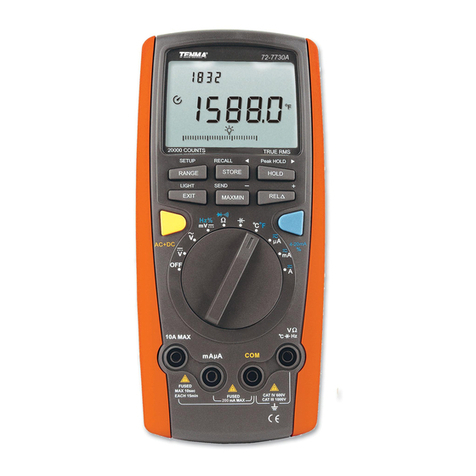
Tenma 72-3540 User manual

1
True RMS Datalogging
Multimeter
Model: 72-3540

2
CONTENTS
Page Number Details
4 Important Safety Information
5 What’s Included
5 Product Overview
5 LCD
6 Buttons
6Input Terminals
7 Rotary Switch
7General Specication
8Electrical Specication
8 AC Voltage
9 DC Voltage
9 AC Voltage + DC Voltage
10 AC Current
10 DC Current
10 AC Current + DC Current
11 Resistance
11 Capacitance
12 Conductance
12 Temperature
12 Frequency
12 Duty Cycle
13 Pulse Width
13 Continuity Test
13 Diode Test
13 Measurement Operations - Meter Power Control
14 Meter Settings
16 AC Voltage
16 DC Voltage
17 AC & DC Current
17 Resistance
18 Conductance
19 Capacitance
19 Continuity Test

3
Page Number Details
20 Diode
20 Frequency / Duty Cycle Measurement / Pulse Width
21 Temperature
21 LPF Measurement
22 dBV
22 dBm
22 Maximum & Minimum Value
23 Relative Value
23 Peak Detection
23 Compare Mode Comp
24 Recording Measurement Data
26 Communication
27 Cleaning & Maintenance
28 Charging the Battery

4
IMPORTANT SAFETY INFORMATION
• When using electrical appliances basic safety precautions should always be
followed.
• Never use a damaged meter. Before use, always check the meter case for cracks
or any missing parts.
• Inspect the test leads for any damaged insulation or exposed metal. If any test
lead is damaged, replace it before using the meter.
• Before using the meter, ensure the battery cover is closed and latched. Before
opening the battery cover, remove the test leads from the meter.
• Do not use the meter when removing the cover or opening the case.
• When the meter works at a voltage of 30V (rms) in AC, 42V (peak) in AC or over
60V in DC, special care should be taken as there is a danger of electric shock.
• Use the proper terminals, function and range for your measurement. Do not
operate the meter separately.
• When measuring the current, shut off the power to the circuit, then connect the
meter to the circuit. The meter and the circuit must be connected in series.
• When making electrical connections, connect the common test lead before
connecting the main test lead. When disconnecting, disconnect the main test lead
before disconnecting the common test lead. If the meter works improperly, do not
use it. The protection measures of the meter may have failed. If in doubt, send the
meter for repair.
• Do not store or use the meter in an environment of high temperature, humidity,
inammable, explosive and strong magnetic eld.
•When using the probes, keep your ngers behind the nger guards.
•Do not use the low-pass lter to verify hazardous voltage, for there may be a
voltage over the indicated value. Firstly, measure the voltage to check whether it is
hazardous in the case of not connecting a lter, then select low-pass ltering.
• Before testing resistance, continuity, conductance, diode or capacitor, shut off the
power to the circuit and discharge all high-voltage capacitors.
• Before measuring the current, check the fuses of the meter.
• Do not measure voltage or current higher than the allowed input values. When the
range of measured values cannot be determined, set the functional range switch
at the maximum-range position.
• When the low battery symbol is on the LCD, the battery should be charged as
soon as possible in order to ensure measurement accuracy.
• Do not arbitrarily change the wiring within the meter to avoid damaging the meter
and endangering safety.
•Test a known voltage before use to conrm the product is functioning correctly.
•If you need to replace the test lead, replace it with a test lead of the same or higher
grade of CAT III 1000V/CATIV 600V.
•When the meter detects voltage ≥30V or overload, the symbol “ ” will display as
a warning for a potential hazardous voltage.
Please read these instructions carefully before use and retain for future
reference.

5
PRODUCT OVERVIEW
1. Case
2. LCD
3. Function keys
4. Rotary switch
5. Input terminals
Function Description
1. Label of function keys Indicates auxiliary functions under current measuring
interface.
2. Simulation bar Analogue display of input signals.
3. Minus sign Indicates negative reading.
4. Lighting symbol Danger - High voltage.
5. Time and date Indicates the time and date set in internal clock.
6. Small measurements Real-time input values are displayed when the primary.
7. Telecommunication Indicates the time and date set in the internal clock.
8. Buzzer Indicates the button sound is enabled.
9. Battery capacity Indicates the capacity level of rechargeable battery.
10. Range indicator Indicates the current range and range mode for the meter.
11. Unit Indicates the measurement unit.
12. Aided function display Indicates the aided measuring function, such as LPF.
13. Aided display Indicates the aided measuring information on input
signals.
LCD
WHAT’S INCLUDED
• One Datalogging Multimeter
• A pair of test leads
• Two K type temperature probes
• One user manual
• One temperature connector
• One charging adaptor
• One charging connector
• One USB cable
• One CD
•One zip bag

6
BUTTONS
Button Function
Turn on or off the meter power.
F1 F2 F3 F4 Select the sub-functions and modes related to the functions of the
rotary switch.
Cursor buttons are used to select menu items, scroll reading
information and input data.
HOLD Keep the current reading on the display.
RANGE
Switch the range mode of the meter to manual mode, then take
turns to switch between all the available ranges.
Press and hold the button to return to automatic range measurment.
MAX MIN Starts to record MIN MAX values.
SELECT Press to select the complex function. Press and hold to access the
“Help” menu.
Press the button change the backlight brightness.
Press and hold to turn off the backlight.
INPUT TERMINALS
Terminal Description
A
Input terminals for measuring the current (maximum duration is
30 seconds for 20A overload and suspend for 10 minutes) and
frequency from 0A to 10.00A.
µA
mA
Input terminals for measuring the current and frequency from 0A to
600mA.
COM Common terminals for all measurements.
°C Hz
V Ω
Input terminals for measuring voltage, continuity, resistance, diode,
conductance, capacitance, frequency, period and duty cycle.
• In addition to the above, four terminals are used for charging and temperature
measurement through corresponding connectors.
•“Lead Error!” will show on the the display as a warning if the probes are inserted
incorrectly.

7
ROTARY SWITCH
Switch Symbol Function
ṼMeasurement of AC voltage.
mṼ Measuremnt of mV in AC and mV in AC+DC.
VMeasurement of voltage in DC and AC+DC.
mV °C °F Measurement of mV in AC and temperature.
ΩnS Measurement of resistance, continuity and specific conductance.
Diode test and capacitance measurement.
Hz% mS-Pulse Measurement of frequency, duty cycle and pulse width.
µA Measurement of µA in AC, DC and AC+DC.
mA Measurement of mA in AC, DC and AC+DC.
A Measurement of ampere in AC, DC and AC+DC.
Battery charge.
GENERAL SPECIFICATION
Max. voltage between any terminal
and ground 1000V
Fuse protection of mA or µA input
terminals 0.8A H 1000V fuse type 6 x 32mm
Fuse protection of A input terminals 10A H 1000V fuse type 10 x 38mm
Max. display 60000
Range Auto/manual
Polarity Auto
Operating temperature -20°C~50°C
Storage temperature -30°C~60°C
Relative humidity ≤80% (0°C~30°C), ≤75% (30°C~40C), ≤45%
(40°C~50C°)
Electromagnetic compatibility
In the RG-eld of 1V/m: overall accuracy =
specied accuracy + 5% of range.
No specied index for the RF-eld over 1V/m.

8
No specied index for RF-eld over
1V/m
Operating altitude 0~2000m
Temperature coefcient 0.1 x (specied accuracy)/°C (<18°C or
>28°C)
Internal battery Lithium battery of 7.4V~2200mAh
Power adaptor Input of 100V~240V, 50/60Hz
External diameter and internal
diameter 5.5mm (external) 2.5mm (internal)
Low battery symbol shows on the LCD
Dimensions 225 x 100 x 60mm
Weight 608g (inc. battery)
Safety standards
IEC/EN61010-1, EN61010-2-030, EN61010-
2-033 in pollution degree 2, CAT III 1000V,
CATIV 600V
IP rating IP65
ELECTRICAL SPECIFICATION
Accuracy
± (% reading + digits), one-year calibration period. If the
temperature variation of environment reaches ±5°C, the
accuracy can be adopted after 2 hours.
Ambient temperature 23°C ±5 °C
Ambient humidity ≤75%RH
Temperature
coefcient 0.1 x (accuracy)/C (<18C or >28°C)
AC VOLTAGE
Range Resolution Accuracy Tolerance: ± (% reading + digits)
60mV 0.001mV 45~1kHz 1k~10kHz 10k~20kHz 20k~100kHz
±(0.6% + 60) ±(1.2% + 60) ±(3% + 60) ±(4% + 60)
600mV 0.01mV 45~1kHz 1k~10kHz 10k~20kHz 20k~100kHz
±(0.3% + 30) ±(1.2% + 40) ±(3% + 40) ±(4% + 40)
6V 0.0001V 45~1kHz 1k~10kHz 10k~20kHz 20k~100kHz
±(0.3% + 30) ±(1.2% + 40) ±(3% + 40) ±(4% + 40)
60V 0.001V 45~1kHz 1k~10kHz 10k~20kHz 20k~100kHz
±(0.3% + 30) ±(1.2% + 40) ±(3% + 40) ±(4% + 40)

9
600V 0.01V
45~1kHz 1k~10kHz 10k~20kHz 20k~100kHz
±(0.3% + 30) ±(1.2% + 40) ±(3% + 40) Only for
reference
1000V 0.1V
45~1kHz 1k~5kHz 5k~10kHz 10k~100kHz
±(0.6% + 30) ±(3% + 40) ±(6%+40) Only for
reference
•Input impedance: about 10MΩ.
•Overload protection: 1000V.
•Display: True virtual value for 10% to 100% of the range.
DC VOLTAGE
Range Resolution Accuracy tolerance: ± (% reading + digits)
60mV 0.001mV ± (0.025% + 20)
600mV 0.01mV
± (0.025% + 5)6V 0.0001V
60V 0.001V
600V 0.01V (0.03% + 5)
1000V 0.1V
AC VOLTAGE + DC VOLTAGE
Range Resolution Accuracy Tolerance: ± (% reading + digits)
60mV 0.001mV 50~1kHz 1k~10kHz 10k~20kHz
±(1% + 80) ±(1.2% + 60) ±(3% + 60)
600mV 0.01mV 45~1kHz 1k~10kHz 10k~20kHz
±(0.3%+30) ±(1.2%+40) ±(3%+40)
6V 0.0001V 45~1kHz 1k~10kHz 10k~20kHz
±(0.3%+30) ±(1.2%+40) ±(3%+40)
60V 0.001V 45~1kHz 1k~10kHz 10k~20kHz
±(0.3%+30) ±(1.2%+40) ±(3%+40)
600V 0.01V 45~1kHz 1k~10kHz 10k~20kHz
±(0.3%+30) ±(1.2%+40) ±(3%+40)
1000V 0.1V 45~1kHz 1k~5kHz 5k~10kHz
±(0.6%+30) ±(3%+40) ±(6%+40)
•Input impedance: about 10MΩ.
•Overload protection: 1,000V.
•Display: true virtual value for 10% to 100% of the range.

10
AC CURRENT
Range Resolution Accuracy Tolerance: ± (% reading + digits)
600µA 0.01µA 45~1kHz 1k~10kHz
±(0.6% + 40) ±(1.2%+40)
6000µA 0.1µA 45~1kHz 1k~10kHz
±(0.6%+20) ±(1.2%+40)
60mA 0.001mA 45~1kHz 1k~10kHz
±(0.6%+40) ±(1.2%+40)
600mA 0.01mA 45~1kHz 1k~10kHz
±(0.6%+20) ±(1.2%+40)
10V 0.001A 45~1kHz 1k~10kHz
±(1%+20) ±(3%+40)
•Display: true virtual value for 10% to 100% of the range.
•Overload protection: µAmA range: 0.8AH 1000V fuse type ɸ 6x32mm.
•10A range: 10AH 1000V fuse type ɸ 10x38mm.
•Switch on for 30 seconds and suspend for 10 minutes for 20A. Not specied for
over 10A.
DC CURRENT
Range Resolution Accuracy tolerance: ± (% reading + digits)
600µA 0.01µA ± (0.08% + 10)
6000µA 0.1µA ± (0.08% + 10)
60mAV 0.001mA ± (0.08% + 20)
600mAV 0.01mA ± (0.15% + 10)
10A 0.001A (0.5% + 10)
•Overload protection: µAmA range: 0.8A H 1000V fuse type ɸ 6x32mm 10A range:
10AH 1000V fuse type ɸ 10x38mm.
•Switch on for 30 seconds and suspend for 10 minutes for 20A. Not specied for
over 10A.
AC CURRENT + DC CURRENT
Range Resolution Accuracy Tolerance: ± (% reading + digits)
60µA 0.01µA 50~1kHz 1k~10kHz
±(0.8% + 40) ±(2.0% + 40)
6000µA 0.1µA 50~1kHz 1k~10kHz
±(0.8% + 20) ±(2.0% + 40)
Table of contents
Other Tenma Multimeter manuals

Tenma
Tenma 72-1015 User manual

Tenma
Tenma 72-7228 User manual

Tenma
Tenma 72-8495 User manual

Tenma
Tenma 72-9375 User manual

Tenma
Tenma 72-10395 User manual

Tenma
Tenma 72-8150 User manual

Tenma
Tenma 72-3530 User manual

Tenma
Tenma 72-13430 User manual

Tenma
Tenma 72-7224 User manual

Tenma
Tenma 72-9280 User manual
Popular Multimeter manuals by other brands

Gossen MetraWatt
Gossen MetraWatt METRAmax 6 operating instructions

PeakTech
PeakTech 4000 Procedure of calibration

YOKOGAWA
YOKOGAWA 90050B user manual

Gossen MetraWatt
Gossen MetraWatt METRALINE DMM16 operating instructions

Fluke
Fluke 8846A Programmer's manual

Tempo Communications
Tempo Communications MM200 instruction manual