Tech4o discover User manual

GPS and Heart Rate Monitor Fitness Watch Manual
discover

INTRODUCTION - WHAT'S IN THE BOX
A. Features and Specifications
B. Overview- Watch Parts and Button Location
B-01. Chest Strap Features and Parts:
C. Definitions / Glossary
D. Charge the Battery
E. Button Operations
F. Warnings and Cautions
F-01. FCC Compliance Statement
GETTING STARTED- SET UP THE WATCH
G. System Settings
G-01. Timer
G-02. Alarms
G-03. Time Date
G-04. User
H. PC Software Installation
H-01. PC Connection - Setup
MAIN WATCH FUNCTION MODES
I. The Workout Mode
I-01. Use the Workout Mode
I-02. Choose a Profile
I-03. History
I-04 Delete
I-05. Smart Lap
I.06. TrackLog
J. The Global Positioning System - GPS
K. The Navigation Function Screens
K-01. Navigation Function- Modes:
K-02. How to Navigate
K-03. Heading pointer
K-04. Create Waypoints or Paths on your PC
L. The Compass Direction Displays
L-01. Compass Calibration and Declination
M. The Heart Rate Functions: Use the Chest Strap
M-01. Pair the Watch to the Strap
M-02. Heart Rate Monitor
M-03. Heart Rate Target Zones
N. Memory Usage:
O. Power Saving Mode:
P. Care and Maintenance
Q. Replace the Chest Strap Battery
R. Limited Warranty
discover

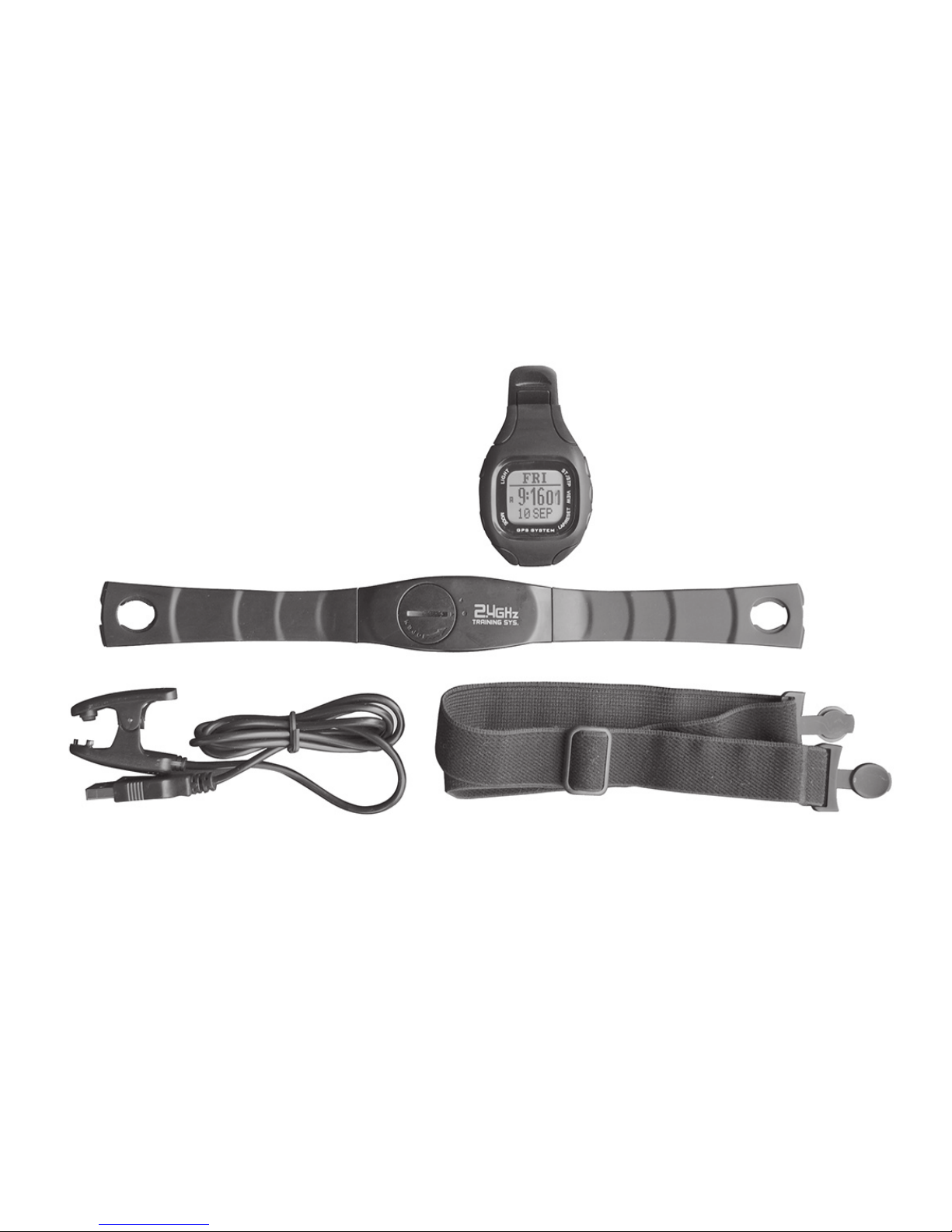
Watch
Chest Strap
USB connector
Elastic Band
INTRODUCTION - WHAT'S IN THE BOX
And a CD with: Software for your PC connection, Step by Step Installation and Setup Guides, Owner's
Manual, Flow Chart for all Buttons & Settings and Warranty Information

The Tech4o DISCOVER combines personal training
and navigation functions into one compact wrist
watch / computer with an integral GPS. This package
also includes a digitally coded Heart Rate Monitor
(HRM) chest strap along with a USB data transfer
cable. The Cable also charges the watch battery. The
included CD provides GPSMaster software for data
management and transfer to a PC.
A. Features and Specifications
• Water resistant 100 ft / 30 meters
• Heavy duty mineral glass lens
• Compact size measures 1.81 x 2.79 x .63 inches and
weighs only 1.94 oz.
• The dual processors are designed to optimize battery
life. Battery life of a single charge keeps the watch
running for a year when not using the GPS. With
heavy GPS use, it will last around 8.5 hours
Workout functions:
• 5 fully customized proles that can be congured
from either the watch or a PC
• 3 view screens for each prole
• 3 programmable elds for each view
• A single workout log supports a maximum 48,170
waypoints. When the number of logs increases, the
total number waypoints is slightly reduced. The watch
can store 120 workout logs
• Smart Lap automatic waypoint marking
Navigation functions:
• Total of 10 paths with a maximum 99 waypoints for
each path
• 3 Navigation Modes: Waypoint, Forward and Backward
• Heading pointer
• Current speed, distance to waypoint and destination,
estimated time of arrival
• Manual and automatic Smart Lap waypoint marking
Digital Compass
• Magnetic North indicator
• 1 degree resolution with 16 cardinals
Heart Rate Monitor
• Digitally Coded 2.4GHz Wireless Chest Strap
• 4 Target Heart Rate Zones
• Above/In/Below Zone Timer
• Audio Above/In/Below Zone Alert

B. Overview- Watch Parts and Button Locations
Stop/Start
Lap/Reset
View
Clip Notch
USB Contacts
Mode
GPS Antenna is inside here; Aim
towards the sky for best reception
Light

B-01. Chest Strap Features and Parts:
Face Outside
Face Inside - towards skin
Top View
SensorSensor
Antenna is under the case
Adjustable Elastic Band
Battery Cover

Compass bearing is a 360˚ direction indicator. The
compass is numbered clockwise with north as 0˚, east
90˚, south 180˚, and west 270˚. So a bearing of 42˚ would
be northeast and a bearing of 200˚ would be southwest.
Lap-By-Distance Creates a lap after the preset lap distance
has been reached.
Lap-To-Waypoint Creates a waypoint at the end of selected
path whenever a lap is marked.
Cold Start If GPS has been off for over 2 hours, the
satellite data is no longer valid. It takes about 30 seconds
to acquire sufcient new data and x your location.
Hot Start If GPS has been off for a short time and you
re-start; satellite data is still valid. It takes a few seconds to
x your location.
"GPSMaster" is application software written to work with
this watch. Workout log and paths can be downloaded /
uploaded via the USB cable. GPSMaster provides a much
better means for workout analysis, path creation and
manipulation.
%EMHR is the percentage of the Estimated Maximum Heart
Rate. EMHR is calculated as 220 minus your age.
Target HR Zone is the region in which you would like your
Heart Rate to be during exercise.
C. Definitions / Glossary
Waypoints are sets of coordinates that identify a point
in physical space. These coordinates usually include
longitude and latitude, and sometimes altitude.
Waypoint names are limited to 10 characters and are
named or renamed in GPSMaster.
Path is a collection of waypoints. It can be treated
independently as scattered waypoints; or linked in
order- either forward or backward. Linked waypoints
form a PATH. This watch supports 10 Paths. Each path
has 99 waypoints maximum. Paths can be created in the
Lap-To-Waypoint function. Or created by GE (Goggle
Earth) / GMaps (Google Maps); then imported through
GPSMaster. A path name can be 32 characters long.
Workout logs are records that contain: starting time /
date, workout summary, lap details, speed, distance, HR
and track data. The sampling interval is controlled by the
value established in TrackLog setting.
Pace is an estimated rate of travel. It is based on the
elapsed time needed per Km / Mile. The unit of PACE is
specified in Menu Settings VSystem VUnits VGeneral.
If the unit is Mile and PACE -reads 6 then you are
moving at 6 minutes per Mile.

D. Charge the Battery
The watch has a built-in rechargeable lithium
polymer battery. Charge it for at least 3
hours before first use. When exhausted,
the battery charges completely in less than
2 hours. The life of a single charge depends
upon usage: If the GPS is not activated, it will
last up to a year. If GPS is left ON, it will last
about 8.5 hours. The battery is good for at
least 500 charges. Even a 15 minute charge
will keep GPS running up to 1.5 hours.
To charge the battery:
1. Align the clip guide and pins with the notch
and contacts at the bottom of the watch
2. Make sure the clip is secure
3. Plug the USB cable into the computer
See photo on the right.
Battery energy level. In TIME MODE press V
or when using the GPS, press Mto view
the approximate time left. This is a rough
estimate. Actual life will vary as operating
conditions change. When the battery nears
empty, GPS and backlight will be disabled.
However, normal time keeping will continue
to run for another 2 weeks.
USB Contact
Pins
Clip
Guide
To the PC

E. Button Operations
Light Press to turn ON the 3 second back light
Hold to enter Night Mode
Press once to exit Night Mode
Mode M Press to move among the 4 function displays
Hold to enter setting Menu.
Hold to quickly exit to functional modes when
you are several levels deep.
Press to exit setting or back up one menu level
VIEW V Press to enter Menu items or Workout Views
Press to confirm selection
Hold to turn on GPS in Workout / Navigation
Mode
STOP/ START S/S Press to move up within a list
Press to increase values
Press to Start/Stop Workout / Timer
LAP/RESET L/R Press to move down within a list
Press to decrease values
Press to Start/Stop Workout / Timer
Press to take laps at Workout Mode
Hold to save Waypoint at Navigation Mode
Hold to clear workout data
F. Warnings and Cautions
WARNING:
• Make sure that you fully understand the functions and
limitations before use.
• Performance depends upon United States satellites. This
satellite system may make changes that could affect
accuracy and performance.
• This product is an assistant device for navigation, and it is
NOT a substitute for getting the navigating information
from charts, maps, observations or an experienced
guide. DO NOT use this product for navigation that
requires precise vital locations.
• The Watch / Chest Strap measures heart rate and is NOT
a substitute for medical devices.
• Consult a doctor or trainer before setting your Upper and
Lower heart rate limits.
• Like most electronic or magnetic devices, it may interfere
with pacemakers. Although safe for patients with
pacemakers, be sure check with a doctor before using.
• If you have doubts about the directions and location of a
route, consult a reliable source.
• DO NOT use this Watch and Chest Strap for commercial
or professional purposes.
• DO NOT charge or connect the unit when it is wet.

CAUTION:
• The GPS only works in an open air environment.
The more open the area, the more accurate is the
information, and the faster it is to obtain your first
position.
• The GPS data is not valid until the receiver is nished
acquiring satellite data.
• DO NOT get lotion/sunscreen on the contacts; as they
will insulate the signal.
• DO NOT expose your watch to extreme heat or cold.
• This unit is water resistant and, you can wear it for
swimming. However, the GPS and Heart Rate
functions will not work under water.
F-01. FCC Compliance Statement
This device complies with part 15 of the FCC Rules.
Operation is subject to the following two conditions:
(1) This device may not cause harmful interference, and
(2) this device must accept any interference received,
including interference that may cause undesired
operation.
WARNING: Any Changes or modications not expressly
approved by the party responsible for compliance could
void the user's authority to operate the equipment.
Note: This equipment has been tested and found to
comply with the limits for a Class B digital device,
pursuant to part 15 of the FCC Rules. These limits are
designed to provide reasonable protection against
harmful interference in a residential installation. This
equipment generates, uses and can radiate radio
frequency energy and, if not installed and used in
accordance with the instructions, may cause harmful
interference to radio communications.
However, there is no guarantee that interference
will not occur in a particular installation. If this
equipment does cause harmful interference to radio
or television reception, which can be determined
by turning the equipment off and on, the user is
encouraged to try to correct the interference by one
or more of the following measures:
• Reorient or relocate the receiving antenna
• Increase the separation between the equipment
and receiver
• Connect the equipment into an outlet on a circuit
different from that to which the receiver is
connected
• Consult the dealer or an experienced radio/TV
technician for help
Table of contents
Popular Fitness Electronic manuals by other brands

Tunturi
Tunturi Platinum Pro user manual

ergoline
ergoline ergoselect 150 Operator's manual

Kettler
Kettler SM3635-68 Training and operating instructions

BH FITNESS
BH FITNESS G6424i manual

BodyMedia
BodyMedia DD100 manual

Octane Fitness
Octane Fitness ZERO RUNNER ZR7000 Console Guide & Set-Up Instructions