
TECAi visioair HD User manual

visioair HD Duct cleaning system
Duct cleaning system
EN
user manual
visioair HD

visioair HD Duct cleaning system
visioair HD Duct cleaning system 2-26
introduction
Dear Client:
Thank you for placing your trust in a quality product from
TEINNOVA.
This product has been made using modern manufacturing
techniques and thorough quality assurance measures.
We strive to do everything we can to make sure you are satisfied with this
product and can work with it without problems.
Should you have any questions about this product, please contact your de-
aler or contact the company directly.
Before starting up the machine, carefully read the
instructions for use of your equipment.
Treat this manual as part of the machine and always keep it handy for future
reference.
Our training services have been designed to
support our clients in achieving their goals and together
we will develop training programs that fit your
strategy.
We offer the option of providing companies with speci-
fic training in the use of our equipment and to educate their
operators so they perform the best service and thus contribute to the
successoftheirfinalcustomers.Aspectssuchasknowinghowtoprepareagood,
objective, quotation, to respond to specific problems that may arise, or to
offer a more professional and efficient service.
Because we manufacture our own cleaning equipment we can
continuously control the quality and performance of every machine we
make, and this is why we have very low repair ratios, and repairs
have always been solved by our in-house Technical Support Service,
managed by the same team as the factory, and to do it
quickly.
We have all kinds of spare parts for your equipment, as well as
related accessories.
This instruction manual is protected by copyright. We reserve all rights, especially the rights to produce,
translate and prepare using electronic systems.
Training service
Technical service

visioair HD Duct cleaning system 3-26
symbols used
safety warnings
conditions of use
know your machine
control panel
remote control
accessories and related equipment
operating instructions
5-26
6-26
7-26
8-26
9-26
11-26
12-26
15-26
contents

visioair HD Duct cleaning system
transport
21-26
22-26
23-26
24-26
25-26
26-26
maintenance and care
troubleshooting guide
technical specifications
guarantee conditions
declaration of conformity
contents
4-26

visioair HD Duct cleaning system
All the symbols used in this manual, as well as those on the equipment, are explai-
ned in this section. It is important to read the text associated with these symbols
carefully, since it is about personal safety and equipment safety.
DANGER!
This symbol warns you of a potentially dangerous situation which could result in
serious injury or even death if the instructions given are not followed properly.
Make sure you read all the instructions in the "Safety information" section.
WARNING!
This symbol warns you of a potentially dangerous situation that could
result in minor or moderate injury, or property damage resulting in injury to people
if proper instructions are not followed.
CAUTION!
This symbol warns you of a situation that may cause damage to
property, without causing injury, if the instructions given are not followed properly.
IMPORTANT!
This symbol alerts you to information about the best way to use the equipment
avoiding any possible improper operation.
symbols used
5-26

visioair HD Duct cleaning system
The VISIOAIR HD equipment should NOT be used for any uses other than those given in this instruction
manual.
Make sure all the electrical and compressed air connections are correct before starting the equipment.
Safety glasses must always be worn to prevent any possible dust streams from reaching the operator's
eyes.
Make sure that the front wheel brakes are on while working with the equipment.
Secure the VISIOAIR HD properly and apply the wheel locks when transporting it in a vehicle.
Everybody who uses the VISIOAIR HD equipment must be properly trained.
Mechanical protection gloves and an overall should be worn when using the equipment.
Make sure your VISIOAIR HD is placed on a flat and stable surface. Apply the wheel brakes to keep
the machine stable.
Do not open the VISIOAIR HD duct cleaning system's control box. In the event of a fault, contact the
TEINNOVA Technical Assistance Service on +34 941 44 50 56.
safety warnings
6-26

visioair HD Duct cleaning system
The VISIOAIR HD machine has been designed and manufactured for the cleaning of air conditioning ducts
and should not be used in other types of ducts. It has two 15-meter hoses, which allow the cleaning of
conduit sections up to 30 meters long from a single access point. It is moved forward by the escape of
compressed air from the head. So to operate the VISIOAIR HD, you need to connect it to a compressed air
supply system and connect it to the mains.
For proper operation, you need to have a vacuum pump that can create a negative relative pressure in the
duct. This high flow vacuum pump (4,000-5,000 l/min) is responsible for absorbing the suspended particles
that the cleaning action of your VISIOAIR HD equipment produces.
conditions of use
Any other use is strictly forbidden
without the written permission of
the manufacturer.
Never place the VISIOAIR HD
in a horizontal position, under any
circumstances, as this will damage
the machine.
LEGEND
AR100
Compressed air
generator
VISIOAIR HD
Pneumatic duct-cleaning robot
brush
power supply
compressed air
7-26

visioair HD Duct cleaning system
2
1
3
4
5
67
17
16
15
18
21
22
20
19
24
23
25
27 26
12
13
9
8
11
10
Components:
1- Membrane keyboard
2- Digital pressure gauge
3- Emergency stop
4- VISIOAIR HD compartment
5- VISIOAIR HD compartment handle
6- Front wheel Brake
7- Front wheel
8- Rear wheel
9- Side panel handle
10- Spool rewind button
11- VISIOPRO HD positioner
12- VISIOPRO HD
13- VISIOPRO HD screen
15- Hose spools
16- Blind nozzle
17- Compressed air inlet
18- Filtration and separation module
19- VISIOAIR HD electrical connection
20- Compressed air outlet
21- Output pressure regulator
22- Output pressure regulator display
23- Spool rewinding motor wheel
24- Smart nozzle
25- VISIOAIR HD carrying handle
26- VISIOPRO HD electrical connection
27- VISIOPRO HD video connection
know your machine
8-26
visioair HD Duct cleaning system
AIRE / AIR
1
1
2
3
2
4
3
5
45
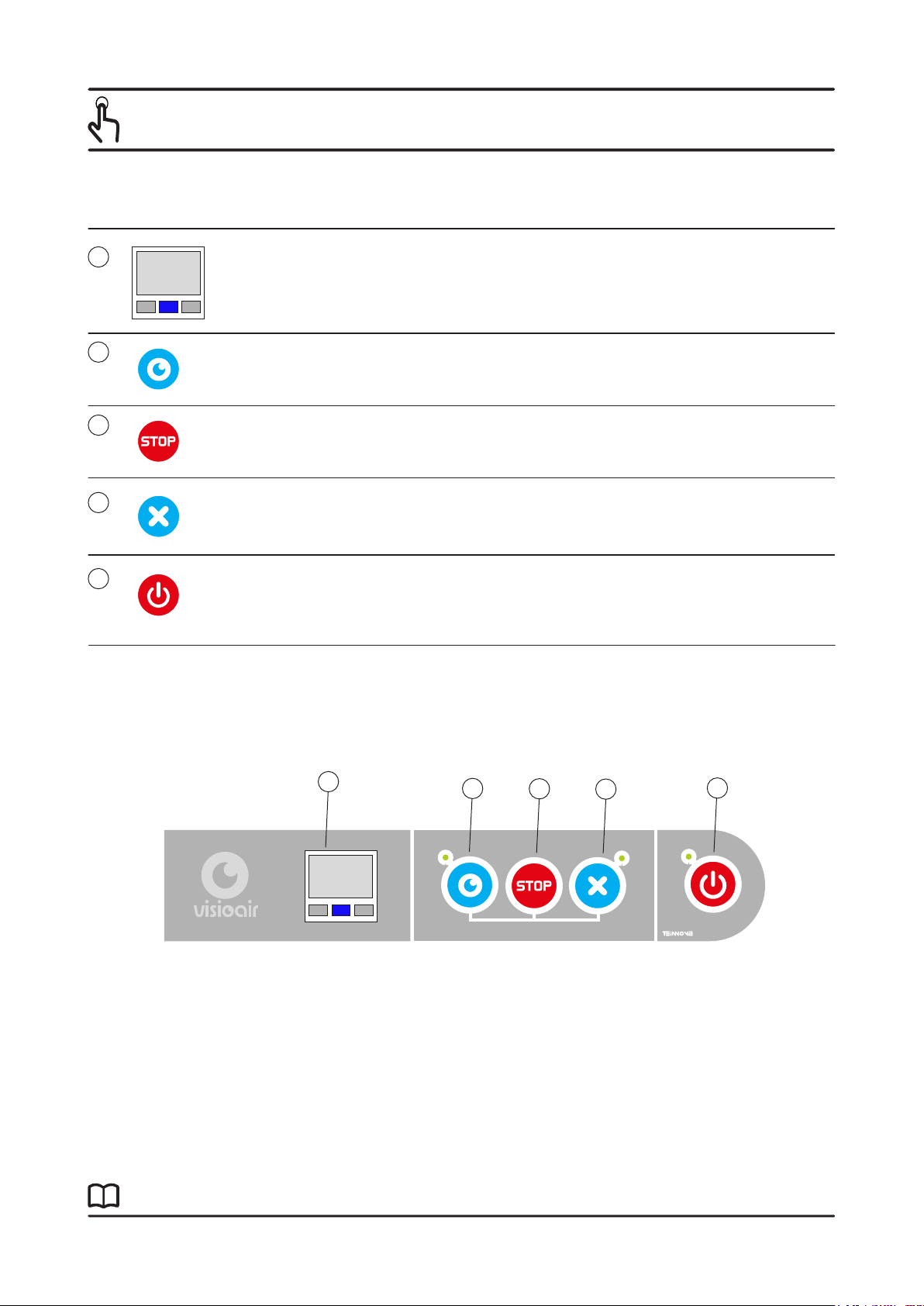
main control panel:
Digital pressure
gauge
ON/OFF
VISIOAIR
Smart nozzle se-
lector
Blind nozzle
selector
Digital pressure gauge, this shows the pressure of the com-
pressed air in the hose.
This option starts the flow of air through the
smart nozzle.
This option starts the flow of air through the
blind nozzle.
Switches the VISIOAIR HD on or off. When the
VISIOAIR HD is on, the smart nozzle camera and lighting are
also switched on.
control panel
STOP This stops the machine immediately.
9-26
Table of contents
Other TECAi Cleaning Equipment manuals


