
TCL ALTO S522W User manual
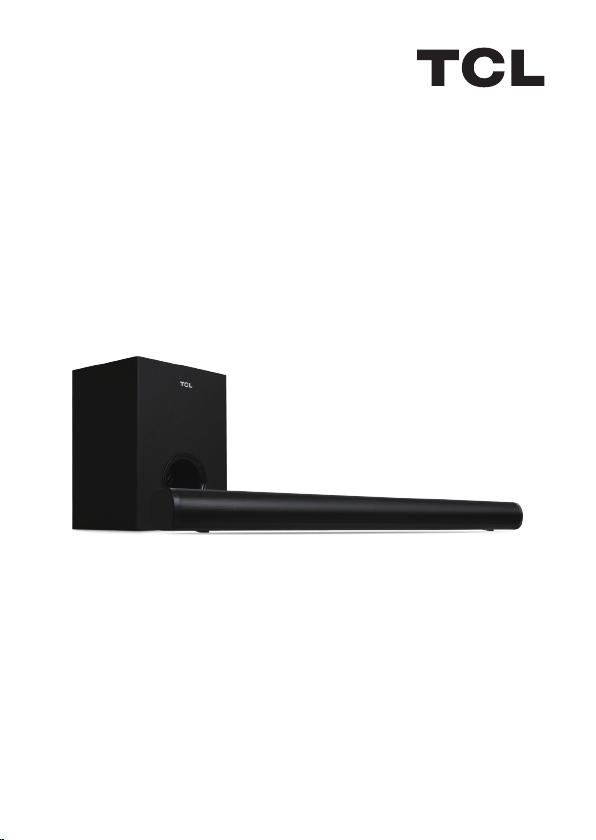
2.1 Channel Sound Bar with Wireless Subwoofer
User Manual
S522W

Contents
1 Important Safety Information ..................................................... 1
Warnings................................................................................... 2
Battery precautions ................................................................... 3
Disposal of your old product and battery ................................... 4
2 Before you begin ......................................................................... 5
3 Welcome ........................................................................... 6
What's in the box ...................................................................... 6
Overview of the Sound Bar........................................................ 7
Overview of the Remote Control................................................ 8
Install/replace the remote control batteries ................................ 9
4 Set up your Sound Bar system 11
Position Your Sound Bar and Subwoofer ................................ 11
Mount your Sound Bar on the wall .......................................... 12
5 Connect your Sound Bar system 15
Connect with the AC power adaptors...................................... 15
Connect with the optical cable ................................................ 17
Direction for setting up your Sound Bar using an optical cable 18
Connect with USB disk ........................................................... 18
6 Use your Sound Bar system 19
Operation instruction ............................................................... 19
Volume and Sound effect regulation ........................................ 21
7 Specification 22
8 Trademarks 24
9 FCC STATEMENT 25
Radiation Exposure Statement ................................................ 25
10 FAQ 26

1
1 Important Safety
Information
Make sure you read all the safety information before you use
this product.
TCL North America bears no responsibility for accidents or
damages caused by unauthorized changes, modifications or
improper use of the product.
User Manual can be found at www.tcl.com/us on the
specific product page in the “Download” section.
CAUTION
RISK OF ELECTRIC SHOCK
DO NOT OPEN
CAUTION: TO REDUCE THE RISK OF ELECTRIC SHOCK, DO NOT
REMOVE COVER (OR BACK). NO USER-SERVICEABLE PARTS INSIDE.
REFER SERVICING TO QUALIFIED SERVICE PERSONNEL.
The lightning flash with arrowhead symbol, within an
equilateral triangle is intended to alert the user to the
presence of uninsulated dangerous voltage within the
product’s enclosure that may be of sufficient magnitude to
constitute a risk of electric shock.
The exclamation point within an equilateral triangle is
intended to alert the user to the presence of important
operating and maintenance (servicing) instructions in the
literature accompanying the product.
This symbol indicates that this product incorporates
double insulation between hazardous main voltage and
user accessible parts. When servicing, use only identical
replacement parts.

2
Warnings
• To reduce the risk of fire or electric shock, do not expose this product
to rain or moisture. This product should not be exposed to dripping
or splashing. No objects filled with liquids, such as vases, should be
placed on or near the product.
• The product is unstable if it is not properly placed or mounted to the
wall. Be sure to follow the wall mounting instructions provided in the
user manual to ensure your safety.
• Do not expose batteries to excessive heat such as sunshine, fire, and
so forth.
• To avoid the danger of suffocation, keep plastic packaging away from
pets, babies, and children. Do not use packaging bags in cribs, beds,
carriages, or playpens.
Safety
• Read these instructions - Read all the safety and operating
instructions before operating the product.
• Retain these instructions - Retain the safety and operating
instructions for future reference.
• Heed all warnings - Adhere to all warnings on the product and in
the operating instructions.
• Follow all instructions - Follow all operating and use instructions.
• Do not use this apparatus near water – The appliance should not
be used near water or moisture – for example, in a wet basement or
near a swimming pool and the like.
• Clean only with a dry cloth.
• Do not block any ventilation openings. Install in accordance with
the manufacturer’s instructions.
• Do not install near any heat sources such as radiators, heat
registers, stoves, or other apparatus (including amplifiers) that produce
heat.
• Do not defeat the safety purpose of the polarized or grounding-
type plug. A polarized plug has two blades with one wider than the
other. A grounding type plug has two blades and a third grounding
prong. The wide blade or the third prong are provided for your safety. If
the provided plug does not fit into your outlet, consult an electrician for
replacement of the obsolete outlet.
• Protect the power cord from being walked on or pinched

3
particularly at plugs, convenience receptacles, and the point where it
exits from the product.
• Use only attachments/accessories specified by the manufacturer.
• Use only with the cart, stand, tripod, bracket, or table specified by
the manufacturer, or sold with the apparatus. When a cart is used, use
caution when moving the cart/apparatus combination to avoid injury
from tip-over.
• Unplug this apparatus during lightning storms or when unused for
long periods of time.
• Refer all servicing to qualified service personnel. Servicing is
required when the apparatus has been damaged in any way, such as
power-supply cord or plug damaged, liquid has been spilled or objects
have fallen into the apparatus, the apparatus has been exposed to rain
or moisture, does not operate normally, or has been dropped.
Warnings
• To prevent electric shock, match wide blade of plug to wide slot, fully
insert.
• Do not place any sources of danger on the product (for example:
liquid filled objects, lighted candles).
• Disconnect the power cord to shut off when find trouble or not in use.
The power cord shall be readily operable.
• Use of controls or adjustments or performance of procedures other
than those described herein, may result in hazardous radiation exposure
or other unsafe operation.
• The power cord/appliance coupler is used as the disconnect device,
the disconnect device must remain readily operable.
• The rating label is located at the bottom or back of the product.
• The use of apparatus in tropical and moderate climates.
Battery precautions
• Do not mix batteries (old and new or carbon and alkaline).
• Do not dispose of batteries in fire or water.
• Recycle or dispose of batteries as per state and local guidelines.
• Danger of explosion if battery is incorrectly replaced. Replace only
with the same or equivalent type.
• When the remote control is not to be used for a long time (more than
a month), remove the battery from the remote control to prevent it from
leaking.

4
• If the batteries leak, wipe away the leakage inside the battery
compartment and replace the batteries with new ones.
• Keep away the batteries from heat or moisture.
• Do not carry or store batteries with other metallic objects. Doing so
could cause batteries to short circuit, leak or explode.
• Never recharge a battery unless it is confirmed to be a rechargeable
type.
• This product contains a coin cell battery. If the coin cell battery is
swallowed, it can cause severe internal burns in just 2 hours and can
lead to death.
• Keep new and used batteries away from children.
• If the battery compartment does not close securely, stop using the
product and keep it away from children.
• If you think batteries might have been swallowed or placed inside any
part of the body, seek immediate medical attention.
Disposal of your old product and battery
Your product is designed and manufactured with high quality materials
and components, which can be recycled and reused.
This product may contain lead and mercury. Disposal of these materials
may be regulated due to environmental considerations. For disposal or
recycling information, please contact your local authorities.
This product contains batteries:
• Do not incinerate. Batteries may explode if overheated.
• For disposal or recycling information, please contact your local
authorities.
CAUTION: Risk of explosion if the battery is replaced by an incorrect
type.
CAUTION: Replacement of a battery with an incorrect type that can
defeat a safeguard.
CAUTION: Disposal of a battery into fire or a hot oven, or mechanically
crushing or cutting of a battery, that can result in an explosion.
CAUTION: Leaving a battery in an extremely high temperature
surrounding environment that can result in an explosion or the leakage
of flammable liquid or gas.
CAUTION: A battery subjected to extremely low air pressure that may
result in an explosion or the leakage of flammable liquid or gas.

5
2 Before you begin
• Carefully read and observe all safety instructions in the
safety leaflet.
• This sound bar is intended for indoor use only. In case it
accidentally gets in contact with small amounts of water,
unplug immediately and use a dry cloth to remove the
water.
• Unplug the sound bar if it is not used for long periods of
time or during lightning storms.
• Make sure the sound bar is installed on a solid surface
or solidly wall-mounted below your TV for the best
experience.
• Only use lithium CR2025 battery for the remote control.
• In case any of the cables are visibly damaged or pinched,
unplug the sound bar and replace the cable.
• Be careful not to sharply bend the HDMI and optical cable
as they may affect the performance.
• Protect your hearing by adjusting to a proper volume.
6
3 Welcome
Congratulations on the purchase of your new TCL Sound
Bar! After it is set up and connected, you can experience a
super sound quality and state-of-the-art design to best fit
your home entertainment system. You are recommended
to read through this user manual which helps you set up,
connect and operate the product easily and properly.
Let's get started.
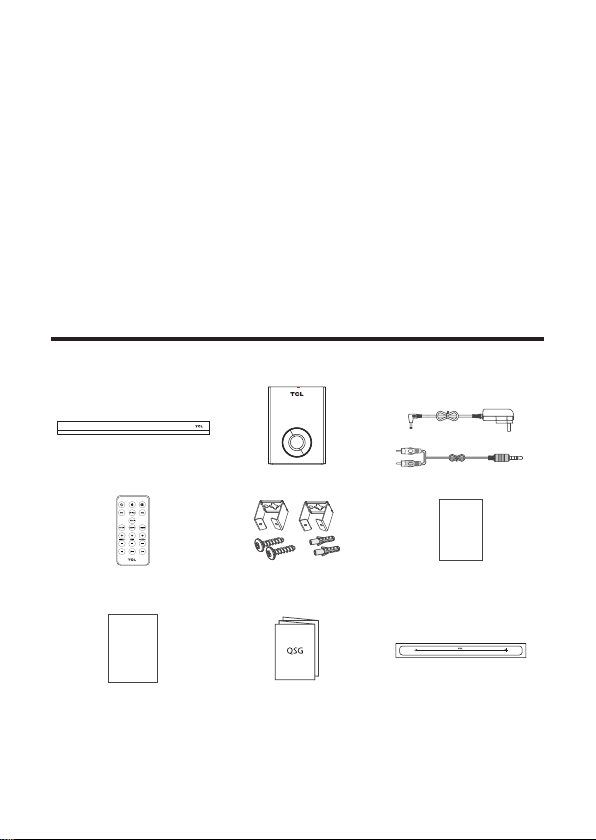
What's in the box
Sound Bar main unit Subwoofer AC adapter x 2
RCA-3.5mm cable
Warranty
Card
Remote control
Wall anchor x 2
Wall mount bracket x 2
Wall bracket screw x 2
Warranty Card
Safety
instructions
Safety Leaflet Quick Start Guide Wall Mount Template
Warning: To avoid the danger of suffocation, keep plastic packaging
away from pets, babies, and children. Do not use packaging bags in
cribs, beds, carriages, or playpens.
7
Overview of the Sound Bar
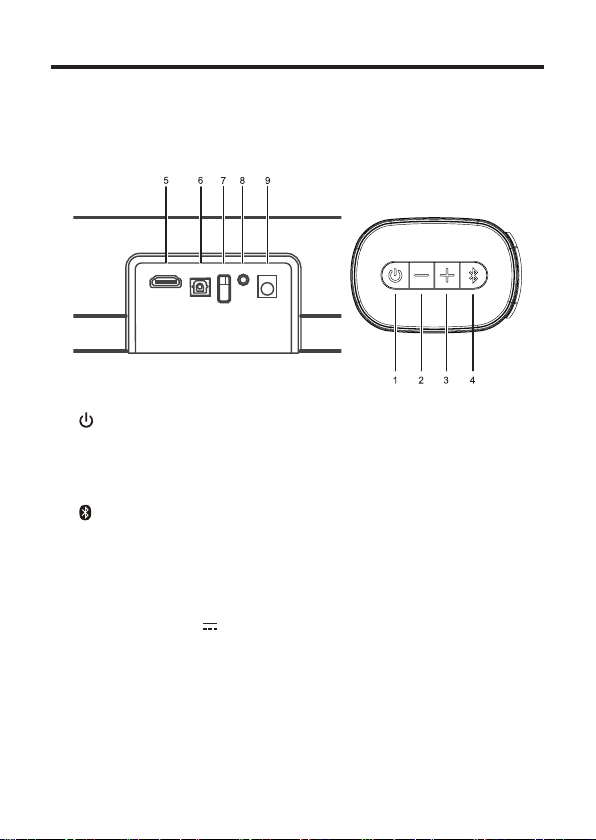
Button and jack definition:
Buttons and jacks are defined as follows:
ARC OPT USB AUX DC IN
1. : Press to power on, short press to switch function,
long press to power off
2. —: Press for volume down
3. +: Press for volume up
4. : Press for Bluetooth pairing
5. ARC: HDMI ARC
6. OPT: Optical input
7. USB: USB input
8. AUX: 3.5mm connector
9. DC IN: DC14V 2A input
Function indicator light:
1. Red light: in standby mode
2. White light: in operation

8
Overview of the Remote Control
1. : Press to power on and power off.
2. (MUTE): Press the mute button and turn on the sound
button (white light will flash slowly when mute).
3. : Press to switch to Bluetooth mode.
4. AUX: Press to switch to AUX mode.
5. OPTICAL: Press to switch to the Optical input mode.
6. USB: Press to switch to USB play when insert USB.
7. HDMI: Press to switch to HDMI mode.
8. MUSIC: Press to select the MUSIC sound mode.
9. MOVIE: Press to select the MOVIE sound mode.
10.DIALOG: Short press to select the DIALOG sound mode.
11.TREBLE +: Press to increase treble sound (the white
light flashes, when hit the maximum or minimum level
white light will be on).
Table of contents
Other TCL Speakers System manuals


Popular Speakers System manuals by other brands




Sondpex
Sondpex Active Speaker System and Digital Music... User manual and installation instructions

JVC
JVC NX-PN7 instructions

Marshall Amplification
Marshall Amplification AR-DM61-BT user manual
Yamaha
Yamaha NX-A01 - Speaker Sys Product bulletin
SE Audiotechnik
SE Audiotechnik I-LINE manual

Gemini
Gemini WRX-843 Series user manual