Suunto T6C User manual

21
USER GUIDE
en
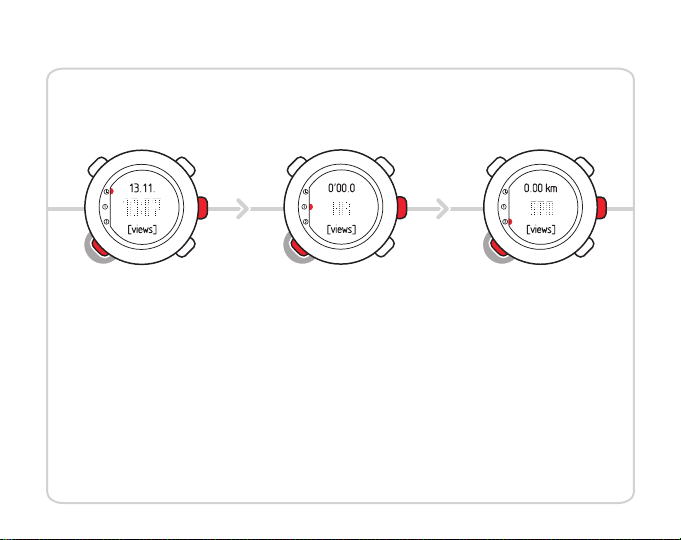
MODES & VIEWS
• weekday
• seconds
• dual time
• altitude
row 1: distance
row 2: speed
views: • altitude
• ascent
• average
speed
• chrono
• descent
Time Training
display 1*
row 1: chrono
row 2: heart rate
views: • average
heart rate
• calories
• EPOC
• lap time
• training effect
Training
display 2*
views:
row 1: date
row 2: time
*) default settings

1 Introduction ............................................................................ 5
2 Using TIME mode ...................................................................... 6
2.1 Setting time ................................................................. 7
2.2 Setting dual time ........................................................... 7
2.3 Setting date ................................................................. 8
2.4 Setting alarm ............................................................... 8
3 Settings before training .............................................................. 10
3.1 Personal settings .......................................................... 10
3.1.1 Maximum heart rate ........................................... 11
3.1.2 Fitness METs level .............................................. 12
3.2 Units settings .............................................................. 12
3.3 General settings ........................................................... 14
3.3.1 Setting tones ................................................... 14
3.3.2 Setting icons ................................................... 15
3.3.3 Setting backlight ............................................... 15
3.4 Configuring TRAINING mode displays .................................... 16
3.5 Setting reference altitude ................................................. 19
3.6 Setting heart rate limits ................................................... 20
3.7 Selecting log parameters ................................................. 21
4 Using TRAINING mode ............................................................... 23
4.1 Putting on your transmitter belt .......................................... 23
2

4.2 Using timers ............................................................... 24
4.3 Using Training Effect ...................................................... 26
4.4 Using EPOC ................................................................ 28
4.5 Starting a training session ................................................ 28
4.6 During training ............................................................ 29
4.7 After training .............................................................. 30
4.7.1 Viewing logbook ............................................... 30
5 Using PODs ........................................................................... 32
5.1 Pairing a POD .............................................................. 32
5.2 Using autolap ............................................................. 33
5.3 Using distance intervals ................................................... 34
5.4 Using speed limits ......................................................... 34
5.5 Using autopause .......................................................... 35
5.6 Calibrating your POD ..................................................... 36
6 Troubleshooting ...................................................................... 37
Pairing your transmitter belt ................................................. 37
7 Care and maintenance ............................................................... 39
7.1 General guidance ......................................................... 39
7.2 Replacing wristop battery ................................................ 40
7.3 Replacing belt battery .................................................... 41
8 Specifications ......................................................................... 42
3
en

8.1 Technical data ............................................................. 42
8.2 Trademark ................................................................. 43
8.3 Copyright .................................................................. 43
8.4 CE .......................................................................... 44
8.5 ICES ........................................................................ 44
8.6 FCC ......................................................................... 44
8.7 Patent notice .............................................................. 45
8.8 Disposal of device ......................................................... 45
9 Disclaimers ............................................................................ 46
9.1 User’s responsibility ....................................................... 46
9.2 Warnings .................................................................. 46
Index ................................................................................... 47
4

1 INTRODUCTION
Thank you for choosing Suunto t6c as your training companion. Suunto t6c is a
high-precision heart rate monitor designed to make your training as beneficial as
possible.
Suunto t6c gives you extremely accurate feedback on your fitness level. Before you
start regular training with Suunto t6c, you should first learn the values of EPOC and
other body parameters in your normal training sessions. This way you will learn to assess
what type of training will help you to reach your goals.
Key features include:
●Personalized training features
●Log recorder that records each training session
●Functional extensions through Suunto PODs (Peripheral Observation Devices)
●Training analysis with Suunto software
5
en

2 USING TIME MODE
In TIME mode you can view the time of day in two time zones: the time at your actual
location and in another time zone (dual time). The current date is displayed on the top
row of the screen.
Use [View Back] to scroll through the following views:
●Day: name of the current weekday
●Seconds: seconds as numbers
●Dual time: time in another time zone
●Altitude: your altitude from the sea level
You can change the following TIME mode settings in the settings menu:
DescriptionValueSetting
Alarm feature: on or off / hours and
minutes
on / off / 00:00alarm
Main time: hours, minutes and secondshours / minutes / secondstime
Current date: year, month and dayyear / month / daydate
Dual time: hours and minuteshours / minutesdual time
6

2.1 Setting time
To set time:
1. In the settings menu, enter TIME.
2. Scroll to TIME with [Lap +] and [Light -] and enter with [Mode].
3. Change the time with [Lap +] and [Light -] and accept with [Mode].
4. Reset seconds with [Light -]. To set specific seconds, keep [Lap +] pressed. The
seconds start running. Accept the correct seconds with [Mode].
5. Press [Start Stop] to exit.
2.2 Setting dual time
To set dual time:
1. In the settings menu, enter TIME.
2. Scroll to DUAL TIME with [Light -] and [Lap +] and enter with [Mode].
3. Change the time with [Lap +] and [Light -] and accept with [Mode].
4. Press [Start Stop] to exit.
Possible real life situation: Knowing the time at home
You are traveling abroad and you set the dual time to be the time at home. The main time
is the time at your current location. Now you always know the local time and you can quickly
check what time it is at home.
7
en

NOTE: We recommend that you set the current time at your current location as the
main time because the alarm clock operates according to the main time.
2.3 Setting date
To set the date:
1. In the settings menu, enter TIME.
2. Scroll to DATE with [Lap +] and [Light -] and enter with [Mode].
3. Change the day, month, and year with [Lap +] and [Light -] and accept with
[Mode].
4. Press [Start Stop] to exit.
2.4 Setting alarm
You can set up to three alarms on your Suunto t6c.
To set the alarms:
1. In the settings menu, enter TIME.
2. Scroll to ALARM with [Lap +] and [Light -] and enter with [Mode].
3. Scroll through the alarms with [Lap +] and [Light -] and enter with [Mode].
4. Set the alarm on or off with [Lap +] and [Light -] and accept with [Mode].
5. Change the alarm time with [Lap +] and [Light -] and accept with [Mode].
6. Press [Start Stop] to exit.
8

When the alarm sounds, acknowledge it by pressing any button. If you do not
acknowledge the alarm, it will automatically stop sounding after 30 seconds.
TIP: You can use one alarm on workdays and the others on weekends. You can also use
the extra alarms as reminders or snooze options.
9
en
Other manuals for T6C
1
This manual suits for next models
1
Table of contents
Other Suunto Fitness Electronic manuals


Popular Fitness Electronic manuals by other brands
Tunturi
Tunturi Platinum Pro user manual

ergoline
ergoline ergoselect 150 Operator's manual

Kettler
Kettler SM3635-68 Training and operating instructions

BH FITNESS
BH FITNESS G6424i manual

BodyMedia
BodyMedia DD100 manual
Octane Fitness
Octane Fitness ZERO RUNNER ZR7000 Console Guide & Set-Up Instructions