
stemoscope PRO LITE STEMO500 User manual


2
SAFETY WARNINGS AND PRECAUTIONS
Consult your physician before using the
device if you are not a medical professional.
Keep Stemoscope PRO LITE at least 1 meter
away from all radio frequency (RF) emitters,
including WIFI routers and radios. DO NOT
use Stemoscope PRO LITE near strong RF
signals or portable and/or mobile RF devices.
If sudden or unexpected sounds are heard,
move away from any radio transmitting
antennas.
Bluetooth Class 2 is used for data
transmission. Its maximum radio frequency
field strength is considered safe to use with
other medical devices. However, audio, video,
and other similar equipment may cause
electromagnetic interference. If such devices
are encountered, and cause interference,
immediately move Stemoscope PRO LITE
away from that device and/or switch OFF
Stemoscope PRO LITE.
Store Stemoscope PRO LITE and components
in a clean and safe place out of the reach of
infants and children.

3
DO NOT move, slide or push the switch
button when Stemoscope PRO LITE is wet. If
you do so, liquid droplets may go into the
device and damage the internal electrical
circuitry.
Recharge the battery using only the provided
charging cable with a UL-certified charger
(not provided). DO NOT use Stemoscope PRO
LITE when it is being charged.
DO NOT subject the device to extreme
temperatures, humidity, or direct sunlight.
DO NOT subject the device to strong shocks,
such as dropping the unit on the floor.
The working distance will be reduced when
objects (walls, furniture, people, etc.) are
between Stemoscope PRO LITE and the
connected phone or earphones. To improve
Bluetooth connection, reduce the distance
and/or allow a line of sight between
Stemoscope PRO LITE and the connected
phone or earphones.
No modification of this equipment is allowed.
Switch off Stemoscope PRO LITE to save the
battery power when not in use.

4
CONTENT
SAFETY WARNINGS AND PRECAUTIONS ...............2
1. Introduction .......................................................................5
1.1. Indications for use .....................................................5
1.2. Specifications and technical data...................6
1.3. Signs and symbols.....................................................7
1.4. Package contents ......................................................8
2. Hardware identification............................................8
3. Basic steps to listen to the sounds.....................10
4. Record a video composed of the auscultatory
sounds and the camera view ............................................16
5. Record the sounds on a predefined body spot
16
6. More features for medical professionals ........18
7. Live stream the auscultatory sounds ............... 21
8. Share (send) a recording.......................................... 27
9. Care, cleaning, and disinfection..........................28
10. Data security .............................................................28
11. Trouble shooting ......................................................... 29
12. Electrical Safety ....................................................... 31
13. FCC Statement ........................................................ 36
14. Disposal.........................................................................36
15. Warranty....................................................................... 37
16. Contact information ........................................... 37

5
1. Introduction
Stemoscope PRO LITE (Model: STEMO500) is a
smart wireless noise-cancelling stethoscope. It
transmits audio to the “DrStemo” app installed on
a smartphone. The “DrStemo”app provides rich
functions such as amplification, visualization,
filtering, recording, sharing, etc. The app also
allows a user to access premium cloud services,
including video call service and cloud data storage.
Before your first use, please read the manual
carefully and follow all the instructions. Please
contact us if you encountered any problems.
1.1. Indications for use
The Stemoscope PRO LITE is designed for medical
professionals or lay users to auscultate, record, and
transmit sounds from the heart, lungs, abdomen,
arteries, veins, and other internal organs. The
device is intended for medical diagnostics
purposes but not for self-diagnosis.

6
1.2. Specifications and technical data
Item
Description
Supported
phones
iOS: 9.0 or above
Android: 7.0 or above
Frequency range
20 – 2000 Hz
Working distance
< 2 meters typically
Transportation
And storage
-10 °C to +60 °C / 15 %RH to
85 %RH / 800 hPa to 1060
hPa
Operating
conditions
+10 °C to +40 °C / 15 %RH to
85 %RH / 800 hPa to 1060
hPa
The time required for Stemoscope PRO LITE to warm
from the minimum storage temperature (-25°C )
between uses until it is ready for intended use when
the ambient temperature is 20°C: 1 hour.
The time required for Stemoscope PRO LITE to cool
from the maximum storage temperature (70°C )
between uses until it is ready for intended use when
the ambient temperature is 20°C: 1 hour.
7
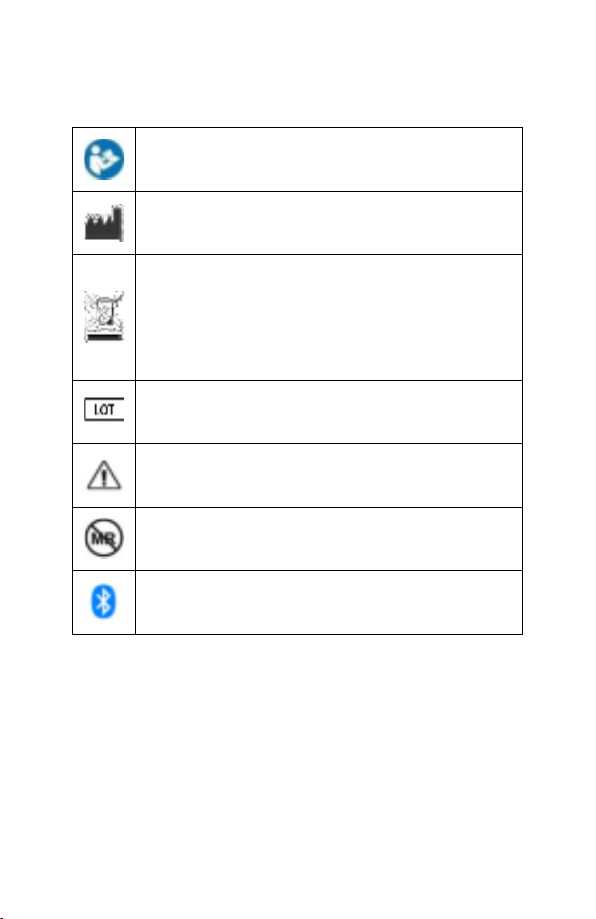
1.3. Signs and symbols
Follow operating instructions
Indicates the manufacturer of the unit,
including manufacturer’s name and address
The device must be disposed of properly
when it will no longer be used. Dispose
medical waste based on local regulations and
comply with applicable laws.
Indicates the Batch Code
Attention, see instructions for use
MR Unsafe
Bluetooth
8
1.4. Package contents
Stemoscope PRO
LITE
Charging cable
Quick start guide
x1
x1
x1
2. Hardware identification
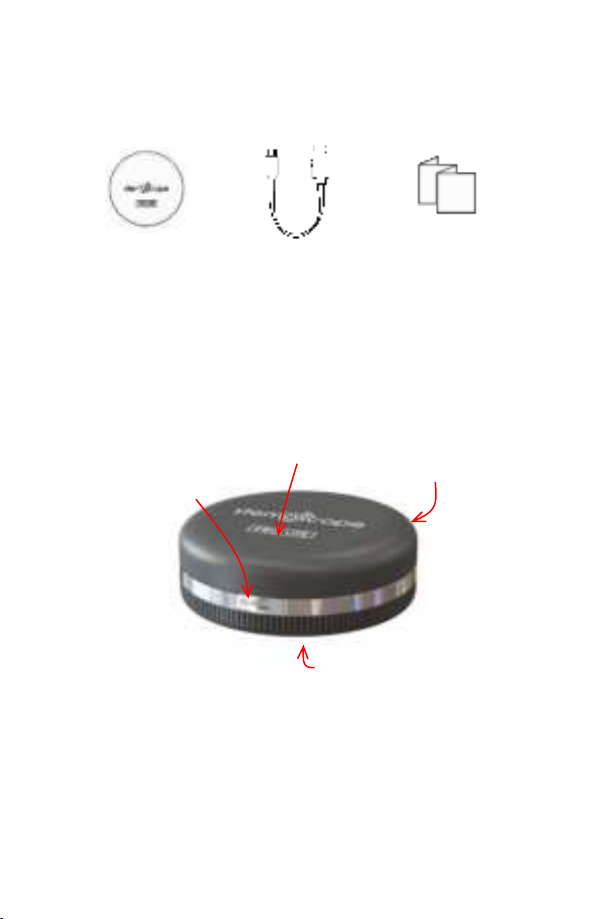
The switch in the left position is the OFF state.
Slide the switch to the right to start Stemoscope
PRO LITE.
Switch
Diaphragm
Notification light
Charge port

9
The diaphragm makes contact with the human
body to pick up body sounds.
To charge Stemoscope PRO LITE, plug one end of
the charging cable into the charge port and
another end to a UL-certified USB charger (not
provided in the package).
The device status can be identified by the
notification light.
Notification light
Device status
Pulsing (smoothly
fading in and out)
Waiting for Bluetooth
connection.
Blinking
Connected but not transmitting
sound.
Consistently on
Connected and transmitting
sounds.
Off
The battery is fully charged if the
device is turned off and being
charged.
Out of battery power if the
device is turned on.

10
3. Basic steps to listen to the sounds
Here are the basic steps for you to use Stemoscope
PRO LITE.
Step 1. Open the “DrStemo”app. If you haven’t
installed the “DrStemo”app, please search and
install it from Apple’s App Store or Google’s Play
Store.
The “DrStemo”App
The app user interface is customized for medical
professionals and lay users. The first time you use
the app, you will be asked to set your role. Please
choose the right one, because a wrong choice can
prevent you from using the device correctly. If you
want to change later, you need to re-install the app.
The app needs to read the QR code on the
diaphragm of your Stemoscope PRO LITE as
shown in the picture below. Just follow the simple
Table of contents
Other stemoscope Medical Equipment manuals









