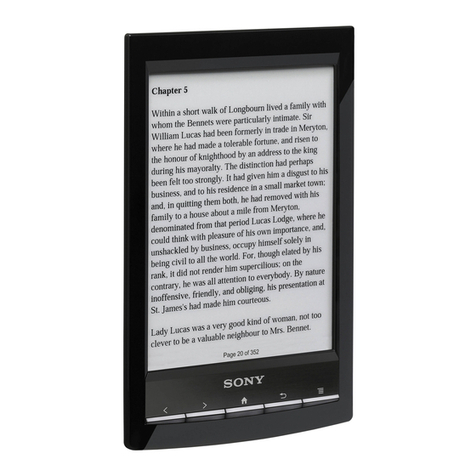
Sovos SVEBK5 User manual

1
SOVOS 5” E-Reader Plus
SVEBK5
User Guide
Please read this user guide carefully before operation

2
Introduction
Thank you for purchasing the SOVOS 5” E-Reader Plus, please
take time to read this User Guide carefully. The information
provided will give an overview of the device and highlight the
basic features so you can start enjoying your new SOVOS E-
Reader Plus as quickly and easily as possible.
Should you experience any problems using this SOVOS product
please call our Technical Support Team on 02920 866429
(9:00am-5:30pm – Monday to Friday) or email us at
support@sovos.co.uk
Thanks again for your custom,
The SOVOS team

3
Product Overview
The SOVOS 5” E-Reader Plus has been developed to allow the
user to view both DRM protected and Non-DRM protected
eBooks, watch videos, listen to music and view photos.
The easy read, high resolution colour LCD TFT screen ensures a
great viewing experience while the music player allows to you to
listen to background music while reading your eBooks.
Using headphones connected to the 3.5mm headphone socket
lets you enjoy your music and videos without distraction or
disturbance from the outside world.
The 1GB internal flash memory allows you to download and
store up to 1000 eBooks on the device, with further memory
expansion available using the SD Card slot. We have also
included some sample eBooks on the device so you can explore
your new purchase straight away.
The SOVOS 5” E-Reader Plus is one of the most versatile E-
Readers on the market today.

4
Product Features
• Compatible with ‘Adobe Digital Editions’ and the following
eBook formats: EPUB DRM Protected files, EPUB, PDF, TXT
(ANSI, UNICODE), RTF, HTML, FB2.
• 5” colour LCD TFT display
• 1GB internal memory - stores up to 1000 books
• Built in battery (1800 mAh Lithium-Polymer) with up to 30
hour music playback & 7 hour eBook viewing
• SD/SDHC Card reader (up to 8GB) for additional memory
expansion
• High resolution 800 * 480 (RGB) pixel screen
• Music playback with MP3, WMA, WAV, OGG, APE, FLAC and
AAC formats
• Movie playback for MP4, MPEG2 and DivX movie files
• Image playback with JPEG, GIF and BMP formats
• Screen rotate feature to read in portrait or landscape mode
• Inbuilt calendar
• Easy PC sync via USB 2.0 cable
• Compatible with Win2000, Win XP, Windows Vista, Windows7
Package Contents
SOVOS 5” E-Reader Plus, stereo earphones, USB 2.0 data cable,
mains power supply, DC power cable and user guide.
Should you find any parts missing please contact your retailer.
Accessories (sold separately):
SOVOS EBK5 5” E-Reader Plus Screen Protector
SOVOS EBK5 5” E-Reader Plus Leatherette Case
SOVOS EBK5 5” E-Reader Plus Wrist Strap
Please contact your SOVOS retailer to purchase accessories.

5
Table of Contents
Introduction ......................................................................2
Product Overview...............................................................3
Product Features................................................................4
Package Contents...............................................................4
Accessories .......................................................................4
Know Your Device...............................................................6
Charging the Battery ..........................................................7
Power On and Off...............................................................8
Connecting the Device to your Computer...............................9
Using your Device with Adobe® Digital Editions....................11
Step by Step Guide to the Main Menu and Functions .............14
Recently viewed eBooks....................................................14
eBooks ...........................................................................15
Music..............................................................................21
Video..............................................................................26
Photo..............................................................................29
File Explorer ....................................................................32
Recorder.........................................................................33
Calendar.........................................................................37
Settings..........................................................................38
Technical Specifications.....................................................40
Troubleshooting ...............................................................41
Warranty Information .......................................................42
Warranty Period...............................................................42
Pixel Statement ...............................................................43
Warnings and Precautions..................................................45

6
Know Your Device
1) Previous page button
2) Next page button
3) Previous page button
4) Next page button
5) Power On-Off / Rotate button
6) Zoom button
7) Navigation button
8) Menu / Enter button
9) Back Next page button
10) USB socket
11) DC input socket
12) SD Card slot
13) 3.5mm headphone socket
14) Microphone
15) Speaker
16) RESET button
17) Carry strap fixing point

7
Charging the Battery
The E-Reader Plus is powered by a 7.4V Li-Polymer rechargeable
battery (1800mAh).
To charge the battery, plug the mains adaptor in to a mains
outlet and connect to the E-Reader using the DC Power cable
(USB to DC Input connector) provided.
Please take care to ensure the DC Input Connector is connected
to the DC Input Jack, shown below.
To achieve the optimum performance from your battery we
recommend a charge-time of 12 hours for the first, second and
third charges, fully discharging the battery between each
recharge. This will extend the battery life as well as provide
longer playback / viewing times (subsequent full charges will
need about 5.5 hours).
Discharge time of the battery will depend on the media being
used, once fully charged the E-reader Plus will give typical
media playback times as shown below:
eBook playback: 7 hours
Video playback: 5 hours
Audio playback: 30 hours
Charging time: 5.5 hours
Re-charging cycles: 400

8
When the battery power is low a window will appear with a ‘Low
Power’ message and the device will shut down, please re-charge
following instructions provided above.
Please Note:
1) Use of an external power supply that was not supplied with
the product may cause failure of the device and will void the
manufacturer’s warranty.
2) The internal battery is non-user replaceable and must be
replaced by SOVOS Product Support Centre when exhausted.
Power On and Off
To turn on the device, press and hold the Power button until the
SOVOS start-up screen appears (approximately five seconds),
the Home page will then open which shows the Main Menu:
1.Recently viewed eBooks
2.eBook
3.Music
4.Video
5.Photo
6.File Explorer
7.Recorder
8.Calendar
9.Settings
To turn off your device press and hold the power button until
shutdown is complete.

9
Connecting the Device to your Computer
The 1GB internal flash memory allows you to copy and store up
to 1,000 eBooks with further memory expansion available using
the SD card slot (up to 8GB SD / SDHC).
Using the USB to Mini USB cable provided, connect the device to
your computer. Once connected the device will display an image
showing connection has been made and your computer will open
a window showing the device as a ‘Removable Disk’. Click on
the ‘Open Folder to View Files’ option.
When an SD card is not inserted in your device one ‘Removable
Disk’ window will open, select this storage location and open.
When an SD card is inserted two ‘Removable Disk’ windows will
open, select your desired storage location and open.
You will also be able to find the device by going through ‘My
Computer’ and selecting the relevant removable disk.
Once the chosen storage location has been opened you can
simply ‘copy and paste’ or ‘drag and drop’ files stored on your
computer to the device.
The device differentiates between the file types (eBooks, music
etc.) that have been stored and will arrange these files
accordingly, i.e. eBooks will be found in the eBook directory and
music files will be found in the music directory.
To disconnect the device from your computer, click the ‘Safely
Remove Hardware’ icon located in the toolbar at the bottom of
the screen and then select the relevant ‘Safely remove USB
Mass Storage Device’ from the menu. Once the device has been
disconnected the Home screen will open and the USB cable can
be removed.

10
Alternatively you can open ‘My Computer’, select the relevant
removable disk, right-click to open the options window and
select ‘Eject'.
When disconnected from your computer the device will display
the ‘Updating Media Library’ message as the internal memory
and external memory are synchronized for listing purposes.
Please Note:
1) File storage quantities are for reference only and may vary
depending on the type of media format used.
2) Method of connecting the device to your computer may vary
depending on your operating system.
Table of contents