
Soundeus Fidelity A50 User manual

Headphones
Kopfhörer
Sluchátka
Slúchadlá
Słuchawki
Fejhallgató
Fidelity A50
FIA050
Soundeus_FIA050_user_manual_80x140 27.05.2021 4:46 Stránka 1

Soundeus_FIA050_user_manual_80x140 27.05.2021 4:46 Stránka 2

1
EN User manual
DE Benutzerhandbuch
CZ Uživatelská příručka
SK Uživateľská príručka
PL Podręcznik użytkownika
HU Használati utasítás
2
10
18
26
34
42
Fidelity A50
FIA050
Soundeus_FIA050_user_manual_80x140 27.05.2021 4:46 Stránka 1

2
Thank you for choosing Soundeus Fidelity A50. Please
read this manual carefully before use. It will help you set
up and operate your product properly and enjoy its ad-
vanced features.
User manual
3.5 mm Aux-in
LED indicator - Bluetooth, Charging, Power on
MIC
MicroUSB charge port
6.3 mm port
6.3 mm jack
4
5
6
7
8
9
Volume up
Next track
Multiple
button
Volume down
Previous track
Short press
Long press
On / Off
Play
Short press
Long press
1
2
3
Components
Soundeus_FIA050_user_manual_80x140 27.05.2021 4:46 Stránka 2

3
Package contents
• Soundeus Fidelity A50 headphones
• Pouch for headphones
• Dual-Duty cable (6.3 mm / 3.5 mm)
• USB charging cable
• User guide
Call / Answer / Hang up
Pause
Soundeus_FIA050_user_manual_80x140 27.05.2021 4:46 Stránka 3

4
Jack lock system
Plug the 3.5 mm plug into the jack, swivel right 90°, then
the cable is locked. Swivel left 90°, then unplug the
cable. No matter how much movementthere is, the cable
will not get off the headphones’ port. This is a great plus
for DJs and musicians.
RR RR
Dual-duty cable & Adapter-free
Our solution for an adapter-free life—There are gold-pla-
ted 3.5 mm & 6.3 mm plugs on each end of the audio
cable, just simply plug in according to your needs, and
no more trouble finding a single adapter Specially desig-
ned for DJ, perfect for mixers, electric guitars, keyboards,
and more.
Soundeus_FIA050_user_manual_80x140 27.05.2021 4:46 Stránka 4
5
RR RR
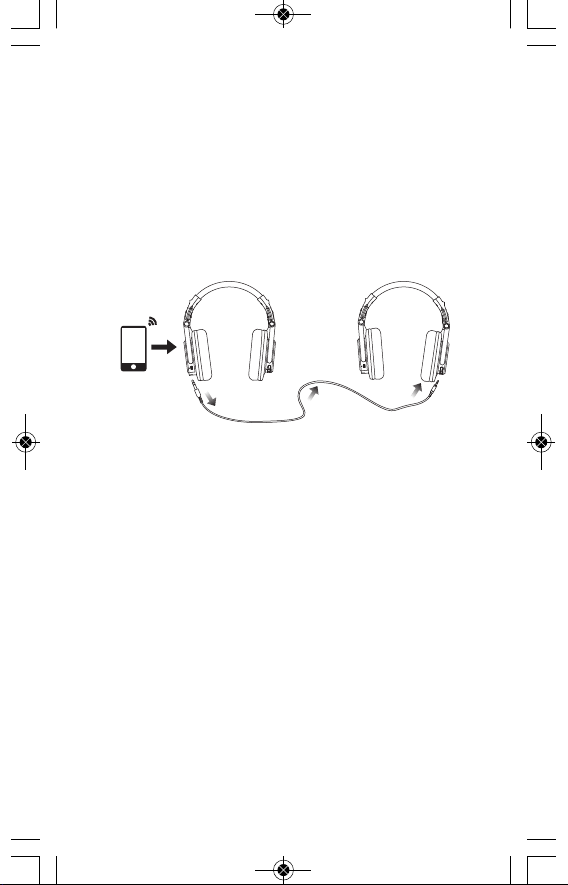
Bluetooth music sharing
Pair your device via Bluetooth and share your tunes
through the dual-duty cable! Simply make one of the
Soundeus Fidelity A50
headphones enter into pairing
mode. Connect the main headphones with 6.3 mm jack,
and use the other end 3.5 mm jack to connect another
Soundeus Fidelity A50
headphones. Then you can share
your favorite music and videos with your friends.
Pairing awireless device
Keep the headphones and the mobile phone/music
player within Imeter of each other when pairing. Enter
pairing mode directly after turning on the headphones.
Turn your iOS, Android or Windows device’s Bluetooth on
and select „
Soundeus Fidelity A50
“ from the list of found
devices.
Playing music
1. Adjusting the volume: Short press „+” forvolume up or
„-” for volume down. The volume is completely syn-
chronized with iPhone and most Android devices.
2. Music Selection: Long press „+“ for next track or „-“ for
previous track
3. Play/Pause: Press (don’t hold) Play/Pause 2to switch
between play and pause status.
Soundeus_FIA050_user_manual_80x140 27.05.2021 4:46 Stránka 5

6
Note: The controls will not function when charging or in
wired use.
If asked for apasscode, please enter “0000“ and the
headphones will be connected to your device. After pair-
ing successfully, the LED light will flash blue occasion-
ally, you can then answer the phone or listen to your
music.
Power on
Press and hold the On/Off 2button to turn the head-
phones on. The LED light will flash between blue and red
when the headphones are active.
Power off
Press and hold the On/Off 2button to turn the head-
phones off. The LED indicator turns off, indicating that
the headphones are off.
Turn to wired mode
1. Ensure the headphones are switched off during wired
use
2. Connect the 6.3 mm cable into the 6.3 mm Aux-in
3. Connect the other end of the cable into your device
Note 1:
Inserting 6.3 mm cable disables wireless functions
Note 2:
The controls will notfunction when charging orwired use
Soundeus_FIA050_user_manual_80x140 27.05.2021 4:46 Stránka 6

7
Troubleshooting
If you cannot connect the headphones to your device,
please try the followings:
1. Ensure that the headphones are charged, switched
on, paired with and connected to your device.
2. Check the headphones are within 12 meters (39 feet)
of your device and there are no obstructions (such as
walls or other electronic devices) between the head-
phones and the devices.
3. If you receive an intermittent signal, please ensure the
headphones are fully charged before continuing use.
4. Reset: Press and hold the volume up and down button
simultaneously for 7 seconds after power on to clear
the Bluetooth record.
Note
1. If you can't connect the headphones to your cell
phones or other devices, please ask us for complete
FAQ guidance of Bluetooth Headphones, you can find
the solutions finally!
2. Depending on your head/ear size/shape, it may be
alittle tight (feels like "on ear") for someone to wear
which is designed to avoid sound leakage. In case of
that and to get both audio and wearing comfort,
please take off the headphone every 2 hours to get
your ears relaxed and protect them from the muggy
environment in use.
Soundeus_FIA050_user_manual_80x140 27.05.2021 4:46 Stránka 7

8
SAFETYWARNINGS AND MAINTENANCE
Continuous exposure to loud music can
cause hearing damage. Improper handling,
damage, or improper repair of the device,
battery, and accessories can result in an ex-
plosion or fire.
PRODUCT DISPOSAL
This symbol indicates that the product
should not be discarded as unsorted munic-
ipal waste. In order to properly dispose ofthe
product, take it to designated collection
points. For more details, contact your local
authority or the nearest collection point.
SAFETY INSTRUCTIONS
For the proper disposal of el. products, follow
the local waste disposal regulations in your
country. The battery in the product is not re-
movable, so dispose of the product as
awhole.
This product complies with all the essential
requirements of the relevant EU directives.
We reserve the right to make changes to the
text, design and technical specifications
without prior notice.
Soundeus_FIA050_user_manual_80x140 27.05.2021 4:46 Stránka 8
This manual suits for next models
1
Table of contents
Languages:
Other Soundeus Headphones manuals


