
Soredex DIGORA Optime User manual

ENGLISH
Digital intraoral imaging plate system
User Manual
208396 rev. 2
DIGORA®Optime


DIGORA®Optime
Copyright Code: 208396 rev 2 Date: January 11, 2013
Copyright © 1/11/13 by SOREDEX.
All rights reserved.
SOREDEX®/DIGORA®are registered trademarks of
SOREDEX, PaloDEx Group Oy.
Documentation, trademark and the software are
copyrighted with all rights reserved. Under the copyright
laws the documentation may not be copied, photocopied,
reproduced, translated, or reduced to any electronic
medium or machine readable form in whole or part, without
the prior written permission of SOREDEX.
The original language of this manual is English.
SOREDEX reserves the right to make changes in
specification and features shown herein, or discontinue the
product described at any time without notice or obligation.
Contact your SOREDEX representative for the most
current information.
Manufacturer SOREDEX, PaloDEx Group Oy
Nahkelantie 160 (P.O. Box 64)
FI-04300 Tuusula
FINLAND
Tel. +358 10 270 2000
Fax. +358 9 701 5261
For service, contact your local distributor.

DIGORA®Optime

rev i
Table of Contents
1 Introduction.................................................................................................................. 1
1.1 Unit with accessories ............................................................................................ 1
1.2 System setup ........................................................................................................ 2
1.3 Controls and indicators ......................................................................................... 3
2 Basic use......................................................................................................................5
2.1 Imaging plate packing ........................................................................................... 6
2.2 Taking and processing an image .......................................................................... 7
2.3 Exposure guidelines.............................................................................................. 9
3 Advanced use ............................................................................................................ 11
3.1 DIGORA®Optime setup options ......................................................................... 11
3.1.1 Status ....................................................................................................... 11
3.1.2 Image Scanning ....................................................................................... 12
3.1.3 Using the dental chart .............................................................................. 12
3.1.4 Resolution ................................................................................................ 12
3.1.5 Image Processing - Noise Filtering .......................................................... 12
3.1.5.1 Retrieve last image.................................................................... 13
3.1.6 Scanner Unit Serial number ..................................................................... 13
3.2 Settings ............................................................................................................... 13
3.3 Workflow ............................................................................................................. 14
3.3.1 Readout start............................................................................................ 14
3.3.2 Touchless operation................................................................................. 15
3.3.3 Plate eject mode ...................................................................................... 16
3.4 Power options ..................................................................................................... 16
3.5 Comfort Occlusal™ projection imaging
(not included in delivery) ..................................................................................... 17
3.6 Full Mouth Series (FMS) imaging........................................................................ 18
4 Accessories introduction.......................................................................................... 19
4.1 Hygiene accessories ........................................................................................... 19
4.2 Imaging plates..................................................................................................... 20
4.3 Imaging plate storage box................................................................................... 21
4.4 Holders................................................................................................................ 21
4.5 Occlusal projection imaging with Comfort Occlusal™ 4C start-up kit and
accessories ......................................................................................................... 22
4.6 Microfibre cloth.................................................................................................... 22
4.7 Optiwipe™ imaging plate cleaning wipes............................................................ 22
4.8 Imaging plate care............................................................................................... 23
4.9 Imaging plate cleaning ........................................................................................ 24
5 Introduction to imaging plate technique ................................................................. 27
5.1 Imaging plate....................................................................................................... 27
5.2 Hygiene accessories ........................................................................................... 28
5.3 Processing .......................................................................................................... 29
5.4 Background radiation .......................................................................................... 30
5.5 Light .................................................................................................................... 31

ii rev
6 Installation of the imaging plate system ................................................................. 33
6.1 Positioning the unit.............................................................................................. 33
6.2 Positioning the PC/network switch ...................................................................... 33
6.3 Connecting the unit to a PC / LAN ...................................................................... 33
6.3.1 Direct connection method
(uses the unit s/n)..................................................................................... 34
6.3.2 IP method (using the unit IP address)...................................................... 35
6.3.3 Multiconnect ............................................................................................. 36
6.4 Other devices ...................................................................................................... 37
7 Troubleshooting ........................................................................................................ 39
7.1 Error images........................................................................................................ 39
7.1.1 Improper use of the hygiene accessories and imaging plates ................. 39
7.1.2 Application errors ..................................................................................... 40
7.1.3 Imaging plate wearing .............................................................................. 43
7.2 Error messages................................................................................................... 44
8 Other information ...................................................................................................... 45
8.1 Quality control ..................................................................................................... 45
8.2 Device care ......................................................................................................... 45
8.3 Device cleaning................................................................................................... 45
8.4 Disinfecting the unit............................................................................................. 46
8.5 Maintenance........................................................................................................ 46
8.6 Repair.................................................................................................................. 46
8.7 Disposal .............................................................................................................. 46
9 Technical specifications ........................................................................................... 47
9.1 Device ................................................................................................................. 47
9.2 System requirements and connections ............................................................... 49
9.3 Imaging plate specifications ................................................................................ 50
9.4 Hygiene bag specifications ................................................................................. 51
9.5 Electromagnetic Compatibility (EMC) tables....................................................... 52
10 Symbols and labeling................................................................................................ 57
10.1 Symbols .............................................................................................................. 57
10.2 Main label............................................................................................................ 58
10.3 Warnings and precautions .................................................................................. 59
1 Introduction
208396 rev 2 SOREDEX 1
1 Introduction
SOREDEX®DIGORA®Optime system is intended to be
used only by dentist and other qualified dental
professionals to process x-ray images exposed to the
imaging plates from the intraoral complex of the skull.
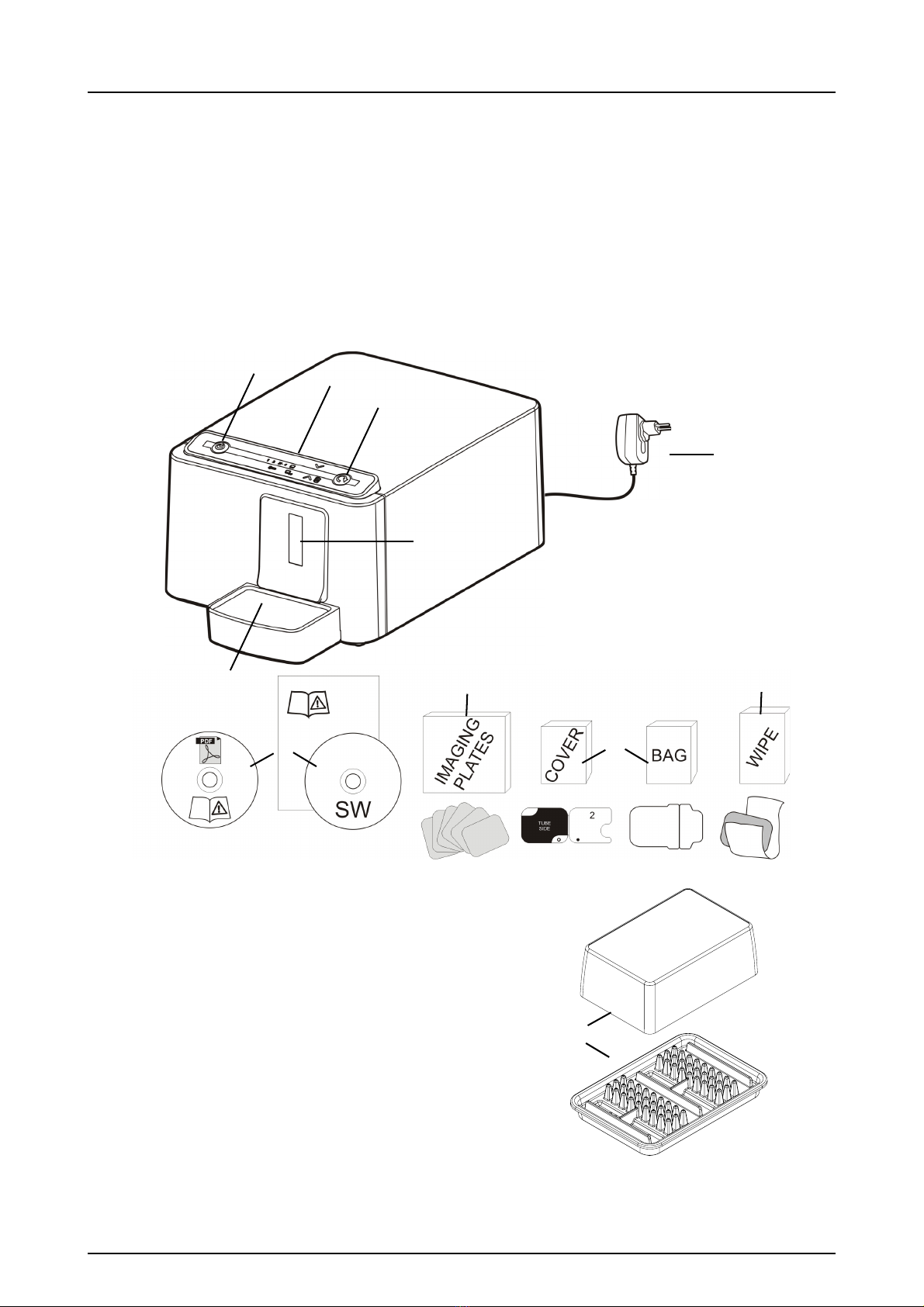
1.1 Unit with accessories
1. ON/OFF key
2. START key
3. Control panel
4. Imaging plate collector
5. Plate slot and plate carrier
6. Power supply
7. Documentation and
imaging application software media
8. Hygiene accessories
9. Imaging plates
10. Imaging plate cleaning wipe samples
11. Imaging plate storage box
1
2
3
5
6
78
910
4
11

1 Introduction
2 SOREDEX 208396 rev 2
1.2 System setup
1. DIGORA®Optime unit
2. Power supply unit (PSU)
CAUTION:
Only use the PSU supplied with the unit or an approved
spare PSU supplied by an authorized distributor
(See chapter Technical Specifications).
3. Ethernet cable (not included)
4. Workstation (WS) computer (not included)
5. Optional local network switch (not included)
6. Optional workstations (WS) computers (not included)
7. Kensington security slot for securing unit in its place
For more details of installing and setting up the system see
chapters Installation and Technical specification.
1 Introduction
208396 rev 2 SOREDEX 3
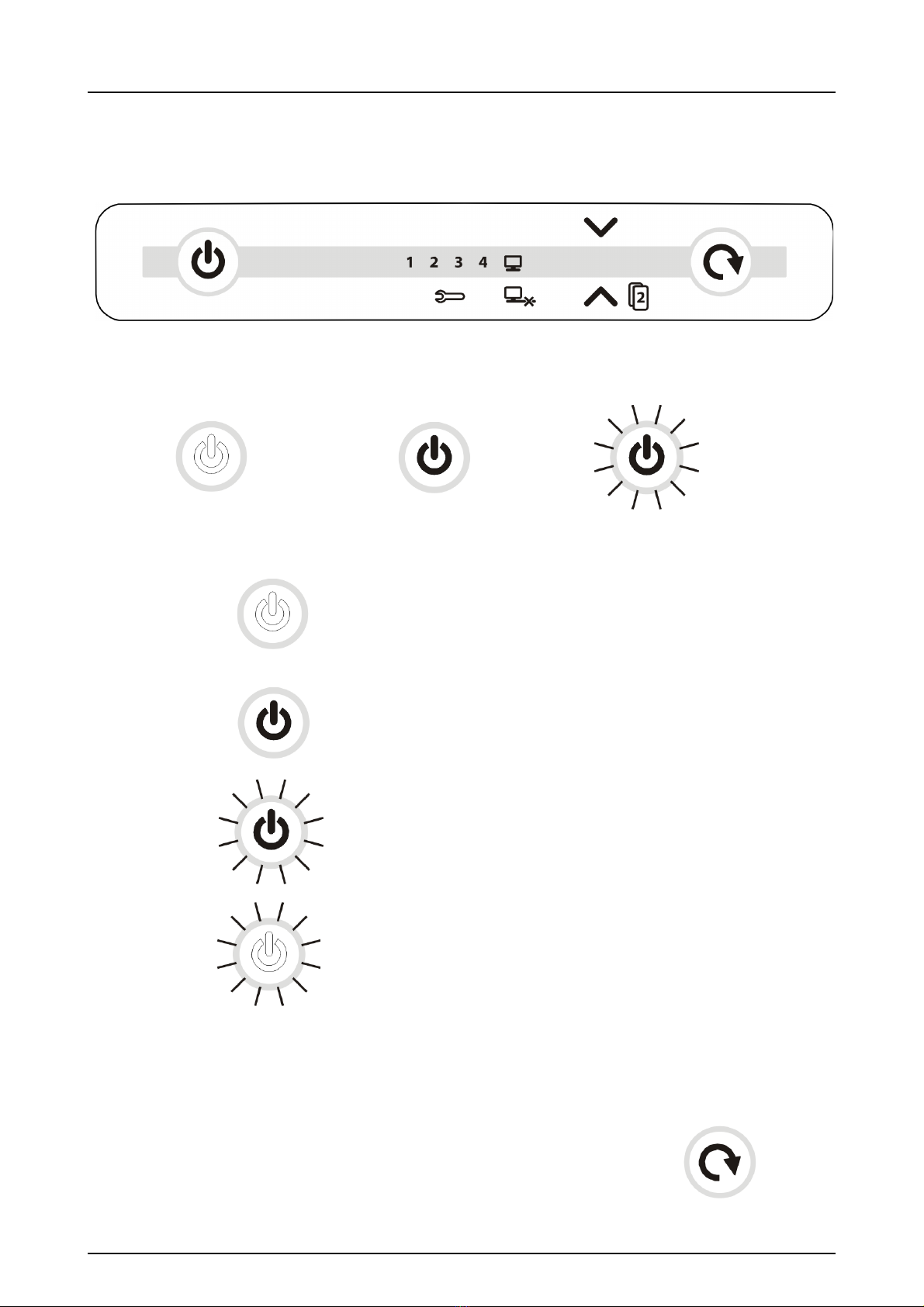
1.3 Controls and indicators
All indicators lit shortly when powering up the unit.
Unit is NOT powered
Unit is powered
Light dim and brighten again in sequence:
Unit is in standby mode (Press ON/OFF or START key
OR activate from imaging software).
Manual start selected
Unit ready
(Insert imaging plate and
press
START to begin processing)
NOT LIT LIT BLINKING
ON/OFF key
START key
1 Introduction
4 SOREDEX 208396 rev 2
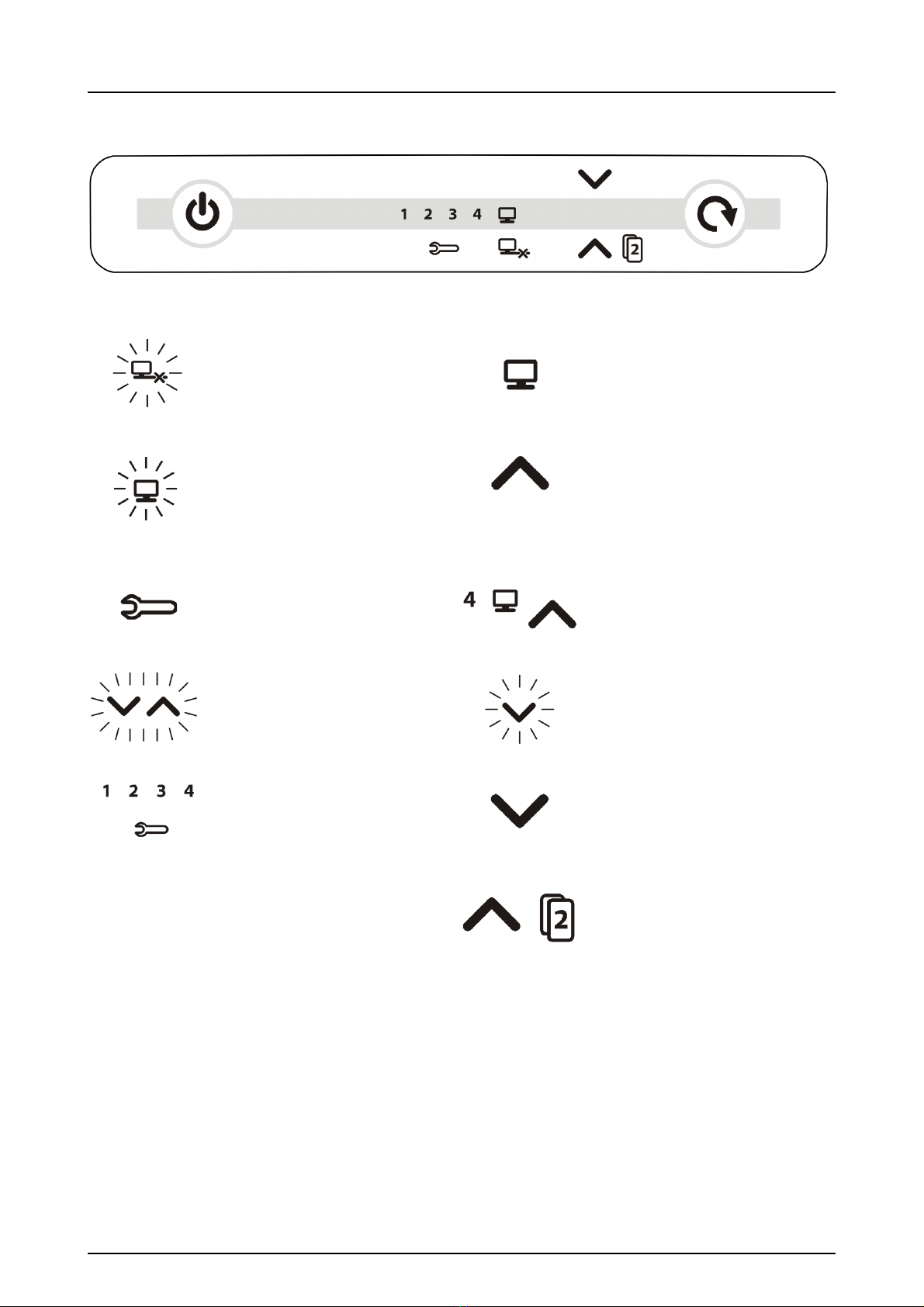
No connection
Connected to imaging
application sw.
Not ready for processing
Open imaging software
- Check workstation
- Image memory full or
plate detected without
patient selected
Ready to process
(Insert imaging plate)
Unit in setup mode
(See chapter Advanced use)
Ready to Process
Image goes to workstation 4
(Insert imaging plate)
Blinking in sequence:
- Imaging plate wrong way
round
Remove protective cover
Error number
Manual plate removal
selected (Remove plate)
Waiting for 2nd size 3 plate
to make Comfort Occlusal™
4C image (Insert 2nd size 3
OR press START to cancel)
Other manuals for DIGORA Optime
1
Table of contents
Other Soredex Medical Equipment manuals









