
Sony MFD-20U User manual

4-677-848-21(1)
2003 Sony Corporation
MFD-20U
Operating Instructions
Mode d’emploi
Bedienungsanleitung
Istruzioni per l’uso
Guía de instrucciones
Manual de instruções
Инcтpyкция по экcплyaтaции
GB
FR
DE
ES
PT
RU
IT
2x Speed USB
Floppy Disk Drive
2
GB
Owner’s Record
The model and serial number are located
on the bottom of the drive unit. Record the
serial number in the space provided
below. Refer to these numbers whenever
you call upon your Sony dealer regarding
this product.
Model No. MFD-20U
Serial No.
WARNING
To prevent fire or shock hazard,
do not expose the unit to rain or
moisture.
To avoid electrical shock, do not
open the cabinet. Refer servicing
to qualified personnel only.
Caution
This equipment has been tested and
found to comply with the limits for a Class
B digital device, pursuant to Part 15 of the
FCC Rules. These limits are designed to
provide reasonable protection against
harmful interference in a residential
installation. This equipment generates,
uses, and can radiate radio frequency
energy and, if not installed and used in
accordance with the instructions, may
cause harmful interference to radio
communications. However, there is no
guarantee that interference will not occur
in a particular installation. If this
equipment does cause harmful
interference to radio or television
reception, which can be determined by
turning the equipment off and on, the user
is encouraged to try to correct the
interference by one or more of the
following measures:
•Reorient or relocate the receiving
antenna.
•Increase the separation between the
equipment and receiver.
•Connect the equipment into an outlet on
a circuit different from that to which the
receiver is connected.
•Consult the dealer or an experienced
radio/TV technician for help.
You are cautioned that any changes or
modifications not expressly approved in
this manual could void your authority to
operate this equipment.
Note:
If you have any questions about this
product, you may call the telephone
number listed in “Technical Support”. The
telephone number below is not for
customer service but only for official
purpose.
Declaration of Conformity
Trade Name: SONY
Model No.: MFD-20U
Responsible Party:Sony Electronics Inc.
Address: 680 Kinderkamack
Road, Oradell, NJ
07649 USA
Telephone No.: 201-930-6972
This device complies with Part 15 of the
FCC Rules. Operation is subject to the
following two conditions: (1) This device
may not cause harmful interference, and
(2) this device must accept any
interference received, including
interference that may cause undesired
operation.

3
GB
GB
Table of Contents
Overview .............................. 4
Overview ............................................. 4
Package Contents ................................ 4
System Requirements .......................... 4
Supported Floppy Disks ...................... 5
Parts and Functions ............................. 5
Positioning the USB Floppy Disk
Drive .................................................... 6
Installing and Removing the Drive
Stand .................................................... 6
Using the USB Floppy Disk Drive ...... 7
Usage Notes......................................... 9
Installation ......................... 10
Installing the Windows XP Device
Driver................................................. 10
Installing the Windows Me Device
Driver................................................. 10
Installing the Windows 2000 Device
Driver................................................. 11
Installing the Windows 98 Device
Driver................................................. 13
Installing the Mac OS 9.x/Mac OS X
Device Driver .................................... 15
Installing the Mac OS 8.6 Device
Driver................................................. 15
Appendix............................ 15
Specifications .................................... 15
Technical Support............. 16
End User License Agreement ..
17
NOTICE TO USERS
Device drivers ©2003 Sony Corporation.
Documentation ©2003 Sony Corporation.
All rights reserved. This manual or device
drivers described herein, in whole or in
part, may not be reproduced, translated to
any machine-readable form without prior
written approval from Sony Corporation.
IN NO EVENT SHALL SONY
CORPORATION BE LIABLE FOR ANY
INCIDENTAL, CONSEQUENTIAL OR
SPECIAL DAMAGES, WHETHER
BASED ON TORT, CONTRACT, OR
OTHERWISE, ARISING OUT OF OR IN
CONNECTION WITH THIS MANUAL,
THE DEVICE DRIVERS OR OTHER
INFORMATION CONTAINED HEREIN
OR THE USE THEREOF.
Sony Corporation reserves the right to
make any modification to this manual or
the information contained herein at any
time without notice.
SONY CORPORATION IS NOT
RESPONSIBLE FOR ANY DAMAGE TO
OR LOSS OF ANY PROGRAMS, DATA,
OR OTHER INFORMATION STORED
ON ANY MEDIA.
Trademarks
•Microsoft and Windows are registered
trademarks of Microsoft Corporation in
the United States and/or other countries.
•Macintosh, Mac, PowerBook, Power
Macintosh, iMac, iBook, and Mac OS
are registered trademarks or trademarks
of Apple Computer, Inc.
•Other system names, product names,
and company names appearing in this
manual are trademarks or registered
trademarks of their respective holders,
even though not indicated by the ®or
TM marks.
Before you use the drive for the
first time, you must install the
device driver on your computer.
Before connecting the drive, see page
10 for details about the device driver
installation procedure. Also see the end
user license agreement on page 17.

4
GB
Overview
Overview
The MFD-20U (hereafter referred to as
the “drive”) has the following features:
• Capable of a 2×read/write speed.
• Can be used vertically by installing
the supplied stand.
• Compatible with Windows and
Macintosh systems.
• Equipped with a USB cable for easy
connectivity.
• The drive is powered by your
computer’s USB port (i.e. USB bus-
powered device), so an external power
source is not required.
Package Contents
The drive package contains the
following:
• MFD-20U USB Floppy Disk Drive
• Operating Instructions
• USB Floppy Disk Drive Device
Driver CD-ROM
• Stand
• USB cable1
System
Requirements
The drive requires the following
minimum system configuration:
• PC/AT compatible personal computer
– Preinstalled Windows 98 SE,
Windows 2000 Professional,
Windows Me, or Windows XP
– USB port
– CD-ROM drive (or device that can
read CD-ROM)
• Macintosh system
– Power Mac G4, G4 Cube, iMac,
iBook, PowerBook G4
– Preinstalled Mac OS 8.6, Mac OS 9
or later, or Mac OS X 10.1 or later
Notes
• Mac OS X 10.0 does not support this
drive.
• With Mac OS X, format floppy disks
with the “Erase” command of the Disk
Utility and select the “Mac OS
Standard” format.
• Mac OS X cannot format unformatted
floppy disks.
– USB port
1We do not guarantee the correct operation of the drive if you use a USB cable other than the one
supplied to connect the drive.

5
GB
Overview
Continued
Supported Floppy
Disks
The drive supports the following floppy
disks:
•Windows
–2DD (720 KB)
–2HD (1.44 MB)
•Macintosh
–2DD (720 KB)
–2HD (1.44 MB)
–2HD (Mac standard format)
Parts and
Functions
This section describes the drive parts and
functions.
1
2
1Status indicator
Indicates the status of the drive. It lights
when the floppy disk in the drive is
being accessed.
2Eject button
Push this button to eject a floppy disk
from the drive.
3
3USB type B receptacle
Used to connect the USB cable to the
drive.

6
GB
Installing and
Removing the
Drive Stand
This section describes how to install and
remove the stand of the drive when
using the drive vertically.
To install the stand
1Holding the drive vertically,
insert the stand hook into the
notch at the rear of the drive.
2Raise the stand toward the
drive until the stand pins snap
into the notches under the
drive.
54
4USB type B plug
Used to connect the USB cable to the
drive.
5USB type A plug
Used to connect the USB cable to your
computer.
Positioning the
USB Floppy Disk
Drive
The drive is designed to be used
horizontally and vertically. When you
want to use it vertically, you must install
the stand supplied with the drive. For
details, see “Installing and Removing the
Drive Stand”, page 6.
Warning
•When using the drive vertically, make sure
that you place the drive on a stable
horizontal surface. Failing to do so may
cause the drive to fall resulting in
damage, injury, and/or loss of data
on the floppy disk.
•Do not use the drive in any other position
than horizontal and vertical.

7
GB
Overview
Continued
To remove the stand
1Holding the drive vertically,
push down the front of the
stand, taking care not to let it
fall.
2Remove the stand hook from
the notch at the rear of the
drive.
Using the USB
Floppy Disk Drive
This section describes how to use the
drive.
With a Windows system
1Holding a floppy disk label side
up, push it into the drive until
you hear a click.
Note
When you are using the drive vertically,
insert the floppy disk with the label side
facing left.
2Perform the desired operations
with the floppy disk from your
computer.
3To eject the floppy disk, wait
until the status indicator goes
off, and then push the eject
button.
Note
Do not eject the floppy disk from the
drive while the status indicator is on as
this may result in data loss or damage.

8
GB
With a Macintosh system
1Holding a floppy disk label side
up, push it into the drive until
you hear a click.
A floppy disk icon appears on your
desktop.
Note
When you are using the drive vertically,
insert the floppy disk with the label side
facing left.
2Perform the desired operations
with the floppy disk from your
computer.
3To eject the floppy disk, drag
the floppy disk icon to the trash
can on your desktop.
A message confirming that you can
eject the floppy disk from the drive
appears.
4Push the eject button of the
drive.
Notes
•Do not eject the floppy disk by pushing
the eject button before dragging the
floppy disk icon to the trash can as this
may result in data loss or damage.
•It is recommended to eject the floppy
disk from the drive before your
computer goes into sleep mode.
To write-protect a floppy disk
To prevent data on a floppy disk from
being overwritten, you can write-protect
the floppy disk. When the floppy disk is
write-protected, data cannot be saved on
it.
To write-protect a floppy disk, push the
write-protect tab as illustrated below.
To remove the write-protection on a
floppy disk, push the write-protect tab as
illustrated below.

9
GB
Overview
Usage Notes
Usage with other USB devices
Because the drive is a high-powered
device (bus-powered; draws 500 mA of
current or less), it may malfunction if the
power from the computer is not stable.
Therefore, the drive operation is not
guaranteed in the following situations.
•When using the drive at the same time
as other high-powered USB devices
such as hard disks, CD-ROM drives,
scanners, and printers.
•When multiple drives are connected at
the same time.
•When using the drive at the same time
as a bus-powered hub.
Connection to the USB hub
•Connect the drive directly to your
computer’s USB connector (root hub).
Operation is not guaranteed when you
connect the drive to other bus-powered
hubs such as keyboard hubs.
10
GB
Installation
Installing the
Windows XP
Device Driver
Windows XP does not require a device
driver to use the drive because the
device driver is already installed. It is
automatically found when you connect
the drive to your computer.
Installing the
Windows Me
Device Driver
This section explains how to install the
drive device driver on a system running
Windows Me.
To install the device driver
1Insert USB Floppy Disk Drive
Device Driver CD-ROM into the
CD-ROM drive of your
computer.
2Connect the USB connector of
the drive to the USB port of
your computer.
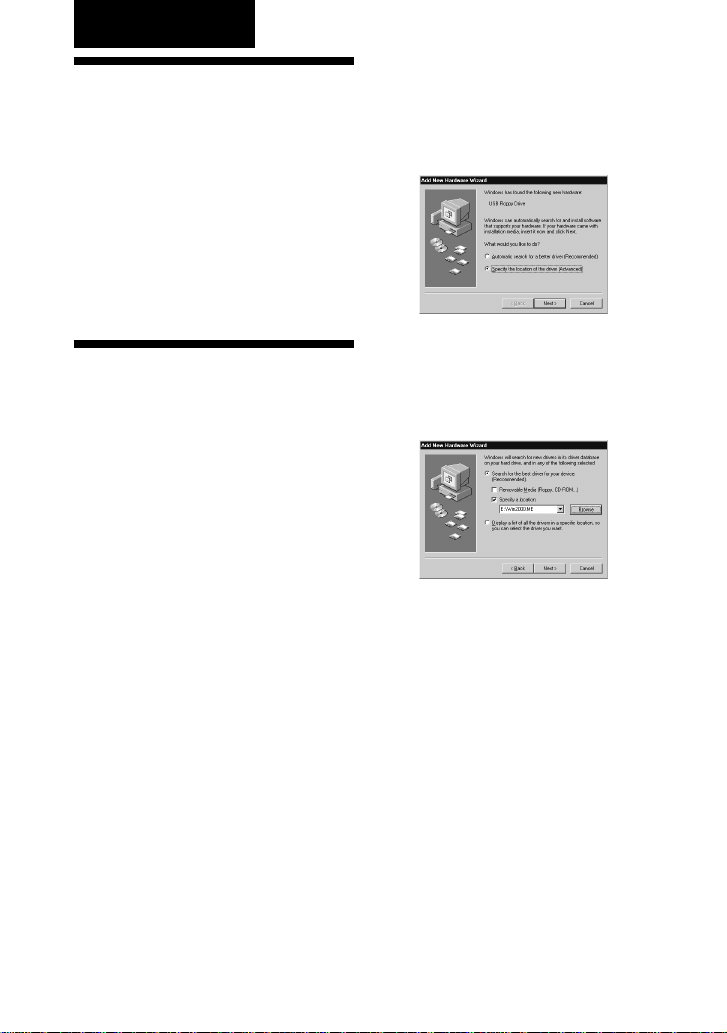
The Add New Hardware wizard starts and
the following dialog box appears.
3Select “Specify the location of
the driver (Advanced)”, and
then click [Next].
The following dialog box appears.
4Select the “Specify a location”
check box and type
“X:\Win2000.ME”(where X is
your CD-ROM drive letter) in
the box.
Note
Make sure that all the other check boxes
are clear.
Table of contents
Languages:
Other Sony Floppy Disk Drive manuals

Sony
Sony MP-F17W User manual

Sony
Sony MSFD-20U User manual

Sony
Sony MPF920-Z User’s Guide User manual

Sony
Sony OA-D32W User manual

Sony
Sony SMO-S551 User manual

Sony
Sony MSFD-20U User manual

Sony
Sony MPF82E User manual

Sony
Sony SFD-FW200P User manual

Sony
Sony M-PF88E Dimensions

Sony
Sony MPF920-Z User’s Guide User manual


