SONIC COUTURE CLAV User manual

SONICCOUTURE CLAV USER GUIDE
www.soniccouture.com email : support@soniccouture.com

SONICCOUTURE
CLAV
CONTENTS
INSTALLATION
ABOUT THE CLAV
THE KONTAKT INSTRUMENT
!INSTRUMENT PANEL
!OPTIONS PANEL
!EFFECTS PANEL
SUPPORT
E.U.L.A
SONICCOUTURE CLAV USER GUIDE

INSTALLATION
1. Put the ‘SC Clav’ folder somewhere safe on your system (C drive) or main
Macintosh Hard Drive. You can move the library folder to a separate HD after
you have authorized it.
If you do not own Kontakt 5, you will need to download and install the
free Kontakt player which you can do here: Kontakt Player Download
Link
TO ADD THE LIBRARY AND AUTHORIZE IN KONTAKT
1. In Kontakt or Kontakt Player open the Browser on the left (the folder Icon
at the top).
2. In the Libraries tab at the top of the Browser go to "Add Library"
3. Click and use the dialogue window to navigate to and point Kontakt to the
location of the Soniccouture Clav>Library folder. This will add it to the
Kontakt Library list AND to the Service Center.
4. If Kontakt asks you to Activate the library, the NI Service Center program
will launch and you will need your serial number to authorize Clav.
If Kontakt doesn't ask you to authorize, you can force it to by clicking the
little "Activate" button in the upper right corner of our Clav Library pane, in
the Browser/Libraries list. It will then prompt you to launch the Service
Center.
(You will find your serial number in the email you were sent when you
purchased. If for some reason you haven't received this yet, you can run your
library in demo mode until it arrives.)
N.B : After authorization, you should restart Kontakt.
SONICCOUTURE CLAV USER GUIDE

ABOUT THE CLAV
The Hohner Clavinet was manufactured from the 1960s through to about
1982. It contained 60 strings that are amplified by two active pickups, one
above the strings and closer to the bridge (Upper Pickup) and one below the
strings (Lower Pickup). The instrument is played from a keyboard, which
launches little hammers that strike and hold the strings in place. When the
hammer is released, the dampers at the end of the string stop the sound.
The D6 also has a Mute slider, which brings a felt damper over the resonant
part of the strings to create a different timbre.
The Clavinet gained popularity in the 1970s,
primarily as a funk instrument, and especially
when used together with a wah pedal. One
of the earliest recordings of a Clavinet being
used with a wah pedal however is The Band’s
“Up On Cripple Creek”, which was released
in 1969.
We have a Clavinet model D6, which was one
of the later Clavinet models, famously used
by Stevie Wonder and other funk musicians.
We had our unit modified to allow us to
record the output directly from the two
pickups, this means we can pan the pickups to make a stereo sound.
SONICCOUTURE CLAV USER GUIDE

CLAV SPECS
•14,880 samples , 24 bit 48 khz stereo sampling
•9.6 GB library (just under 5 GB with Kontakt NCW compression)
•5 octaves: 60 notes, from F1 to E5
•31 velocities on all articulations; straight, mute, release, and mute release
•Modeled impulse responses of Clavinet D6 preamp /filters.
•Separation of pickups with independent volume and pan.
•Intelligent round robin, switchable.
SONICCOUTURE CLAV USER GUIDE

THE KONTAKT INSTRUMENT
Note that you can hover your mouse over any control in Clav to get
Info about its function if you have the Kontakt Info pane activated.
THE INSTRUMENT PANEL
Selecting the ‘Instrument’ tab provides access to the main controls of the
Clav instrument.
SONICCOUTURE CLAV USER GUIDE

THE ROCKER SWITCHES
The main section duplicates controls of a real Hohner D6 Clavinet.
If you haven’t used a real Clavinet (and even if you have) these rocker
switches can be a little bit confusing. First of all, the switches are ON when
turned to a downward facing position. So in the image above, the four filter
switches (Brilliant, Treble, Medium, and Soft) are ON, and the two pickup
switches (CD, AB) are OFF.
The filter switches basically turn on or off a bandpass filter allowing a certain
frequency range through. As you might guess Brilliant is a high frequency
band pass and Soft is a lower frequency band pass. If all four of these are
off, there is no sound from the Clav.
Again, if all four of these filters are off, there is no sound from the Clavinet!
(There is in fact no sound from the pre-amp of the Clav, which we’ll see later
we can get behind in this virtual emulation of a Clav.)
The pickup switches CD and AB are also rather confusing, so we’ve put a
menu below those that show you what pickup configuration is selected. You
can use either the menu or the rocker switches to make your selection. On
the original instrument you had only the rocker switches, and the
configurations were as follows:
CD AB Pickup
OFF OFF Both pickups in phase
ON OFF Upper pickup only
OFF ON Both pickups, out of phase
ON ON Lower pickup only
SONICCOUTURE CLAV USER GUIDE

OPEN THE HOOD
Below the Brilliant switch you’ll see a little Edit button, if you click on this you
get some controls that are not available to the original Clavinet.
Here you can adjust the Volume and Pan of the Upper and Lower pickups, as
well as the amount of signal going to the PREAMP (the filter switches) and to
the DIRECT OUT, which bypasses the filters entirely.
Panning the pickups apart from each other creates a great stereo effect not
available to an un-modified Clavinet.
If you Command-Click (Control-Click in Windows) on any of these knobs, it
sets it back to a nominal position, which is our basic “real” Clavinet setting.
(ie. pan centre, no Direct out, etc.)
All controls can be automated, by right-clicking on
the knob to Learn MIDI CC routing, or by using the
Auto tab in the Kontakt Browser section.
SONICCOUTURE CLAV USER GUIDE

PLAYBACK PARAMETERS
In the bottom part of the main window we have some typical parameters for
further adjusting the sound.
On the left there is Volume. (This is very useful when you start adding
effects.)
The FILTER section is turned on with the little switch beside the word
FILTER, and gives you control of:
FREQ The cutoff frequency of a Low Pass Filter
RES Resonance of the Low Pass Filter
FEG Filter depth to the Low Pass Filter
VEL Velocity depth to the Low Pass Filter Cutoff
HPF A High Pass Filter (static)
The ENVELOPE SECTION gives you control over the Attack, Decay,
Sustain, and Release of this instrument. If the FEG switch is enabled, you
are editing the Filter Envelope.
Note that if you lengthen the Release of the amplitude envelope you risk a
weird result if the Key Off samples are audible. If you want to make a Clav
sound with a long release, it’s best to turn down the KEY OFF samples,
which you can do on the Options panel.
If you want to set the Release to our preferred time to blend with the KEY
OFF samples, simply Command-Click (Control-click in Windows) on the
Release knob.
The MUTE switch swaps the sample set from our normal Clavinet samples to
the Mute Clavinet samples.
SONICCOUTURE CLAV USER GUIDE
THE OPTIONS PANEL
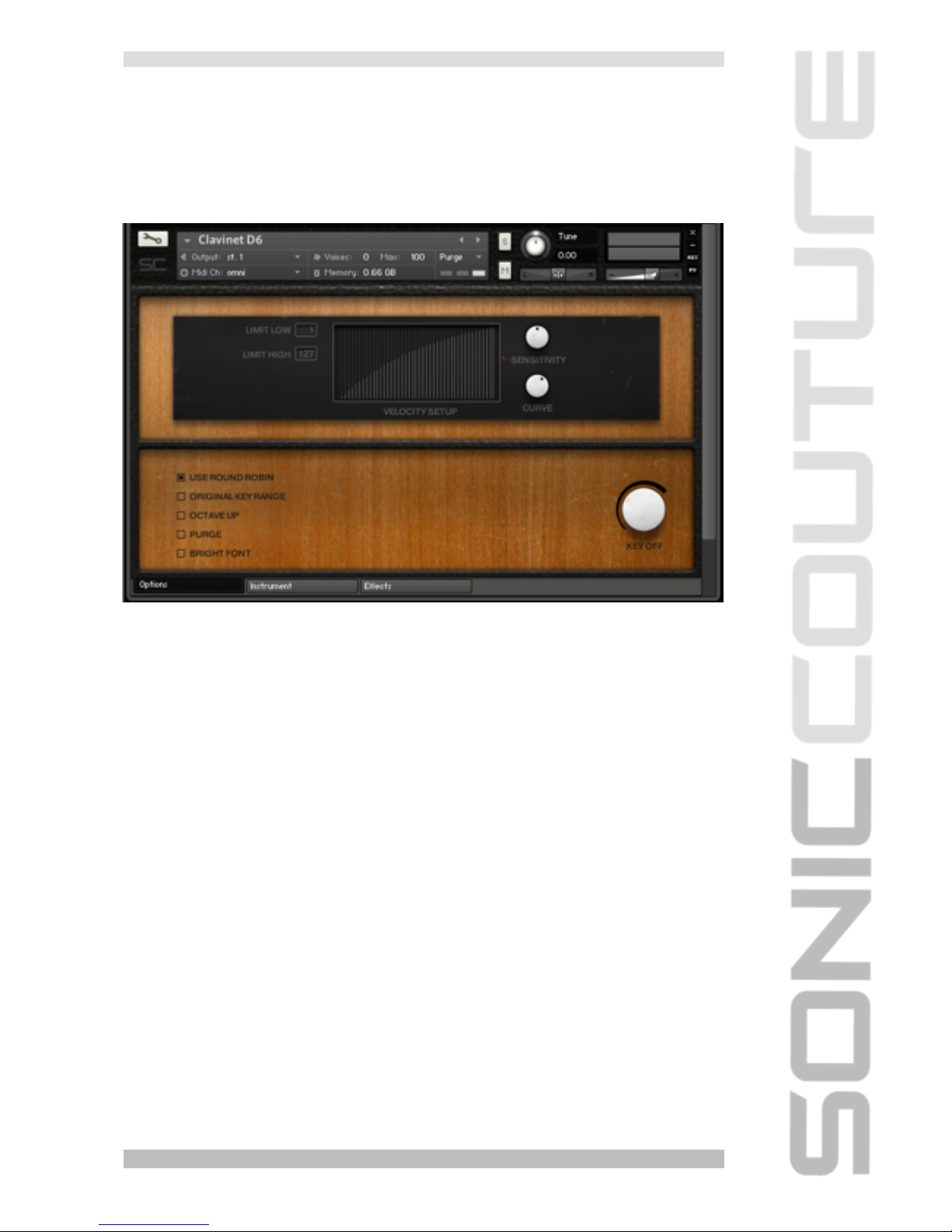
Selecting the ‘Options’ tab provides access to the preferences and
performance options of the Clav instrument.
VELOCITY
The top half of the window is dedicated to the velocity response of the
instrument. You can set a Velocity LIMIT LOW and LIMIT HIGH if you need.
You can adjust the SENSITIVITY (which is how our instrument’s volume
responds to velocity), and you can adjust the CURVE of the velocity
response to suit your playing style or keyboard.
KEY OFF
At the bottom right there is a knob to adjust the level of the KEY OFF
samples. These are the usually quite soft sounds of the hammer action
bouncing back when you release a key.
On the bottom left there are some options which can be turned on or off.
These include:
SONICCOUTURE CLAV USER GUIDE
Table of contents
Other SONIC COUTURE Musical Instrument manuals