I
Troubleshooting
Unable
to
startcloning.
Please
check whetherthe actual capacity
of
HDD-2 disk
is
larger
than
HDD-1
disk (HDD-2 must be equal
or
larger than
HDD-1
),
otherwise
it
won
't
wor
kwhen HDD-1disk actual capacity
is
larger
than HDD-2 disk.
Indicator
light
stops
flashing
up
during
offllne
duplicating.
It
might
because
of
disk bad sectors
so
that
data couldn't be cloned
as
usual.
You
have
to
change agood disk.
Where
is
rest
capacity
of
HDD-2
disk
after
cloning?
Aftercloning, the rest capacity
of
HDD-2 disk
is
showed and
operated via Windows "Disk management'; which located at
"AdministrativeTools"
in
Control Panel, Disk Management located
on the left-hand side
of
the
Computer Management window, under
the Storage heading.
Please
backup
any
important
date
on
HDD
-2
befo
re
cloning
.
Because once you startcloning, HDD-2 hard di
sk
partition methods
and data are completely cloned
as
a hard disk.Our company does
NOT
undertake any responsibility
for
data
or
economy
loss
which
could bring by damaged data.
2TB
or
larger
hard
disk
couldn't
be
identified
by
USB
under
windows
XP.
Because
the
ma
x
imum
capaci
ty
of
hard disk which Windows
XP
can
support
is
2TB
and couldn't be identified by system
if
over
2TB
.
It
only
supports after upgrading
the
operating system WindowsVista
or
above and we suggest changing hard disk i
nto
a
GPT
disk
partition.
I
Note
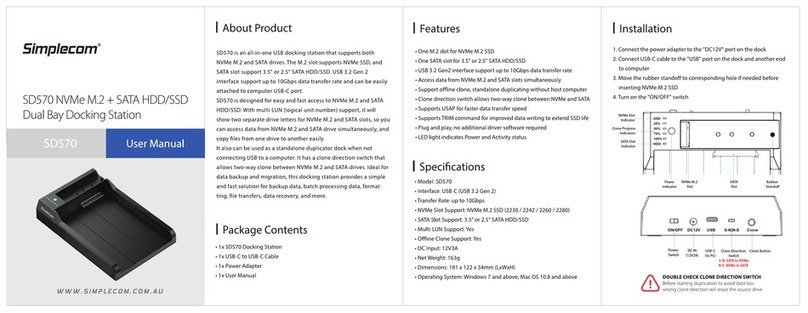
•Ane
w hard drive needs
to
be initialized and partitioned before
appear in Windows Explorer
or
Mac Desktop.
•Do
not
remove the hard drive while
it
is
in
use
. Doing
so
may
corruptthe data on the hard drive
or
cause damaged
to
the
hardware.
•Simplecom takes diligent care
of
all goods, however Simplecom will
not
be responsible for any loss
of
data,and
that
it
is
the responsibility
of
the customer
to
backup any data
that
he/
she
believes
to
be
important, valuable,
or
irreplaceable.
I W
ar
ra
n
ty
1
Year
limited Warranty.Ourgoods come
with
guarantees
that
cannot
be excluded under the Australian Consumer
Law.
You
are
entitled
to
a
replacement
or
refund
for
a majorfailure and for compensation for
any
other
reasonably foreseeable
loss
or
damage.
You
are
also entitled
to
have
the
goods repaired
or
replaced
if
the goodsfail
to
be
of
acceptable quality and thefailure does
not
amount
to a majorfailure.
For
our
assistance
with
regards
to
warranty please email
to
support@simplecom.com.au
or
create a
support
ticket at
http:
//
www.simplecom.com.
au