Silicon Image SATA RAID FOR SILICON IMAGE User manual

SATARaid™
Serial ATA
RAID Management Software
09/26/03
Silicon Image, Inc.
1060 East Arques Ave.
Sunnyvale CA 94085
(408) 616-4000
www.siliconimage.com

SATARaid User’s Manual
2
Copyright © 2003, Silicon Image, Inc. All rights reserved. No part of this publication may be reproduced, transmitted,
transcribed, or translated into any language or computer format, in any form or by any means without prior written
permission of:
Silicon Image, Inc.
1060 East Arques Ave.
SunnyvaleCA 94085
Silicon Image, Inc. reserves the right to make changes to the product(s) or specifications to improve performance, reliability,
or manufacturability. Information furnished is believed to be accurate and reliable, but Silicon Image, Inc. shall not be
responsible for any errors that may appear in this document. Silicon Image, Inc. makes no commitment to update or keep
current the information contained in this document.
However, no responsibility is assumed for its use; nor any infringement of patentsor other rights of third parties which may
result from its use. No liability is assumed as a result of their use or application. No rights under any patent accompany the
sale of any such product(s) or information.
Silicon Image, Inc. products are not designed or intended for use in Life Support Systems. A Life Support System is a
product or system intended to support or sustain life, which if it fails, can be reasonably expected to result in significant
personal injury or death. If Buyer or any of its direct or indirect customers applies any product purchased or licensed from
Silicon Image, Inc. to any such unauthorized use, Buyer shall indemnify and hold Silicon Image, Inc., its affiliates and their
respective suppliers, harmless against all claims, costs, damages and expenses arising directly or indirectly, out of any
such unintended or unauthorized use, even if such claims alleges that Silicon Image, Inc. or any other person or entity was
negligent in designing or manufacturing the product.
Specifications are subject to change without notice.
SATARaid is a trademark of Silicon Image, Inc. JAVA is a trademark of Sun Microsystems, Inc. Windows is a trademark of
Microsoft Corp. for their family of computer operating systems.
Revision History:
Revision Comment Date
1.00 Initial creation of document 09/26/03

SATARaid User’s Manual Copyright © 2003 Silicon Image Inc.
3
Table of Contents
1Welcome .............................................................................................................................................4
SATARaid Features..................................................................................................................................4
2An Introduction to RAID....................................................................................................................5
3Installing Drivers for Windows XP/2000/98/NT..............................................................................6
4JAVA 2 Runtime Environment Installation .....................................................................................7
5SATARaid GUI Installation ...............................................................................................................9
6Creating and Deleting RAID Sets .................................................................................................11
Creating RAID Sets................................................................................................................................ 13
Deleting RAID Sets................................................................................................................................. 14
Rebuild RAID 1 Set................................................................................................................................ 15
Resolving Conflicts................................................................................................................................ 16
Low Level Formatting............................................................................................................................ 18
Logical Drive Information...................................................................................................................... 18
7Allocating Partitions........................................................................................................................19
Windows XP & 2000............................................................................................................................... 19
Windows NT........................................................................................................................................... 24
Windows 98 & Me .................................................................................................................................. 27
8SATARaid GUI Overview...............................................................................................................32
Devices and Information Windows........................................................................................................ 32
Event Viewer and Events Windows........................................................................................................ 34
SATARaid Toolbar and Menu Commands.............................................................................................. 34
RAID Management................................................................................................................................. 35
System View.......................................................................................................................................... 35
Configure SATARaid.............................................................................................................................. 35
Send Configuration................................................................................................................................ 35
Save Configuration................................................................................................................................ 35
Copy Configuration................................................................................................................................ 35
SATARaid Help...................................................................................................................................... 35
Exit........................................................................................................................................................ 35
About SATARaid.................................................................................................................................... 36
9SATARaid Configuration................................................................................................................37
10 RAID Set Management Under Windows 2000 & XP....................................................................45
Creating RAID Sets................................................................................................................................ 46
Deleting RAID Sets................................................................................................................................. 54
Modifying RAID Sets.............................................................................................................................. 56
Creating a Spare RAID 1 Drive............................................................................................................... 62
Deleting a Spare RAID 1 Drive............................................................................................................... 64

Copyright © 2003 Silicon Image Inc. SATARaid User’s Manual
4
1Welcome
Silicon Image’s SATARaidTM software provides Serial ATA RAID0 (Striping), RAID1 (Mirroring) and RAID10 (Striping and
Mirroring) functionality to enhance the industry’s leading PCI-to-SATA host controller products. Two major challenges facing
the storage industry today are keeping pace with the increasing performance demands of computer systems by improving
disk I/O throughput and providing data accessibility in the face of hard disk failures. With SiIicon Image Serial ATA host
controller and SATARaid, both of these problems are solved.
SATARaid software provides a Graphical User Interface (GUI) for easy-to-use configurations of the RAID Sets.
SATARaid Features
•RAID 0, RAID 1, and RAID 10 Sets are supported
•Under Win 2000 and XP only, RAID Sets can be created and deleted without exiting Windows
•Hot Spare and On-line Mirror Rebuilding
•System GUI Monitoring Utility:
•Displays/Logs/Alerts Users to Vital RAID Set Information
•Manages RAID Set Functions (configures, rebuilds, etc.,)
•RAID Set Accommodates Multiple Size HDDs
•HDDs Function Normally When Not in RAID Sets
•Adjustable Stripe Size for RAID 0
•Uses the Self-Monitoring, Analysis, and Reporting Technology (SMART) feature in the attached drives for automatic
notification of imminent drive failures.
•Can be configured to automatically email RAID Set system events and failure reports.
•Automatically Selects Highest Available Transfer Speed for All ATA and ATAPI Devices. Supports the following:
•UDMA up to 150MB/Sec.
•All UDMA and PIO Modes
•Up to 4 SATA devices
•ACPI and ATA/ATAPI6

SATARaid User’s Manual Copyright © 2003 Silicon Image Inc.
5
2An Introduction to RAID
RAID -Redundant Array of Independent Disks
RAID technology manages multiple disk drives to enhance I/O performance and provide redundancy in order to withstand
the failure of any individual member, without the loss of data. There are many different methods of implementation for RAID,
with each having advantages and disadvantages. Raid levels or set types are given a numerical designator that defines its
implementation such as RAID 0 or RAID 1. SATARaid provides support for three RAID Set types: Striped (RAID 0) , Mirrored
(RAID 1), and RAID 10 Mirrored/Striped. Other RAID types are not supported by SATARaid software and thus are not
discussed.
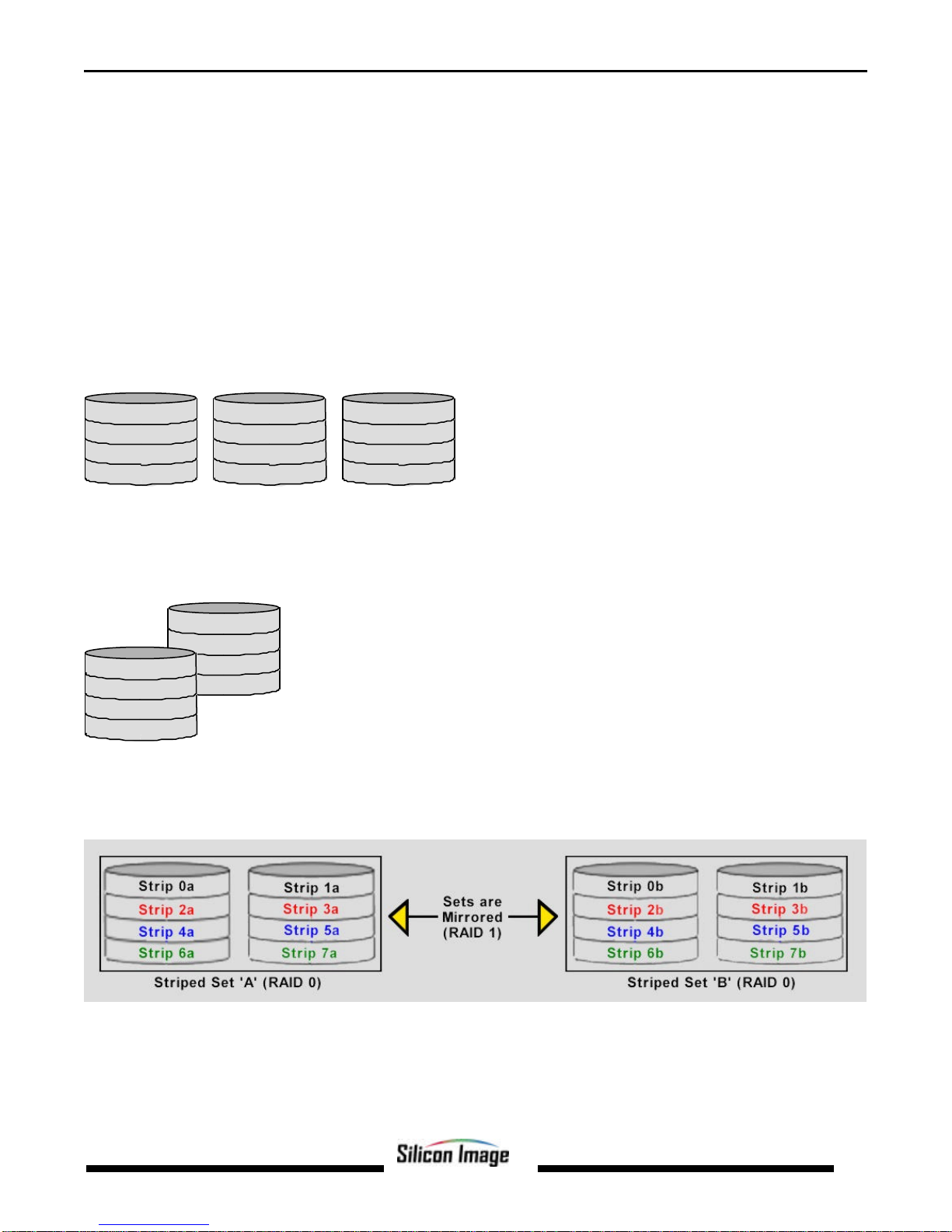
Disk Striping (RAID 0)
Striping is a performance-oriented, non-redundant data mapping technique. While Striping is discussed as a RAID Set
type, it is does not provide any fault tolerance. With modern SATA and ATA bus mastering technology, multiple I/O
operations can be performed in parallel, enhancing data throughput. Striping arrays use multiple disks to form a larger
virtual disk. The figure below illustrates a three-disk stripe set. Stripe one is written to disk one, stripe two to disk two, and
so forth. RAID 0 sets can be comprised of two, three, or four drives.
Strip 2
Strip 5
Strip 8
Strip 11
Strip 0
Strip 3
Strip 6
Strip 9
Strip 1
Strip 4
Strip 7
Strip 10
Disk Mirroring (RAID 1)
Disk mirroring creates an identical twin for a selected disk by having the data simultaneously written to two disks. This
redundancy provides instantaneous protectionfrom a single disk failure. If a read failure occurs on one drive, the system
reads the data from the other drive. RAID 1 sets are comprised of two drives. A third drive can be allocated as a spare in
case one of the drives in the set fails.
Block 0
Block 1
Block 2
Block 3
Block 0
Block 1
Block 2
Block 3
Disk Mirroring and Striping (RAID 10)
RAID 10 combines the features of both RAID 0 and RAID 1. Performance is provided through the use of Striping (RAID 0),
while adding the fault tolerance of Mirroring (RAID 1). The implementation of RAID 10 requires four drives. The drives are
assigned as two sets of striped pairs.
The data is written to RAID Set A, which is striped (RAID 0). This allows maximum speed. The data is then mirrored to
another RAID 0 striped set, which is Set B in the figure above. This provides dataredundancy (RAID 1), and thus increased
data security.
Under certain circumstances, a RAID 10 set can sustain multiple simultaneous drive failures.

Copyright © 2003 Silicon Image Inc. SATARaid User’s Manual
6
3Installing Drivers for Windows XP/2000/98/NT
Before installing the SATARaid software, Silicon Image SerialATA host adapter driver must be installed. When Windows
detects the newly installed SATA host adapter, it will open a Driver Installation Wizard. Click on the Next buttons until the
wizard prompts for the location of the driver. Insert the Silicon Image SATA host adapter driver CD into the computer’s CD-
ROM drive and click on the Browse button. Select the directory on the CD in which the driver resides and click OK.
Click the Next button. A window will be displayed to verify proper installation of the host adapter driver. Click Finish. When
prompted to restart the computer, click Yes.

SATARaid User’s Manual Copyright © 2003 Silicon Image Inc.
7
4JAVA 2 Runtime Environment Installation
The Java 2 Runtime Environment is required for the SATARaid GUI. The Java 2 Runtime Installer and executable package
must be downloaded from the Sun Microsystems website at http://java.sun.com/j2se/downloads.html. The computer must
have an Internet connection set up before installation can proceed.
Save the installer file to a known location, such as the My Documents folder. Using Windows Explorer or by clicking on the
My Computer icon on the desktop, select the installation file and open it. The installation will begin. The installer program
will download the needed files from the Internet.
When a window appears asking for acceptancethe license agreement, select I accept the terms of this license agreement
and click Next.

Copyright © 2003 Silicon Image Inc. SATARaid User’s Manual
8
Choose the Typical setup type and click Next.
When the installation completes, click Finish. Restart the computer when prompted.

SATARaid User’s Manual Copyright © 2003 Silicon Image Inc.
9
5SATARaid GUI Installation
Insert the Silicon Image SATARaid Installation CD into the computer’s CD-ROM drive. Using Windows Explorer or by
clicking on the My Computer icon on the desktop, display the contents of the CD-ROM. The SATARaid GUI Installation
program is namedJava SATARaid.exe. Select this file and open it. The installation will begin.
Click the Next button when the Welcome window appears.
Click the Next button to install the SATARaid program in the default directory (recommended). An alternate directory may be
selected if desired.

Copyright © 2003 Silicon Image Inc. SATARaid User’s Manual
10
Click the Finish button to complete the installation.
Other manuals for SATA RAID FOR SILICON IMAGE
1
This manual suits for next models
1
Table of contents
Other Silicon Image Software manuals