
Sharper Image ZipConnect stereo METRO User manual
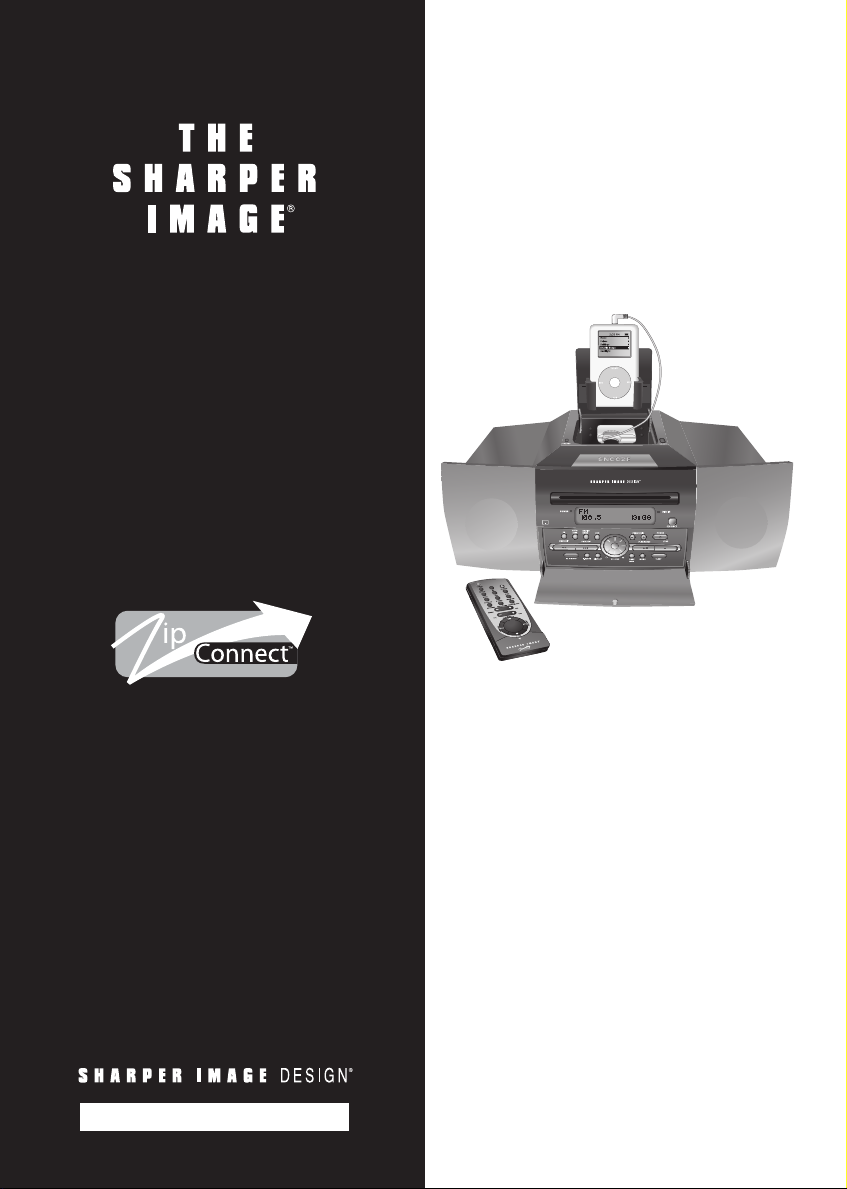
ZipConnect™stereo
METRO
CD/AM/FM Stereo
& Subwoofer + ZipConnect™
for iPod®& MP3 Players
GT308 Instructions
Read and save these instructions.


Dear Sharper Image Customer,
Thank you for your purchase! We appreciate your business very much.
This item was created by Sharper Image Design, our company’s own
product development group. Please accept my personal assurance of
your complete satisfaction with this product’s quality and performance.
We offer generous return privileges and excellent warranties on all
our products.
For more than 25 years, The Sharper Image has shared the fun of
discovering innovative products that make life better and more enjoyable.
We’ve been in business a long time because we are an exciting place to
shop and — just as importantly — we strive to deliver great customer
service that exceeds your expectations.
Enjoy your purchase!
Respectfully,
Richard Thalheimer
Founder, Chairman and Chief Executive Officer
Call 1-800-344-4444 for 24-7 ordering and customer service,
or go to , our complete online store.

Table of Contents
Warnings .......................................................................................................5
Important Safety Instructions ......................................................................6
Quick Start ....................................................................................................7
Installation .................................................................................................7
ZipConnect™ Operation............................................................................7
Tuner/Radio Operation...............................................................................8
CD Player Operation..................................................................................8
General Instructions.......................................................................................9
Overview...................................................................................................9
Parts Diagram ..............................................................................................10
Main Unit ................................................................................................10
Remote Control .......................................................................................13
Installation and Operation ...........................................................................15
Zip Connect™ Operation.........................................................................15
Changing the Zip Connect™ Module .......................................................16
Tuner/Radio Operation.............................................................................17
CD Player Operation................................................................................18
Auxiliary Input .........................................................................................20
Additional Features ..................................................................................21
Clock, Alarm and Sleep Timer Functions ..................................................21
Troubleshooting Guide.............................................................................24
Specifications...........................................................................................25
Statement of FCC/DHHS Compliance..........................................................26
FCC Label Compliance Statement................................................................26
Warnings
• To prevent fire or shock hazard, do not use this stereo’s plug with an exten-
sion cord, receptacle or other outlet unless the blades can be fully inserted to
prevent blade exposure.
• Do not expose this appliance to rain or moisture.
The lightning flash with arrowhead symbol, within an equilateral tri-
angle, is intended to alert the user to the presence of uninsulated
“dangerous voltage” within the product’s enclosure that may be of
significant magnitude to constitute a risk of electric shock to persons.
Warning: To reduce the risk of electric shock, do not remove cover
(or back). No user-serviceable parts inside. Refer servicing to quali-
fied service personnel.
The exclamation point within an equilateral triangle is intended to
alert the user to the presence of important operating and mainte-
nance (servicing) in the literature accompanying the unit.
5

Important Safety Instructions
1. Read these instructions.
2. Keep these instructions.
3. Heed all warnings.
4. Follow all instructions.
5. Do not use near water.
6. Clean only with a dry cloth.
7. Do not block any ventilation openings. Install in accordance with manufac-
turer’s instructions.
8. Do not install near any heat source such as radiators, heat registers, stoves,
amplifiers or other appliances that produce heat.
9. Do not defeat the safety purpose of the polarized or grounding-type plug. A
polarized plug has two blades and a third grounding prong. The wide blade
or the third prong are provided for your safety. If the provided plug does not
fit into your outlet, contact an electrician for replacement of the obsolete
outlet.
10.Protect the power cord from being walked on or pinched, particularly at
plugs, convenience receptacles and the point where they exit from the
apparatus.
11.Only use attachments/accessories specified by the manufacturer.
12.Unplug the stereo during lighting storms or when unused for long periods
of time.
13.Refer all servicing to qualified service personnel. Servicing is required when
the apparatus has been damaged in any way, such as when the power-sup-
ply cord or plug is damaged, liquid has been spilled or objects have fallen
into the apparatus, the apparatus has been exposed to rain or moisture,
does not operate normally or has been dropped.
This appliance should not be exposed to dripping or splashing water. An object
filled with liquid, such as a vase, should not be placed on the apparatus.
6

Quick Start
Installation
1. Connect the FM antenna wire to the FM ANTENNA jack.
2. Connect the AM loop antenna to the AM LOOP connecter.
3. For clock backup, install 2 AAA batteries (purchase separately) into the
backup battery compartment located on the bottom of the unit.
4. Insert the AC power plug into AC wall outlet.
5. To activate the remote control’s battery, remove the plastic tab from the
remote battery compartment.
ZipConnect™ Operation
1. To access the ZipConnect™ dock, press the RELEASE button on the top of
the stereo.
2. To enable the METRO stereo to play music from any audio player with
a headphone jack (MP3 player, iPod®, portable CD player) through the
system’s speakers, slowly pull and extend the ZipConnect™ cable to the
desired length. (See illustration in General Instructions.)
3. Insert the plug into the headphone jack of your audio device.
4. To retract the cable to the desired length, pull on the cable with a quick, gentle
tug, then gently guide it as it automatically spools back into the module.
5. Slide the audio player into the built-in stand on the ZipConnect™ dock and
adjust the width as needed.
6. To select ZipConnect as the auxiliary source, slide the ZipConnect switch
on the back of the stereo to the ZipConnect position.
7. To turn on the stereo, press the POWER button.
8. To listen to music from the auxiliary ZipConnect source, press the ZIP/AUX
button.
9. Turn on the connected audio player (MP3 player, iPod, portable CD player)
according to the manufacturer’s instructions.
10.Set the volume for audio player to about 70% of the maximum volume.
Note: You may need to adjust the volume on your personal audio player above
or below 70% to achieve a desired volume level or to reduce distortion. Start at
70% of the maximum volume and adjust from there.
11.To adjust the sound level of the stereo’s speakers, rotate the VOLUME +/-
dial.
7

Tuner/Radio Operation
1. Connect the FM antenna wire to the FM ANTENNA jack and extend, then
slide the FM ANT INT/EXT (Internal/External) switch to the EXT position.
Note: If you do not wish to use the external FM antenna, slide the FM ANT
INT/EXT to the INT position.
2. Connect the AM loop antenna to the AM LOOP connecter.
3. To activate the radio, press the RADIO/BAND button.
4. To select AM or FM band, press the RADIO/BAND button again.
5. To manually tune to desired station, repeatedly press the TUNE-/9or
TUNE+/:button.
6. To automatically search for stations with strong signals, press and hold the
TUNE-/9or TUNE+/:button until the display digit begins to scan then
release the button. The tuner stops on the first strong station signal it finds.
CD Player Operation
1. Press the POWER button.
2. If the “DISC IN” indicator is off, insert a CD into the CD IN/OUT slot.
3. The stereo begins CD playback automatically.
4. Adjust the sound level by rotating VOLUME +/- dial.
5. To skip to a desired CD track, press the 9or :button.
6. To fast-forward or rewind within the track playing, press and hold the 9or
:button.
7. To pause CD playback, press the PLAY/PAUSE4; button. To resume play-
back, press the PLAY/PAUSE4; button again.
8. To stop CD playback, press the STOP < button.
9. To turn off the unit, press the STOP < button again.
8

General Instructions
Overview
Features
1. Front-Loading CD Player
2. Built-in Subwoofer
3. Dot-Matrix LCD with Blue Backlight
4. ID3 Technology Displays MP3-CD Audio Text Tags
5. Digital PLL Tuner with 15 AM & 15 FM Presets
6. Remote Control with ZipConnect™ Capabilities
7. Headphone & AUX Audio Input Jacks
8. Digital Volume Control and Adjustable Equalizer (Classic, Pop, Jazz, Rock)
9. Snooze Alarm Clock and Sleep Timer
10.ZipConnect™ to play iPod + MP3 (included)
11.ZipConnect™ to charge + play iPod Shuffle™ (purchase separately)
12.ZipConnect™ to charge + play + remote control iPod & iPod mini
(purchase separately)
13.Plays CD/CD-R/CD-RW/MP3/WMA Discs
14.Playback Modes:
• Repeat One/Repeat Directory/Repeat All
• Program Playback up to 30 Tracks
• Random and Intro Playback
15.Programmable Alarm Wakes you to CD Track, Radio Station or Buzzer
Supplied Accessories
• Remote control with 2 CR2032 batteries
• AM Loop Antenna
• External FM Antenna
9
iPod is a registered trademark of Apple Computer, Inc. Shuffle is a trademark of Apple Computer, Inc.

Parts Diagram
Main Unit
Top
1. RELEASE Button: Opens ZipConnect dock door.
2. ZipConnect Dock and Stand
3. ZipConnect™ Module
4. iPod CHARGE Indicator: Illuminates when an iPod is connected to the
ZipConnect module using the optional charge+play+remote control
ZipConnect™for iPod and iPod mini (purchase separately).
5. SNOOZE Button: Activates the snooze function.
10
1
2
4
5
3
This manual suits for next models
1
Table of contents
Other Sharper Image Stereo Receiver manuals

Popular Stereo Receiver manuals by other brands




Pioneer
Pioneer SX-1000TA operating instructions

Yamaha
Yamaha MusicCast TSR-5B3D owner's manual

Sony
Sony STR-DE335 - Fm Stereo/fm-am Receiver operating instructions

Sony
Sony STR-DG500 - Multi Channel Av Receiver Service manual

Panasonic
Panasonic AJSD955B - DVCPRO50 STUDIO DECK Brochure & specs

Pioneer
Pioneer SX-838 Service manual