SERD Taurus Quattro User manual

Operating Instructions
DECT Telephone
Model SERD Taurus Quattro
with 3 add-on sets
(3 additional handsets and charging stations
with mains adapters)
IMPORTANT!
This device can only work properly with the included
telephone connection cable (TAE cable)

Controls of the telephone and symbols on the LCD
Explanatory note: Design and precision of the illustration may be subject to change.
Handset
<1> LCD
<2> Talk
<3> OK
<4> Page up
<5> Page down
<6> Recall key
<7> Delete
<8> Transfer
<9> Menu
<10> Dial buttons
Base station
<11> 'In use' LED
<12> Power LED
<13> Page
<14> AC power adaptor jack
<15> Telephone line cord jack
123456789000
1514
Chars and symbols on the display
7-segment-char display
for numbers and letters
Caller display (clip)
Microphone symbol
(mute symbol)
Antenna symbol
Phone book symbol
Battery symbol
Talk symbol
1
4
2
5
6
11
12
13
8
3
9
7
10
10:48
0621
JOHN SMITH

Caution!
You cannot make emergency calls without a main current entry!
Use re-chargeable batteries for the handset!
Only replace the batteries with identical ones
or with others recommended by the manufacturer!
Make sure to dispose of the batteries in an environmentally friendly manner!

Table of Contents
N
S
WO
N
S
WO
2Version no. 12-03E
Table of Contents
Controls of the telephone and symbols on the LCD
1 Safety instructions ................................................................................................. 4
2 Connection and commissioning ........................................................................... 6
2.1 Installing an additional handset and a further charging device............................. 8
3 Basic functions ..................................................................................................... 10
3.1 Setting date and time......................................................................................... 10
3.2 Changing the handset name.............................................................................. 11
3.3 Setting the language.......................................................................................... 12
3.4 Setting melody and volume ............................................................................... 13
3.5 Setting the handset volume ............................................................................... 13
3.6 Setting the key beep.......................................................................................... 14
3.7 Dialling numbers with display on the LCD.......................................................... 14
3.8 Manual dialling (without display on the LCD) ..................................................... 15
3.9 Saving the last 10 numbers dialled .................................................................... 15
3.10 Accepting a talk ................................................................................................. 15
3.11 Recall (call waiting) ........................................................................................... 16
3.12 Paging (radio paging) ........................................................................................ 16
3.13 Pause ................................................................................................................ 16
3.14 Warning: Battery low ......................................................................................... 17
3.15 Out of range ...................................................................................................... 17
3.16 Memory ............................................................................................................. 18
3.17 BABY CALL ....................................................................................................... 18
3.18 Inband signalling ............................................................................................... 19
4 Phone book ........................................................................................................... 20
4.1 ADD ENTRY...................................................................................................... 20
4.2 EDIT entry ......................................................................................................... 21

Table of Contents
Version no. 12-03E 3
4.3 DELETE entry ................................................................................................... 22
4.4 SEARCH entry .................................................................................................. 22
5 CALLER DISPLAY ................................................................................................24
5.1 CALLER LIST.................................................................................................... 24
5.2 CALLER DISPLAY ............................................................................................ 25
5.3 Viewing the caller list ........................................................................................ 26
5.4 Recall from number list ..................................................................................... 27
5.5 Deleting calls from the caller list........................................................................ 27
6 Further functions ..................................................................................................28
6.1 Changing the base station PIN.......................................................................... 28
6.2 Setting a prefix code ......................................................................................... 29
6.3 Barring numbers................................................................................................ 30
7 Accessory functions ............................................................................................32
7.1 Registering handsets at the base station........................................................... 32
7.2 Signing off handsets from the base station........................................................ 34
7.3 Selecting the base station ................................................................................. 35
7.4 Priorities for handset ringing sequence ............................................................. 36
7.5 Internal talks (transfer) ...................................................................................... 38
7.6 Handing over external talks............................................................................... 39
7.7 Teleconference ................................................................................................. 40
8 Notes on battery usage ........................................................................................41
9 Cleaning ................................................................................................................42
10 Problems and solutions .......................................................................................43
Accompanying document

Safety instructions
4Version no. 12-03E
1 Safety instructions
1. Please read all the instructions in this manual prior to commissioning the product.
2. Adhere to all instructions displayed on the product.
3. Install the product on a solid base and make sure no-one can trip over the telephone
cable.
4. Do not fasten the AC-cable to the mounting base with metal devices.
5. This product should only be operated from a power source indicated on the product. If
you are not sure which type of power connection applies to the location of installation,
please contact your local power company.
6. Never use this product in the vicinity of water or with wet hands. Should the product get
in contact with liquid, disconnect it from the mains immediately and contact the repair
service.
7. To avoid electrical shock, please do not expose the product to rain or other sources of
humidity.
8. Prior to cleaning the product, disconnect it from telephone socket and power supply.
Use a soft, damp cloth for cleaning. Do not use cleaning liquids, aerosol cleaners or
abrasives to clean the product.
9. Since electric shock can also be caused by lightning, you should refrain from installing
or using the product during thunderstorms.
10. If the product does not function properly or if it is damaged, do not open the casing and
do not try to repair the device yourself. Noncompliance will void your warranty claim.
Furthermore you expose yourself to dangerous electric shock and other risks. Please
contact the repair service.
11. Do not use metallic objects to connect the loading terminals at the base station, since
that may cause fire through a power source overload.
12. Use only the charging device included in the delivery scope to re-charge the batteries.
13. Never use conventional (i.e. non-rechargeable) batteries. Only use approved (re-
chargeable) batteries of the same kind, since you may otherwise cause battery failures.

Safety instructions
Version no. 12-03E 5
14. Dispose of damaged batteries in accordance with existing rules and regulations.
15. Do not touch the insulated telephone wires or -terminals, unless the connections of
telephone cables and power supply lines were disconnected beforehand.
16. Do not overload the wall outlets and extensions cords, since it may lead to electric
shock.
17. The handset may impair proper functionality of medical devices.

Connection and commissioning
6Version no. 12-03E
2 Connection and commissioning
1. Connect the telephone cable to the TAE-female connectors, the one end to the wall and
the other to the base station (see fig. 2-1).
2. Connect the base station to the mains by plugging the AC-adapter into the base
station's power socket (see fig. 2-1). The base station's power-LED lights up.
Fig. 2-1 Connecting the TAE-connection cable (left) and the mains supply line (right)
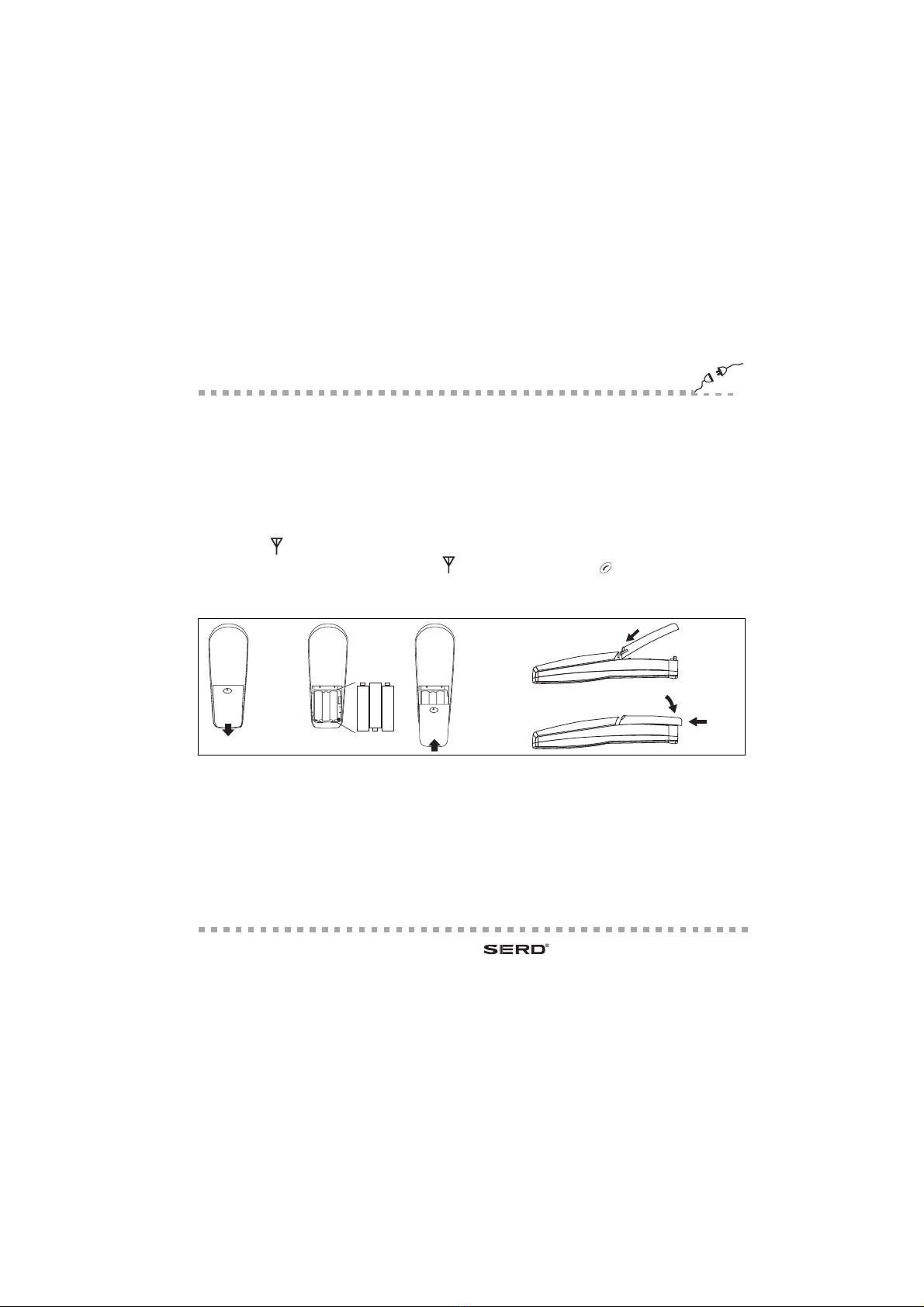
3. Open the handset's battery compartment and insert re-chargeable batteries. Pay
attention to the correct polarity (see fig. 2-2). Close the battery compartment again.
Under no circumstances should you use non-rechargeable batteries.
4. After five seconds the handset will emit a greeting tone to confirm the power connection
reset. Place the handset into the base station for a loading period of approximately ten
hours prior to using it for the first time.
The battery symbol starts to indicate.

Connection and commissioning
Version no. 12-03E 7
NOTE: If the handset's batteries are entirely empty, the base station will do a quick re-
load for a couple of hours and then change to the slow loading process. The handset
will warm up during quick loading. This warming is normal and in no way dangerous.
The handset will cool down slowly once the batteries are almost fully charged.
5. On delivery, the base station is already registered with the base station. The antenna
symbol should always be active to show that the handset is synchronised with the
base station. If the antenna symbol indicates, operate the -key to activate
synchronisation.
Fig. 2-2 Insert the batteries and close the lid of the compartment
Explanatory note:
1. This product works on a frequency of 1.89 GHz.
2. Place the base station on a high level to ensure the best possible operating range.
3. Do not install the base station in bathrooms.
4. The range of the DECT-telephone may vary depending on the operating surroundings.
+
-
AAA
+
-
AAA
+
-
AAA

Connection and commissioning
8Version no. 12-03E
2.1 Installing an additional handset and a further charging device
1. Connect the AC-adapter to the socket on the charging device's rear side.
2. Open the handset's battery compartment and insert re-chargeable batteries. Pay
attention to the correct polarity (see fig. 2-4). Close the battery compartment again.
Under no circumstances should you use non-rechargeable batteries.
3. After five seconds the handset will emit a greeting tone to confirm the power connection
reset. Place the handset into the base station for a loading period of approximately ten
hours prior to using it for the first time. The battery symbol starts to indicate.
Fig. 2-3 Connecting the
charging device to the mains
Fig. 2-4 Insert the batteries and close the lid of the compartment
+
-
AAA
+
-
AAA
+
-
AAA
This manual suits for next models
1
Table of contents
Other SERD Cordless Telephone manuals