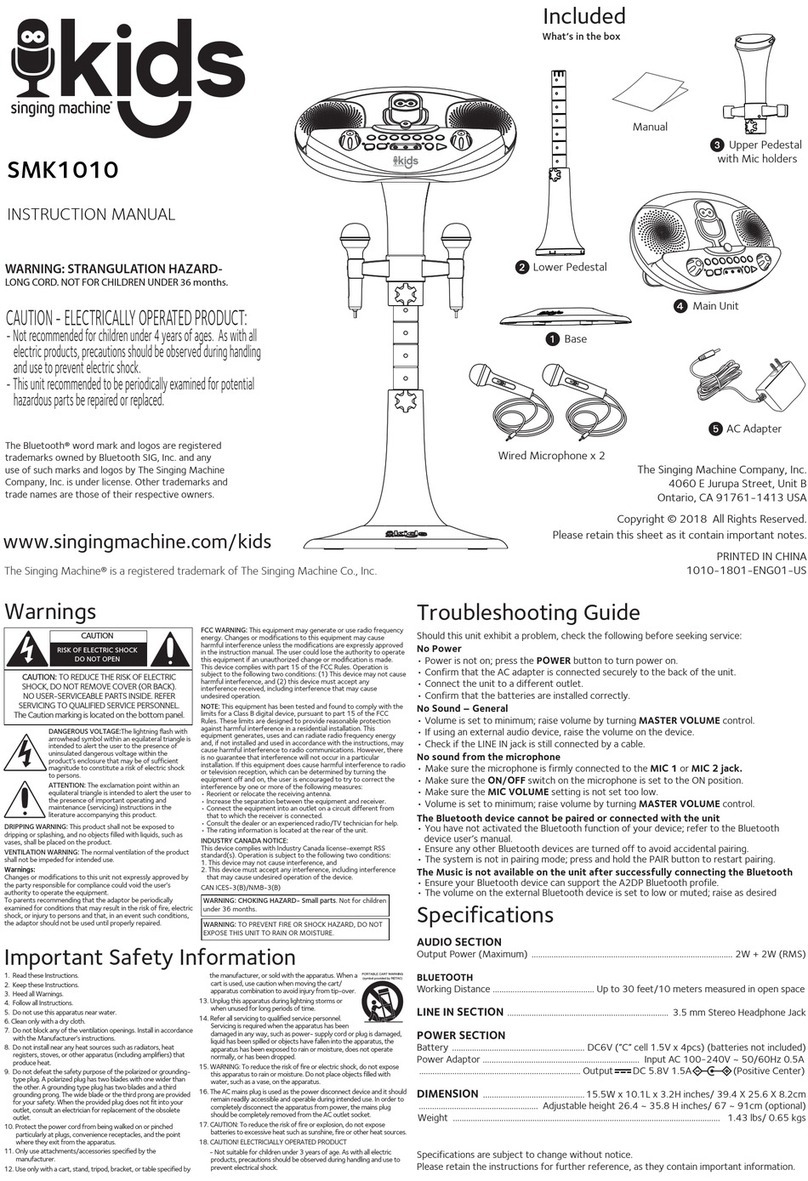
Sencor SSS 3400K User manual

SSS 3400K
EN User Manual Wireless karaoke speaker
CZ Uživatelská příručka Bezdrátový karaoke reproduktor
SK Používateľská príručka Bezdrôtový karaoke reproduktor
HU Felhasználói kézikönyv Vezeték nélküli karaoke hangszóró
PL Podręcznik użytkownika Bezprzewodowy głośnik karaoke

EN – 2
SAFETY INSTRUCTIONS
This product has been designed with the utmost safety in mind.
However, incorrect use may lead to electric shock or re. This is
why users should observe the following instructions when using this
device.
This device uses a semiconductor unit and contains no user
serviceable parts. Do not disassemble this device, otherwise you
are exposed to the risk of electric shock. If any damage to this
product occurs, please have this product repaired by a qualied
service technician.
Power
Power supply of this unit must be match the serial plate data.
Heat source
Keep this unit out of heat sources like stove or direct sunlight.
Cleaning
Prior to cleaning, please disconnect power rst. For cleaning, don’t
use liquid detergents or caustic liquids - just clean the unit with
a soft cloth.
Heavy objects
Do not place heavy objects on the unit, otherwise damage might
occur.
Wireless karaoke speaker

EN – 3
Wireless karaoke speaker
Connecting other devices
Before connecting other devices to this unit, please make sure to
disconnect power. Otherwise damage to the unit or personal injury
might occur.
Faults to be repaired
If any of the following problems occurs, please disconnect power to
the unit and contact a qualied service technician.
A. Power cord or plug is damaged.
B. Liquids or other foreign objects have penetrated inside the
product.
C. If the unit does not work even if it’s being operated according
to the instructions, don’t press any buttons other than those
described in these instructions. Otherwise, damage to this unit
may occur along with a more demanding repair.
D. This unit has fallen on the ground from a big height.
E. Burns can be smelled from the product inside.
Maintenance
If you don’t have enough technical knowledge necessary to maintain
this unit, don’t attempt to repair it by yourself. By removing the
cover, you are exposed to a risk of electric shock. If needed, please
contact a qualied service technician.
Replacement of parts
If you need to replace any part of this unit, ask your service
technician to make a replacement for equal spare part models. If
other spare part models are used for replacement, serious damage,
electric shock or shortening the unit’s lifetime may occur.

EN – 4
Safety check
After completing maintenance, ask your service technician to
perform an on-site safety check to ensure that the unit is operating
safely.
Remark:
Before using this product, read these instructions carefully and keep
it well for future use.

EN – 5
SUPPLY CONTENT
1x BT speaker SSS 3400K
2x Wireless microphone
2x Microphone holder
1x AUX-IN cable (3.5mm)
1x USB-C charging cable
1x User’s manual
DESCRIPTION OF THE BT SPEAKER
AND MICROPHONE

EN – 6

EN – 7
SSS 3400K front side
A Wireless microphone 1
B Wireless microphone 2
C Removable holder for wireless microphone 1
D Removable holder for wireless microphone 2
E BT speaker carrying handle
F LED eect
G Treble speaker
I Wideband speaker
SSS 3400K top side
1On/o button
2Light eects button (change/on/o)
3 Previous track button, microphone volume down
4PLAY / PAUSE / Change Source button (Bluetooth, memory
card, USB, AUX-IN, COAX)
5 Next track button, microphone volume up
6 “ECHO -” level down button
7 “ECHO +” level up button
8 Rotary volume down/up control
9 Projections for mounting the microphone holder

EN – 8
10 TONE button to change the predened voice eect
11 LED indicator
SSS 3400K back side
12 COAX input
13 Input for audio AUX IN mini jack (3.5mm)
14 Memory card slot
15 USB-A for playback from memory device
16 Charging socket (USB-C)
17 LED charging indicator
Wireless microphone
18 Sound sensor
19 LED indicator
20 On/o button
21 Charging socket (USB-C)

EN – 9
PUTTING INTO OPERATION
Before rst use, be sure to read the safety instructions contained in
this user's manual carefully.
Before rst use, please charge the BT speaker to a maximum level.
Hold down the power on button to turn on the BT speaker. Turning
on/o is indicated by a sound signal. To turn the BT speaker o,
hold down the power on button. To change the source of the music
being played, press and hold the “Play / Pause / Change Source”
button while it is on.
TRANSMISSION AND BT SPEAKER POSITION
To carry the BT speaker, use the “E” handle located on the top of
the BT speaker. The speaker oers 1 positioning option. The side
designated for the correct position is always tted with rubber feet
on the underside of the BT speaker.
Caution: always position the equipment so that it does not
endanger the health of persons in the vicinity or cause damage to
property.
PAIRING DEVICES VIA BLUETOOTH
Turn on the BT speaker and search for its Bluetooth name
“SSS 3400K” in the device to be paired, then start the pairing

EN – 10
process. If you are requested to enter a pairing code while your
device and the BT speaker are pairing, use the code: “0000”.
To disconnect the paired device, end the pairing session on
your mobile device or long hold the “Change source” button.
Disconnection will be indicated by an acoustic tone.
Remark: To ensure a stable Bluetooth connection, make sure that
the distance between the BT speaker and your connected device is
kept within 10 meters.
AUDIO AUX IN
The BT speaker is equipped with a 3.5mm jack. Your device can
be connected to the BT speaker via the supplied audio cable.
First connect the audio plug to your device and then to the BT
speaker’s jack.
Please note: before connecting your device and BT speaker, make
sure that the output signal from your device is at the minimum level
(minimum output volume). This will prevent the BT speaker from
damage. When the audio cable is connected, the BT speaker does
not meet the water ingression protection class.
Remark: In this mode, not all functions of the BT speaker are
available. The Bluetooth function is not active if the audio jack is
connected to the BT speaker.
Table of contents
Languages: