
ScoutGuard SG880MK-8mHD User manual

Infrared Mobile Digital Scouting Camera
User’s Manual
SG880MK-8mHD/MG882K-8mHD

Content
1 Instruction ..............................................................................1
1.1 General Description .......................................................1
1.2 Camera Body Interfaces................................................ 2
1.3 Remote Control............................................................. 2
1.3.1 Navigating................................................................. 4
1.3.2 Characters................................................................. 4
1.4 Shooting Information Display ...................................... 4
1.5 MMS/GPRS function .................................................... 5
2 Cautions..................................................................................7
3 Quick Start Guide .................................................................. 8
3.1 Power Supply ................................................................ 8
3.2 Insert the SD card and the SIM card ............................ 9
3.3 Do the Camera Settings................................................10
3.4 Enter into the TEST Mode ........................................... 11
3.4.1 Custom Settings ....................................................... 11
3.4.2Manual Capturing.................................................... 11
3.4.3 Send MMS................................................................ 11
3.5 Power on and Enter into the ON Mode........................12
3.6 SMS Control .................................................................12
3.7 SMS Command List .....................................................13
3.8 Power Off .....................................................................14
4 Advanced Operations ...........................................................15
4.1 Settings Menu ..............................................................15
4.2 Default Setting ............................................................ 20
4.3 Playback .......................................................................21
4.3.1 View Photo...............................................................21
4.3.2Delete Photo or Video ..............................................21
4.4 Laser Pointer............................................................... 22
4.5 File Numbering ........................................................... 22
Appendix I: PIR Detection Zone.............................................. 23
Appendix : Technical SpecificationsⅡ..................................... 25
Appendix : Parts ListⅢ............................................................. 26

SG880MK-8mHD/MG882K-8mHD 1 Instruction
Page 1
1Instruction
1.1 General Description
This camera, a digital scouting camera with black IR and
MMS function, is a digital infrared surveillance camera,
triggered by any movement of humans or animals monitored by
a high sensitive Passive Infrared (PIR) motion sensor, and then
automatically captures high quality pictures (up to 8M pixels)
or records video clips (720P HD) according to default settings
or preset customer settings. It will then send the pictures
instantly to your mobile device or e-mail via GSM/GPRS
network. You’ll be alerted just when the camera is triggered or
per custom settings.
It takes color pictures or videos under sufficient daylight.
While at night, the built-in 940nm IR LEDs take clear pictures
or videos (monochrome). It’s invisible to game. And this model
has a new design of PIR and this new PIR is patented.
There is a 1.5” color LCD display screen on the camera and a
sound recorder embedded in the camera. A laser pointer is used
to help target the photo area of the camera. It supports
MMS/SMS/E-mail via GSM/GPRS Network.
It is resistant against water and snow. The camera can also
be used as a portable digital camera.
SG880MK-8mHD/MG882K-8mHD 1 Instruction
Page 2
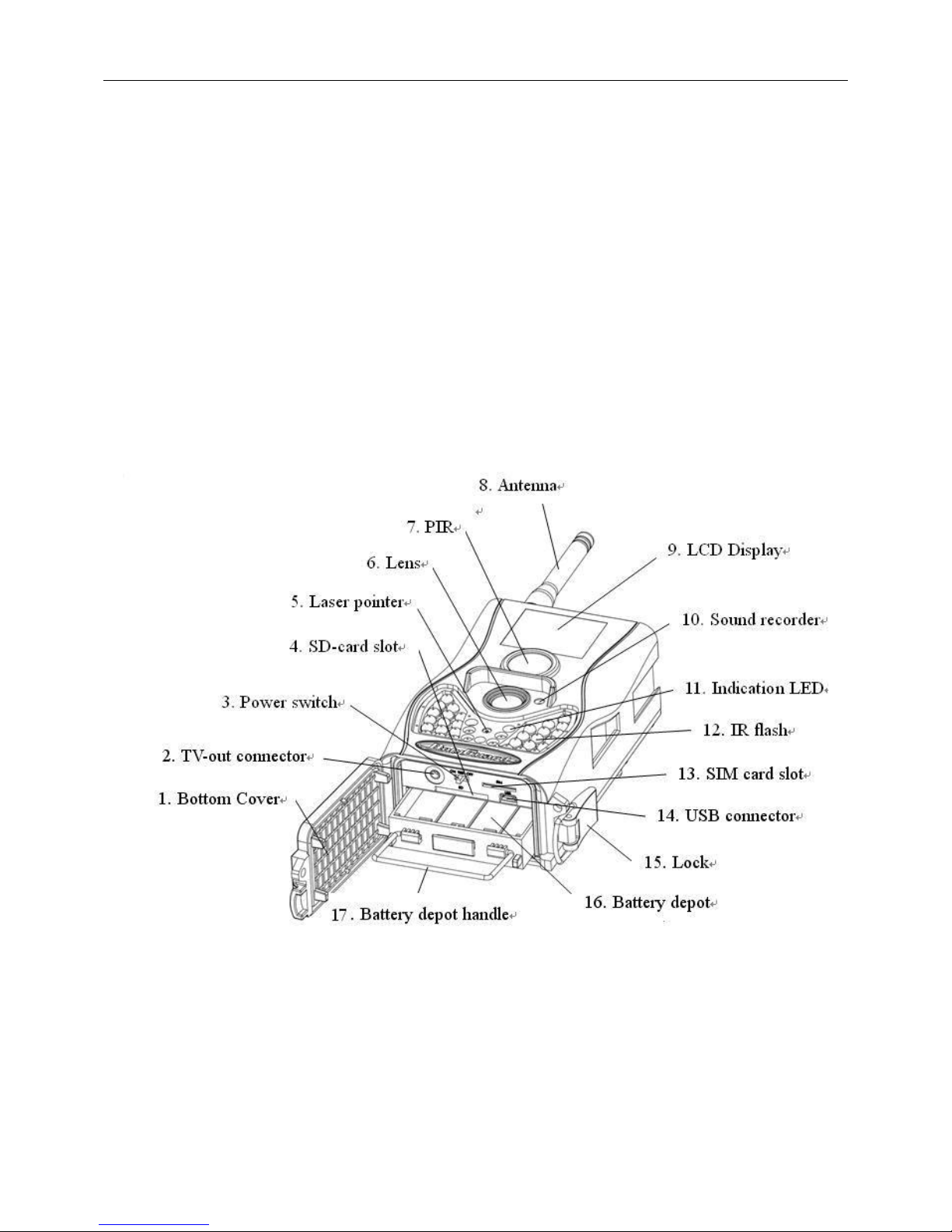
1.2Camera Body Interfaces
The camera has the following I/O interfaces: USB
connector, SD card Slot, TV output and external DC power
connector.
Take a few moments to familiarize yourself with the
camera controls and displays. It is helpful to bookmark this
section and refer to it when reading through the rest of the
manual.
Fig.1 Diagramofcamerafunctionalindicators
1.3Remote Control
The remote control is the input device for the camera and is

SG880MK-8mHD/MG882K-8mHD 1 Instruction
Page 3
primarily used for customer settings and
password input. This is an infrared type
wireless remote control. The maximum
remote distance is 30 feet.
Fig.2 Remote control
Note:
The remote will not work properly without the antenna
attached.
When power on the camera, allow approximately 10-20
seconds for the camera to acquire a signal. The remote will
not function properly until the camera has acquired a signal.
You can determine that the camera has acquired a signal by
locating the signal icon on the LCD screen.
Fig.3Placeforremotecontrol
Menu Cancel
OK
1
2
abc
3
def
4
ghi
5
jkl
6
mno
7
pqrs
8
tuv
9
wxyz
*
0
#
Menu Cancel
OK
1
2
abc
3
def
4
ghi
5
jkl
6
mno
7
pqrs
8
tuv
9
wxyz
*
0
#

SG880MK-8mHD/MG882K-8mHD 1 Instruction
Page 4
1.3.1 Navigating
Press UP or DOWN to select or highlight the menu item.
Press LEFT or RIGHT to select the option of each item and
press OK to make a selection.
1.3.2 Characters
When entering digits, letters or punctuations into an input
column, there are some useful characters that can be used by
pressing the button continuously:
1: 1 . / : @ _
: 0 + -
Press the punctuation “*” for laser pointer.
1.4Shooting Information Display
When the camera is turned on (the power switch is slid to
ON or TEST position), the current settings will be displayed on
screen.

SG880MK-8mHD/MG882K-8mHD 1 Instruction
Page 5
Fig.4Shootinginformationdisplay
1.5MMS/GPRS function
This camera can send pictures instantly to your mobile
device via GSM/GPRS network. You’ll be alerted just when a
picture or video has been taken. The camera sends MMS
message through GPRS network, so before using this function,
you need to open GPRS service from your service provider. It
supports four bands :850MHz, 900MHz, 1800MHz and
1900MHz.
SIM card Icon:There are two SIM card icons which stand for
different installation situations. means the SIM card is
inserted and it works well. means the MMS function can’t
work correctly because of loss of signal or other communication
issues.

SG880MK-8mHD/MG882K-8mHD 1 Instruction
Page 6
There are 4 submenu settings within the MMS/GPRS
function. They are Send Mode, MMS Set, GPRS Set and Send to.
Send Mode means to choose a way to send MMS (refer to 4.1
table). MMS Set and GPRS Set means to have the right MMS
and GPRS setting parameters according to your network. Send
to means to input the phone number or email address which
you want to send to. All 4 submenus must be correctly set up.

SG880MK-8mHD/MG882K-8mHD 2 Cautions
Page 7
2Cautions
★Please install batteries according to shown polarity.
★Please unlock the write-protect before inserting the SD card.
★Please insert the SD card when the power switch is in the
OFF position before testing the camera. The camera has no
internal memory for saving images or videos. If no SD card is
inserted, the camera will shut down automatically after a
continuous indication sound.
★Please do not insert or take out the SD card when the power
switch is in the ON position.
★It is recommended to format the SD card by the camera when
used for the first time.
★The camera will be in USB mode when connected to a USB
port of a computer. In this case, the SD card function is as a
removable disk.
★In the TEST mode, the camera will shut down automatically
after 3 minutes if no operation is done. Please turn on the
power again if you want to continue to work with the remote.
★Please ensure there is sufficient power when having a
firmware upgrade, otherwise the upgrade process could be
interrupted and the camera may stop functioning properly.

SG880MK-8mHD/MG882K-8mHD 3QuickStartGuide
Page 8
3Quick Start Guide
3.1Power Supply
To supply power for the camera, four or eight size AA
batteries are needed. The following batteries with 1.5V output
can be used:
1. High-density and high-performance alkaline batteries
(Recommended)
2. Rechargeable alkaline batteries
3. Rechargeable NiMH batteries
There are four battery slots. Slot 1 and 2 form one group and
is marked “1”while slot 3 and 4 form the other group and is
marked “2”. Only one “group” of batteries is needed to supply
power to the camera, but both can be used and is
recommended.
When in a low-battery state, the camera will be automatically
shut down after two indication sounds. Please change the
batteries at this time. If you have set the MMS function, it will
send you a MMS/SMS or Email to indicate the low battery
situation.
This manual suits for next models
1
Table of contents
Other ScoutGuard Scouting Camera manuals

ScoutGuard
ScoutGuard MG984G-36M User manual

ScoutGuard
ScoutGuard SG880MK-8M User manual

ScoutGuard
ScoutGuard SG550 Series User manual

ScoutGuard
ScoutGuard G560P-8M User manual

ScoutGuard
ScoutGuard SG550-12mHD User manual

ScoutGuard
ScoutGuard SG-660 User manual

ScoutGuard
ScoutGuard SG880MK-18mHD User manual

ScoutGuard
ScoutGuard SG880MK-8M User manual

ScoutGuard
ScoutGuard SG565FV User manual

ScoutGuard
ScoutGuard SG968K-10M User manual


