
Scientific Atlanta Explorer 2100 Troubleshooting guide

User’s Installation Guide
EXPLORER®2100 or 3100
Digital Home Communications Terminals
2
Note to the Installer
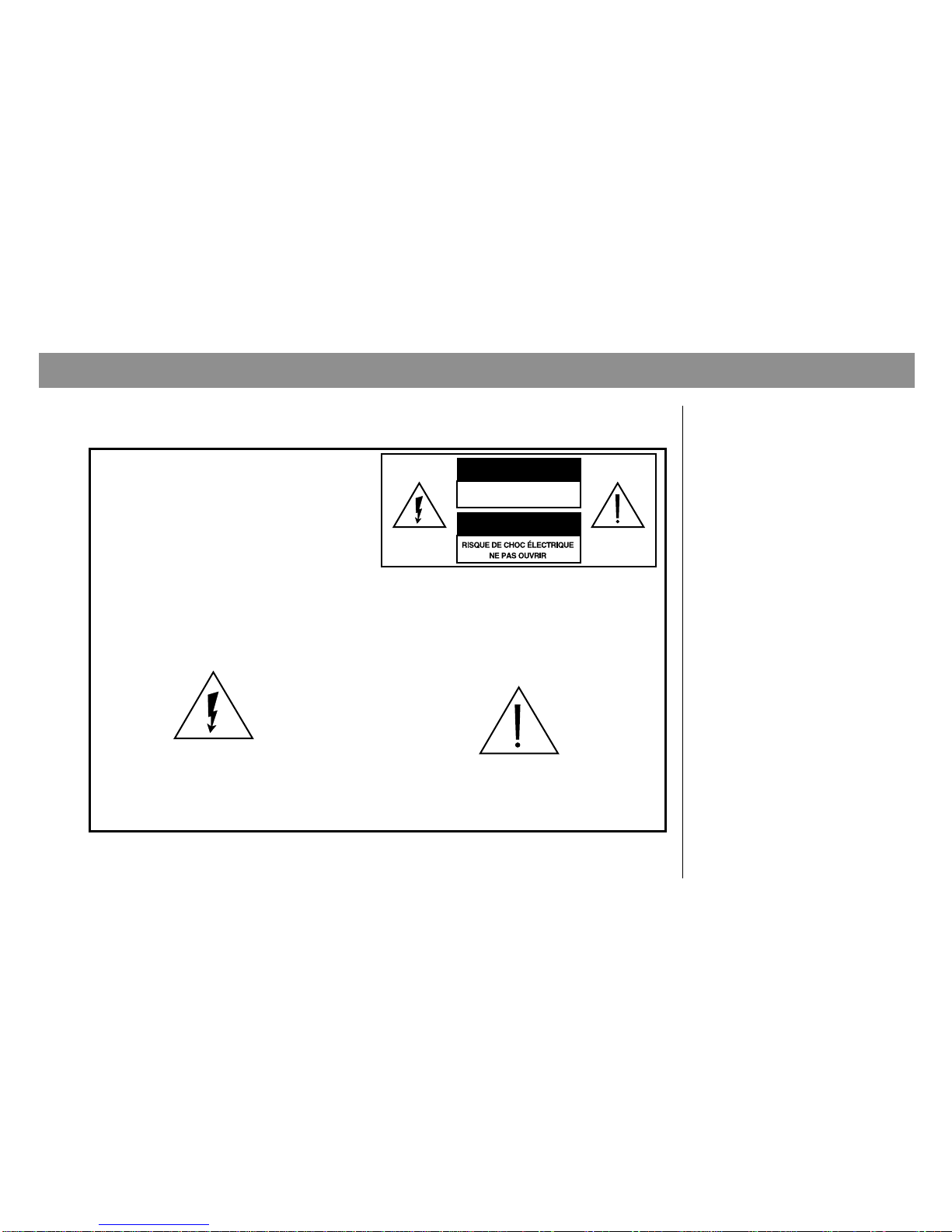
CAUTION
RISK OF ELECTRIC SHOCK
DO NOT OPEN
AVIS
Note to CATV System Installer
This reminder is provided to call the CATV
system installer’s attention to Article 820-40
of the NEC (Section 54, Part I of the Canadian
Electrical Code), that provides guidelines for
proper grounding and, in particular,
specifies that the CATV cable ground shall
be connected to the grounding system of
the building, as close to the point of cable
entry as practical.
CAUTION: To reduce the risk of electric
shock, do not remove cover (or back).
No user-serviceable parts inside. Refer
servicing to qualified service personnel.
This symbol is intended to alert you of the
presence of important operating and
maintenance (servicing) instructions in the
literature accompanying this product.
This symbol is intended to alert you that
uninsulated voltage within this product may
have sufficient magnitude to cause electric shock.
Therefore, it is dangerous to make any kind of
contact with any inside part of this product.
WARNING
TO PREVENT FIRE OR ELECTRIC SHOCK,
DO NOT EXPOSE THIS UNIT TO RAIN OR
MOISTURE.
Read and Retain These
Instructions
• Read all of the instructions
before you operate this
equipment. Give particular
attention to all safety
precautions. Retain the
instructions for future
reference.
• Comply with all warning
and caution statements in
the instructions. Observe all
warning and caution
symbols that are affixed to
this equipment.
• Comply with all instructions
that accompany this
equipment.
IMPORTANT RULES FOR SAFE OPERATION

3
Cleaning the Equipment
Before cleaning this equipment, unplug it from the
electrical outlet. Use a damp cloth to clean this
equipment. Do not use a liquid cleaner or an aerosol
cleaner. Do not use a magnetic/static cleaning device
(dust remover) to clean this equipment.
Placement
Place this equipment in a location that is close enough
to an electrical outlet to accommodate the length of the
power cord. Place this equipment on a stable surface.
The surface must support the size and weight of this
equipment.
WARNING:
Avoid personal injury and damage to this
equipment. An unstable surface may cause
this equipment to fall.
Accessories
Do not use accessories with this equipment unless
recommended by your cable company.
IMPORTANT RULES FOR SAFE OPERATION,continued
Ventilation
This equipment has openings for ventilation that protect
it from overheating. To ensure the reliability of this
equipment, do not obstruct the openings.
• Do not place other equipment, lamps, books, or any
other object on the top of this equipment.
• Do not place this equipment in any of the locations that
follow:
- On a bed, sofa, rug, or similar surface
- Over a radiator or a heat register
- In an enclosure, such as a bookcase or equipment
rack, unless the installation provides proper
ventilation
WARNING:
Avoid electric shock and fire hazard. Never
push objects through the openings in this
equipment. Objects can touch dangerous
voltage points or cause electrical shorts that
can result in electric shock or fire.

4
Liquid or Moisture
Do not expose this equipment to liquid or moisture. Do
not place this equipment on a wet surface. Do not spill
liquids on or near this equipment.
Lightning and Power Surges
Ground (earth) your cable system to provide some
protection against voltage surges and built-up static
charges. If you have questions, call your cable company.
Servicing
Do not open the cover of this equipment. If you open the
cover, your warranty will be void. Refer all servicing to
qualified personnel only. Contact your cable company
for instructions.
Power Cord Protection
Arrange all power cords so that people cannot walk on
the cords, place objects on the cords, or place objects
against the cords, which can damage the cords. Pay
particular attention to cords that are at plugs, at
electrical outlets, and at the places where the cords exit
the equipment.
IMPORTANT RULES FOR SAFE OPERATION,continued
Power Sources
A label on this equipment indicates the correct power
source for this equipment. Operate this equipment only
from an electrical outlet that has the voltage and
frequency that the label indicates.
If you are unsure of the type of power supply to your
residence, consult Scientific-Atlanta, Inc., or your local
power company.
WARNING:
Avoid electric shock and fire hazard. Do not
overload electrical outlets and extension cords.
For equipment that requires battery power or
other sources to operate, refer to the operating
instructions for that equipment.

5
IMPORTANT RULES FOR SAFE OPERATION,continued
Grounding
This equipment has a two-prong plug. Properly ground
(earth) this equipment by inserting the plug into a
grounded electrical, two-socket outlet. If this plug is
polarized it has one wide prong and one narrow prong.
This plug fits only one way.
CAUTION:
To prevent electric shock, match wide blade of
plug to wide slot, fully insert.
If you are unable to insert this plug fully into the outlet,
contact an electrician to replace your obsolete outlet.
Damage that Requires Service
For damage that requires service, unplug this equipment
from the electrical outlet. Refer service to qualified
service personnel when any of the following occurs:
• There is damage to the power cord or plug
• Liquid enters the equipment
• A heavy object falls on the equipment
• There is exposure to rain or water
• Operation is not normal (the instructions describe the
proper operation)
• If you drop this equipment, or damage the cabinet of
this equipment
• If this equipment exhibits a distinct change in
performance
Upon completion of any service or repairs to this
equipment (home terminal), ask the service technician to
perform safety checks to determine that the equipment is
in proper operating condition.

6
Contents
Overview
Using This Guide ..................................................... 7
Getting Started ......................................................... 8
Selecting Your Connection Diagrams................... 9
Explorer 2100 and 3100 DHCT Front Panel ....... 10
Explorer 2100 and 3100 DHCT Back Panel ........ 11
Optional Devices................................ 12 through 16
Using an RF Bypass Module ................................ 14
Connection Diagrams........................ 17 through 27
Using the DHCT .................................................... 28
Tips for Improved Performance .......................... 29
Notices ..................................................................... 31
FCC Compliance ..................................... Back cover
Optional Devices
Connecting a VHF Transformer for
Non-Cable-Ready TV ............................................ 12
Connecting a VCR Commander Module ........... 12
Connecting a TV with the PIP Feature
to a Signal Splitter.................................................. 13
Using an RF Bypass Module ................................ 14
Connecting a Digital Audio Decoder ................. 16
Connection Diagrams
Connecting a Non-Stereo TV ............................... 17
Connecting a Stereo TV ........................................ 18
Connecting a Non-Stereo TV and a
Non-Stereo VCR..................................................... 19
Connecting a Non-Stereo TV and a
Stereo VCR .............................................................. 20
Connecting a Stereo TV and a
Non-Stereo VCR..................................................... 21
Connecting a Stereo TV and a
Stereo VCR .............................................................. 22
Connecting a Stereo TV with S-Video Input ..... 23
Connecting a Stereo TV and VCR with
S-Video Input ......................................................... 24
Connecting a Non-Stereo TV, Non-Stereo
VCR, and Stereo Receiver or Amplifier.............. 25
Connecting a Stereo TV, Stereo VCR, and
Stereo Receiver or Amplifier ................................ 26
Connecting a Stereo TV, Stereo VCR, and
Home Theatre Receiver......................................... 27
7
Important Messages
Please read this entire guide before you install or
operate this equipment. Look for the following
safety symbol throughout this guide:
Read the caution or warning that appears with
each safety symbol throughout this guide.
CAUTION:
Do not place a magnet, or any type
of magnetic/static dust removal device on or
near this equipment. Magnetic/static devices
may affect the operation of this equipment.
About This Guide
Using This Guide
Introducing the Explorer 2100 and 3100 DHCTs
The Explorer®2100 and 3100 Digital Home
Communications Terminals (DHCTs) are
converters that can view analog and digital
signals. The Explorer 2100 and 3100 DHCTs
provide exceptional picture quality and an
Interactive Program Guide (IPG)–an interactive,
on-screen browsing and program-selecting menu.
This guide provides diagrams of the front and
back panels of the DHCT, diagrams for connecting
the DHCT to other electronic devices, basic
instructions for using the DHCT, and
troubleshooting tips for proper operation.
Joining the Explorer Club
Scientific-Atlanta invites you to join the Explorer
Club. This online club provides news and “what’s
up” information about the Explorer DHCT and
offers you a chance to win prizes and other
premium items.
You can access the Explorer Club by logging on to
the Internet and entering our address
http://www.scientificatlanta.com. Then, click the
Explorer user? Join the Explorer Club icon and
follow the instructions.

8
Installation Overview
The following list provides an overview of the
installation process.
1. Determine the electronic devices you must
connect using the information on page 9.
2. Connect the DHCT and your electronic devices
using the diagrams in this guide, based upon
the information on page 9.
3. Plug in the DHCT to an AC power source, but
do not press the Power key on the DHCT.
4. Set the input channel (3 or 4) on your TVand
VCR.
5. Wait for the time to display on the front-panel
display. Then, press the Power on the DHCT.
See page 28 for detailed instructions.
6. Program your remote control to operate your
TV and VCR. (See your remote control user’s
guide.)
7. Use the IPG to browse and view your program
preferences. (See the IPG user’s guide.)
Getting Started
Installation Tips
Follow these tips for proper DHCT operation:
• Do not plug the DHCT into a wall outlet that is
controlled by a wall switch. The IPG data does
not update when the outlet is switched to the off
position.
• You can plug your TV into the AC Switched
Outlet on the back of the DHCT.
• To ensure proper ventilation, do not place any
objects on top of the DHCT, including devices
such as your TV.
• If your TV is equipped with a picture-in-picture
(PIP) feature, see the connection diagram on
page 13.
9
Selecting Your Connection Diagrams
Introduction
This section provides a list of electronic devices
that connect to your DHCT. The Optional Devices
list includes devices that may be required for
specific combinations of viewing and listening
preferences. The TV and VCR Setup table
includes the audio and video options (non-stereo,
stereo, and S-Video) on your TV and VCR. Identify
all of your devices, then go to the page number
shown and use the diagrams and instructions to
connect your devices to the DHCT.
Optional Devices
Some optional devices must be installed to provide
specific sound and viewing preferences. Review
the list and go to the page shown for instructions
on connecting the device in your system.
• VHF Transformer for non-cable-ready TV ...... 12
• Connecting a VCR Commander Module ......... 12
• RF Splitter for PIP viewing ................................ 13
• RF Bypass Module for viewing cable
programming while recording premium
programming ....................................................... 14
• Digital Audio Decoder for surround sound .... 16
• Stereo Receiver or Amplifier for using
external speakers ....................................... 25 or 26
• Home Theatre Receiver for using
external speakers ................................................. 27
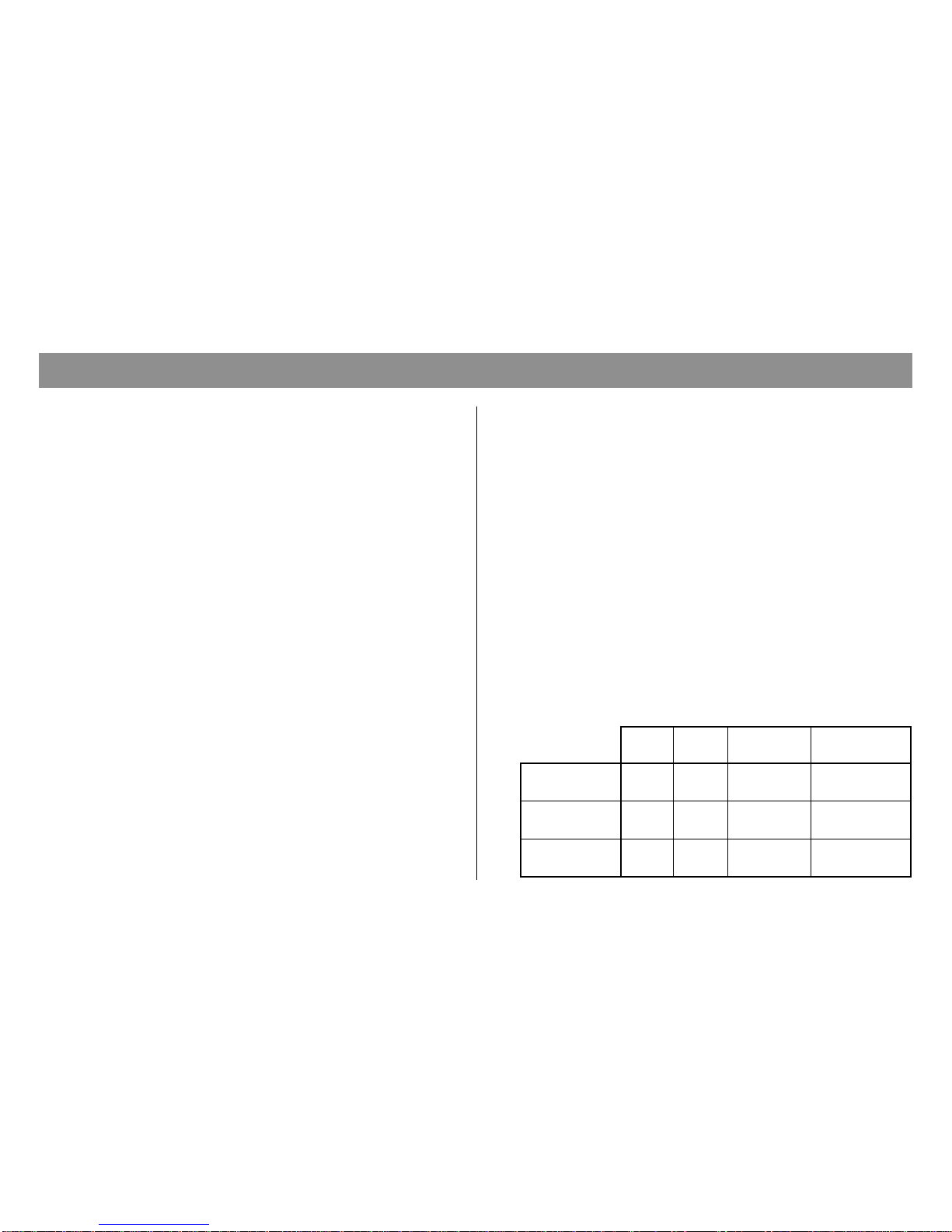
TV and VCR Setup
Use the table below to find the page number of the
connection diagrams for your style of TV and VCR.
Find your TV style in the left column and find your
VCR style across the top row. The intersection of
the row and column contains the page number of
the connection diagram for your specific TV and
VCR.
TV
Stereo
VCR with
S-Video Input
VCR
Stereo
VCR
None VCR
Non-Stereo
2218 21
TV
Non-Stereo n/a
n/a
2017 19
TV with
S-Video Input 24
n/a
23 n/a
10
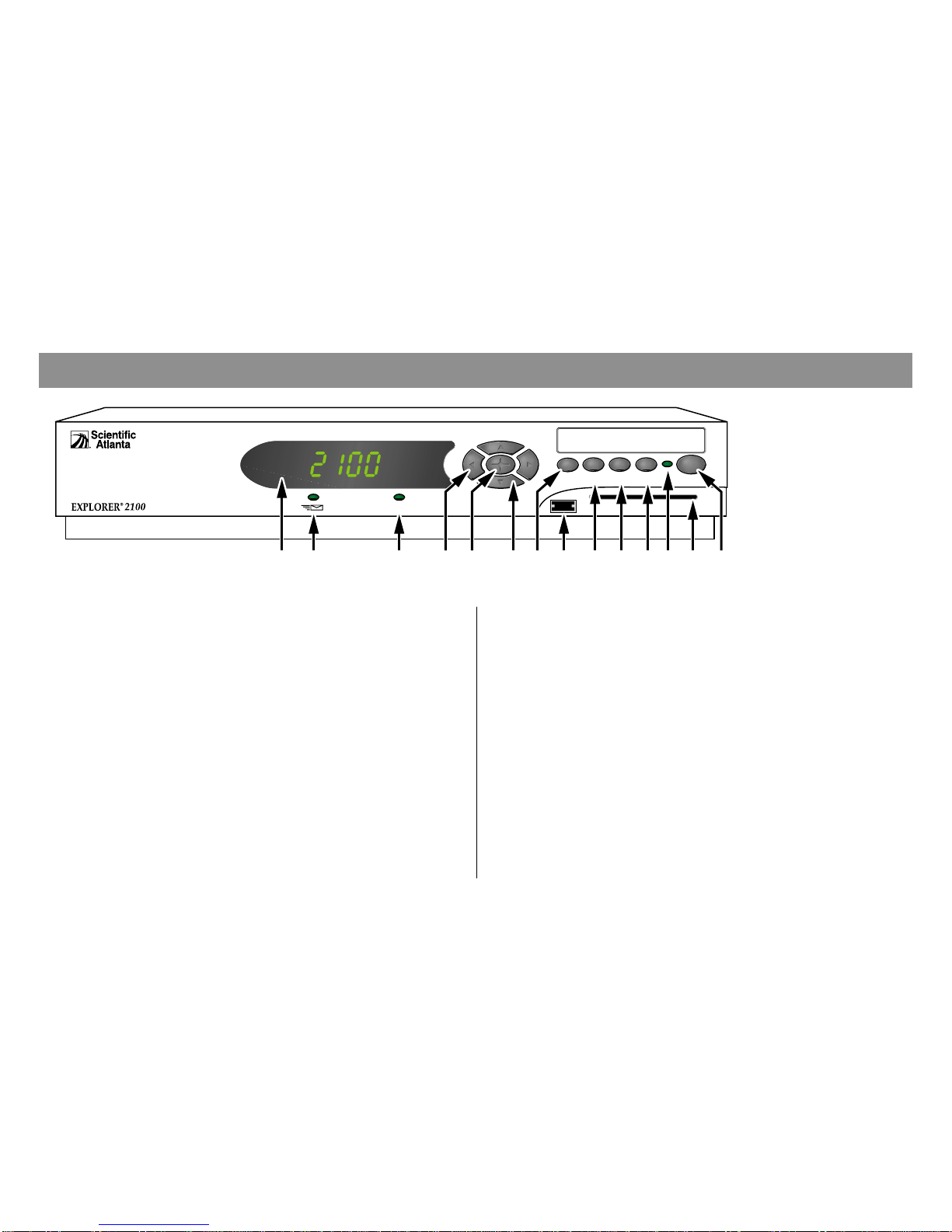
1Display Displays the channel numbers
and time of day
2Message indicator Indicates a message is waiting
when blinking or illuminated
3Bypass indicator Indicates optional bypass
feature is on when illuminated
4VOL- and VOL+ Increases or decreases volume
5Select Confirms or accesses on-screen
options
6CH- or CH+ Scrolls up or down through the
channels
Explorer 2100 or 3100 DHCT Front Panel
7Guide Accesses on-screen, Interactive Program
Guide (IPG)
8USB Connects to external equipment
(Universal Serial Bus)
9Info Accesses program information
10 Exit Exits menus, guide, or program
information
11 Settings Accesses Settings menu
12 Power LED Illuminates when power is on
13 Smart card Allows smart card access
slot
14 Power Activates the functions of the DHCT
BYPASS
VOL— VOL+
CH+
CH—
GUIDE INFO EXIT SETTINGS POWER
T8739
1 9 10 11122 3 6 87 135 144
This manual suits for next models
1
Table of contents
Popular Conference System manuals by other brands

Kramer
Kramer VIA GO quick start guide

AVT
AVT MAGIC AC1 Go Configuration guide

ProSoft Technology
ProSoft Technology AN-X4-AB-DHRIO user manual

Sony
Sony PCS-I150 Operation guide

Middle Atlantic Products
Middle Atlantic Products VTC Series instruction sheet

Prentke Romich Company
Prentke Romich Company Vanguard Plus Setting up and using


