Scanreco G5 Pocket System User manual
Scanreco G5 Repeater Instructions................3
Pair Rocket Flex with G5 CAN Receiver.................3
Convert a Rocket Flex transmitter into a repeater ..4
Pair a Rocket Flex transmitter with a repeater ........5
Normal Repeater Operation ....................................6
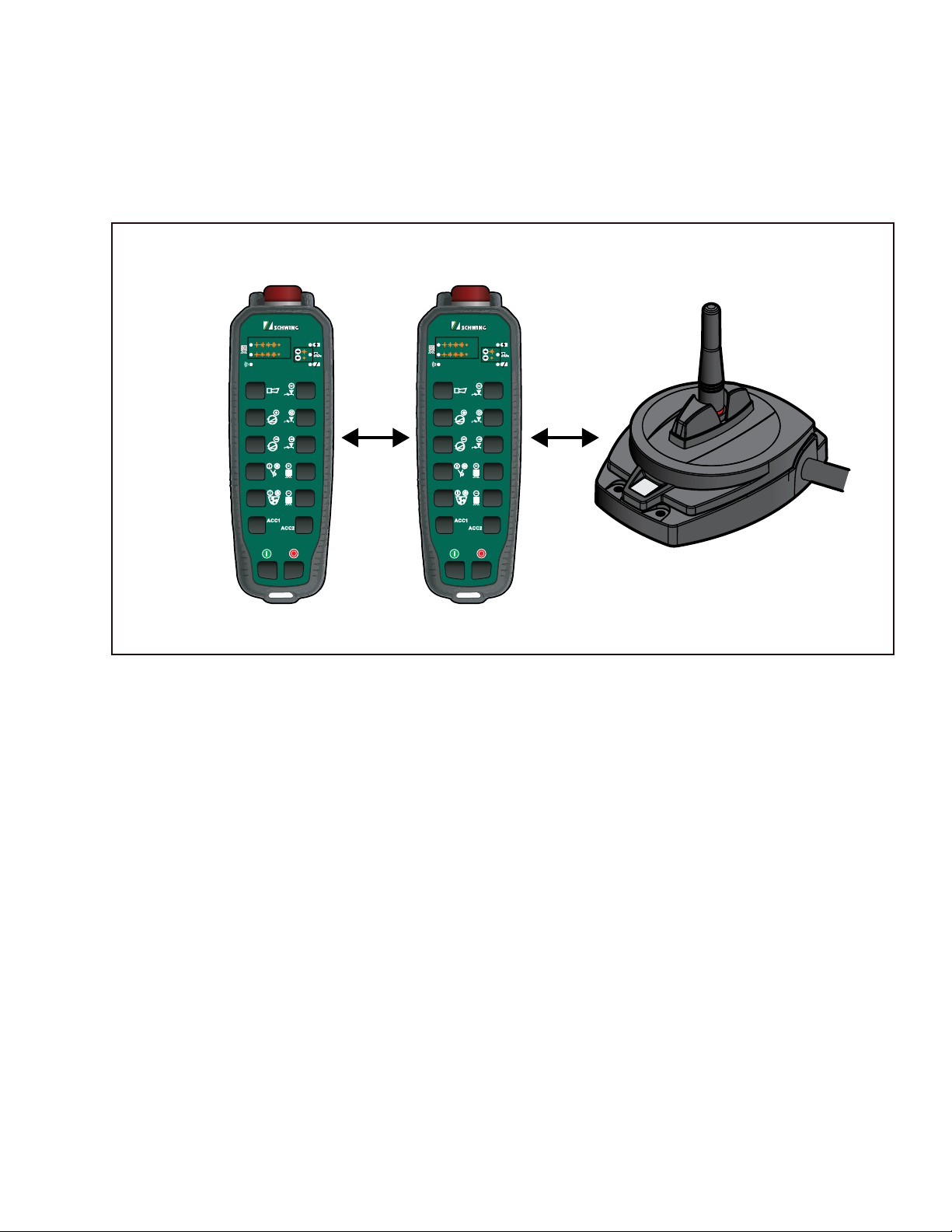
Scanreco G5 Repeater
Transmitter Repeater Receiver
50%
100%
50%
100%

2
Scanreco G5 Repeater
Short Instructions
3
Scanreco G5 Repeater
Short Instructions
Scanreco G5 Repeater Instructions
Pair Rocket Flex with G5 CAN Receiver
The Scanreco G5 system has the capability of adding a
repeater to extend the range of the system. Below are
the instructions to setup the repeater and how to oper-
ate a system with a repeater.
Transmitter Repeater Receiver
50%
100%
50%
100%
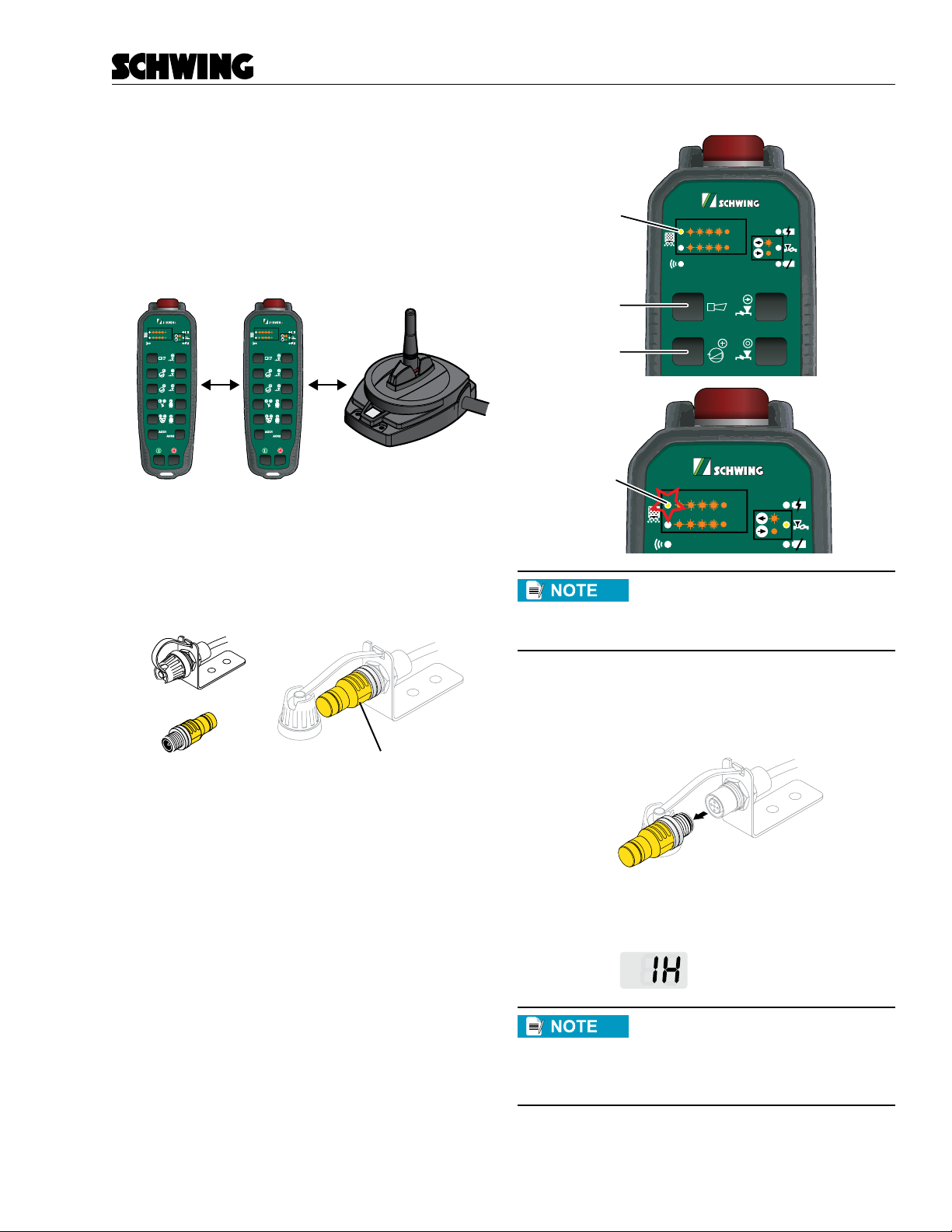
1. Power down the RECEIVER.
2. Place the pairing plug on cable B of the RECEIV-
ER. (Same location you would use for pairing nor-
mally)
Paring Plug
Receiver Socket
Paring Plug installed in socket
3. Momentarily press and hold both buttons 1 and
3 on the REPEATER. You should see LED 3 turn
on.
a. Then turn power on to the RECEIVER within
10 seconds
b. On the REPEATER, you will start seeing
LED 3 blinking.
c. The blinking LED indicates that the system
is pairing. Once the pairing process is com-
plete, LED 3 will turn off on the REPEATER
50%
100%
Button 1
Button 3
LED 3
50%
100%
LED 3 blinking
If you don’t see LED 3 blinking, try
again with the same repeater. It may
also mean the repeater has already
been paired.
4. Turn off the power to the RECEIVER
5. Remove the pairing plug from cable B.
6. Power on the REPEATER & RECEIVER. When
a link is established, the RECEIVER will display:
= Link Established
The steps up to this point are just the
standard pairing procedure for the
G5 system. The following set of in-
structions are for converting a trans-
mitter into repeater
4
Scanreco G5 Repeater
Short Instructions
Convert a Rocket Flex transmitter into a repeater
If your Rocket Flex transmitter is currently not paired
with your receiver, then you will need to do the previ-
ous set of instructions. You can tell if the transmitter is
paired if you can operate the machine.
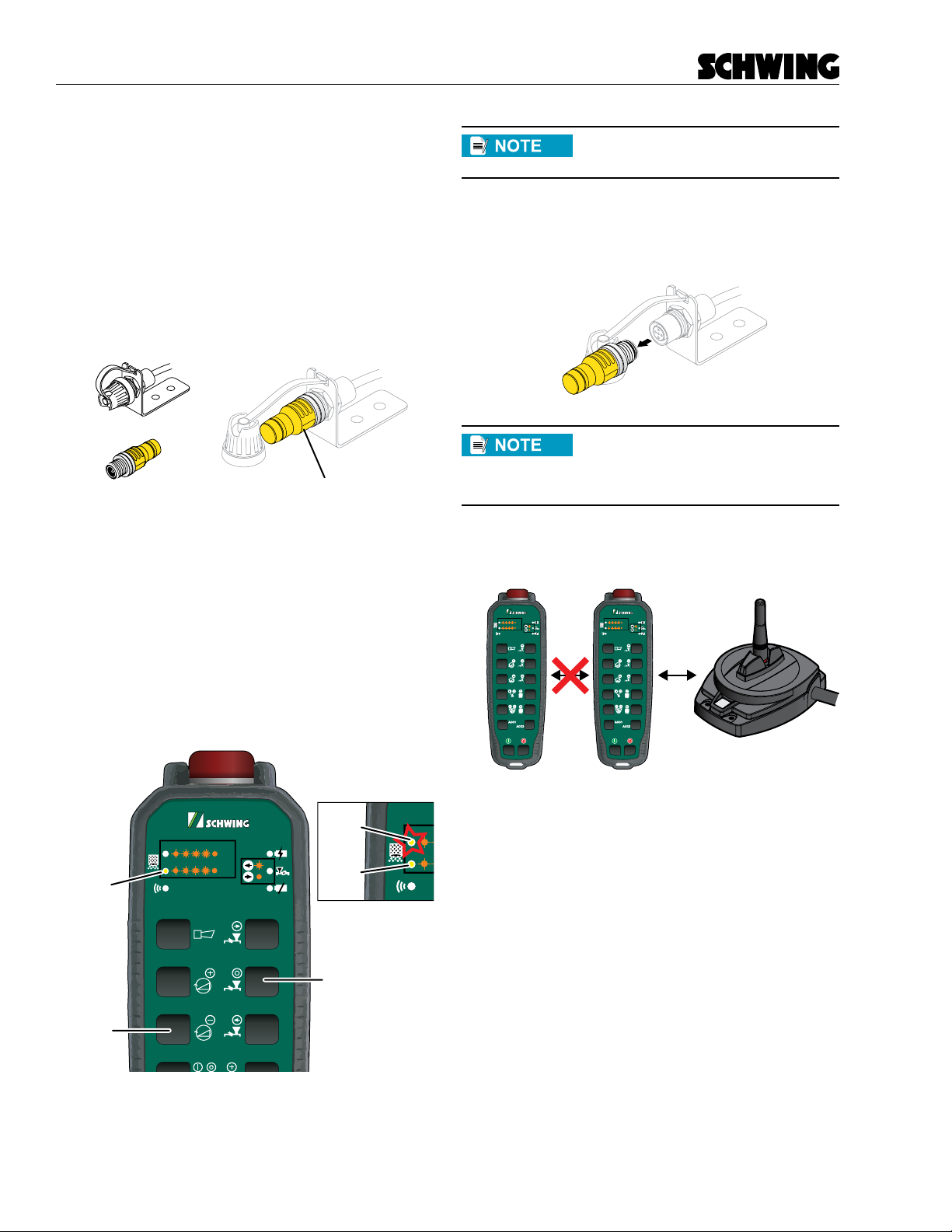
1. Power down the RECEIVER.
2. Place the pairing plug on cable B of the RECEIV-
ER. (Same location you would use for pairing nor-
mally).
Paring Plug
Receiver Socket
Paring Plug installed in socket
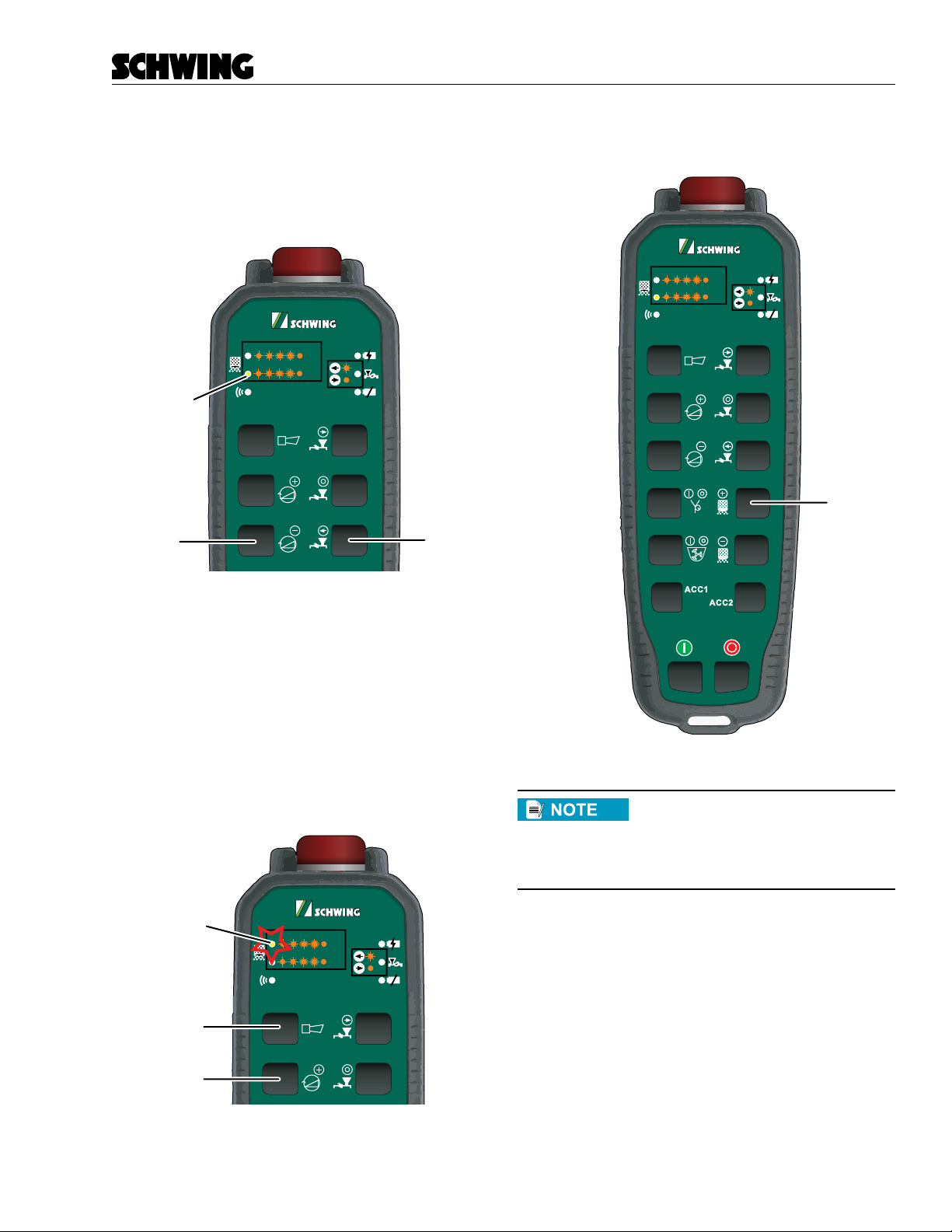
3. Momentarily press buttons 4 and 5 on the RE-
PEATER. You should see LED 2 turn on.
a. Then turn power on to the RECEIVER within
10 seconds
b. On the REPEATER, you will start seeing
LED 3 blinking.
c. The blinking LED indicates that the system
is converting it to a REPEATER. Once the
pairing process is complete, LED 3 will turn
off on the REPEATER
50%
100%
Button 4
Button 5
LED 2
blinking
LED 3
LED 2
If you don’t see LED 3 blinking, try
again with the same repeater.
4. Turn off the power to the receiver.
5. Remove the pairing plug from the receiver.
Now we are at the stage to add the
transmitter to the system. Currently
the transmitter, repeater and receiver
should all be off at this point.
Currently the system is setup as:
Transmitter Repeater Receiver
50%
100%
50%
100%
5
Scanreco G5 Repeater
Short Instructions
Pair a Rocket Flex transmitter with a repeater
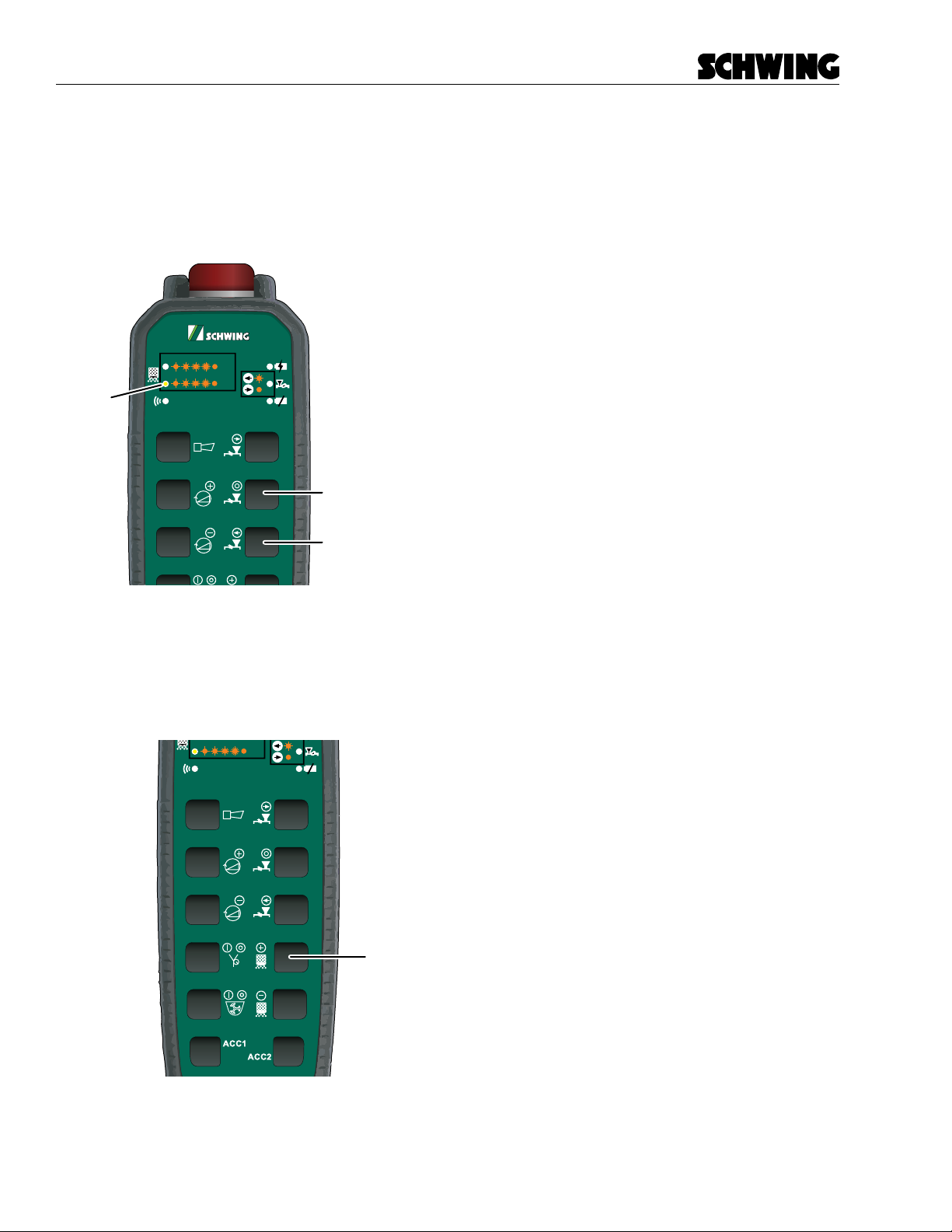
1. Press both buttons 5 and 6 on the REPEATER,
and you will see LED 2 turn on. This puts the
REPEATER in a mode like that of a RECEIVER’s
for pairing.
50%
100%
Button 6
Button 5
LED 2
2. Press both buttons 1 and 3 on the TRANSMIT-
TER, and LED 3 will begin flashing indicating that
the TRANSMITTER is pairing with the REPEAT-
ER.
a. On the TRANSMITTER, you will start seeing
LED 3 blinking.
b. The blinking LED indicates that the TRANS-
MITTER is paring with the REPEATER.
Once the pairing process is complete, LED 3
will turn off on the TRANSMITTER
50%
100%
Button 1
Button 3
LED 3 blinking
3. Turn off REPEATER by pressing button 8.
Repeater
50%
100%
Button 8
IMPORTANT NOTE: ONLY BUTTON
8 WILL TURN OFF THE REPEATER
WHILE IT IS IN REPEATER MODE.
E-STOP AND OFF BUTTON WILL
NOT OPERATE.
6
Scanreco G5 Repeater
Short Instructions
Normal Repeater Operation
1. Now apply power to the RECEIVER.
2. Press both buttons 4 and 6 on the REPEATER,
and you will see LED 2 turn on. This puts the
Rocket Flex Remote into Repeater mode.
50%
100%
Button 4
Button 6
LED 2
3. Turn on the TRANSMITTER and verify that you
can control the receiver.
4. When you are finished using the system, you will
need to turn off the REPEATER by pressing but-
ton 8.
Repeater
50%
100%
Button 8
Special notes about the repeater
• The REPEATER can function as a standard trans-
mitter, just by pressing the on button for your sys-
tem’s configuration.
• The REPEATER will consume about 4 time more
power while in REPEATER mode, so make sure
to power the REPEATER down when the system
is not in use.
• When a transmitter is in REPEATER mode, the
automatic timeout feature is disabled.
Other manuals for G5 Pocket System
2
Table of contents