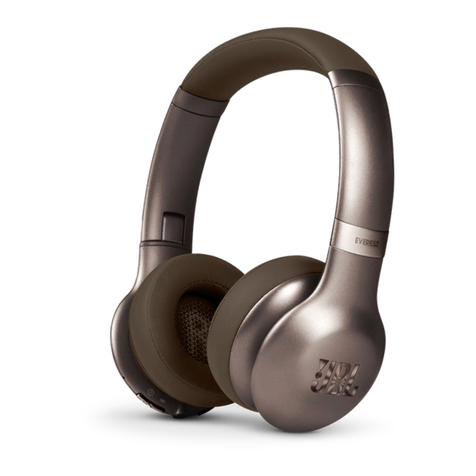
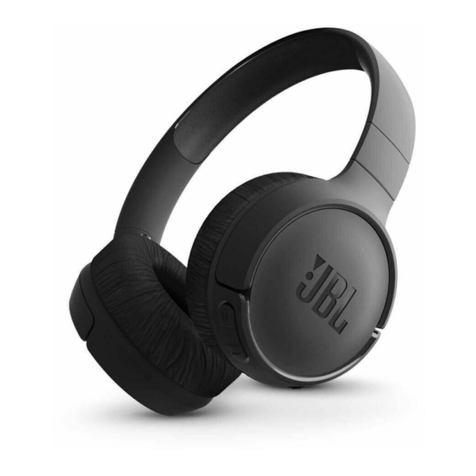
SBS NOSTALGIA Firenze User manual

TENOSHEADBT
Firenze
Wireless Stereo Headphone

Specification:
Wireless: V 5.0
Working range: 10m
Input: 5 VDC
Speaker size: 40mm
Radio frequency:
2.402Hz-2.480GHz
Impedance: 32Ω
Frequency: 20Hz-20kHz
Battery capacity: 250mAh
Playing time: 12 hours
Working time: 10-12 hours
Stand by time: 100 hours
Charge time: 2 hours
Volume +
Next song
On / O
Play / Pause
Micro-USB port
Jack 3.5 mm port
Volume -
Previous song

3
UK User Manual 4
IT Manuale di istruzioni 5
F Mode d’emploi 6
D Bedienungsanleitung 7
ES Manual de instrucciones 8
P Manual de instruções 9
NL Gebruikershandleiding 10
RUS Ръководство за потребителя 11
PL Instrukcja obsługi 12
TR Kullanim kilavuzu 13
GR Εγχειρίδιο χρήστη 14
AR 15
CZ Uživatelský manuál 16
SK Používateľská príručka 17
LT Lietotāja rokasgrāmata 18
LI Vartotojo vadovas 19
For other informations please contact us at
Frequency: 20Hz-20kHz
Battery capacity: 250mAh
Playing time: 12 hours
Working time: 10-12 hours
Stand by time: 100 hours
Charge time: 2 hours
Volume -
Previous song

4
UK USER MANUAL
Power-on and pairing
Press the central button (G) for approximately 5 seconds until
the blue LED starts to flash. A voice message will confirm
activation of the headset and Bluetooth® search.
Open Bluetooth settings on your smartphone and search the
list of devices for ‘GREY HEADPHONES’. Select.
Power-o
Press and hold the central button (G) for approximately 3
seconds. A voice message will confirm power-o.
Play/pause music playback
With headset connected, press the central button (G) once to
start playback. Press again to pause.
Answer/end a call
Press the central button (G) once to answer an incoming call.
Press the central button (G) again to end the call.
Volume adjustment
Press the E (+) or F (-) buttons repeatedly to increase or
decrease the listening volume.
Previous/next track
Press the E (+) or F (-) keys for approximately two seconds to
go to the next or previous track.
Charging the headphones
Insert the charging cable’s micro USB connector into the
micro USB port (B) and the USB connector into a wall charger
or a PC port. The red LED (D) will illuminate to confirm
charging.
NOTE: when using playback via the cable with mini jack
connector (A), the buttons on the headset will be disabled and
control will have to be carried out on the smartphone.

5
IT MANUALE DI ISTRUZIONI
Accensione ed associazione
Premere il tasto centrale (G) per circa 5 secondi, fino a
che il LED blu inizia a lampeggiare. Un messaggio vocale
confermerà l’attivazione delle cue e della ricerca Bluetooth®
Aprire nello smartphone le impostazioni BT e cercare
nell’elenco dispositivi “CUFFIE GRIGIE”. Selezionare.
Spegnimento
Tenere premuto circa 3 secondi il tasto centrale (G). Un
messaggio vocale confermerà lo spegnimento.
Play/pausa della riproduzione musicale
A cua connessa premere una volta il tasto centrale (G) per
avviare la riproduzione. Premere nuovamente per mettere in
pausa.
Rispondere/chiudere una chiamata
Premere una volta il tasto centrale (G) per rispondere ad una
chiamata in arrivo. Premere nuovamente il tasto centrale (G)
per chiudere la conversazione.
Regolazione volume
Premere ripetutamente i tasti E (+) oppure F (-) per aumentare
o diminuire il volume di ascolto.
Brano precedente/successivo
Premere circa due secondi i tasti E (+) oppure F (-)per
avanzare o retrocedere di un brano.
Ricarica delle cue
Inserire il connettore MicroUSB del cavetto di ricarica nella
porta MicroUSB (B) ed il connettore USB in un caricabatteria
da parete o una porta del PC. L’accensione del LED rosso (D)
conferma l’avvio della ricarica.
NOTA: utilizzando la riproduzione via cavo con connettore
mini-jack (A), i comandi sulle le cue verranno disattivati ed
il controllo dovrà essere eettuato via telefono.

6
F MANUEL D’UTILISATION
Mise en marche et association
Appuyer sur la touche centrale (G) pendant environ 5
secondes, jusqu’à ce que la LED commence à clignoter. Un
message vocal confirmera la mise en marche des écouteurs
et de la recherche Bluetooth®.
Allumer le réglage BT sur votre smartphone et chercher dans
la liste appareils “ÉCOUTEURS GRIS”. Sélectionnez
Arrêt
Appuyer pendant 3 secondes environ sur la touche centrale
(G)>. Un message vocal confirmera l’arrêt.
Lecture/ pause de la lecture musicale
Avec les écouteurs connectés, appuyer une fois sur la touche
centrale (G) pour mettre en marche la lecture. Appuyer à
nouveau pour mettre en pause.
Répondre/ mettre fin à un appel
Appuyer une fois sur la touche générale (G) pour répondre à
un appel en entrée. Appuyer à nouveau sur la touche centrale
(G) pour mettre fin à la conversation.
Réglage volume
Appuyer à plusieurs reprises sur les touches E (+) ou bien F (-)
pour augmenter ou diminuer le volume de l’écoute.
Morceau précédent/suivant
Appuyer pendant environ deux secondes sur les touches E (+)
ou bien F (-) pour avancer ou reculer d’un morceau.
Recharge des écouteurs
Insérer le connecteur Micro USB du petit câble de recharge
dans le port Micro USB (B) et le connecteur USB dans un
chargeur de batterie mural ou à un port de PC. L’allumage de
la LED rouge (D) confirme la mise en marche de la recharge.
NOTE : en utilisant la lecture par câble avec le connecteur
mini-jack (A), les commandes sur les écouteurs seront
désactivées et le contrôle devra être eectué par téléphone.

7
D BEDIENUNGSANLEITUNG
Einschalten und Verbinden
Die Zentraltaste (G) ca. 5 Sekunden lang drücken, bis das
blaue LED-Lämpchen zu blinken beginnt. Eine Vokalnachricht
beständig dann die Aktivierung des Kopfhörers und die
Bluetooth®-Suche.
Im Smartphone die Bluetooth-Einstellungen önen und im
Geräte-Verzeichnis „GRAUE KOPFHÖRER“ suchen.Auswählen.
Ausschalten
Ca. 3 Sekunden lang die Zentraltaste (G) gedrückt halten.
Eine Vokalnachricht bestätigt dann das Ausschalten.
Abspielen / Pausieren der Musikaufnahme
Bei verbundenem Kopfhörer einmal die Zentraltaste (G)
drücken, um die Wiedergabe zu starten. Erneut drücken, um
eine Pause einzulegen.
Einen Anruf entgegennehmen bzw. beenden
Einmal die Zentraltaste (G) drücken, um einen ankommenden
Anruf entgegenzunehmen. Erneut die Zentraltaste (G)
drücken, um das Gespräch zu beenden.
Einstellung der Lautstärke
Wiederholt die Tasten E (+) oder F (-) drücken, um die
Lautstärke beim Anhören zu erhöhen oder zu verringern.
Vorheriges / folgendes Musikstück
Die Tasten E (+) oder F (-) ca. zwei Sekunden lang drücken, um
zum nächsten oder zum vorherigen Musikstück zu gelangen.
Aufladen des Kopfhörers
Stecken Sie den Micro-USB-Stecker des Ladekabels in
den Micro-USB-Eingang (B) und den USB-Stecker in ein
Ladegerät oder einen PC-Eingang. Das Leuchten des roten
LED-Lämpchens (D) bestätigt den Beginn des Ladevorgangs.
HINWEIS: Beim Abspielen von Musik über das Kabel
und Verbindung über den Ministecker (A) werden die
Bedienungstasten auf dem Kopfhörer desaktiviert, so dass
die Kontrolle über das Telefon erfolgen muss.

8
ES MANUAL DE USUARIO
Encendido y emparejamiento
Pulsar el botón central (G) durante unos 5 segundos hasta
que el LED azul empiece a parpadear. Un mensaje de voz
confirmará la activación de los auriculares y de la búsqueda
Bluetooth®
Abrir los ajustes de Bluetooth del smartphone y buscar
“AURICULARES GRISES” en la lista de dispositivos. Seleccionar.
Apagado
Mantener pulsado el botón central (G) durante unos 3
segundos. Un mensaje de voz confirmará el apagado.
Play/Pause de la reproducción de música
Cuando los auriculares estén conectados, pulsar el botón
central (G) una vez para iniciar la reproducción. Volver a
pulsarlo para ponerlo en pausa.
Responder/finalizar una llamada
Pulsar el botón central (G) una vez para responder una llamada
entrante. Volver a pulsar el botón central (G) para finalizar la
conversación.
Control de volumen
Pulsar los botones E (+) o F (-) repetidamente para subir o
bajar el volumen de los auriculares.
Canción anterior/siguiente
Pulsar los botones E (+) o F (-) para avanzar o retroceder entre
canciones.
Carga de los auriculares
Insertar el conector Micro USB del cable de carga en el puerto
Micro USB (B) y el conector USB en un cargador de pared o
en un puerto del ordenador. El LED rojo (D) se encenderá para
confirmar que se ha iniciado la carga.
NOTA: Cuando se utiliza la reproducción mediante cable con
conector mini jack (A), los controles de los auriculares se
desactivarán y el control deberá hacerse a través del teléfono.

9
P MANUAL DE INSTRUÇÕES
Ligar e emparelhar
Pressione o botão central (G) durante cerca de 5 segundos
até o LED azul começar a piscar. Uma mensagem de voz
confirmará a ativação dos auscultadores e da pesquisa
Bluetooth®
Abra as configurações de BT no smartphone e procure na lista
de dispositivos por “AUSCULTADORES CINZENTOS”. Selecione.
Desligar
Mantenha pressionado por cerca de 3 segundos, o
botão central (G). Uma mensagem de voz confirmará o
encerramento.
Play/pausa da reprodução de música
Com os auscultadores ligados, pressione o botão central (G)
uma vez, para iniciar a reprodução. Pressione novamente
para colocar em pausa.
Atender/terminar uma chamada
Pressione o botão central (G) uma vez, para atender uma
chamada recebida. Pressione o botão central (G) novamente,
para finalizar a chamada.
Ajuste do volume
Pressione os botões E (+) ou F (-) repetidamente, para
aumentar ou diminuir o volume.
Faixa anterior/seguinte
Pressione os botões E (+) ou F (-) por cerca de dois segundos,
para mudar uma faixa para frente ou para trás.
Carregamento dos auscultadores
Ligue a tomada MicroUSB do cabo de carregamento na porta
MicroUSB (B) e a tomada USB a um carregador de parede
ou a uma porta de um PC. O LED vermelho (D) acende para
confirmar que o carregamento foi iniciado.
NOTA: utilizando a reprodução através do cabo com o mini-
jack (A), o controlo dos auscultadores serão desativados e a
verificação deve ser feita através do telefone.

10
NL GEBRUIKERSHANDLEIDING
Inschakeling en koppeling
Druk ongeveer 5 seconden op de middelste knop (G) totdat de
blauwe LED begint te knipperen. Een spraakbericht bevestigt
de activering van de headset en Bluetooth® zoekopdracht
Open de BT instellingen op de smartphone en zoek in de
apparatenlijst naar “GRIJZE HEADSET”. Selecteer.
Uitschakeling
Houd de middelste knop (G) ongeveer 3 seconden ingedrukt.
Een spraakbericht bevestigt de uitschakeling.
Play / pauzeren van het afspelen van muziek
Terwijl de headset is aangesloten, drukt u eenmaal op de
middelste knop (G) om het afspelen te starten. Druk nogmaals
om te pauzeren.
Een oproep beantwoorden / beëindigen
Druk eenmaal op de middelste knop (G) om een inkomende
oproep te beantwoorden. Druk nogmaals op de middelste
knop (G) om het gesprek te beëindigen.
Volumeregeling
Druk herhaaldelijk op de knoppen E (+) of F (-) om het
luistervolume te verhogen of te verlagen.
Vorige / volgende nummer
Druk gedurende ongeveer twee seconden op de knoppen E (+)
of F (-) om een nummer vooruit of achteruit te verplaatsen.
Headset opladen
Steek de micro USB-connector van de oplaadkabel in de micro
USB-poort (B) en de USB-connector in een muurlader of een
pc poort. De rode LED (D) gaat branden om te bevestigen dat
het laden is begonnen.
OPMERKING: bij gebruik van kabel reproductie met mini-
jack-connector (A) zullen de commando’s op de headset
gedeactiveerd worden en moet de controle telefonisch
uitgevoerd worden.
This manual suits for next models
2
Table of contents
Languages:
Other SBS Wireless Headphones manuals