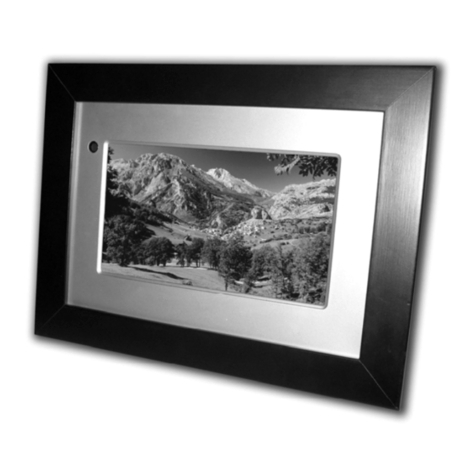
Sandstrom S7iDPF10 User manual

Instruction Manual
7” Interchangeable Digital Photo Frame
S7iDPF10


Contents
Unpacking the Photo Frame...............................................................................4
Product Overview................................................................................................5
Preparations.........................................................................................................6
Attaching the Stand ................................................................................................................ 6
Changing the Frame................................................................................................................ 7
Connecting to the Mains Power.......................................................................................... 8
Inserting a Memory Card / USB Flash Drive.................................................................... 9
Basic Operation ................................................................................................ 10
Display Image ..........................................................................................................................10
Auto Rotation...........................................................................................................................11
Settings ............................................................................................................. 12
Set Image Size..........................................................................................................................12
Set Slideshow Eect ..............................................................................................................13
Set Slideshow Interval ..........................................................................................................13
Set Split Slideshow.................................................................................................................13
Rotate..........................................................................................................................................14
Zoom File...................................................................................................................................14
Delete File..................................................................................................................................15
Reset setting.............................................................................................................................15
Language...................................................................................................................................16
Brightness / Contrast / Colour / Tint ................................................................................16
Time.............................................................................................................................................17
Troubleshooting ............................................................................................... 18
Specications.................................................................................................... 19
Safety Warnings................................................................................................ 20
Settings
Basic Operation
PreparationsIntroduction and
Product Overview Troubleshooting
and Specication
GB-4
Safety Warnings
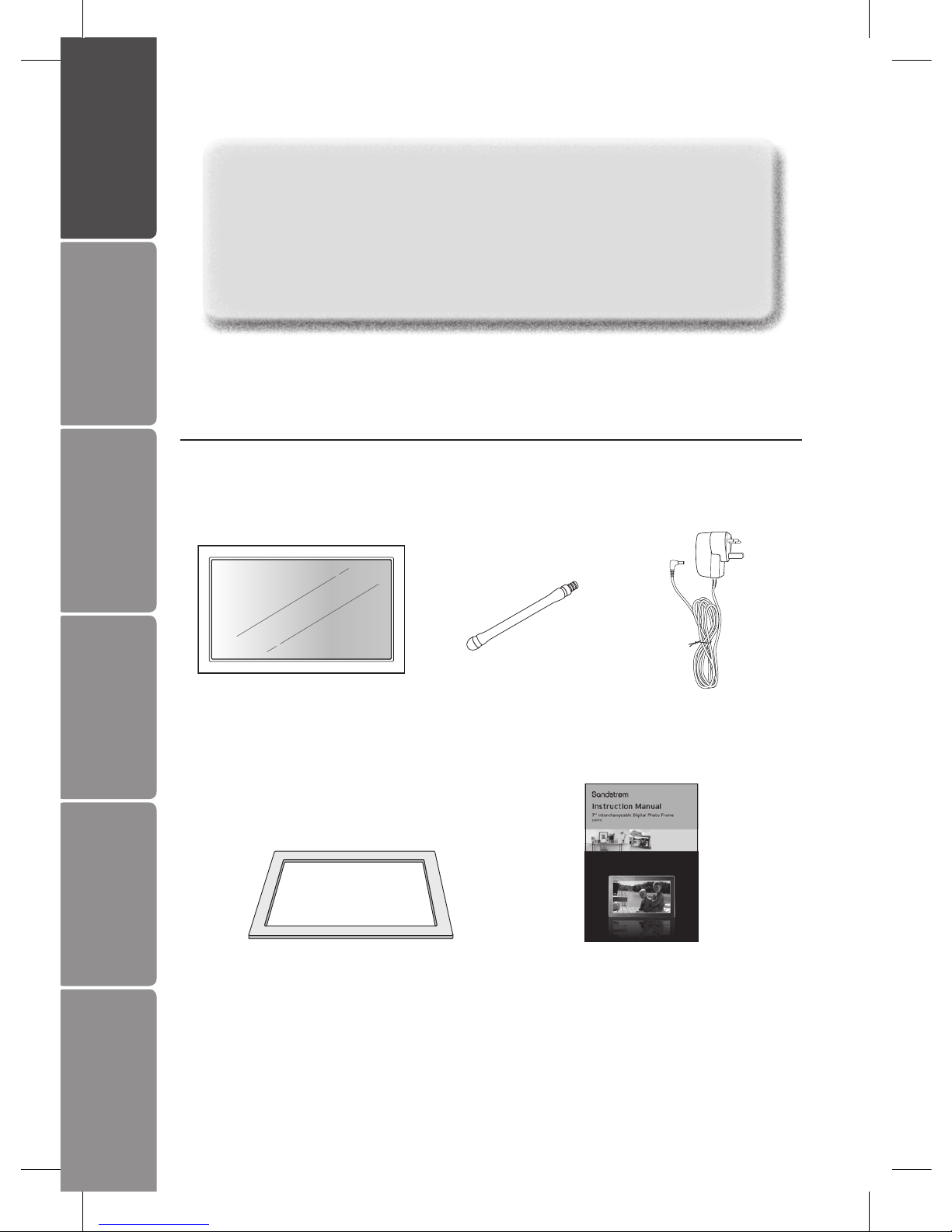
2. Photo Frame Stand
(P.N. : 61-DPF-001)
3. Mains Adapter
(P.N. : 31-0512#UK)
5. Instruction Manual
(P.N. : 71-DPF970A-002)
4. Photo Frame x 1
(P.N. : 40-DPF970A-001)
1. Digital Photo Frame
Unpacking the Photo Frame
Remove all packaging from the unit. Retain the packaging. If you dispose it please do
so according to local regulations.
Congratulations on the purchase of your new Sandstrøm Digital Photo Frame.
We recommend that you spend some time reading this instruction manual in order
that you fully understand all the operational features it oers. You will also nd
some hints and tips to help you resolve any issues.
Read all the safety instructions carefully before use and keep this instruction
manual for future reference.
If items are missing or damaged, please contact partmaster (UK only).
Tel: 0844 800 3456 for assistance.
Settings Basic Operation Preparations Introduction and
Product Overview
Troubleshooting
and Specication
GB-5
Safety Warnings
SD/MMC/MS
DC 5V
UNSCREW
LCD Display
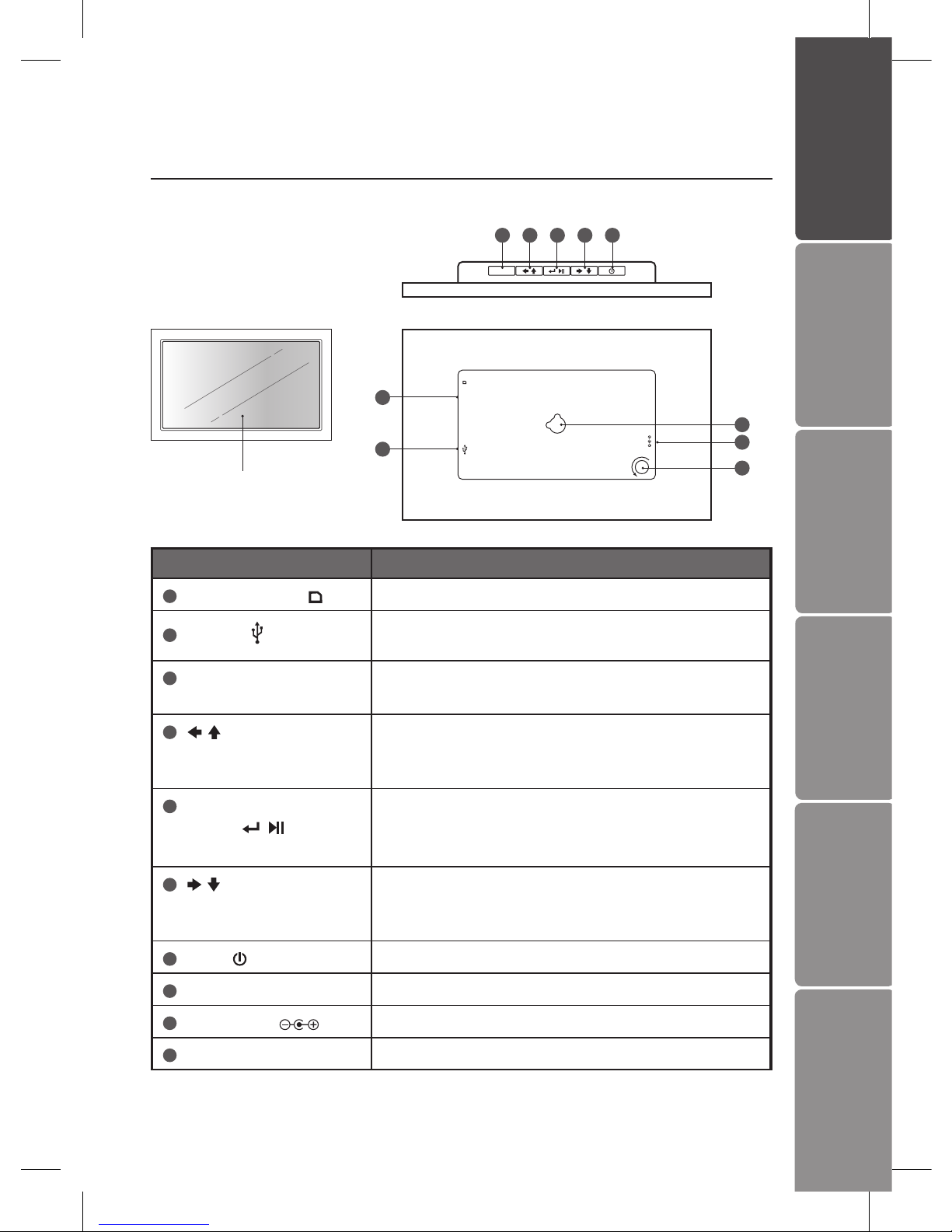
Product Overview
Main Unit
Name Description
1SD/MMC/MS slot • To accommodate SD, MMC, MS cards
2USB host • To accommodate USB devices such as portable
USB ash drives or ash memory card readers
3MENU / EXIT • To display setting menu
• To exit the menu or return to last display
4button • To move left or up in the menu / thumbnail mode
/ option settings
• To display the previous photo
5Enter / Play / Pause
button
• To conrm a setting or enter next display
• To slideshow the photos
• To pause the sildeshow
6button • To move right or down in the menu / thumbnail
mode / option settings
• To display the next photo
7Power button • Press and hold to turn the photo frame on / o
8Wall mounting hole • For mounting the photo frame on the wall
9DC-IN socket • To connect to the mains supply
10 Stand receptacle • To attach the supplied stand
MENU/EXIT
34567
1
9
8
2
10
GB-6
Settings
Basic Operation
PreparationsIntroduction and
Product Overview Troubleshooting
and Specication
Safety Warnings
SD/MMC/MS
DC 5V
UNSCREW
SD/MMC/MS
DC 5V
UNSCREW
SD/MMC/MS
DC 5V
UNSCREW
SD/MMC/MS
DC 5V
UNSCREW
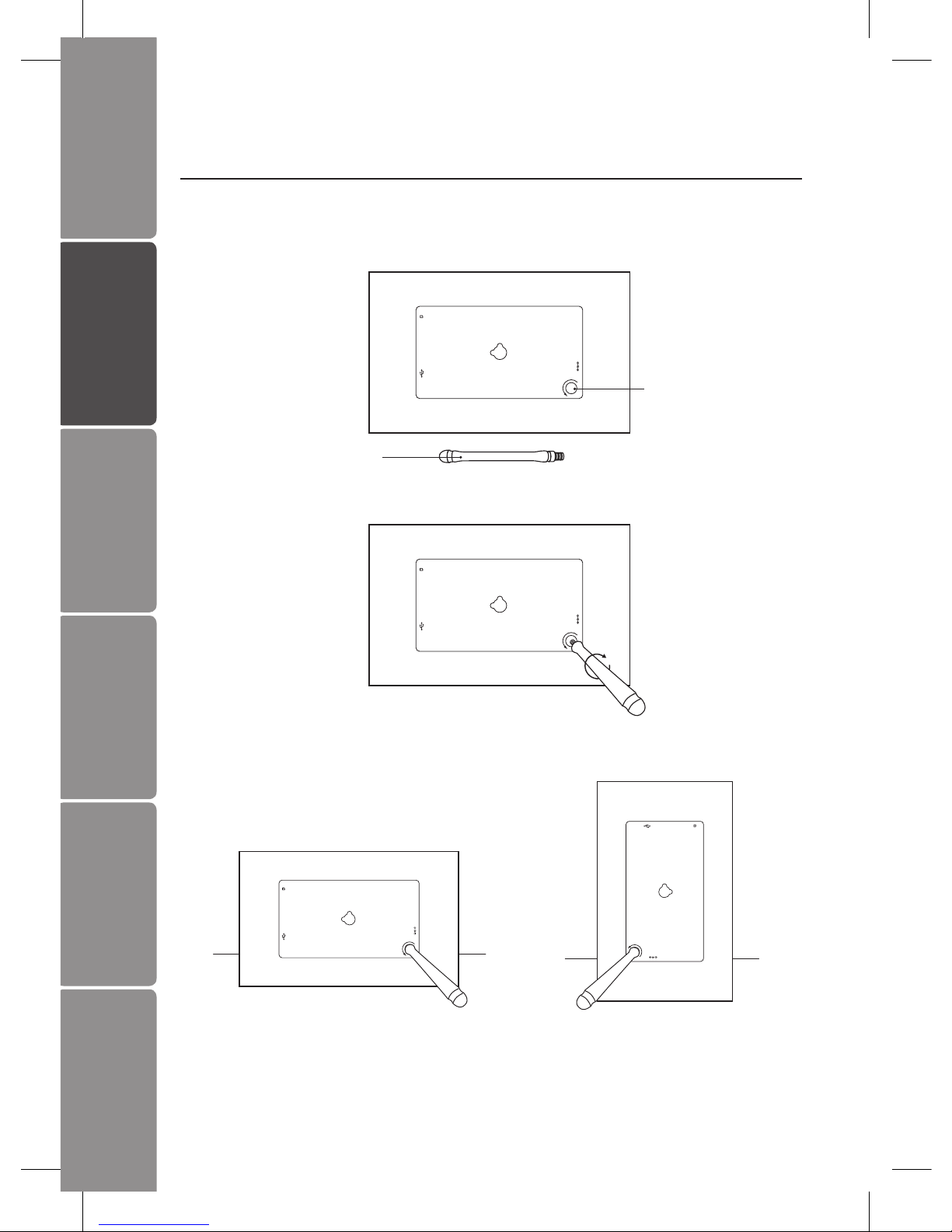
2. Screw in the stand into the stand receptacle.
3. Now the stand is xed, you can choose to display your photo frame in a landscape
or portrait position.
To take o the stand, unscrew it from its receptacle.
Preparations
Attaching the Stand
1. Take out the stand attached at the back of the photo frame.
Stand
Stand Receptacle
Landscape Position Portrait Position
GB-7
Settings Basic Operation Preparations Introduction and
Product Overview
Troubleshooting
and Specication
Safety Warnings
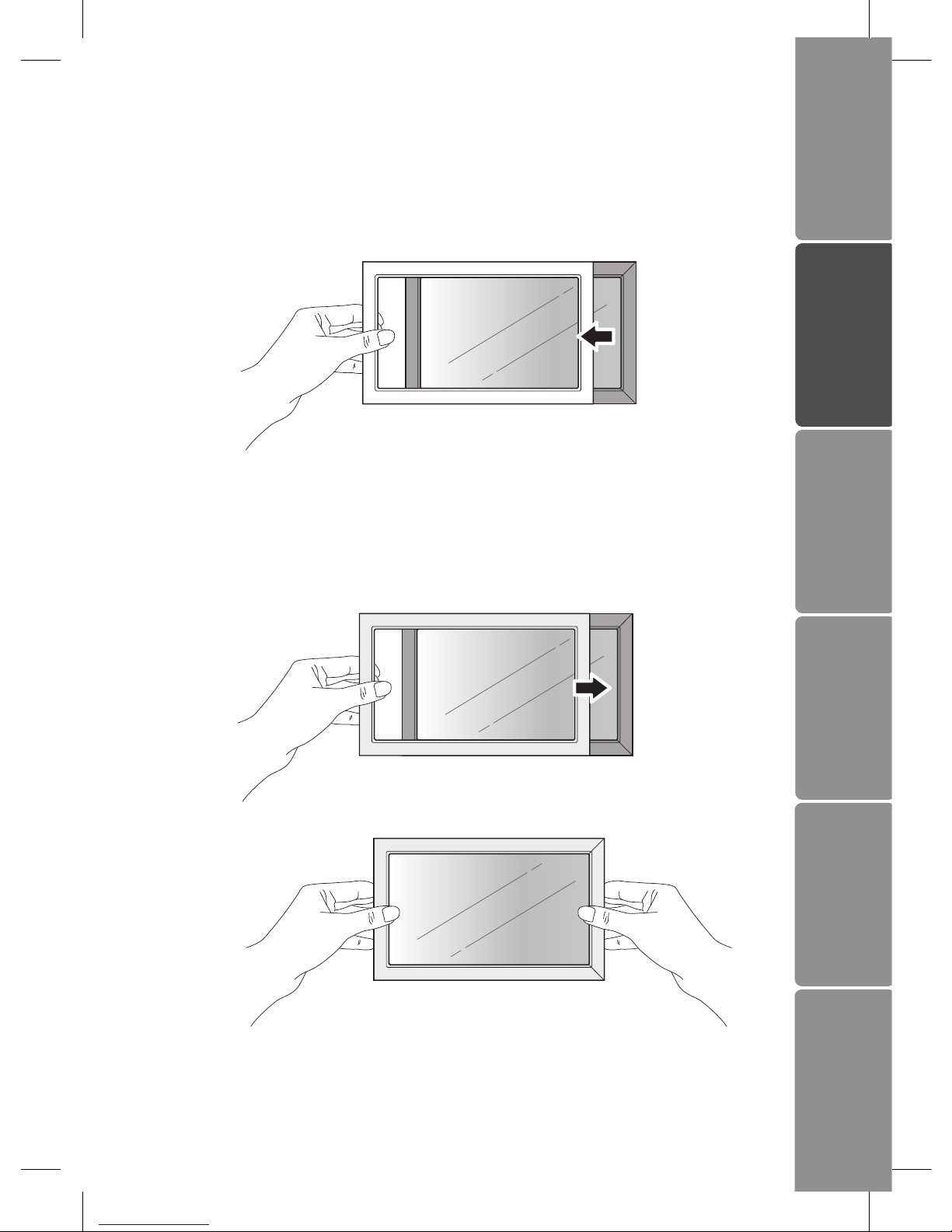
Changing the Frame
1. Removing the interchangeable frame
Release all the hooks on the edges of the interchangeable frame by pulling up the
interchangeable frame.
2. Installing the interchangeable frame
• Hold the interchangeable frame and place it on the photo frame.
• Press the interchangeable frame for all the hooks to be xed in place. Now the
interchangeable frame is installed.
GB-8
Settings
Basic Operation
PreparationsIntroduction and
Product Overview Troubleshooting
and Specication
Safety Warnings
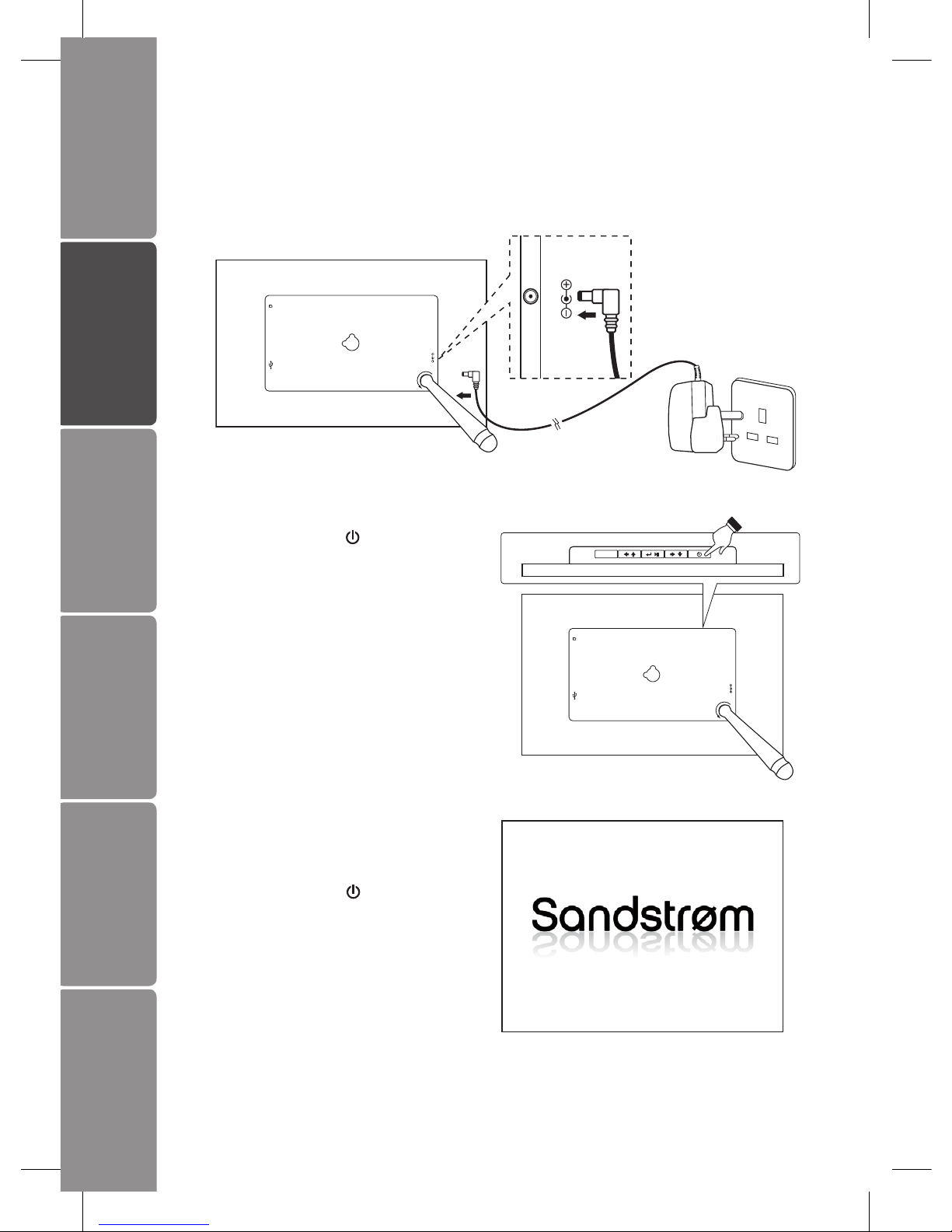
Connecting to the Mains Power
1. Connect the supplied mains adapter (5V DC, 1.2A) to the photo frame, and plug in
the mains adapter into the mains socket.
2. Press and hold the button on the
photo frame to turn it on.
SD/MMC/MS
DC 5V
UNSCREW
DC 5V
SD/MMC/MS
DC 5V
UNSCREW
MENU/EXIT
3. The opening screen will appear. The
display will automatically switch to
calendar in 3 seconds. To turn o
press and hold the button.
GB-9
Settings Basic Operation Preparations Introduction and
Product Overview
Troubleshooting
and Specication
Safety Warnings
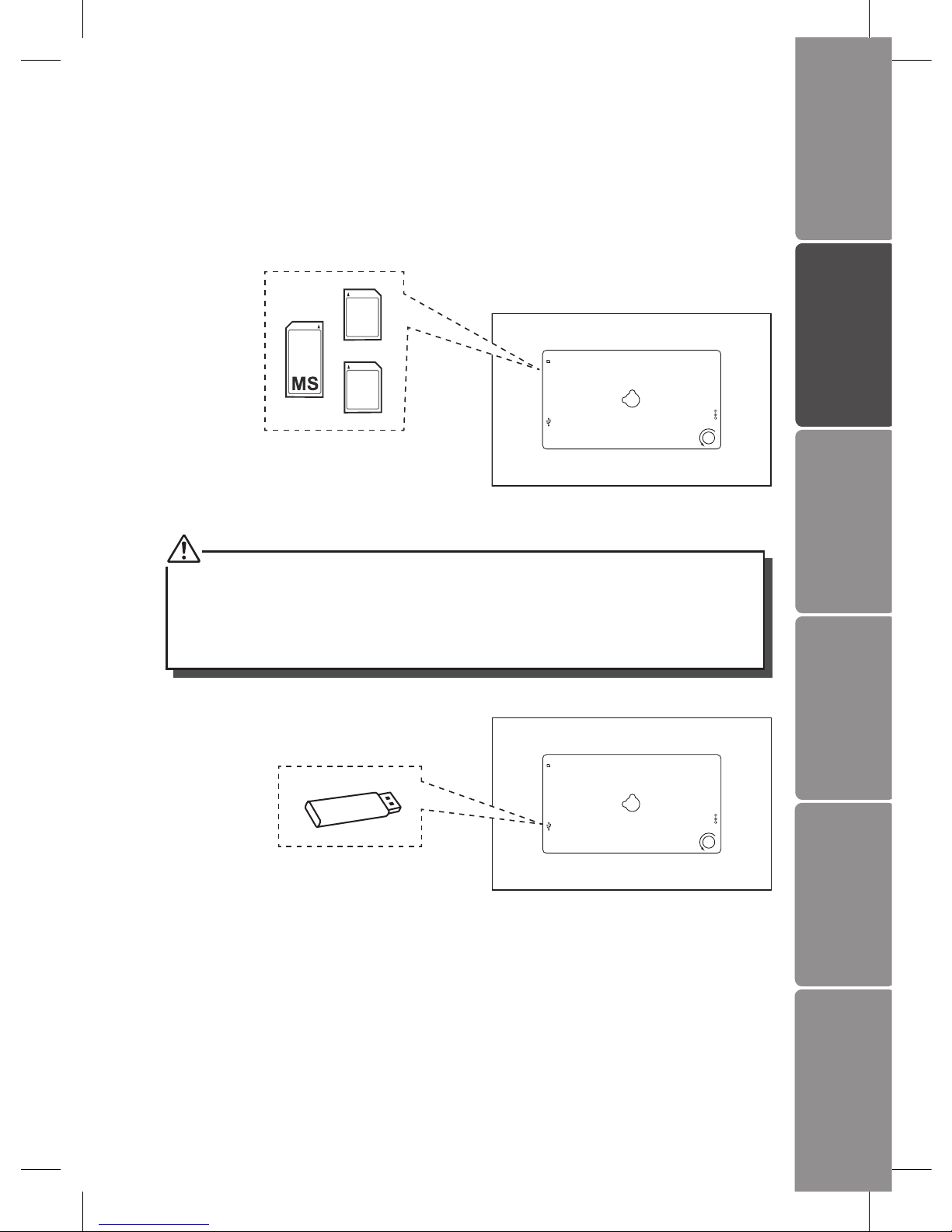
Inserting a Memory Card / USB Flash Drive
Insert a SD memory card, MMC memory card, or Memory Stick into the slot with its
label side facing forward.
SD/MMC/MS
DC 5V
UNSCREW
MMC
SD
• Insert your memory card into the
appropriate slot following the orientation
marked on the photo frame.
• This unit can play back only one memory card or a USB ash drive at a time.
• This unit does not support any external hard disk and MP3 player connection via the
USB 2.0 A-Type port.
• Some of the newer higher capacity cards may not be compatible with this frame.
• Do not insert a micro or mini memory card without an adapter.
SD/MMC/MS
DC 5V
UNSCREW
• Insert a USB drive into the USB port.
GB-10
Settings
Basic Operation
PreparationsIntroduction and
Product Overview Troubleshooting
and Specication
Safety Warnings
Basic Operation
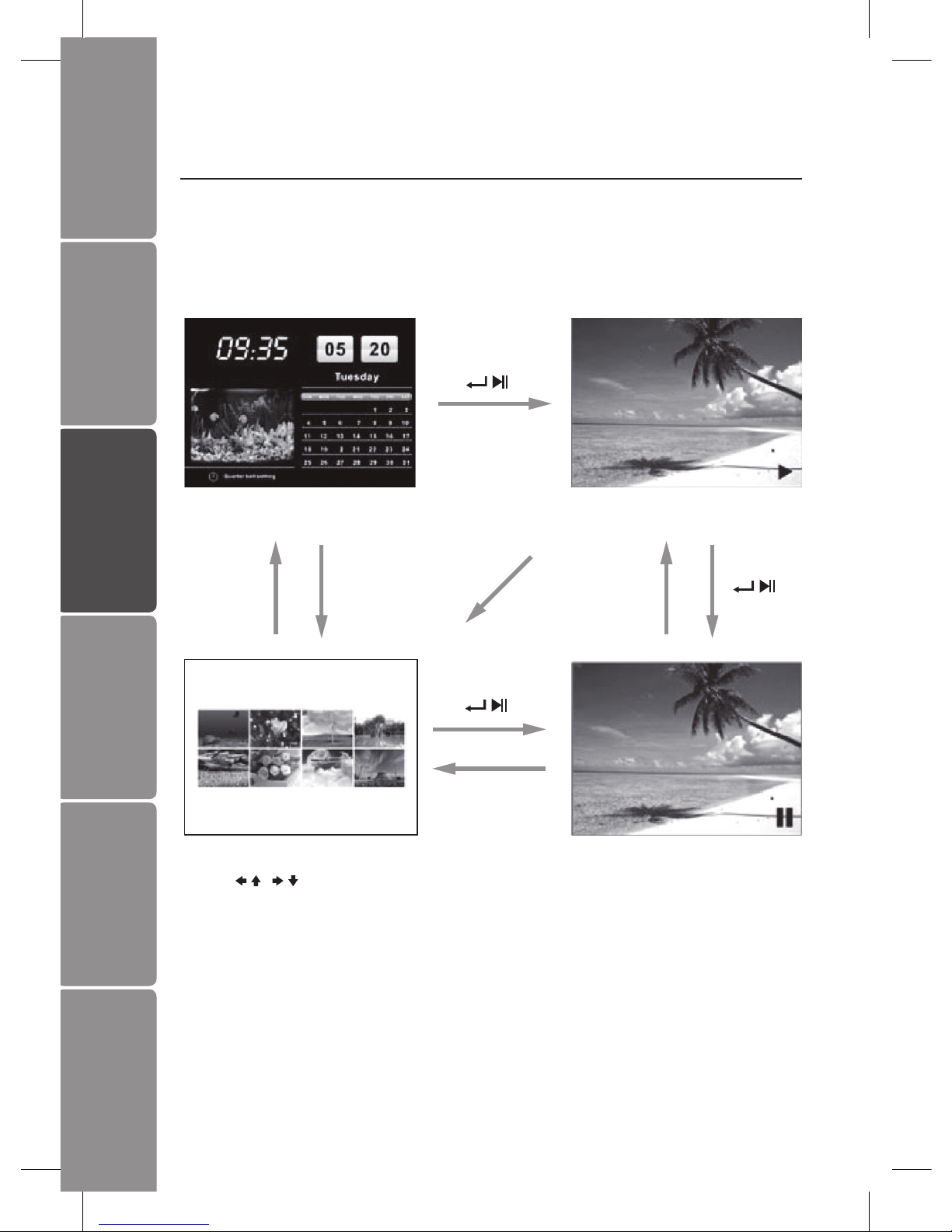
Display Image
After turning on the unit the opening screen will appear, and after 3 seconds
automatically switch to calendar display with slideshow image. If no memory card is
inserted, a still image in the internal memory is displayed.
Calendar Display
MENU/EXIT MENU/EXIT
MENU/EXIT
MENU/EXIT
Slideshow Image (default)
Index Thumbnails
(Hold / to scroll whole page)
Still Image
Table of contents
Other Sandstrom Digital Photo Frame manuals

Sandstrom
Sandstrom S7DPF10 User manual

Sandstrom
Sandstrom S10DPF10 User manual

Sandstrom
Sandstrom S08DPF10E User manual

Sandstrom
Sandstrom S07DPF11 User manual

Sandstrom
Sandstrom S7DPF10E User manual

Sandstrom
Sandstrom S08DPF10 User manual

Sandstrom
Sandstrom S08DPF11 User manual

Sandstrom
Sandstrom S3CRAD11E User manual

Sandstrom
Sandstrom S10DPF11 User manual

Sandstrom
Sandstrom S8KDPF10 User manual