Samsung Wireless i730 Windows Mobile 5.0 Update... User manual

Verizon Wireless i730 Windows Mobile 5.0 Update Utility
User's Guide
Version Issue: Version 1.0
Last Update: 05/19/2006

VERIZON WIRELESS SAMSUNG I730 WINDOWS MOBILE 5.0 UPDATE UTILITY USER’S GUIDE
Table of Contents
1. General Information:.................................................................................................................3
2. About This Guide: .....................................................................................................................4
3. Installation Instructions:...........................................................................................................4
4. Supported Operating Systems:.................................................................................................4
5. Supported ActiveSync Versions:..............................................................................................4
6. Requirements:............................................................................................................................4
7. Screen Navigation:.....................................................................................................................5
Fig 1-1 ActiveSync is “Not Connected”..........................................................................................5
Fig 1-3 Connection Settings for Active Sync 4.1............................................................................5
Fig 1-4 Establishing a Partnership Between Device and PC...........................................................5
Fig 1-5 ActiveSync is “Connected”.................................................................................................6
Fig 1-6 Launching The Update Utility.............................................................................................7
Fig 1-7 Legal Agreement Window..................................................................................................7
Fig 1-8 Verizon i730 Update Utility................................................................................................8
Fig 1-9 User Warning Message Box:...............................................................................................8
Fig 1-10 Installing PDA Image........................................................................................................9
Fig 1-11 Installing Phone Image......................................................................................................9
Fig 1-12 Successful Upgrade.........................................................................................................10
Fig 1-13 Closing the Update Utility...............................................................................................10
8. Troubleshooting Common Upgrade Problems:....................................................................11
9. ActiveSync Connectivity Problems:.......................................................................................12
Page 2 of 12

VERIZON WIRELESS SAMSUNG I730 WINDOWS MOBILE 5.0 UPDATE UTILITY USER’S GUIDE
1. General Information:
The Verizon Wireless Windows Mobile Update Utility will enable Verizon
Wireless customers to upgrade the operating system on the Samsung i730 Pocket PC
Phone to the latest versions of the Windows Mobile 5.0®operating system. The tool will
be available to customers to download from the Internet to a personal computer.
WARNING: This Microsoft Windows Mobile 5.0®upgrade is a major update for
your wireless device. During this process, you will completely erase all data and
third party applications on your device and update your handheld’s operating
system. It may be necessary to repeat this process multiple times in order to
successfully upgrade your device. If you experience any problems with the
upgrade process, please review these instructions carefully and attempt the
upgrade again. If you continue to have problems, please contact our Wireless
Data Technical Support team.
Microsoft Windows Mobile 5.0®is a new operating system for your handheld device.
Some third-party applications may not be compatible with your device after the upgrade.
If you experience any problems with your third-party applications, please contact the
developer for assistance. Verizon Wireless does not provide support for third-party
applications.
What’s New: The Samsung i730 with Microsoft Windows Mobile 5.0
Your Samsung i730 device will feature different capabilities and functionality once
upgraded to Microsoft Windows Mobile 5.0®.
¾Your Samsung i730 with Windows Mobile 5.0 will now feature:
•Verizon Wireless BroadbandAccess Connect
•Improved One-Hand operation
•Improved Outlook Mobile Look & Feel
•Persistent Storage for personal data and applications
•Pocket MSN
•Simultaneous CDMA Voice and Wi-Fi Data
•Improved Office Mobile Experience and Usability
•View and edit native file formats of Microsoft Excel and
Microsoft Word documents.
•Create graphs and charts in Excel Mobile.
•View charts, pictures and other formatting in Word Mobile.
•View presentations with transitions in PowerPoint Mobile.
•Enterprise Users: Microsoft Messaging and Security Feature Pack
•Microsoft Exchange Server 2003 with Service Pack 2 required
For complete details and information, please review the Samsung i730 Owner’s
Manual for Microsoft Windows Mobile 5.0®or visit the Verizon Wireless website.
Page 3 of 12

VERIZON WIRELESS SAMSUNG I730 WINDOWS MOBILE 5.0 UPDATE UTILITY USER’S GUIDE
2. About This Guide:
This User Guide contains step-by-step instructions for upgrading the i730
device using the Update Utility. This will guide you through:
¾Establishing a connection to Microsoft ActiveSync®with the Device
¾Launching the WinZip Self Extractor
¾Reviewing and Accepting the Verizon Wireless Software License
Agreement before Update
¾Viewing the Verizon Wireless Update Utility Tool
¾Viewing the Installation of PDA Image
¾Viewing the Installation of Phone Image
¾Verifying the Update
3. Installation Instructions:
¾Download the Update Utility to your PC (The file is approximately 32MB
and available from http://www.VerizonWireless.com/data.)
¾Cradle your Samsung i730 Device
¾Wait for ActiveSync to connect to your device
¾Launch the utility and respond to all the dialogs
¾The application will notify you when the upgrade is complete
¾Your device should now be upgraded and you can use ActiveSync on your
PC to restore your email and personal information.
4. Supported Operating Systems:
¾Windows 2000 Professional SP4
¾Windows XP Home SP2
¾Windows XP Professional SP2
5. Supported ActiveSync Versions:
¾4.1
6. Requirements:
¾Laptop computers should be plugged into AC power.
¾Computer should have:
oAt least 50MB of free disk space.
oMicrosoft ActiveSync (version 4.1) must be installed on your
computer
¾Back up email and personal information with Microsoft Outlook and
establish a partnership between the PC and Samsung i730. Ensure that
ActiveSync shows status as “Connected”
¾Samsung i730 should be connected to AC power.
¾Samsung i730 must be connected directly to the computer with the USB
cradle, not into a USB hub or peripheral (keyboard, monitor, etc.)
¾Samsung i730 must have a device version of S:i730.2.6V.YE05.15045 or
S:i730.2.6V.YH25.15045.
Page 4 of 12

VERIZON WIRELESS SAMSUNG I730 WINDOWS MOBILE 5.0 UPDATE UTILITY USER’S GUIDE
7. Screen Navigation:
Fig 1-1 ActiveSync is “Not Connected”
Step1: Launch “Microsoft ActiveSync” from Computer Start Menu
Step2: If Status Shows “Not Connected”, Click on File / Connection Settings
Fig 1-3 Connection Settings for Active Sync 4.1
Step 1: Ensure “Allow USB connection” is checked.
Step 2: Click on “OK” Button
Fig 1-4 Establishing a Partnership Between Device and PC
Note: If you have a partnership already configured, you can skip this step.
Page 5 of 12

VERIZON WIRELESS SAMSUNG I730 WINDOWS MOBILE 5.0 UPDATE UTILITY USER’S GUIDE
Step1: Click on Next Button
Step2: Wait for ActiveSync to connect to your device and show as “Connected”
Fig 1-5 ActiveSync is “Connected”
Page 6 of 12
VERIZON WIRELESS SAMSUNG I730 WINDOWS MOBILE 5.0 UPDATE UTILITY USER’S GUIDE
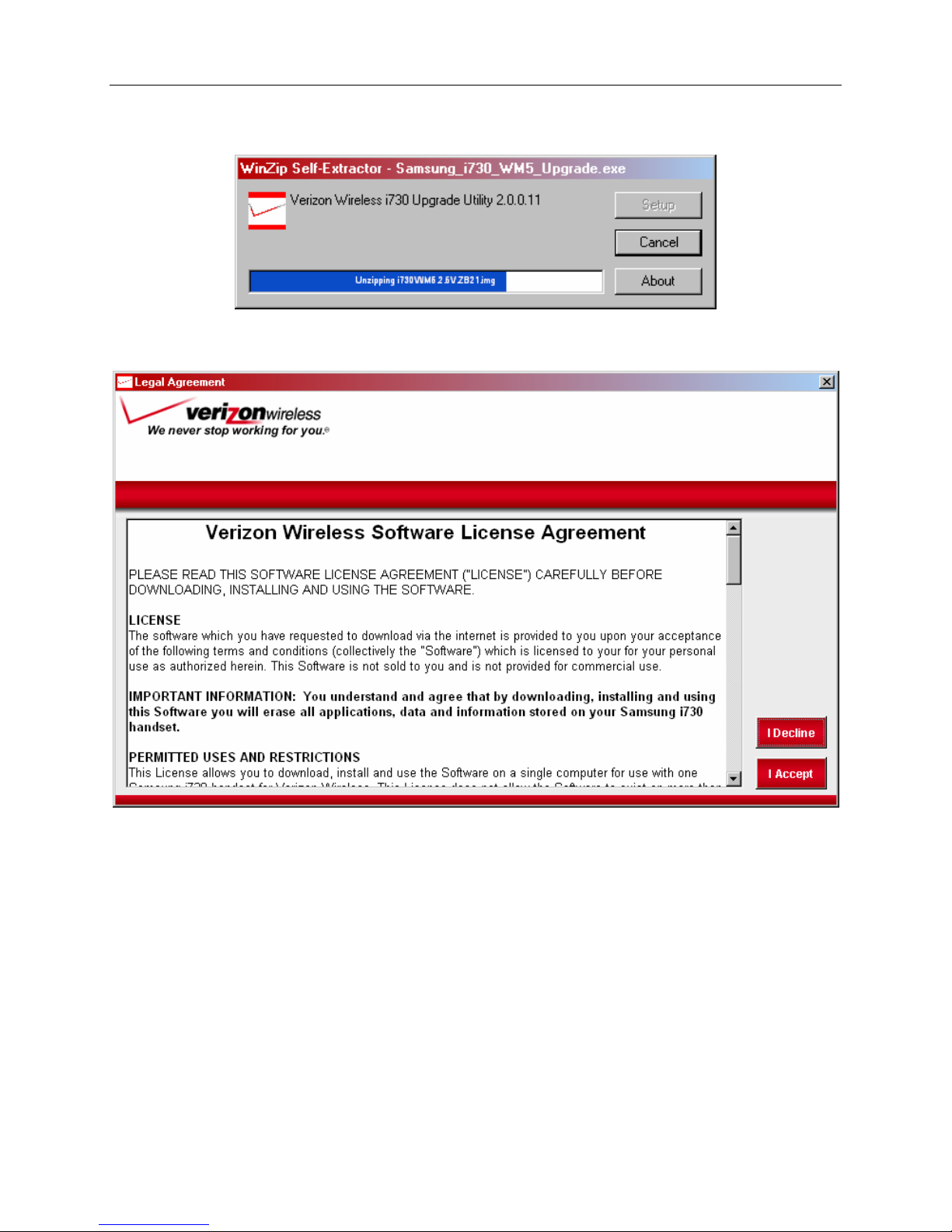
Fig 1-6 Launching The Update Utility
Step1: Double-click Samsung_i730_Maintenance_Release.exe
Fig 1-7 Legal Agreement Window
Step1: Read the Verizon Wireless Software License Agreement, and Click the
Accept Button if you agree to the terms and wish to continue.
Page 7 of 12

VERIZON WIRELESS SAMSUNG I730 WINDOWS MOBILE 5.0 UPDATE UTILITY USER’S GUIDE
Fig 1-8 Verizon i730 Update Utility
Step1: Click Upgrade Button
Fig 1-9 User Warning Message Box:
Step 1: Click “Yes” Button
Step 2: The Samsung i730 device will reset itself automatically and then the
utility starts updating your handheld automatically.
Page 8 of 12

VERIZON WIRELESS SAMSUNG I730 WINDOWS MOBILE 5.0 UPDATE UTILITY USER’S GUIDE
Fig 1-10 Installing PDA Image
Fig 1-11 Installing Phone Image
Page 9 of 12

VERIZON WIRELESS SAMSUNG I730 WINDOWS MOBILE 5.0 UPDATE UTILITY USER’S GUIDE
Fig 1-12 Successful Upgrade
Step1: Click “OK” Button
Fig 1-13 Closing the Update Utility
Step 1: Click “Done”
Page 10 of 12
Table of contents
Other Samsung Handheld manuals

Samsung
Samsung SENS Q1 User manual

Samsung
Samsung SPH-i700 Series User manual

Samsung
Samsung SGH-I780 User manual

Samsung
Samsung Q1B User manual

Samsung
Samsung NEXiO S160 User manual

Samsung
Samsung SGH-I780 User manual

Samsung
Samsung Ultra-Mobile NP-Q1-V002 User manual

Samsung
Samsung NP-Q1 User Manual (Vista) User manual

Samsung
Samsung SGH-i700 Series User manual

Samsung
Samsung GALAXY TAB SC-01C User manual