SalvationData Video Investigation Portable User manual

VIP (Video Investigation Portable)
User Manual
XLY Salvationdata Technology INC.
All Rights Reserved.
2018,Sept

Contents
1. Product Introduction....................................................................................................... 3
1.1. Recommended Configuration......................................................................... 4
1.2. Software Installation........................................................................................ 4
1.3. Software Activation......................................................................................... 7
2. System Setting and Function Introduction................................................................... 9
2.1. System Setting.................................................................................................. 9
2.2. Function Introduction...................................................................................... 9
3. Disk Extraction.............................................................................................................. 12
4. Network Extraction.......................................................................................................20
5. Disk Imaging..................................................................................................................23
6. Video Retrieval..............................................................................................................26
7. Ultra Player.................................................................................................................... 31
8. Toolbox...........................................................................................................................32
8.1. VIP Tools.........................................................................................................33
8.2. Other Tools......................................................................................................33
9. FAQ.................................................................................................................................35
10. Help & Support......................................................................................................37

1. Product Introduction
Figure 1.1 VIP Package with Laptop
VIP (Video Investigation Portable) is a forensically sound system for video extraction,
recovery and analysis from CCTV DVRs of video surveillance system during
investigations. Through VIP, it helps clarify the visual evidence and restore the truth
rapidly.
VIP can get access to the CCTV DVRs without password. And there are four main
features of VIP i.e video extraction, video play, video retrieval and analyze. With
these features, VIP could help you quickly extract video clips from video surveillance
system; automatically retrieve video evidence from abundant video clips; successfully
get access to encrypted or destroyed CCTV DVRs.

1.1. Recommended Configuration
To realize best usage experience, we recommend computer platforms with following
(or higher) configuration.
Desktop platform
Mobile platform
CPU
Intel Core I7-4790
Intel Core I5-6200U
Internal
Memory
16GB
8GB
(System) Drive
120GB SSD
Monitor
1920×1080(1080p)
Ports
USB 3.0 ×2 RJ-45 internet access ×1
OS
Win7/8/10 64 bit operating system
1.2. Software Installation
Before installation, please temporarily close all anti-virus software, and add VIP
into the white list.
Step 1: double click VIP Setup.exe to start the installation.

Figure 1.2 Installation Home Page
Step 2: Setup configurations
1) Click “Custom Install” to setup install path and case storage path.
2) Click “Start Install”
Note: System will automatically use default installation paths if you don’t
want to specify.
Figure 1.3 VIP Setup Wizard
Step 3: Setup MySQL database
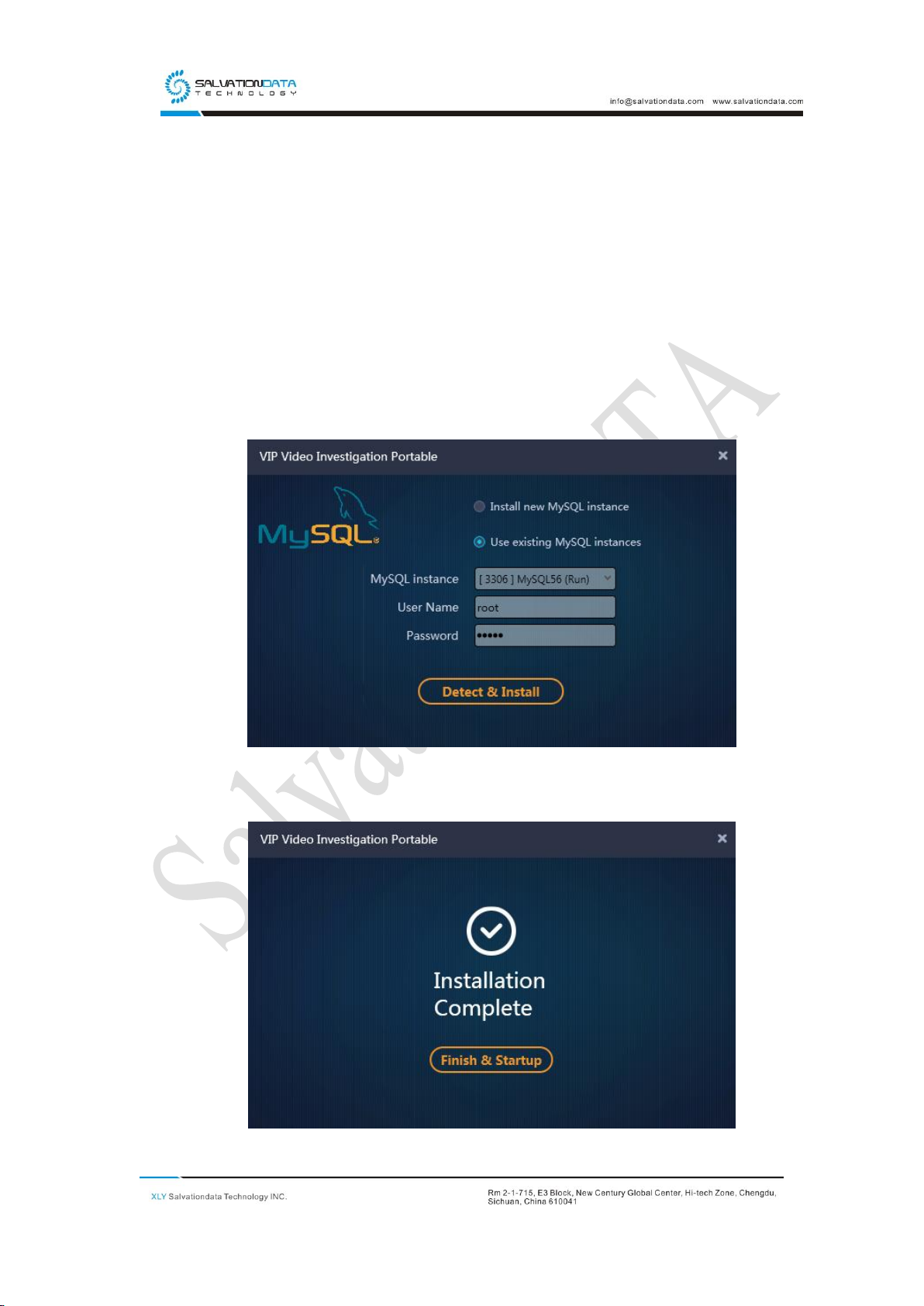
1) If you don’t have a MySQL database installed on your PC before, MySQL
installation is required. Please enter a password and VIP setup wizard will
automatically finish database setup.
2) If you have installed MySQL database before, choose a MySQL instance
from the list and enter the password.
Note: VIP default MySQL ID is “root”, password “mysql”, port “3306”
3) Click “Detect & Install”, wait for database installation and initialization.
Figure 1.4 Database Configurations

Figure 1.5 Installation Complete
1.3. Software Activation
Users must activate the software when they open the program for the first time.
The software can be activated by a license code or USB dongle. Please contact our
sales people for the software authorization. The activation procedure is as follows:
License CodeActivation
Step 1: Please contact us for your license code, and you will receive an e-mail notice
containing the license code.
Figure 2.3 Input Activation Code
Step 2: Start the software, an activation window will be shown, input your license
code and press Activate.
Note: The activation process requires internet connection.

Figure 2.4 Activation Successful
Invalid Verification Code
In case the activation failed, please check your e-mail and verify that your license
code is correct. Please contact us for support if you failed to activate the software
Figure 2.5 Invalid Verification Code
USB DongleActivation
Step 1: Insert your USB dongle to your PC
Step 2: Start the software, an activation window will be shown, and the license within
the USB dongle will be detected automatically.
Step 3: Press Activate.

2. System Setting and Function Introduction
2.1.System Setting
Figure 2.1 System Settings
Service Settings: Set storage path for VIP case data and temp files.
Extraction Settings: Set extraction settings including Hash type.
Other Settings: Set UI language, clear VIP data.
2.2.Function Introduction
VIP is an integration of the following DVR forensic function modules:
Disk Extraction, Network Extraction, Disk Imaging, Video Retrieval and Tool
Box.

Figure 2.2 System Home Page
➢Disk Extraction
Scan and extract deleted and damaged video files on disk.
➢Network Extraction
Connect surveillance host through the network, and extract video files from
surveillance host. Being restricted by cable and hardware of targeted surveillance
host, the extracting speed is 150M/min.
➢Disk Imaging
Imaging data from source disk into file to ensure integrity of data.
➢Ultra-Playing
Play files with different video format from different video recorder manufacturers
➢Video Retrieval
Play files with different video format from different video recorder manufacturers.
This manual suits for next models
1
Table of contents