
Saab 12 787 156 User manual

Saab 9-3 4D M03-
900 Installation instructions
SCdefault
MONTERINGSANVISNING ·INSTALLATION INSTRUCTIONS
MONTAGEANLEITUNG ·INSTRUCTIONS DE MONTAGE
SITdefault
Saab 9-3 4D M03-
Integrated telephone
Accessories Part No. Group Date Instruction Part No. Replaces
12 787 156 9:39-12 Oct 03 12 788 466
F930A145

2 12 788 466
Saab 9-3 4D M03-
2 Bolt (x4)
3 Antenna, Bluetooth
4 Fibre optic cable
5 Connector, optical cable, 2-pin
6 Cable tie (x2)
7 Cable tie (x2)
8 Plastic foam tape
In addition, the following items are required
(ordered separately)
·Telematics unit (no. 1)
·Wiring harness (certain cars)
·Antenna cable GPS/GSM (certain cars)
·Antenna cable GSM (certain cars)
·Control panel (certain cars)
·Steering wheel with switch (certain cars)
F930A146
5
1
2
3
7
4
6
8
12 788 466 3
Saab 9-3 4D M03-
Bus Communication
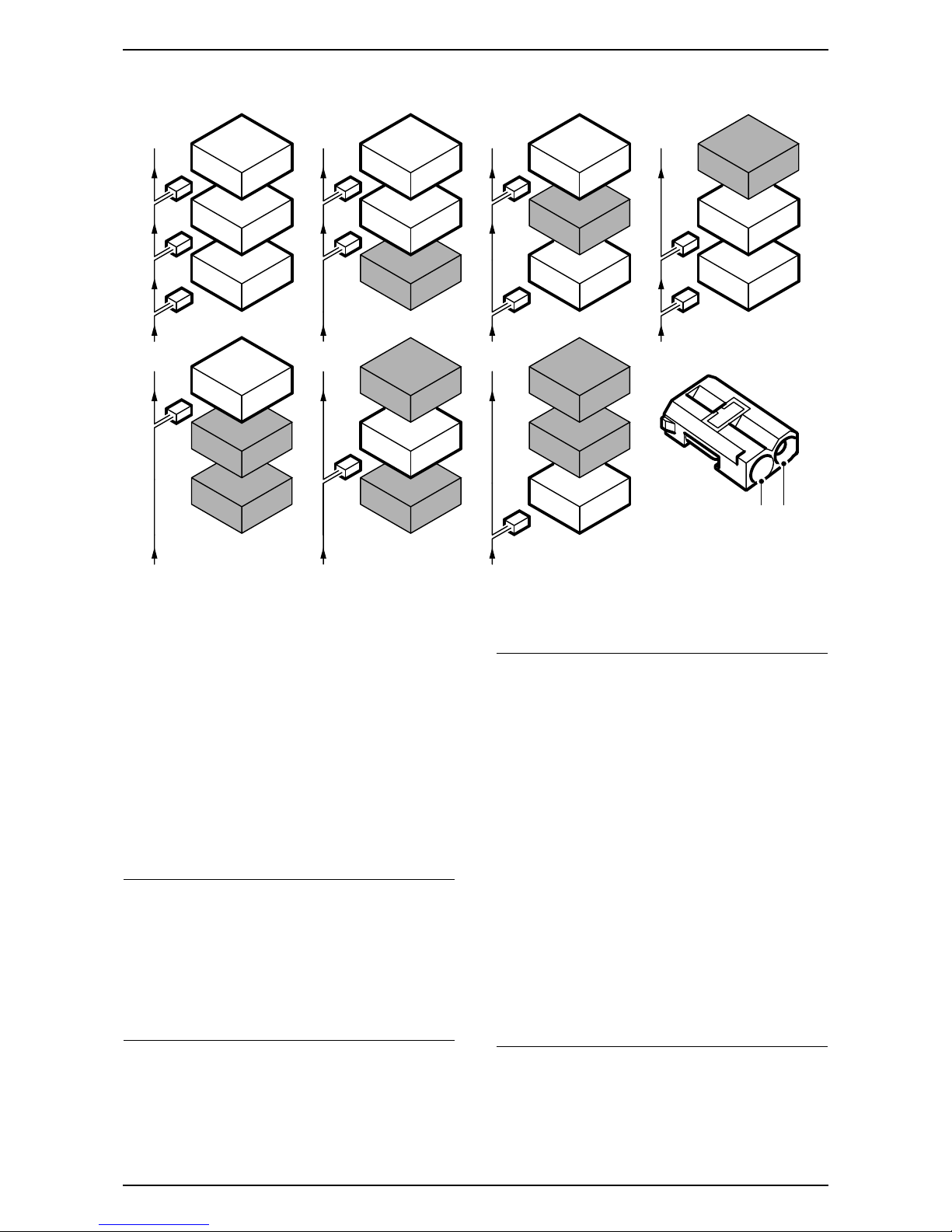
Many parts of the car's electrical system communi-
cate using a bus. There are three types of bus com-
munication: P-bus (Powertrain Bus), I-bus (Instru-
ment Bus) and O-bus (Optical bus). The audio
system communicates via the O-bus together with
the navigation system, the telephone system and
others.
The O-bus is optical and is a ring bus. Two fibre opti-
cal cables are connected to each control module on
the bus, one fibre optical cable for receiving and one
for sending. Messages received are converted by
each control module from a fibre optic signal to elec-
trical and then converted back to optical for sending.
The O-bus data transfer rate is 25 Mbit/s.
AMP1 is an amplifier below the left-hand front seat
AMP2 is an amplifier by the REC
CDC is a CD changer by the REC
DVD is a DVD player by the REC
When fitting new equipment to be connected to the
O-bus it is important that it is connected into the
correct side of the existing equipment.
Important
It is very important that everything connected to
the O-bus is connected in a specific order, see
illustration, and that the ring is closed the whole
time.
Connection in any other way than that described
in these fitting instructions may result in several of
the car's systems failing to work.
F930A100
1
2
CDC
1
2
DVD
1
2
AMP2
1
2
1
2
AMP2
CDC
1
2
1
2
AMP2
DVD
1
2
1
2DVD
CDC
1
2
1
2
1
2
AMP2
DVD
CDC
2 1
Important
Handle the fibre optic cables with care or the
signal may be distorted.
·It is very important that the two leads in the
connector are not confused with one another.
·Do not splice the cables.
·Do not bend the cable in a radius smaller than
25 mm.
·Do not expose the cable to temperatures
exceeding 85 °C.
·Keep the cable ends free from dirt and grime.
·Do not expose the cable to impact as this may
cause the transparent plastic to whiten, thereby
reducing the intensity of the light and causing
possible communication interruptions.
·The cable should not lie against any sharp
edges as this may cause increased signal
reduction.

4 12 788 466
Saab 9-3 4D M03-
1Cars without navigation: Open the boot lid.
2 Open the bonnet, remove the battery cover
and negative cable and take the key from the
ignition.
3Cars without navigation: Fold the luggage
compartment floor forwards.
4Cars without navigation: Remove the hatch in
the luggage compartment's left-hand side trim.
5Cars without navigation: Remove the clips for
the left-hand side trim and fold the trim away.
6 Open the rear doors.
7 Lower the rear seat backrest.
Important
In cars where the left-hand front seat is electrically
adjustable and there is no bracket at the REC, the
left-hand front seat must be positioned in its most
forward position and with the backrest folded
forwards.
F930A147
4
4
5
5

12 788 466 5
Saab 9-3 4D M03-
8 Detach the clips holding the parcel shelf trim.
9 Pull the parcel shelf trim straight out.
10 Remove the cover plate from each respective
C-pillar trim. Use 82 93 474 Removal tool.
11 Carefully remove the screw from each respective
C-pillar trim.
12 Remove the C-pillar trims by first pulling the
lower edge of each respective trim directly out-
wards from the C-pillar and then turning them,
so that the hook in the upper edge becomes
free.
13 Locate the antenna cable(s) at the right-hand
C-pillar.
Cars with single antenna cable which contin-
ues forward in the car: Continue with step 14.
Cars with single antenna cable with violet
connector and where the antenna cable con-
tinues to the centre of the parcel shelf.
No telematics unit: Continue with step 26.
Cars with double antenna cable where one
continues forward in the car and the other
continues to the centre of the parcel shelf.
Telematics unit fitted: Continue with step 14.
Cars with double antenna cable where one
continues forward in the car and the other
continues to the centre of the parcel shelf.
No telematics unit: Continue with step 14.
Cars with double antenna cable which con-
tinues to the centre of the parcel shelf.
Telematics unit fitted: Continue with step 31.
Cars with double antenna cable which
continues to the centre of the parcel shelf.
No telematics unit: Continue with step 26.
Important
The screw is fitted in an expander which is mounted
in the body. If the expander is pushed through the
hole it may be lost.
912
12
12
11 10
F930A298

6 12 788 466
Saab 9-3 4D M03-
14 Remove the high-level brake light cover by
carefully drawing the cover downwards and
backwards.
15 Remove the clip at the rear edge of the head-
lining by turning it 90°.
16 Remove the end pieces on the rear courtesy
handle. Use 82 93 474 Removal tool and prise
outwards.
17 Draw the courtesy handle straight out.
18 Undo the ceiling trim from the weatherstrip by
the rear doors.
19 Carefully lower the roof at the rear edge so that
the antenna can be reached. The brake light
connector may have to be removed.
F930A148
16,17
15
14 19 18
12 788 466 7
Saab 9-3 4D M03-
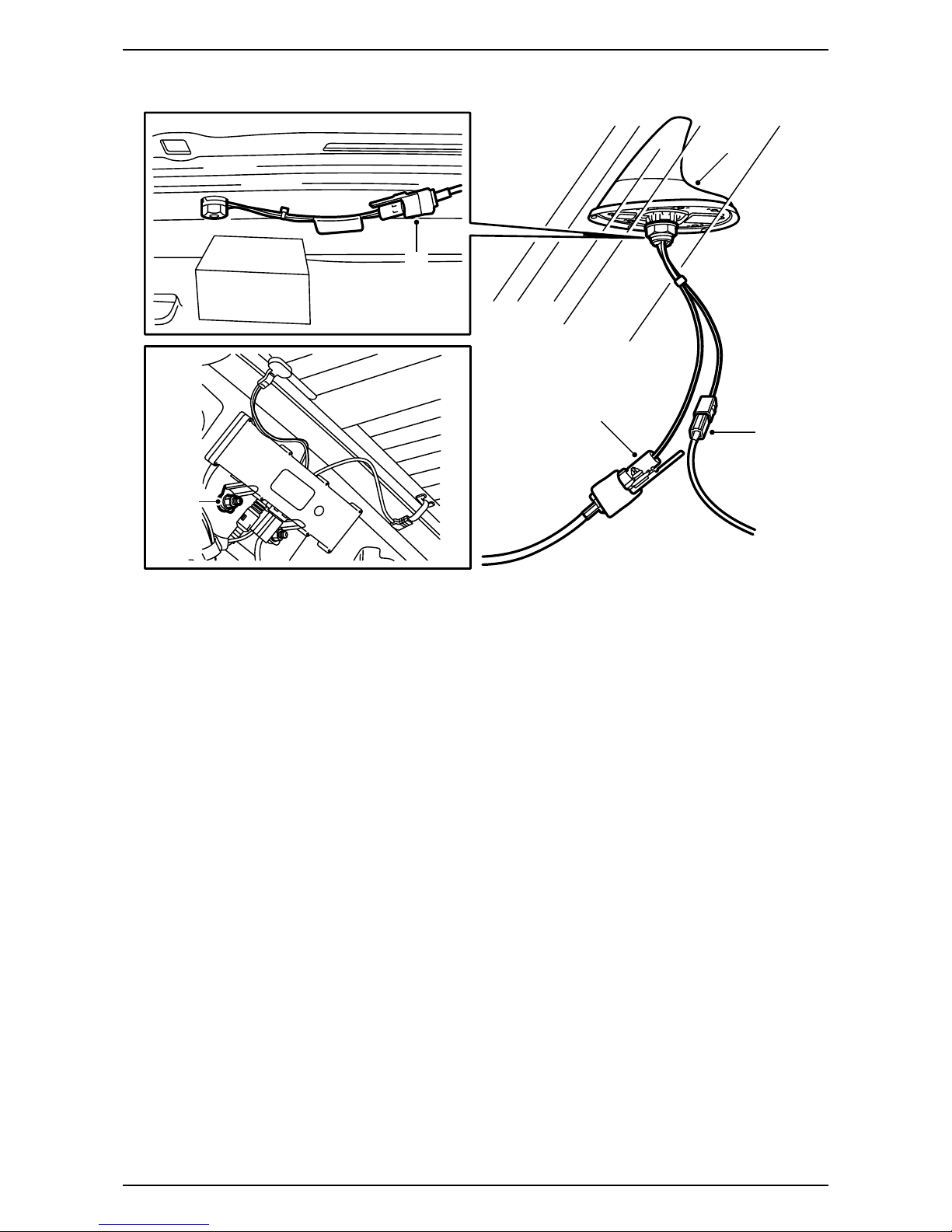
20 Remove the antenna cable from the roof
antenna, remove the antenna cable from the
holes in the rear edge of the roof and bend the
antenna cable down along the right-hand C-pillar.
The antenna cable may be secured using a clip
to the antenna amplifier's upper retaining screw,
if so, remove this clip.
21 Cars with double antenna cable where one
antenna cable continues forward in the car
and the other antenna cable continues to the
centre of the parcel shelf: Remove the
antenna cable which runs to the centre of the
parcel shelf, and if a telematics unit is fitted, the
antenna cable must also be detached from it.
22 Connect the kit's antenna cable and continue as
follows:
– Fit the clips on the cable in the holes in the
rear edge of the roof.
– Guide the antenna cable towards the right-
hand C-pillar and secure the kit's antenna
cable on the antenna amplifier's upper retain-
ing screw.
– Secure both antenna cables and excess
connectors with cable ties to the C-pillar.
– Fit the plastic foam tape to the body behind the
excess connectors in order to prevent rattling.
– Guide the antenna cable down from the
C-pillar to the centre of the parcel shelf.
F930A149
21
22
22
20
20,22

8 12 788 466
Saab 9-3 4D M03-
23 Fit the ceiling trim above the rear doors'
weatherstrip.
24 Press and fasten the rear courtesy handle
securely into the end pieces.
25 Plug the connector into the upper brake light
(if it has been removed), fit the cover and press
in the headlining clip.
Cars without navigation: Continue with step 26.
Cars with navigation: Continue with step 31.
F930A150
24
25
24
23
25

12 788 466 9
Saab 9-3 4D M03-
26 Remove the mid-range speakers from the
parcel shelf and detach the connectors from the
speakers.
27 Remove the left-hand bass speaker or the
left-hand cover.
28 Remove the wiring harness from the parcel shelf
and remove the connection in the REC.
29 Fit the new wiring harness above the parcel
shelf and connect it.
Position the connector with the two fibre optic
cables next to the REC without attaching it.
30 Connect and fit the speakers and any cover.
Important
If the car has treble speakers the connector must
be separated so that the wiring harness between
the treble speakers and the mid-range speakers is
still connected to the speakers.
F930A151
28,29
29
26,30
27,30 26,30
Important
Handle the fibre optic cables with care or the
signal may be distorted.
·Do not bend the cable in a radius smaller than
25 mm.
·Do not expose the cable to impact as this may
cause the transparent plastic to whiten,
thereby reducing the intensity of the light and
causing possible communication interruptions.
·The cable should not lie against any sharp
edges as this may cause increased signal
reduction.
Important
If the car has no bass speakers then the connectors
must be fitted on the underside of the speaker
covers.

10 12 788 466
Saab 9-3 4D M03-
31 Cars with navigation: Remove the connector
from the telematics unit and remove the tele-
matics unit.
32 Place the kit's telematics unit on the parcel shelf
and connect the wiring harness and antenna
cables. Connect the bluetooth antenna.
33 Fit the telematics unit and screw it into the parcel
shelf.
Tightening torque 8 Nm (6 lbf ft)
34 Secure the wiring harness and antenna cables
to the cable clamps on the parcel shelf.
Important
Be careful with the bluetooth antenna as it is very
easily damaged.
F930A299
32
32
32
34
3333
34 34 34
Table of contents
Other Saab Telephone manuals








