
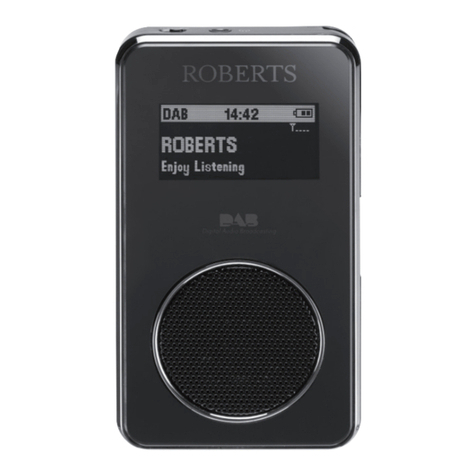
Roberts Rambler User manual

DAB / DAB+ / FM RDS digital portable radio
Please read this manual before use
ROBERTS

Controls........................................................................... 2-3
Battery operation.................................................................4
Using the AC adaptor..........................................................5
Operating your radio - DAB.................................................6
Selecting a station - DAB.....................................................7
Secondary services - DAB...................................................7
Display options - DAB...................................................... 8-9
Finding new stations - DAB.................................................9
Manual tuning - DAB .........................................................10
Dynamic range control - DAB............................................11
Prune stations - DAB.........................................................12
Operating your radio - FM .................................................13
Manual tuning - FM............................................................14
Display options - FM..........................................................15
Scan sensitivity setting - FM..............................................16
Stereo/mono setting - FM..................................................17
Presetting stations.............................................................18
Recalling a preset station..................................................19
Setting alarm times...................................................... 20-22
Cancelling alarms..............................................................23
Contents
Snooze function.................................................................23
Disable alarms...................................................................24
Sleep function....................................................................25
Setting the clock manually........................................... 26-27
Automatically updating the clock.......................................28
Display backlight dimmer...................................................29
Eco power saving mode....................................................30
Software version................................................................31
Language function.............................................................32
System reset......................................................................33
Headphone socket.............................................................34
Auxiliary input socket.........................................................35
General..............................................................................36
Specifications ....................................................................37
Circuit features ..................................................................37
Guarantee..........................................................................38
1

2
Controls
1. Tuning / Select control
2. Loudspeaker
3. LCD display
4. Volume control
5. Headphone socket
6. On / Off / Sleep button
(Top)
5
7. Mode button
8. Auto Tune button
9. Dimmer button
10. Info / Menu / Alarm 1 button
11. Preset / Alarm 2 button
12. Auxiliary input socket
1
34
6 7 8 9 10 11 12
2

3
Controls
13. USB socket (in battery compartment, for service use only)
14. Battery compartment
15. Telescopic aerial
16. DC input socket
16
(Rear view)
DC In
15
1314

4
Battery operation
1. Remove the battery cover located underneath the unit by applying
pressure to the catch in the direction shown by the arrow and then
lifting off the cover.
2. InsertfourLR14(Csize)batteriesintothespacesinthecompartment.
Take care to ensure all batteries are inserted with the correct polarity
asshownnext to the batterycompartment.Replacethe battery cover.
3. Reduced power, distortion and a ‘stuttering’ sound are all signs that
the batteries may need replacing.
4. If the radio is not to be used for any extended period of time it is
recommended that the batteries are removed from the radio.
We would recommend for economy that the radio is used via the AC
adaptor whenever possible with battery operation for occasional use
only.
If long term battery powered use is required, we recommend using
the Eco power saving mode, as described on page 30. The use of the
Eco power saving mode will maximise battery life if only occasional
use is intended and where the radio is not connected to the mains at
other times.
IMPORTANT: The batteries should not be exposed to excessive heat
suchassunshine,fireorthelike.Afteruse,disposablebatteriesshould
if possible be taken to a suitable recycling centre. On no account
should batteries be disposed of by incineration.
1

Using the AC adaptor
1. Place your radio on a flat surface.
2. Plug the mains adaptor into the DC input socket located on the rear
of your radio (marked 'DC') ensuring that the plug is pushed fully into
the socket.
3. Plug the other end of the mains adaptor into a standard mains socket
outletandswitchonthewallsocket.Thedisplaywillshow'WELCOME'
for a few seconds and '00:00' will be shown on the display.
Whenever the adaptor is used the batteries are automatically
disconnected.
The AC adaptor should be disconnected from the mains supply and
from the radio when not in use.
IMPORTANT: The mains adaptor is used as the means of connecting the
radiotothemainssupply.Themainssocketusedfortheradiomustremain
accessible during normal use. In order to disconnect the radio from the
mains completely, the mains adaptor should be removed from the mains
socket outlet completely.
Use only the mains adaptor provided with the product, or a genuine
replacement provided by Roberts Radio. The use of alternative adaptors
may invalidate the guarantee.
DC In
5

6
Operating your radio - DAB
1. Carefully extend the telescopic aerial. The aerial should be fully
extended and positioned vertically for optimum reception.
2. Press and release the On/Off button to switch on your radio. After
each use the radio will remember the mode used and then switch on
in that mode the next time that it is used.
3. If this is the first time the radio is used a scan of the Band III DAB
channels will be carried out. This is known as 'Auto tune'. If the radio
has been used before the last used station will be selected.
4. During Auto tune each group of stations will be detected and the
station count will be updated.
5. When the Auto tune is completed the first station (in numeric-alpha
order0...9...A....Z)willbeselected.Thefirststationinthelistofstations
found will be played.
6. If no stations are found then 'OFFAIR' will be displayed and it may be
necessary to relocate your radio to a position giving better reception.
You should then carry out an auto tune to find stations as described
on page 9 (see Finding new stations on page 9).
• Your radio has an indicator on the display to indicate the strength
of the DAB radio signal being received.
Note:Whenfirst switched on, the radio willsetthevolumetoamoderately
high level, in case the broadcast is very quiet. After you have set the
volume, the radio will remember the setting that you have applied for the
next time that it is used.
2

7
Selecting a station - DAB
1. Press and release the On/Off button to switch on your radio.
2. Press and release the Mode button until the 'DAB' mode is selected.
3. Rotate the Tuning/Select control to step through the list of available
stations.
4. When the desired station name appears on the display press and
release the Tuning/Select control to select the station.The radio will
select the new station.
5. Adjust the Volume to the required setting.
Note:If afterselectingastationthe displayshows'OFFAIR' itmaybe
necessary to relocate your radio to a position giving better reception.
Secondary services - DAB
1. Certainradiostationshaveoneormoresecondaryservicesassociated
with them. If a station has a secondary service associated with it the
secondary service will then appear immediately after the primary
service as you rotate the Tuning/Select control clockwise.
2. Totunetothesecondaryservice,pressandreleasetheTuning/Select
control. Most secondary services do not broadcaset continually and
if the selected service is not available, the radio will re-tune to the
associated primary service.
3,4
2
1,2

8
Display options - DAB
Your radio has a range of display options when in DAB mode:-
1. Press and release the Info/Menu button to cycle through the various
options. All displays except the text display will revert to the clock
display after about 10 seconds.
a. Station name Displays the station name being
listened to.
b. Scrolling text Displays scrolling text messages such
as artist/track name, phone-in number,
etc.
c. Program type Displaystypeofstationbeinglistenedto
e.g. Pop, Classic, News, etc.
d. Signal strength Displaysthesignalstrength.Theminimum
signal marker ( ) shows the minimum
signal strength needed for good DAB
reception. The signal indicator chevrons
increaseordecreaseshowingthechanging
signalstrengthasyouadjustthetelescopic
aerial or your radio position.
e. Multiplex Name Displays name of multiplex to which the
current station belongs.
f. Frequency Displays the frequency for the currently
tuned DAB station.
b
c
d
a
e
f
1

9
Finding new stations - DAB
As time passes new stations may become available or you may have
moved to a different part of the country. In this case you may need to
cause your radio to scan for new stations.
1. Press and release the Auto Tune button. Your radio will perform a
scan of the Band III DAB channels. As new radio stations are found
the station counter on the right-hand side of the display will increase
and the radio stations will be added to the list stored in the radio.
Display options - DAB cont.
g. Bit rate Displaysthedigital bit rate for the currently
tuned DAB station.
h. Time Displays the current time.
i. Date Displays the current date.
g
h
i
1
Table of contents
Other Roberts Radio manuals

Roberts
Roberts Stream 205 User manual

Roberts
Roberts Vintage User manual

Roberts
Roberts Gemini 45 RD-45 User manual

Roberts
Roberts Sovereign User manual

Roberts
Roberts R701 User manual
Roberts
Roberts Sports DAB 3 User manual

Roberts
Roberts RD-15 User manual

Roberts
Roberts R9958 Manual

Roberts
Roberts RD-7 User manual

Roberts
Roberts Elise User manual

Roberts
Roberts R9940 User manual

Roberts
Roberts SOUND66 User manual

Roberts
Roberts Blutune 40 User manual

Roberts
Roberts Blutune 5 User manual

Roberts
Roberts RD-41 User manual

Roberts
Roberts RD-3 User manual

Roberts
Roberts R9994 User manual

Roberts
Roberts ecologic 2 User manual

Roberts
Roberts Gemini 59 RD-59 User manual

Roberts
Roberts SOUND RD-78 User manual





