
REI UHD816-EX230-K User manual

page 1
18Gbps 8 x 8 HDMI Matrix (70m)
with IR Matrix Function
USER MANUAL
Follow us on Youtube and
Facebook
www.orei.com
UHD816-EX230-K

page 02
Table of Contents
Thank you for purchasing this product. For optimum performance and safety, please
read these instructions carefully before connecting, operating or adjusting this product.
Please keep this manual for future reference.
page 02
Thank you for purchasing this product
This product contains sensitive electrical components that may be damaged by electri-
cal spikes, surges, electric shock, lightning strikes, etc. Use of surge protection systems is
highly recommended in order to protect and extend the service life of your equipment.
Surge protection device recommended
Introduction 04
Features 04
Package Contents 05
Specifications 05
Operation Controls and Functions 07
IR Remote 10
IR Cable Pin Assignment 11
IR Control System 12
EDID Management 13
Web GUI User Guide 15
RS-232 Control Command 23
Application Example 31

page 03
Registration Page
Please Activate your warranty by registering our product through the link below -
https://www.orei.com/pages/warranty-registration
Technical Support
Need Help?
Our experienced Technical Support Team is here for you to answer your questions,
give technical advice or help troubleshoot your project to get you installed on time
and on budget. Call, email or chat with us now.
OREI Live Technical Support Hours
US team (US/Canada/Mexico): Monday-Friday, 9 a.m. - 6 p.m. Central Time Support
Email - [email protected]om | Support Number - 877-290-5530
Or
Chat Live on www.orei.com
Send us an instant message now. Our Technical Support Team will respond momen-
tarily. Available during live support hours.

page 04
Introduction
The UHD816-EX230-K Matrix can connect up to 8 HDMI sources and output to 16
displays. It features eight HDMI outputs, and each HDMI output is mirrored to pro-
vide a CAT-Cable output which runs simultaneously. It supports transmission of video
with resolutions up to 4K@60Hz 4:4:4 and supports HD digital audio formats such as
LPCM 7.1CH, Dolby TrueHD, Dolby Digital Plus and DTS-HD Master Audio. The Matrix
can be used for multi-room connectivity, and the HDMI signals can be extended up to
230ft/70m via CAT-Cable outputs by connecting the included CAT Receivers. The Matrix
supports one-way IR matrix function. It can be controlled via front panel buttons, IR
remote, RS-232, LAN, and Web GUI.
1. HDMI 2.0b and HDCP 2.2/1.x compliant
2. Video resolution up to 4K@60Hz (YUV 4:4:4) on all HDMI & CAT ports
3. 8 HDMI inputs, 8 HDMI & CAT mirrored outputs
4. HDMI ports support 18Gbps lossless compressed video bandwidth
5. HDR, HDR10, HDR10+, Dolby Vision, HLG are supported
6. CAT output can extend the transmission distance up to 230ft/70m via a single CAT6 cable
7. HDMI audio pass-through up to 7.1CH HD audio (LPCM, Dolby TrueHD and DTS-HD
Master Audio)
8. Advanced EDID management and CEC control are supported
9. 12V PoC on all CAT ports
10. Supports one-way IR matrix function
11. Control via front panel buttons, IR remote, RS-232, LAN and Web GUI
Features

page 05
Package Contents
1. UHD816-EX230-K Matrix 1pcs
2. CAT Receiver 8pcs
3. IR Remote 1pcs
4. 12V/5A Power Supply 1pcs
5. RS-232 Serial Cable (1.5m, DP9 female head to 3 pin Phoenx connector) 1pcs
6. IR Blaster Cable (1.5m) 8pcs
7. IR Receiver Cable (1.5m) 9pcs
8. Machine Screw (KM3*6) 8pcs
9. Mounting Ear (Matrix and Receiver) 18pcs
10. User Manual 1pcs
Specications
Technical
HDMI Compliance HDMI 2.0b
HDCP Compliance HDCP 2.2 and HDCP 1.x
Video Bandwidth 18Gbps
Video Resolution Up to 4K@50/60Hz (4:4:4)
Color Depth
8-bit, 10-bit, 12-bit (1080p@60Hz)
8-bit (4K@60Hz YUV4:4:4)
8-bit, 10-bit, 12-bit (4K@60Hz YCbCr 4:2:2/4:2:0)
Color Space RGB 4:4:4, YCbCr 4:4:4/4:2:2/4:2:0
HDMI Audio Formats LPCM 2.0/2.1/5.1/6.1/7.1, Dolby Digital, Dolby TrueHD, Dolby Digital Plus
(DD+), DTS-ES, DTS HD Master, DTS HD-HRA, DTS-X
HDR formats HDR 10, HDR 10+, Dolby Vision, HLG
Transmission Distance 230ft/70m (via a single CAT6 cable)
ESD Protection Human body model —
±8kV (Air-gap discharge) & ±4kV (Contact discharge)

page 06
Specications
Connection
Matrix
Inputs: 8 × HDMI Type A [19-pin female]
Outputs: 8 × HDMI Type A [19-pin female]
8 × CAT port [RJ45]
Controls: 1 × TCP/IP [RJ45]
1 × RS-232 [3-pin phoenix connector]
8 × IR OUT [3.5mm Stereo Mini-jack]
1 × IR EXT [3.5mm Stereo Mini-jack]
CAT Receiver
Inputs: 1 × IR IN [3.5mm Stereo Mini-jack]
1 × CAT port [RJ45]
Output: 1 × HDMI Type A [19-pin female]
Control: 1 × SERVICE [Micro USB, Update port]
Mechanical
Housing Metal Enclosure
Silkscreen Color Black
Dimensions Matrix: 440mm (W) × 250mm (D) × 44.5mm (H)
Receiver: 61mm (W) × 88mm (D) × 18mm (H)
Weight Matrix: 3.2kg, Receiver: 155g
Power Consumption 50W (Max)
Power Supply
Input: AC 100-240V 50/60Hz
Output: DC 12V/5A
(US/EU standards, CE/FCC/UL certified)
Operating Temperature 32~104°F / 0~40°C
Storage Temperature -4~140°F / -20~60°C
Relative Humidity 20~90% RH (Non-condensing)
Resolution / Cable
length 4K60 - Feet / Meters 4K30 - Feet / Meters 1080P60 - Feet / Meters
HDMI IN / OUT 16ft / 5m 32ft / 10m 50ft / 15m
The use of “Premium High Speed HDMI” cable is highly recommended.
page 07
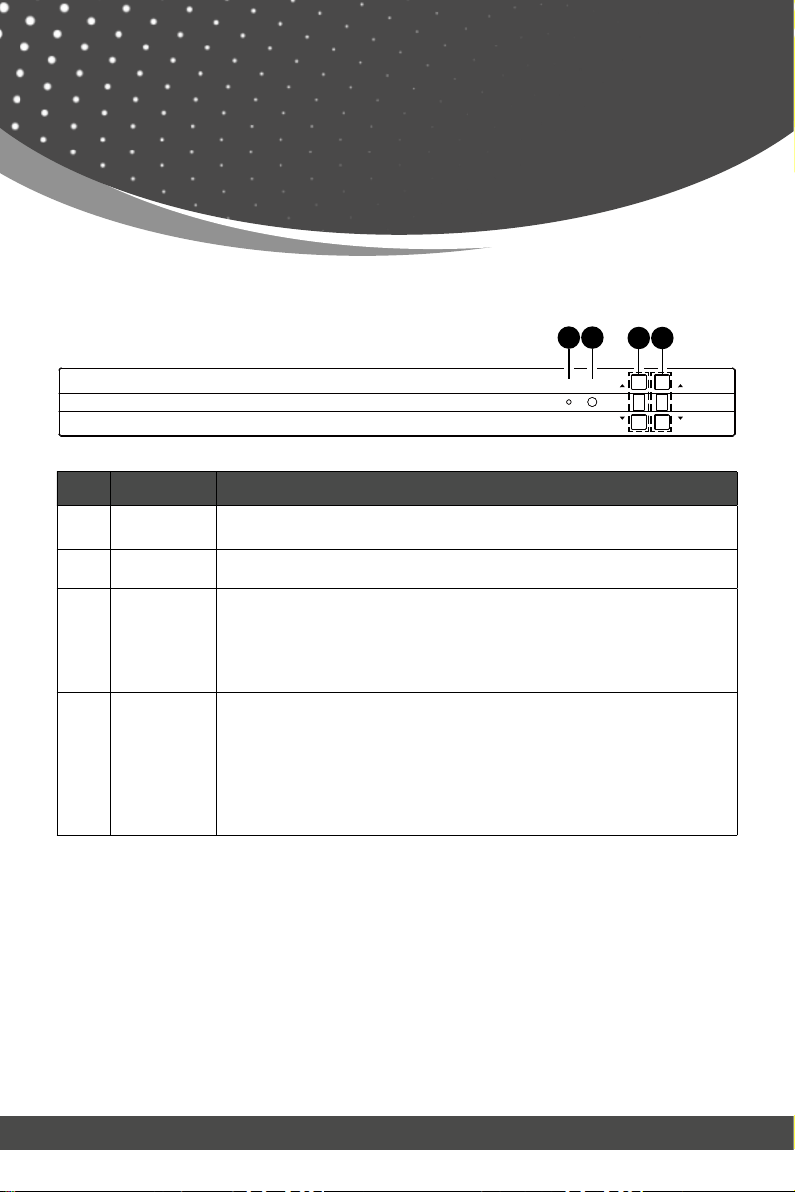
No. Name Function Description
1. Power LED The LED will light up green when the product is working normally, and
red when the product is on standby.
2. IR window IR receiver window. It only receives the IR remote signal from this Matrix.
3. INPUT ▲/▼
buttons
Short press the INPUT
▲
/
▼
button to circularly select HDMI signal input
channels 1~8. The input Nixie tube will display the corresponding input
channel number.
Long press the INPUT ▲button for 3 seconds; the Matrix enters the
standby mode. Short press the INPUT
▲
button to turn on the Matrix.
4. OUTPUT ▲/▼
buttons
Short press the OUTPUT▲/▼button to circularly select HDMI signal out-
put channesl 1~8 / A (A indicates all output channels). The output Nixie
tube will display the corresponding output channel number.
Long press the OUTPUT ▲and ▼button at the same time for 10 sec-
onds, the Nixie tube displays “FC” and flashes 5 seconds for 1HZ, then
the Matrix will restore to factory default setting (including IP address and
other configuration).
18Gbps HDMI 8x8 Matrix over CAT 70m
POWER
INPUT OUTPUT
INPUT OUTPUT
IR
1 2 3 4
Front Panel
Operation Controls
and Functions
Input and output switching operation:
First press the OUTPUT ▲/▼button to select HDMI signal output channel 1~8 with
the input Nixie tube showing the corresponding number, then press the INPUT ▲/▼
button to select HDMI signal input channel 1~8 with the output Nixie tube showing
the corresponding number. After two Nixie tubes flash 3 times, the input signal will be
switched to the output channel successfully, and two Nixie tubes will show “0A”. If you
select the output channel A, then select HDMI signal input channel 1~8, the input 1~8
source signal will be output to all display devices.

page 08
No. Name Function Description
1OUTPUT 1~8
ports
HDMI signal output ports, connected to HDMI display devices such
as TV or monitor with HDMI cable.
CAT mirrored output ports, connected to CAT Receivers with CAT cable.
2. HDMI IN 1~8
ports
HDMI signal input ports, connected to HDMI source device such as
DVD or PS4 with HDMI cable.
3. IR OUT 1~8
ports
Connect with IR blaster cable. The IR signal is from the “IR IN” port of
the CAT Receiver.
4. IR EXT Connect with IR receiver cable to be able to control the matrix if it is
placed in a closet or a rack.
5. TCP/IP port The link port for TCP/IP control. Connected to an active Ethernet link
with an RJ45 cable.
6. RS-232 RS-232 command control port, connect to a PC or control system
with a D-Sub 9-pin cable to control the Matrix.
7. Power switch Press the switch to turn on/off the Matrix.
8. DC 12V DC 12V power input port.
Rear Panel
Operation Controls
and Functions
OUTPUT 1
RJ45
HDMI
RJ45
HDMI OUTPUT 2
RJ45
HDMI
RJ45
HDMI OUTPUT 4
RJ45
HDMI
1 2 3 4 5 6 7 8
1 2 3 4 5 6 7 8
OUTPUT 5
RJ45
HDMI OUTPUT 6
RJ45
HDMI OUTPUT 7
RJ45
HDMI OUTPUT 8 DC 12V
RXTX
RS-232
TCP/IP
HDMI IN
IR OUT IR EXT
OUTPUT 3
47
8
3
21 1
56

page 09
CAT Receiver Panel
4
3
HDMI OUT DC 12VIR INSERVICECAT IN
12567
No. Name Function Description
1 HDMI OUT HDMI signal output port, connect to a HDMI display device such as TV
or Projector with an HDMI cable.
2. CAT IN Connect to the CAT OUTPUT port on the Matrix with a CAT cable.
3. Power Indicator
(Green) When the receiver is powered on, the power indicator will light up.
4.
Data signal
Indicator
(Orange)
When there is signal transmission between the Matrix and the receiver,
the indicator will light up.
5. SERVICE port Used for firmware update.
6. IR IN Connect with the IR Receiver cable. The IR signal will be sent to the IR
OUT port of the Matrix.
7. DC 12V
Plug DC 12V/2.5A power supply into the unit and connect the adapter
to an AC outlet.
(Note: The CAT receiver also can be powered by the Matrix via a CAT
cable. )
Operation Controls
and Functions
page 10
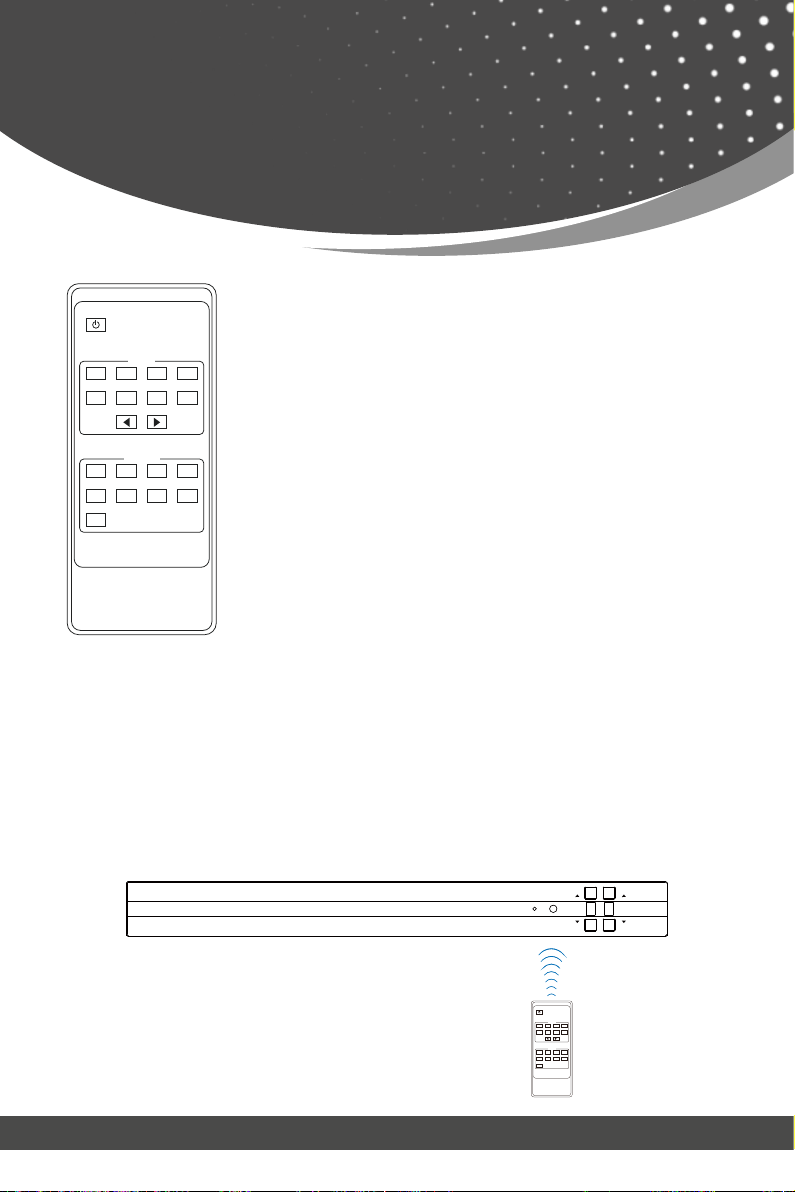
IR Remote
Power on or Standby:
Input 1/2/3/4/5/6/7/8:
◀ ▶:
Output 1/2/3/4/5/6/7/8:
ALL:
Power on the Matrix or set it to standby mode.
Press these buttons to select the input signal source.
Select all output channels simultaneously. For example, when
you press the “ALL” button and then press INPUT “1” button,
at this time the input “1” source will be output to all display
devices.
The first way: The IR window accepts the IR remote signal. When using the IR remote,
the furthest distance is 7 meters and the angle is ± 45°. The diagram is shown as below:
The Matrix supports selecting input and output channel by using the IR remote. There
are two ways to receive the IR remote signal.
Press these buttons to select the signal output channel.
Select the last or next signal input channel.
Operation Instruction: You need to press the Output button first and then press the
Input button to select the corresponding input source. For example, press Output-X (X
means the output button from 1 to 8, including “ALL” button), then press Input-Y (Y
means the input button from 1 to 8).
HDMI Matrix Remote
1 2 3 4
58
67
1 2 34
58
67
All
Output
Input
IR remote of the Matrix
1 2 3 4
5 6 7 8
1 2 3 4
8765
All
HDMI Matrix Remote
Input
Output
18Gbps HDMI 8x8 Matrix over CAT 70m
POWER
INPUT OUTPUT
INPUT OUTPUT
IR
Table of contents
Other REI Matrix Switcher manuals


