
Red Sea ReefDose 2 User manual
User Manual 2 & 4 Heads
ENG DE FR


User Manual 2 & 4 Heads
Accurate – Smart - Intuitive

Red Sea ReefDose®
4
Contents
Introduction.................................................................................5
Safety .........................................................................................6
Device guide...............................................................................8
Installation...............................................................................10
Introduction to ReefBeat App.................................................12
Connection and initial setup...................................................13
Scheduling................................................................................20
Device manager.......................................................................26
Troubleshooting........................................................................30
Spare Parts list..........................................................................32
Warranty....................................................................................33

Red Sea ReefDose®
5
ENG
Introduction
Congratulations on your purchase of Red Sea’s ReefDose®.
The ReefDose was designed to cater to the specific needs of reef aquariums and reef hobbyists. ReefDose
employs highly precise, direct-drive dosing heads driven by high quality customized gear-motors, capable
of keeping a consistent daily dosing schedule to the accuracy of a single drop. ReefDose has 3 easy-set
fully automated daily dosing programs, another automated schedule for individually planned doses, and on-
demand manual dosing that is available at all times, for each supplement.
ReefDose is part of Red Sea’s suite of smart devices that are operated via Wi-Fi by Red Sea’s ReefBeat®App,
which needs to be installed on a smart mobile device with internet connectivity.
Welcome to Red Sea’s smart reef-keeping.
Sincerely,
The Red Sea Team
Red Sea ReefDose®
6
Safety
PLEASE READ AND FOLLOW ALL SAFETY INSTRUCTIONS
THIS DEVICE IS INTENDED FOR HOUSEHOLD AND INDOOR USE ONLY.
DANGER: To avoid possible electric shock, special care should be taken when handling a wet aquarium. For
each of the following situations, do not attempt repairs yourself; return the appliance to an authorized
service facility for service or discard the appliance.
WARNING: To guard against injury, basic safety precautions should be observed, including the following:
Do not operate any appliance if it has a damaged cord or plug, if it is malfunctioning, or if it is dropped or
damaged in any manner.
To avoid the possibility of the appliance, plug or receptacle getting wet, position the aquarium stand and tank
to one side of a wall-mounted receptacle to prevent water from dripping onto the receptacle or plug. You
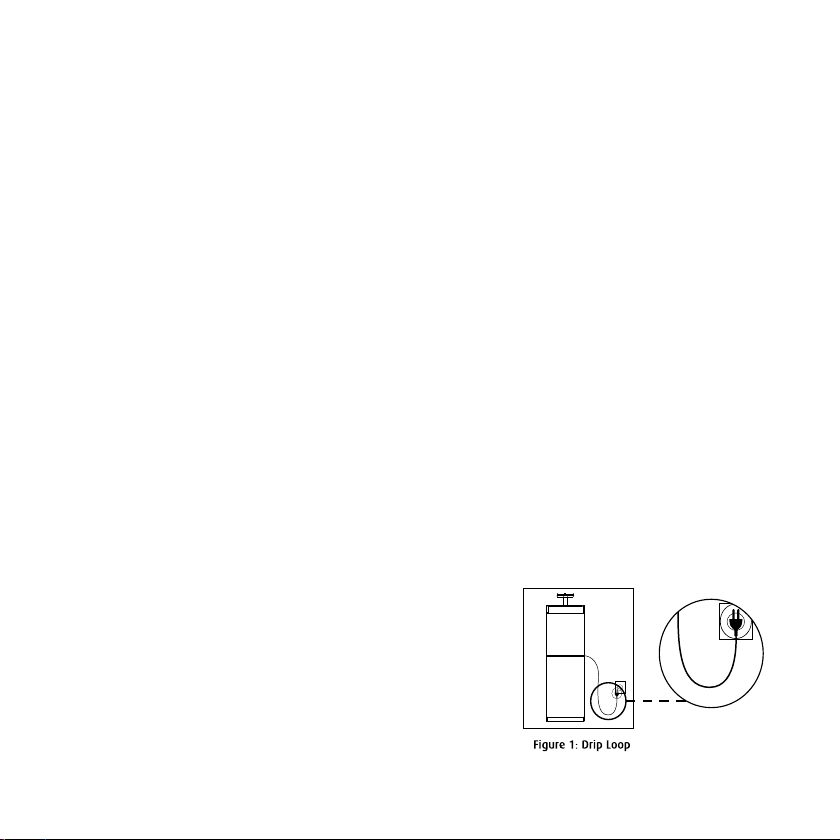
should create a "drip loop" (see Figure 1) for each cord connecting an aquarium appliance to a receptacle. The
"drip loop" is that part of the cord below the level of the receptacle, or the connector. Use an extension cord, if
necessary, to prevent water traveling along the cord and coming into contact with the receptacle. If the plug or
receptacle does get wet, DO NOT unplug the cord. Disconnect the fuse or circuit breaker that supplies power to
the appliance. Then unplug the device and examine for presence of water in the receptacle.
This appliance can be used by children aged from 8 years and above and persons with
reduced physical, sensory or mental capabilities or lack of experience and knowledge if they
have been given supervision or instruction concerning use of the appliance in a safe way and
understand the hazards involved. Children shall not play with the appliance. Cleaning and user maintenance
shall not be made by children without supervision.
The appliance is only to be used with the power supply unit
provided with the appliance.
To avoid injury, do not contact moving parts.
Always unplug an appliance from an outlet when not in use, before
putting on or taking off parts, and before cleaning. Never pull the
cord itself to remove the plug from the outlet. Grasp the plug and
pull to disconnect.
Red Sea ReefDose®
7
ENG
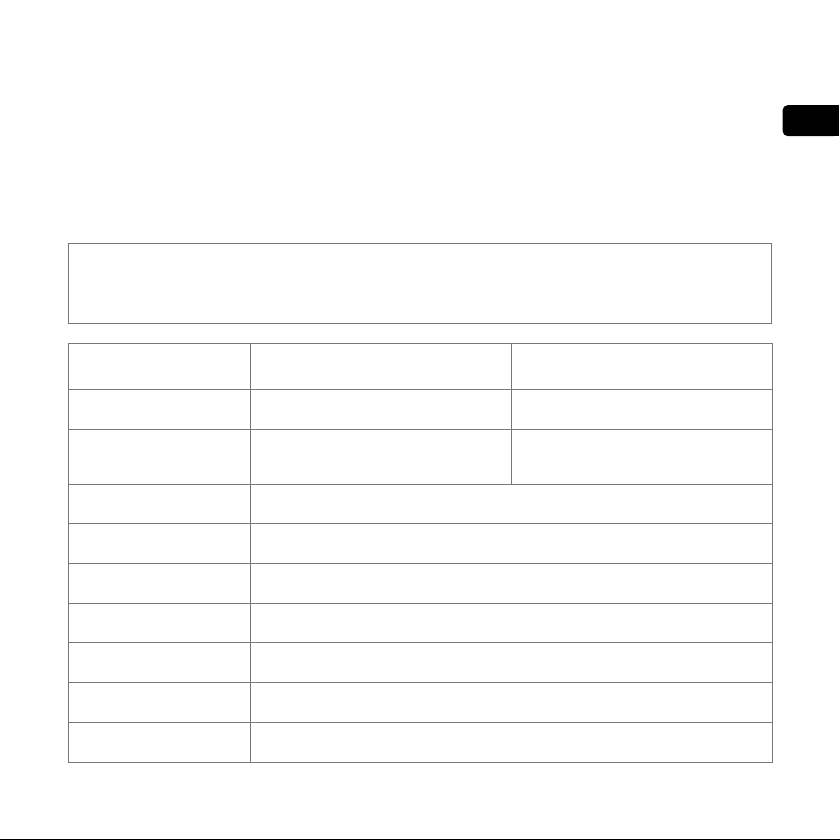
Specifications ReefDose®2 ReefDose®4
Number of dosing heads 2 4
Dimensions 13 x 10.5 x 8.5 cm
(5.1” x 4.1” x 3.4”)
22.5 x 10.5 x 8.5 cm
(8.9” x 4.1” x 3.4”)
Operating Temperature 5 to 45°C
Relative Humidity 15~85%RH
Supply voltage 100-240V 50/60Hz
Rating 1A, @10W Max.
Operating Voltage 12 Vdc
Operating Frequency 2402 - 2480 MHz
Max. Power 32.43 mW
Note: A cord rated for less amperes or watts than the appliance rating may overheat. Care should be
taken to arrange the cord so that it cannot be tripped over or pulled accidentally.
Do not use an appliance for anything other than its intended use.
The use of attachments not recommended or sold by the appliance manufacturer may cause unsafe conditions.
Do not install or store the appliance where it will be exposed to the weather or to temperatures below
freezing point.
Make sure an appliance mounted on a tank is securely installed before operating it.
Read and observe all the important notices on the appliance.
Red Sea ReefDose®
8
Device Guide
Power Supply
Only use the power supply provided with the product.
Plug the power supply into the wall outlet or suitable power center.
Connect the DC jack of the power supply to DC inlet on the back of the ReefDose. After powering on the
unit, the Power indicator LED of the ReefDose will switch on and the Setting Indicator LED will be off.
If the power indicator LED is not working, check that the power supply is properly inserted in the wall outlet
and it is switched on.
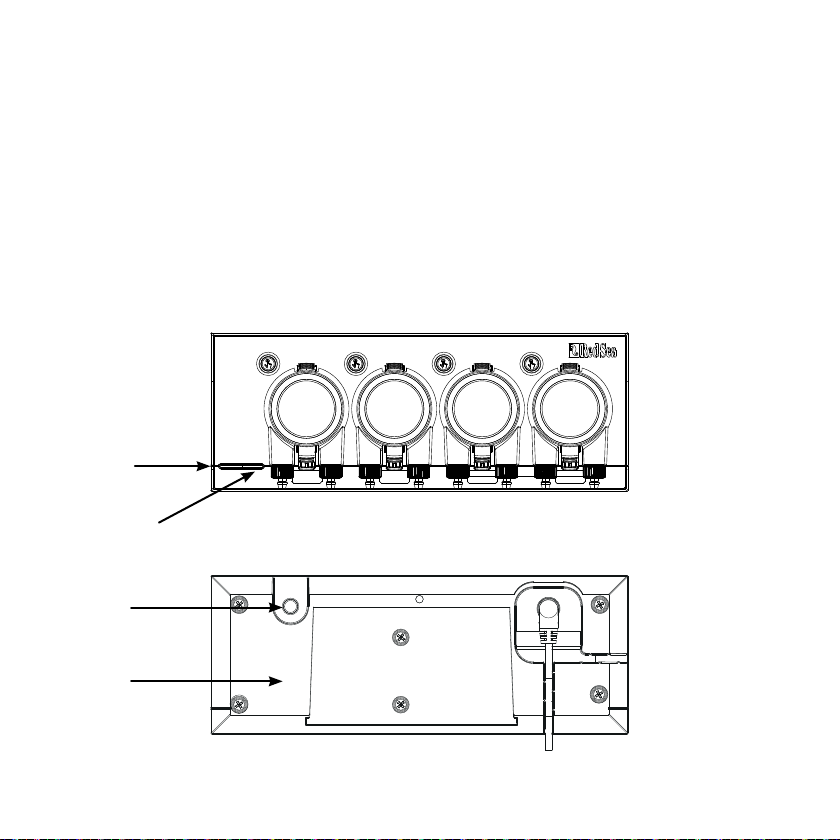
LED Indicators
Wi-Fi Settings
Buttons
Power
status LED
Wi-fi Status LED
AP name
Red Sea ReefDose®
9
ENG
Power Status Indicator LED
Red light DC power is available.
Wi-Fi Status Indicator LED
Solid Red light ReefDose is connected to the Home network.
Blinking Red light ReefDose is in Wi-Fi Access
Point (AP) mode (device can be discovered by Wi-Fi devices).
No Red light ReefDose Wi-Fi is off.
Double blink indicates change of status / end of process.
If indicator LED is off (ReefDose Wi-Fi is off):
Pressing button for 5 seconds (until double blink) activates Wi-Fi AP mode. The AP name is shown on the
back of the device.
If indicator LED is blinking (ReefDose Wi-Fi is in AP mode):
Pressing button for 5 seconds (until double blink) switches Wi-Fi off.
Clear Settings
Pressing the button for 15 seconds (until double blink) deletes all user settings. Complete the reset
process by disconnecting and reconnecting the DC power. (Note: before initiating "clear settings," delete
the specific ReefDose from ReefBeat via Device Manager.)
Wi-Fi Settings button and status LEDs
If indicator LED is on (ReefDose Wi-Fi is connected to a Wi-Fi network):
Pressing button for 5 seconds (until double blink) disconnects the ReefDose from the network and switches
it to Wi-Fi AP mode. (Note: before disconnecting a ReefDose from a network, delete the specific ReefDose
from ReefBeat via the Device Manager.)
Red Sea ReefDose®
10
Installation
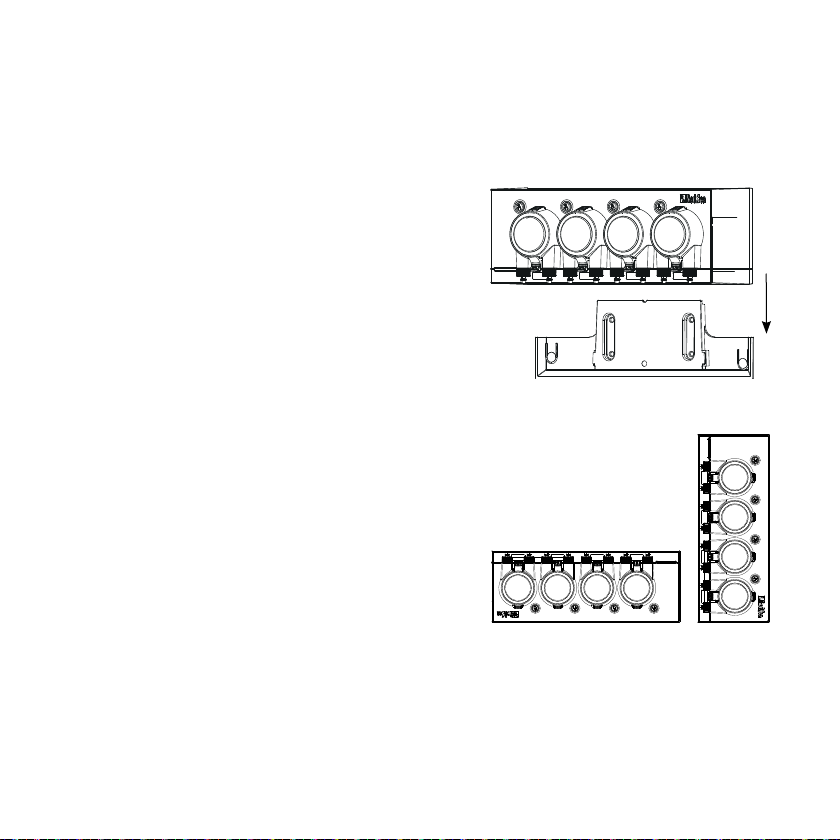
The ReefDose unit is splashproof and designed to work inside an aquarium cabinet.
It is not waterproof and therefore it is not advisable to mount it directly above open water.
The ReefDose can be mounted directly of any vertical surface
using the mounting bracket provided, which should be
securely screwed to the surface. Self-adhesive pads are not
recommended.
Alternatively, the ReefDose may also be placed directly on
any at surface such as a shelf, on either its bottom, top, back
or both sides (see gure 2) without any impediment to its
functions and operation. If placed on its bottom surface, make
sure that the dosing tubes are not restricted in any way.
Before on-boarding the ReefDose to your ReefBeat, the individual head priming buttons are active so that you
can test that the heads are working and install the supplement containers and prime them ready for calibration.
Once the ReefDose is on-boarded to the App, the priming buttons are deactivated by default to prevent accidental
supplementing. They can be activated as and when required from the ReefBeat App as described below.
This manual suits for next models
1
Table of contents
Languages:
Other Red Sea Water Pump manuals


Popular Water Pump manuals by other brands






Sykes AmeriPumps
Sykes AmeriPumps GP100M Operation and maintenance instructions

DUROMAX
DUROMAX XP WX Series user manual
BRINKMANN PUMPS
BRINKMANN PUMPS SBF550 operating instructions
Franklin Electric
Franklin Electric IPS Installation & operation manual

Xylem
Xylem e-1532 Series instruction manual

Milton Roy
Milton Roy PRIMEROYAL instruction manual