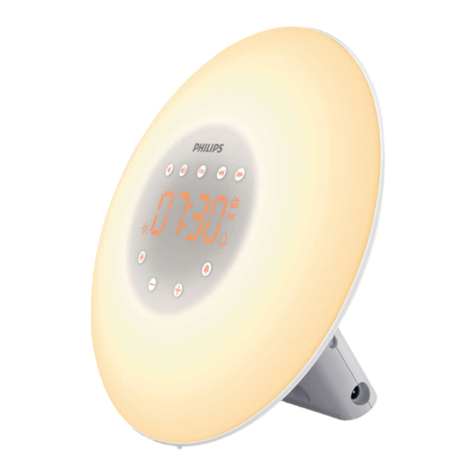
Reacher R3 User manual


For our valued customers:
We would like to thank you very much for your purchase
from Reacher. The utmost care has gone into the design and
manufacture of your R3. Please read all of these instructions
carefully and keep these in a safe place for future reference.
The R3 helps create perfect sleep environment. It can
soothe you with any one of its 12 soothing sounds and wake you
up with 6 nature sounds. It is also suitable for children,
adults, and senior citizens as it is easy to use and helpful for
getting a good night’s sleep and refresh you in the morning.
Instructional Video:
We made a instructional video on YouTube as below link and
QR code, just need to scan the code or enter the
below video link.
Link: https://youtu.be/p32T0DVegGQ

Technical Information
Item Size
weight
Power Requirements
Speaker Impedance
Display size
USB output
235g
58*96*85mm (H x W x D)
5 Volts, DC, 5W
71.6 X 39.3 mm
4.8ohm(RMS)
5V/1A
Features
Dual Alarm clock with 6 wake up sounds
White noise sound machine
30Levels Volume Control
0-100 Dimmer
Sleep timer
Snooze
Battery backup
USB charging port

Catalog
Quick Getting Start.....................................................4
Time Setting............................................................... 5
Alarm Setting............................................................. 6
1.Turn on/off the alarm.............................................. 6
2. Alarm set...............................................................7
3. Alarm volume set .................................................. 8
4.Stop the alarm ....................................................... 9
5.Snooze................................................................... 9
White Noise Sound Machine.....................................10
Sleep Timer...............................................................11
Dimmer..................................................................... 11
Track List of Soothing Sounds/Alarm Sounds...........12
Batteries Operated................................................... 13
Warranty................................................................... 13

Step 1: Insert 3 “AAA” batteries to keep working in case of
power interruption.
Step 2: Plug in the adapter into a standard household outlet
to get the clock working.
Step 1
Step 2
Quick Getting Start and Time Setting
4

Step 1
Step 2
Step 3
Step 4
SET SET SET+
TIME SET
SLEEP SET-
SOUNDS ON/OFF
Note:
The preset time is 12:00 AM (0:00 in military time), so please
set your time by 12 hours, NOT military time.
Step 1: Short Press “TIME SET” to set hours and minutes.
Step 2: Press “SET+” or “SET-” to adjust the number.
Step 3: After setting the hours and minutes. Press “TIME SET”
again to choose 12H mode or 24H mode (military
time).
Step 4: Press “TIME SET” again to finish time setting.
1-12
ON/OFF(Long Press)
SET(Short Press)
SET(Short Press)
ON/OFF(Long Press)
5

Alarm Setting
Long press “ALARM 1” or “ALARM 2” for 2 seconds to turn
on or turn off the alarm.
1. Turn on/off the alarm
Long press to turn/off the alarm
SET SET SET+
TIME SET
SLEEP SET-
SOUNDS ON/OFF
1-12
ON /OFF(Long Press)
ON /OFF(Long Press)
SET(Short Pres s) SET(Short Press)
6

2. Alarm set
SET SET+
TIME SET
SLEEP SET-
SOUNDS ON/OFF
Step 1
Step 3
Step 5
Step 4
Step 2
1-12
ON/OFF(Long Press)
SET
ON/OFF(Long Press)
SET(Short Press)SET(Short Press)
Step 1: Short press “ ALARM 1” to set the alarm.
Step 2: Press “SET+” or “SET-” to adjust hours and minutes.
Step 3: Short press “ ALARM 1” to set alarm sound.
Step 4: Press “SET+” or “SET-” to choose from P01-P06.
When choosing the alarm sound, you can also adjust
the volume(on the back panel).
Step 5: After setting your alarm sound and volume, Short
press “ALARM 1” to finish alarm set. You can see the
“alarm 1 on” from the display.
7

3. Alarm volume set
Volume
+
Charge Your Phone
Screen Dimmer
+
(1) Short Press “VOLUME +” or “VOLUME -” to adjust the
alarm volume.
(2) Hold “VOLUME +” or “VOLUME -” for quick adjusting and
play the alarm sound you set for 5 seconds.
Note:
There are 30levels volume to choose from. The preset
volume is level 22.
8

(1) Press any button except “SNOOZE” and “VOLUME+/-” to
stop the alarm.
(2) If you do not press any button, the alarm will last 30
minutes.
4. Stop the alarm
5. Snooze
(1) When alarm goes off, Press “SNOOZE” to stop the alarm,
but it will goes off after 9 minutes.
(2) The alarm will last 30 minutes if you do not press any
button.
(3) You can snooze 6times, when you press “Snooze” after
that, the alarm will not goes off.
(4) The snooze time can be adjusted to 1-15 minutes. Hold
“SNOOZE” for 2 seconds, There are snooze time and “zZ”
symbol on the display. Then press “SET+/SET-” to adjust.
(5) It will quit the setting if you do not press any buttons in 5
seconds.
Note:
the alarm will goes off on next day after you stop the alarm,If
you want to turn off the alarm, long press "ALARM 1" and
display will show "OFF".
9
Other manuals for R3
1
Table of contents
Other Reacher Alarm Clock manuals