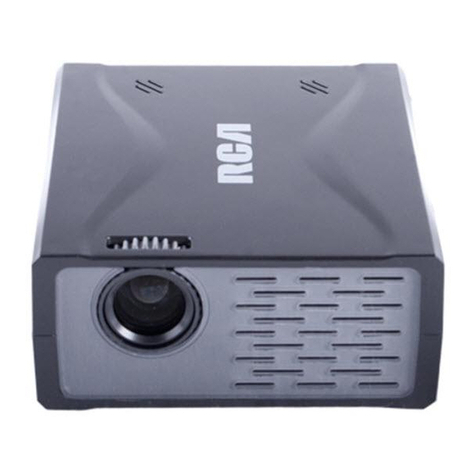
RCA RPJ135 User manual

ROKU, STREAMING STICK and the ROKU logo are the trademarks or registered
trademarks of Roku, Inc.
MODEL NO.: RPJ135
Standard HD Projector
Includes Roku®Streaming Stick®
INSTRUCTION MANUAL
PLEASE READ BEFORE OPERATING THIS EQUIPMENT
This product is manufactured and sold by Curtis International Ltd.
RCA, the RCA logo, the two dogs (Nipper and Chipper) logo, are registered trademarks
or trademarks of RCA Trademark Management and are used under license by Curtis
International Ltd. Any other product, service, company, trade or product name and logo
referenced herein are neither endorsed nor sponsored by RCA Trademark Management or
its affiliates.

1
For Portable Projector
1. Read these Instructions.
2. Keep these Instructions.
3. Heed all Warnings.
4. Follow all instructions.
5. Do not use this apparatus near water.
6. Clean only with a dry cloth.
7. Do not block any ventilation openings. Install in accordance with the
manufacturer’s instructions.
8. Do not install near any heat sources such as radiators, heat registers, stoves,
or other apparatus (including amplifier) that product heat.
9. Protect the power cord from being walked on or pinched particularly at plugs,
convenience receptacles, and the point where they exit from the apparatus.
10. Only use attachments/accessories specified by the manufacturer.
11. Unplug this apparatus during lightning storms or when unused for long periods of time.
12. Refer all servicing to qualified service personnel. Servicing is required when
the apparatus has been damaged in any way, such as
power-supply cord or plug is damaged, liquid has been spilled
or objects have fallen into the apparatus, the apparatus has
been exposed to rain or moisture, does not operate normally, or has been dropped.
13. Use only with a cart, stand, tripod, bracket, or table specified by the manufacturer
or sold with the apparatus. When a cart is used, use caution when moving the cart/
apparatus combination to avoid injury from tip-over.
NOTE: Please see the Roku®Streaming Stick®Important Product Information
insert for streaming player safety precautions, legal notices, and other
important information.

2
For Portable Projector
1. Do not look directly into the projector light.
2. Don’t touch the projector lens
3. Mains adapter is used as disconnect device and it should remain readily operable
during intended use. In order to disconnect the apparatus from the mains completely,
the mains plug should be disconnected from the mains socket outlet completely.
4. CAUTION: Use of controls or adjustments or performance of procedures other than
those specified may result in hazardous radiation exposure.
5. WARNING: Changes or modified to this unit not expressly approved by the party
responsible for compliance could void the user’s authority to operate the equipment.
6. WARNING: Use of this unit near fluorescent lighting may cause interference regarding
use of the remote. If the unit is displaying erratic behavior move away from any
fluorescent lighting, as it may be the cause.
7. WARNING: Shock hazard - Do Not Open.
8. Caution and marking information is located at the rear or bottom of the apparatus.
9. WARNING: To reduce the risk of fire or electric shock, do not expose this apparatus to
rain, moisture, dripping, or splashing.
10. Objects filled with liquids, such as vases, shall not be placed on the apparatus.
NOTE: Please see the Roku®Streaming Stick®Important Product Information
insert for streaming player safety precautions, legal notices, and other
important information.

ROKU, STREAMING STICK and the ROKU logo are the trademarks or registered
trademarks of Roku, Inc.
MODEL NO.: RPJ135
Standard HD Projector
Includes Roku®Streaming Stick®
INSTRUCTION MANUAL
PLEASE READ BEFORE OPERATING THIS EQUIPMENT
This product is manufactured and sold by Curtis International Ltd.
RCA, the RCA logo, the two dogs (Nipper and Chipper) logo, are registeredtrademarks
or trademarks of RCA Trademark Management and are used under license by Curtis
International Ltd. Any other product, service, company, trade or product name and logo
referenced herein are neither endorsed nor sponsored by RCA Trademark Management or
its affiliates.
3
Remote AC Power Adapter
User Manual
What’s Included
FCC Warning
Main Unit
Lens Cover
Two AAA
Batteries
Roku ®
Streaming Stick®
USB Power Cable
Roku®
Remote
This device complies with Part 15 of the FCC rules. Operation is subject to the following two
conditions: (1)this device may not cause harmful interference, and (2) this device must
accept any interference received, including interference that may cause undesired
operation.
Warning: Changes or modifications to this unit not expressly approved by the party
responsible for compliance could void the user's authority to operate the equipment.
NOTE:This equipment has been tested and found to comply with the limits for a Class B
digital device, pursuant to Part 15 of the FCC Rules. These limits are designed to provide
reasonable protection against harmful interference in a residential installation. This
equipment generates, uses, and can radiate radio frequency energy and, if not installed
and used in accordance with the instructions, may cause harmful interference to radio
communications. However, there is no guarantee that interference will not occur in a
particular installation. If this equipment does cause harmful interference to radio or
television reception, which can be determined by turning the equipment off and on, the user
is encouraged to try to correct the interference by one or more of the following measures:
• Reorient or relocate the receiving antenna.
• Increase the separation between the equipment and receiver.
• Connect the equipment into an outlet on a circuit different from that to which the receiver
is connected.
• Consult the dealer or an experienced radio/TV technician for help.
• Please see the Important Product Information insert in the Roku®Streaming Stick®box
for streaming player safety precautions, legal notices, and other important information.
OK
ABC
/DEF
GHI JKL M NO
PQRS TU V WXYZ
FLI P
EXIT
FAV
RECA LL
SETUP
@

4
Important Safety Instructions - - - - - - - - - - - - - - - - - - - - - - - - - - - -
Table of Contents
P1
Additional Warnings and Precautions - - - - - - - - - - - - - - - - - - - - - - P2
FCC Warning - - - - - - - - - - - - - - - - - - - - - - - - - - - - - - - - ----- - - - - P3
What's Included - - -- - - - - - - - - - - - - - - - - - - - - - - - - - - - - - - - - - P3
Table of Contents -- - - - - - - - - - - - - - - - - - - - - - - - - - - - - - - - - - - - P4
Remove & Close the Lens Cover - - - - - - - - - - - - - - - - - - - - - - - - - - P5
Placing Your Projector - - - - - - - - - - - - - - - - - - - - - - - - - - - - - - - - P5
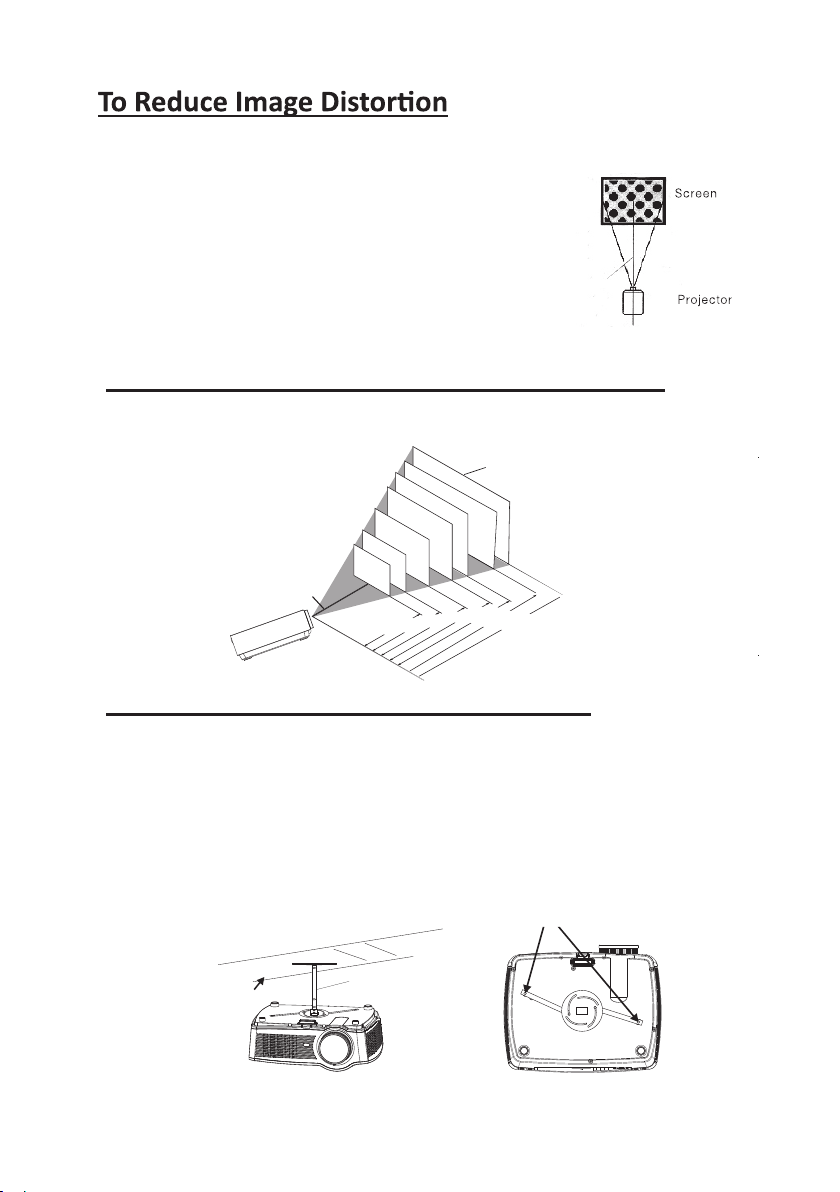
To Reduce Image Distortion - - - - - - - - - - - - - - - - - - - - P6
Distance Between The Projector And Screen - - - - - - - - - - - - - - - - P6
Placing Your Projector on the Ceiling - - - - - - - - - - - - - - - - - - - - - P6
Adjust the Vertical Location - - - - - - - - - - - - - - - - - - - - - - - - - - - - P7
Adjust the Focus and Keystone --- - - - - - - - - - - - - - - - - - - - - - - P7
Projector Remote --- - - - - - - - - - - - - - - - - - - - - - - - - - - - - - - - - - - P8
Install / Remove Battery of Remote --- - - - - - - - - - - - - - - - - - - - - -
Controls of Projector - - - - - - - - - - - - - - - - --- - - - --- - - - --- - - P9
Install Power Adapter - - - - - - - - - - - - - - - - - - - - - - - - - - - - - - - - - P10
Main Operation --- - - - - - - - - - - - - - - - - - - - - - - - - - - - - - - - - - - P10
Connect HDMI - -- -- -- -- -
- -- -- -- -- -- -- -- -- -- -- - - - - - - - P12
Connect AV - -- -- -- -- -- -- -- -- -- -- -- -- -- -- - - - - - - - - - - - P12
Connect VGA - - -- - -- - -- - -- - -- - -- - -- - -- - -- - -- - - - - - - - - - P13
Connect Audio Output (Aux Out / Line Out) - - - - - - - - - - - - P14
-eciveDBSUllatsnI --------------------------------- 41P-
Using USB Playback (Media Player) - - - - - - - - - - - - - - - - - - - - - - - P15
Using Projector Menu 1.0 - - - - - - - - - - - - - - - - - - - - - - - - - - - - - P16
Using Projector Menu 2.0 - - - - - - - - - - - - - - - - - - - - - - - - - - - - - P17
Using Projector Menu 3.0 - - - - - - - - - - - - - - - - - - - - - - - - - - - - - P17
Using Projector Menu 4.0 - - - - - - - - - - - - - - - - - - - - - - - - - - - - - P18
Specifications - - - - - - - - - -- - - - - - - - - - - - - - - - - - - - - - - - - - - - P19
P8
Troubleshooting - - - - - - - - - - - - - - - - - - - - - - - - - - - - - - - - - - - - - P20
Set up/Install the Roku®Streaming Stick®------ - - - - - - - - - - - - P11

5
Remove & Close The Lens Cover
Placing Your Projector
Your projector can be installed in four different configurations (see picture below):
LENS COVER
REMOVE CLOSE
LENS COVER
FRONT TABLE
REAR TABLE
FRONT CEILING
REAR CEILING
Remove the lens cover before using Close the lens cover when unit not using
Front Table:
Select this location with the projector placed near
the floor in front of the screen. This is the most
common way to position the projector for quick
setup and portability.
Front Ceiling:
Select this location with the projector suspended
upside-down from the ceiling in front of the screen.
NOTE: A projector mount is required to install the
projector in a ceiling.
Rear Table:
Select this location with the projector placed near
the floor behind the screen.
NOTE: That a special rear projection screen is
required.
Rear Ceiling:
Select this location with the projector suspended
upside-down from the ceiling behind the screen.
NOTE: A projector mount is required to install the
projector in a ceiling. A special rear projection
screen is required.

6
Distance Between The Projector and Screen
Measure the distance between the projector and where you want to position the
screen. This is the projection distance.
Placing Your Projector on the Ceiling
When installing the projector in the ceiling, please purchase a projector mount
recommended by an installation professional and follow the instructions that come with
the mount.
Before installing the projector in the ceiling, please check to make sure the ceiling
structure can support the weight of the projector and the mount. If in doubt, please ask
the advice from an installation professorial.
NOTE: Projector mount and screw(s) not included
CEILING
HANGER
FIX HANGER HOLES
to
Square /Rectangle
It is recommended to move the projector as close to
center of screen.
SCREEN
120
100
THE CENTER OF LENS
72
"
60
"
50
"
45
"
37
"
"
"
1.36m
1.63m
1.7m
2m
2.42m
3.3m
3.9m

7
Adjust The Focus And Keystone
Follow below picture to adjust the focus and trapezoidal screen.
Adjust the focus by turning the lens while observing the image
pixels near the center of the screen. Optimal focus is obtained
when the pixels are clearly visible. Depending on the projected
screen size, the focus near the screen edges may be less sharp
than the screen center.
Keystone image is created when the projector lens is
projected from above or below the center of the screen.
Keystone correction restores the distorted image to a
rectangular or square shape.
SCREEN
VERTICAL
DIMENSION
PROJECTOR
VERTICAL
DIMENSION
PROJECTOR
SCREEN
VERTICAL
DIMENSION
PROJECTOR
SCREEN
Press the "PUSH" button (Button 3 page 9)
to extend the front leg and adjust the vertical
height of the projector.
FOCUS ADJ. KNOB
Follow below picture to adjust the vertical location.
HDMI 2
USB 2
Then sharpen the image
by rotating focus knob.
TRAPEZOIDAL ADJ. KNOB

OK
ABC
/DEF
GHI JK L MNO
PQRS T UV WXYZ
FLIP
EXIT
FAV
RECALL
SETUP
@
8
Projector Remote
Remove the battery compartment cover on the back of the remote by carefully sliding
to open. The battery cover can then be lifted away. Fit the correct batteries (not
included), referring to the polarity markings. Finally, replace the cover.
NOTES:
Batteries shall not be exposed to excessive heat such as placing under the sunlight
or near a fire.
Please make sure the batteries are installed with their correct polarities.
Do not mix old and new batteries.
Use only the same type of batteries.
Do not dispose of the batteries in fire, battery may explode or leak.
Do not recharge a non-rechargeable battery.
BATTERY DOOR
AAA / UM4
AAA / UM4
+ -
- +
OK
EXIT
ADJUST VOLUME SOUND
HOME SELECTOR
Tip: The Roku®Streaming Stick®
the streaming player.
uses a separate Roku remote, needed to control

HDMI 2
USB 2
9
1. IR Sensor (Front Side)
2. LENS
3. ANGEL ADJ. Button
4. FOCUS ADJ. Knob
5. NAVIGATOR Buttons
6. RETURN Button
7. POWER on Indicator
8. POWER Button
9. HOME Button
10. SETUP Button
11. KEYSTONE ADJ. Knob
12. VIDEO IN Jack
13. USB 1 Port ( Media Player)
14. USB 2 Port (For charging the Roku Stick)
15. HDMI 1 Port
16. HDMI port 2 (Roku®Streaming Stick®input)
17. DC IN Jack
18. AUDIO OUT R/L Jack
19. IR Sensor (Rear Side)
20. AUDIO IN R/L Jack
21. VGA IN Jack
Controls Of Projector
PUSH
32 1
4
5
7
6
8
95
10
1114 12 13
17 16
15
19
18 20 21
This manual suits for next models
1
Table of contents
Other RCA Projector manuals