RadioLink CB86-PLUS User manual

Lithium battery balance charger CB86-PLUS
User Manual
Radiolink Electronic Co., Ltd
Web Site:http://www.radiolink.com.cn
Warning : High powered product ,please use it within sight !
FCC

INTRODUCTION
Thank you for purchasing Radiolink high precision independent balance charger
CB86-PLUS .
CB86-PLUS, open the era of high precision independent balance charge, integrate 6
ways for charge current and equipped exclusive charging circuit for every single battery
cell, which realize batteries don’t affect each other in independent balance charge system.
Support max 6A charge current for 8 battery packs charging with capacity analyzed and
inner resistance assessed, compatible with 1S-6S battery packs. 0.001V balance
precision, better than the average 0.01V. Unique USB flash drive upgrade. Charging
diaries, including initial voltage, complete voltage and charge-discharge voltage, etc.
Analyses of every battery cell’s capacity in each group and assess of internal resistance.
Precision voltage and trickle repairing restore the high-power of over-discharged battery.
Suggestion :when you read this manual,please connect the charger and other related
equipment ,operating while reading. Any questions when using CB86-PLUS, please refer
to the manual or call our after_service +86-755-88361717 or login BBS (such as
www.rcgroups.com, www.5imx.com, www.rcfans.com ) to check the issues related
answer to questions.
Due to unforeseen changes in production procedures , the information contained in this
manual in subject to change without notice.
more information please check our website as below:
http://www.radiolink.com.cn
CUSTOMER SERVICE
Contact Us
Tel: +86-755-88361717
Fax: +86-755-88360925
Email: sales@radiolink.com.cn
Programming and User questions
Tel: +86-755-88361717
Fax: +86-755-88360925
Email: after_service@radiolink.com.cn

一、Function:
CB86S Technical data:
Input Voltage:Voltage range 10.5-15V(The charge will not work with wrong input power
polarity, warning when input power voltage over 15V and less than 10.5V, temperature
over 48C°will auto-start fans)
Voice Indicator:ON/OFF
Time setting: Charging or discharging time from 0 to 99 minutes and 59 second
Charging Mode: Cycle charging, parallel charging, discharging, voltage measure
Charging voltage: 0.00V-4.23V,setting precision 0.01V;
Discharging voltage: 2.00-4.23V,setting precision 0.01V;
Charging current:0.0-6.0A,setting precision 0.1A;
Discharging current: 1.05A
二、Operation:
1、Connection
Connect the charger with a DC power source of output voltage 10.0-5V and current not
less than15A.
Balance plug:
CB86S contains 8 balance ports, it can charge 8pcs 6-cell Lithium battery at the same
time connecting 1S-6S batteries freely by the following sketch. Mind the polarity of
Input
Voltage
Charging
Mode
Voice
Indicator
Charging
Time
Final Voltage
Charging Current
START/STOP:
To start or stop
present status
“+/▲”,“-/▼”: Add or reduce
present data (on charging or
discharging mode)
SET:Set data of the charger
(Forbidden on charging
and discharging status)

batteries (black cable is negative and it shall connect with right side, the red positive
connecting to left side.)
Diagrammatic sketch:
The above sketch is shown by a 4-cell and a 2-cell batteries connected in two ports. Also
you can connect a 6-cell battery in one port, or 3 pcs 2-cell in different port, or 2pcs 3-cell
batteries to different port. Shown by sketch below:
(1)connect with 3pcs 2-cell batteries:
(2)connect with one 6-cell battery:
Red cable(positive)
always on the left
Black cable(negative)
always on the right

(3)connect with two 3-cell batteries:
2、Button instruction:
START/STOP:
To start or stop the current status, it is available at any time, so it’s important to finish
all parameter (voltage and current) setting for charging or discharging before press this
button.
SET:
Only the charger is not working, this button is enabled. Press SET to enter menu of
setting for VOICE, FUNCTION, CURRENT, VOLTAGE and BETTERY GROUP. When
one of the options displayed reversed, use the button key “+/▲” or “-/▼” to get the
relative data.
Voice indicator:
When the charging stopped, press SET to choose the option VOICE INDICATOR,
and use“+/▲” or “-/▼” to set voice ON or OFF. Then press SET to choose the next
option.
Charging port:
When the charging stopped, press SET to choose the option PORT, press “+/▲”or
“-/▼” to choose the port and then press SET for next option.
Function:
When the charging stopped, press SET to choose FUNCTION, press “+/▲” or“-/▼” to
select different status: CYCLE CHARGING, PARALLEL, DISCHARGING, VOLTAGE
MEASURE, and then press SET for next option.
Voltage and current setting:
When the charging stopped, press SET to choose the option VOLTAGE/ CURRENT,
and then press“+/▲”or“-/▼” to set voltage and current, then press SET for next
option.
3、Operation
Connect the charger with a DC power source of output voltage 10.5-15V and current
not less than 15A, and then connect a 6-cell battery with it, power on the charger.
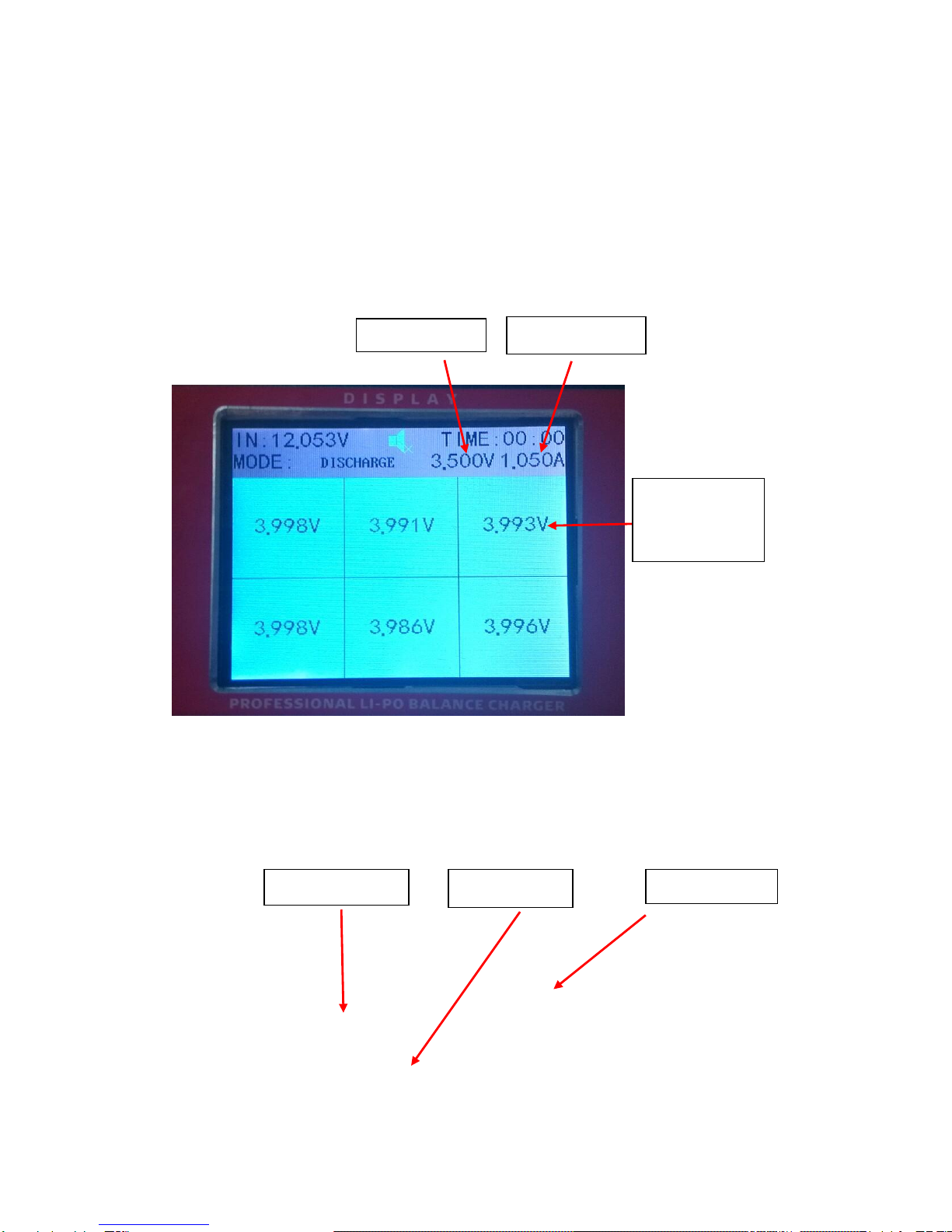
(1)Interface powered on
1
(2)Press the key SET,set the mode CHARGING or DISCHARGING. Press the key
“+/▲”or“-/▼” to set voltage of discharging. Below sketch shows discharging setting
interface:(discharging current is not settable, and charging voltage and current can set by
yourself)
Present voltage
of the battery
cell
Charging
voltage
Charging current
Mode: discharging
External voltage
Discharging time

2
(3)Press the key STOP to pause the present status, and press the key SET till the
cursor comes to MODE,then press the key “+/▲”or “-/▼” to change the mode
CHARGING, and press the button START to start charging. Below is charging interface:
3
(4)press the button key STOPto pause the present status, and press SET till the cursor
comes to MODE,then press“+/▲” or “-/▼”to choose mode DISCHARGING, and press
the button key START to start discharging, shown as below:
Charging status mark
Time left
Cell voltage
Cell charging current
Capacity charged
Cell charging status
Port charged
Time charged
Discharging time
Discharging port
Discharging mark
Discharging time left
Discharging current
is a fixed value(in
charging mode, you
can set the current)

4
(5)When charging or discharging finished, press the button key STOP to check present
voltage and current and every battery cells capacity. Below shows the interface:
5
Press the button “+/▲”or “-/▼” and now the cursor ▼ shift from every port. All of the
checks display the relative port batteries capacity. Below shows the current port battery
status:
Current voltage
Discharging current
Capacity discharged
Battery voltage and capacity

6
And then press SET to find battery capacity of different cells. See the below sketch:
7
And then pres the button key START to return to charging status.
NOTE:1)on the status shown by sketch 7, press SET to go back to the interface shown by sketch
press“+/▲”or“-/▼”
and the cursor▼shifts
from different ports
Each cell represents the port is a
power-saving core rechargeable battery
case
Initial voltage
Charged capacity
Cell resistance
Current voltage

6,and press “+/▲” or “-/▼”till the cursor▼ disappeared,or the voice indicator enabled,
now press the key SET to go back to the sketch 2 to set voltage and current and charging
mode etc.
2)On the interface shown by sketch 7,press“+/▲” or “-/▼” to find other port batteries
capacity.
Other manuals for CB86-PLUS
2
Table of contents
Other RadioLink Batteries Charger manuals