
Radio Shack 2200085 User manual

WIRELESS TOUCHPAD KEYBOARD
COMPACT USB RECEIVER
barely protrudes from
your computer
2-IN-1 TOUCHPAD
lets you use touch gestures
to navigate through Windows
8 and other applications
NUMERIC KEYPAD
is activated when you press
the number lock button
WIRELESS TOUCHPAD KEYBOARD
2200085
User’s Guide
We hope you enjoy your 150-Watt Power Inverter from
RadioShack. Please read this user’s guide before using
your new inverter.
150-Watt
Power Inverter

WIRELESS TOUCHPAD KEYBOARD
COMPACT USB RECEIVER
barely protrudes from
your computer
2-IN-1 TOUCHPAD
lets you use touch gestures
to navigate through Windows
8 and other applications
NUMERIC KEYPAD
is activated when you press
the number lock button
WIRELESS TOUCHPAD KEYBOARD
2
Package Contents
Features
• Operate115VACequipmentfromyourvehicle.
• Threeoutletsallowoperationofmultipledevices
suchasdigitalcameras,DVDplayers,portable
TVs,andmanyotheritems.
• PowerUSBdevicessuchascellphones,
handheldgames,andMP3players.
• Automaticallyshutsoifyourvehicle’sbattery
runslow.
User’s
Guide
Power Inverter

WIRELESS TOUCHPAD KEYBOARD
COMPACT USB RECEIVER
barely protrudes from
your computer
2-IN-1 TOUCHPAD
lets you use touch gestures
to navigate through Windows
8 and other applications
NUMERIC KEYPAD
is activated when you press
the number lock button
WIRELESS TOUCHPAD KEYBOARD
3
Using Your Inverter
1. Plugthepowerinverterintoyourvehicle’s
powersocket.
2. Plugindevices.
PluginanACdevice
(max150watts).
LEDlightswheninverter
isconnected.

WIRELESS TOUCHPAD KEYBOARD
COMPACT USB RECEIVER
barely protrudes from
your computer
2-IN-1 TOUCHPAD
lets you use touch gestures
to navigate through Windows
8 and other applications
NUMERIC KEYPAD
is activated when you press
the number lock button
WIRELESS TOUCHPAD KEYBOARD
4
nNote:
• Devicemustdraw150Worlessof
continuous AC power.
• Ifnecessary,youcanuseanAC
extension cord. The extension
cord’s rating should be equal to or
greater than the device’s rating.
• If the USB port and or AC outlets do
notwork,butLEDlightsupnormally,
unplug the inverter then plug it back
intothepowerport,makingsure
you insert properly and securely.
WIRELESS TOUCHPAD KEYBOARD
COMPACT USB RECEIVER
barely protrudes from
your computer
2-IN-1 TOUCHPAD
lets you use touch gestures
to navigate through Windows
8 and other applications
NUMERIC KEYPAD
is activated when you press
the number lock button
WIRELESS TOUCHPAD KEYBOARD
5
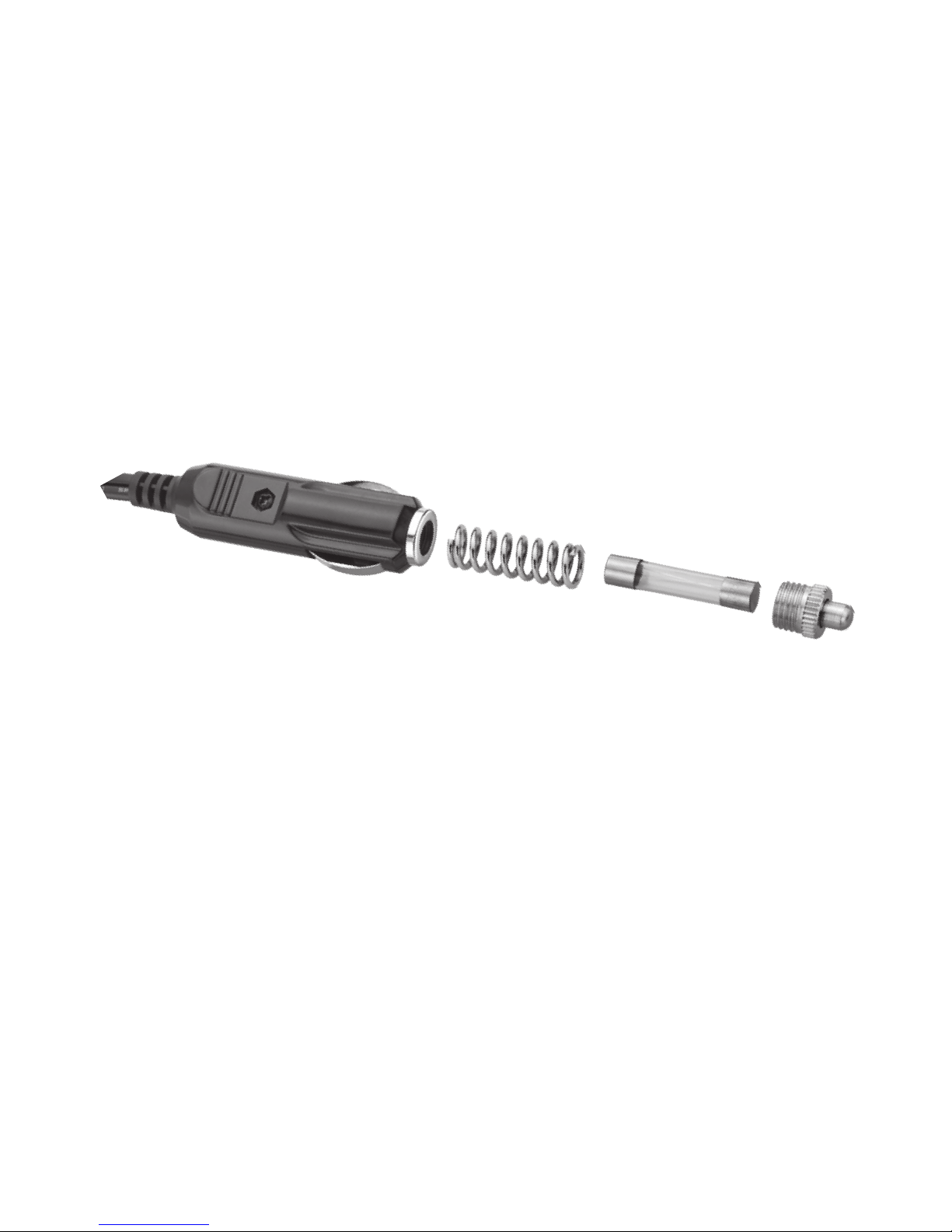
Replacing the Fuse
Ifthefuseisblown,replaceitwitha20A,250Vtube-
typefuse(notsupplied).
1. Unscrewinvertercap.
2. Replacethefuse,thenscrewtheinvertercap
backon.
wCaution:
• Donotuseafusewithadierentrating.Doingso
can damage your inverter.
• Watchoutforlooseparts(springcoilandinverter
tip) when replacing the fuse.

WIRELESS TOUCHPAD KEYBOARD
COMPACT USB RECEIVER
barely protrudes from
your computer
2-IN-1 TOUCHPAD
lets you use touch gestures
to navigate through Windows
8 and other applications
NUMERIC KEYPAD
is activated when you press
the number lock button
WIRELESS TOUCHPAD KEYBOARD
6
Heat Dispersion
Thepowerinverter‘sthermalprotectionprevents
itfromoperatingwhenitstemperatureexceed
167°F(75°C).Iftheinvertergetstoohotwhile
working,itwillturno.Positionthepowerinverter
whereairowsfreelyaroundittoallowtheheatto
disperse.Operationresumeswhenthetemperature
decreasestoabout154°F(67°C).
Safety Information
WARNING! Shock Hazard
This150Winvertergeneratesthesamepotentially
dangerousACvoltageasahouseholdwalloutlet.
Failuretofollowthesewarningsmayresultinpersonal
injuryordamagetotheinverter.
Donotinsertforeignobjects
intotheinverter’sACoutletsor
vents.
Donotexposetheinverterto
water.

7
Caution
• Donotconnectdevicesthatrequirepower
greaterthan150watts.
• Thetotalpowerformultipledevicesconnected
totheACandUSBsocketscannotexceed150
watts.Ifyoudonotknowthetotalpowerforyour
devices,connectjustonedevice.
• Alwaysremovetheinverterfromthelighter
socketwhennotinuse.
• Thepowerinverter’spowerplugmaygethot
whileitispluggedintoapowersocket.Usea
clothoraglovetounplugitfromthesocket.
• Lettheinvertercooldowncompletelybefore
youstoreit.
• Duringoperation,keeptheinverteraway
frommaterialsthatmaybeaectedbyhigh
temperatures.
• Makesurethepowersocketandplugareclean.
Adirtysocketcanpreventtheinverterfrom
workingproperly.
• Donotusethepowerinverterinapositive-
groundedvehicle.Checkwithyourvehicle
dealeroramechanictondoutifyourvehicleis
positive-grounded.

8
Troubleshooting
Theinverterwillshutdown(theLEDashes)under
conditionssuchasexcessivetemperature,overload,
orlowvoltage.Followtherecommendedsolutionsto
restoreoperation.
Cause Solution
Faultydevice
pluggedintothe
inverter
Tryanotherdevice.Ifanother
deviceworksusingtheinverter,
therstdevicemaybefaulty.
Temperature
exceeds167°F
(75°C)
Disconnectalldevicesand
waituntiltheinvertercools.
Yourdevice’spowerrequire-
mentmightalsoexceedthe
inverter’srating(see“Heat
Dispersion”onpage6)
Continuous
Powerload
exceeds150W
Disconnectalldevices.Only
connectdeviceswithacon-
tinuouspowerloadof150W
orless.
Vehiclebattery
voltageislower
than10V
Runthevehicle’sengineto
rechargethebattery,then
connecttheinverterintoyour
vehicle’spowersocket.

9
USBcurrent
exceeds3.8A
Disconnectalldevicesfromthe
inverter.Unplugtheinverter
thenplugitbackintothe
powerport.Thetotalpower
requirementfromyourdevices
mustbelessthan3.8A.
Specications
Input................................................................ 11~16VDC
Output...................................115V±10VAC,60Hz±3Hz
StandbyCurrent................................<0.4A@13.5VDC
OutputPower................ 300Wpeakpowerfor1cycle
............................................... @60Hz,150Wcontinuous
USBOutput...................................5VDC±5%,1A(max)
AutoShut-o............................................... Shortcircuit
.......................................... Temperature>167°F(75°C)
............................................................. Powerload>150W
...................................................Vehiclebattery<10VDC
Fuse................................................... 20Atube-typefuse
Dimensions(L×W×H)..............................5×2.6×1.5in
................................................... (126.9x66.7x38.9mm)
Specicationsaresubjecttochangeand
improvementwithoutnotice.Actualproductmay
varyfromtheimagesfoundinthisdocument.

10
FCC Information
Thisequipmenthasbeentestedandfoundtocomply
withthelimitsforaClassBdigitaldevice,pursuanttoPart
15oftheFCCRules.Theselimitsaredesignedtoprovide
reasonableprotectionagainstharmfulinterferenceina
residentialinstallation.Thisequipmentgenerates,uses
andcanradiateradiofrequencyenergyand,ifnotinstalled
andusedinaccordancewiththeinstructions,maycause
harmfulinterferencetoradiocommunications.However,
thereisnoguaranteethatinterferencewillnotoccurina
particularinstallation.Ifthisequipmentdoescauseharmful
interferencetoradioortelevisionreception,whichcanbe
determinedbyturningtheequipmentoandon,theuser
isencouragedtotrytocorrecttheinterferencebyoneor
moreofthefollowingmeasures:
• Reorientorrelocatethereceivingantenna.
• Increasetheseparationbetweentheequipmentand
receiver.
• Connecttheequipmentintoanoutletonacircuit
dierentfromthattowhichthereceiverisconnected.
• Consultthedealeroranexperiencedradio/TV
technicianforhelp.
Changesormodicationsnotexpresslyapprovedbythe
partyresponsibleforcompliancecouldvoidtheuser’s
authoritytooperatetheequipment.
Thisdevicecomplieswithpart15oftheFCCRules.
Operationissubjecttothefollowingtwoconditions:(1)
thisdevicemaynotcauseharmfulinterference,and(2)this
devicemustacceptanyinterferencereceived,including
interferencethatmaycauseundesiredoperation.
Table of contents
Other Radio Shack Inverter manuals


