
R/Evolution DEva User manual
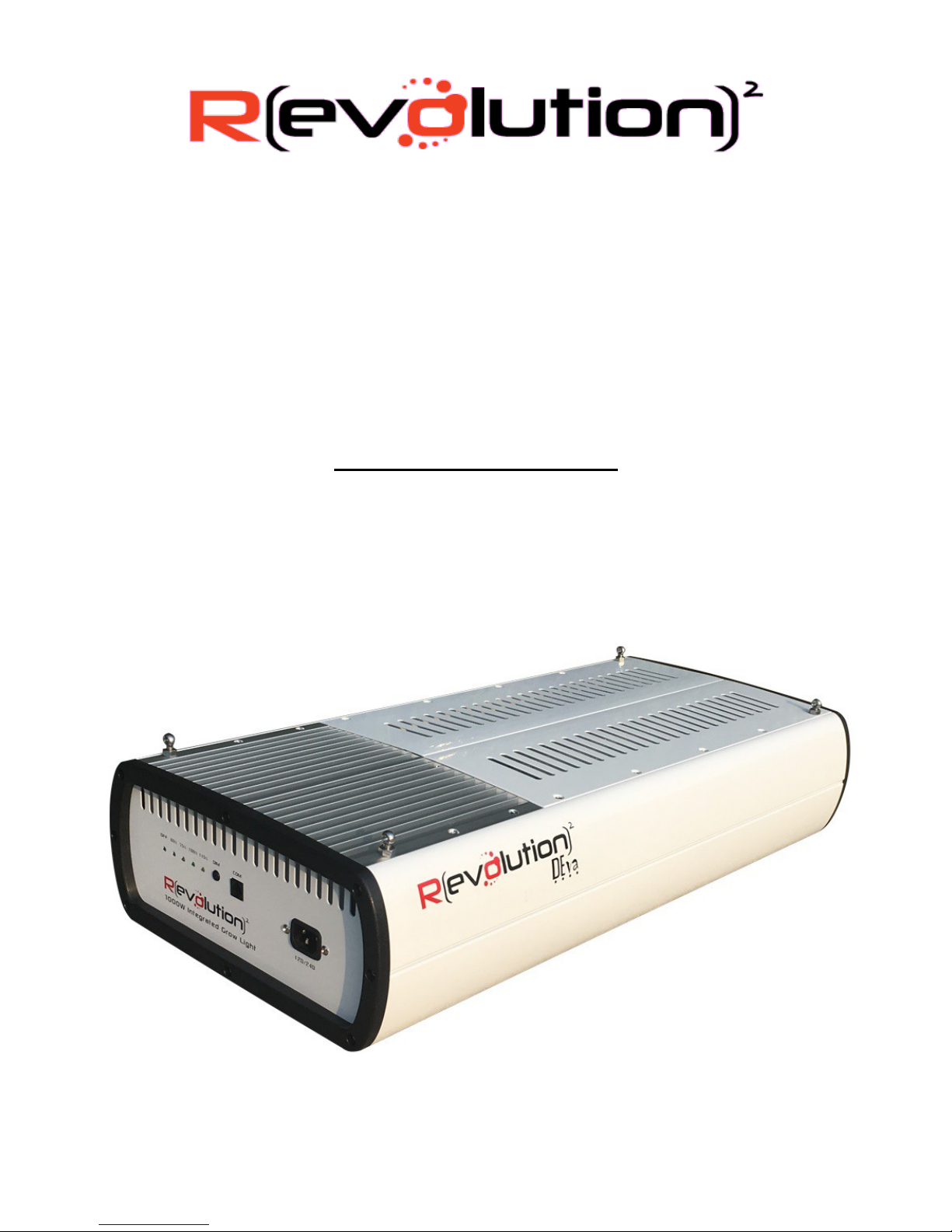
DEva Integrated Lighting System
1000W 120/240v, 240/277v, 347/480v
Owner s Manual
24 July, 2017
Revolution Microelectronics Co., Ltd
Page 1 of 6
Congratulations on your new DEva Integrated Lighting System! The DEva combines a unique low-frequency
square wave ballast with a com uter-designed DE reflector for one amazing, com uter-controlled grow light
system. We ho e you dig it the most.
This manual will tell you to to hang, connect and o erate your new DEva.
The Box Contains
DEva Integrated Lighting System
Power Cord
RJ-14 Data Cable
RJ-14 Dual S litter
Installing Your DEva
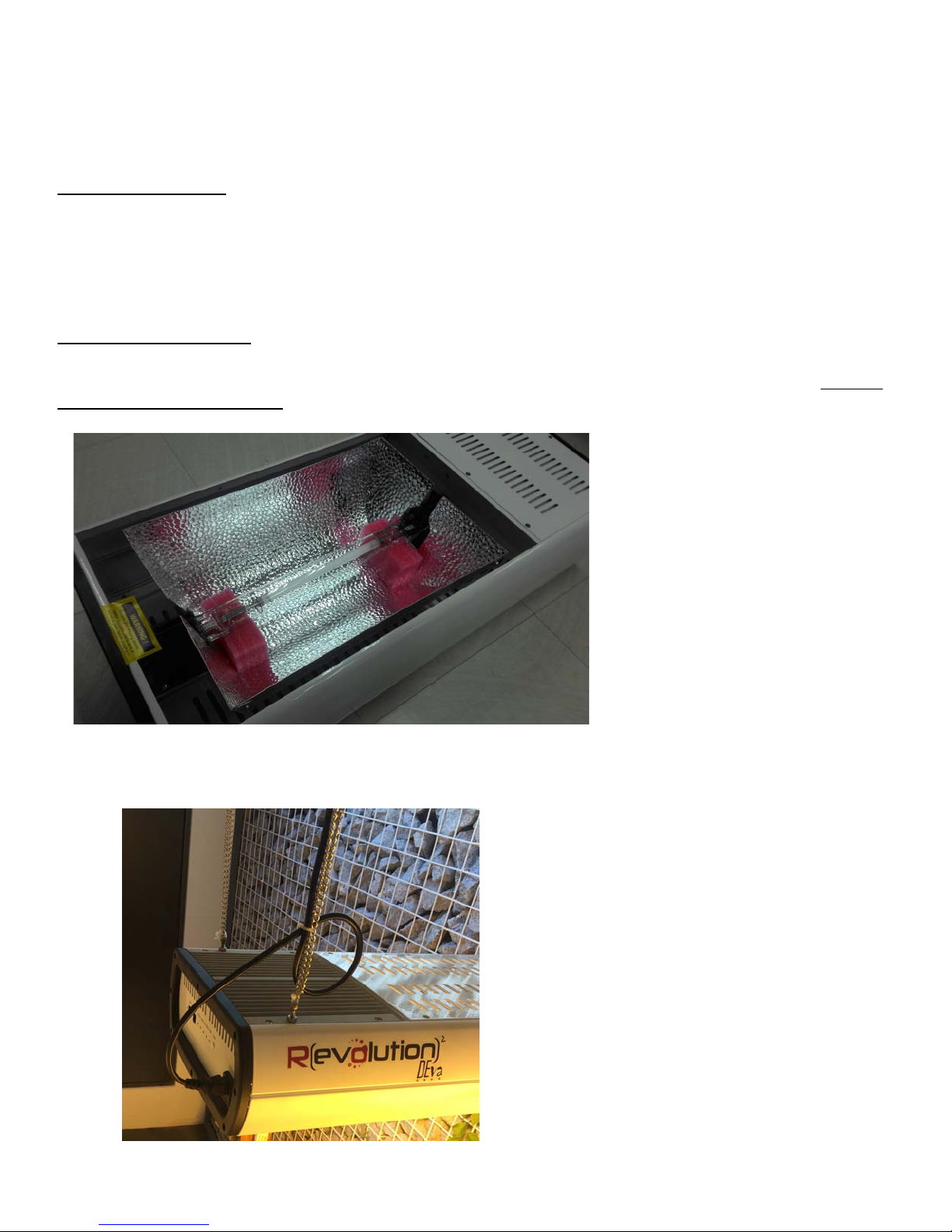
The DEva comes fully assembled, lam installed and ready to go. Before lighting u , make sure to remove
all acking material and ta e and double check the lam lam connectors CLICK down solidly. The ink
foam blocks are to cushion the lam during trans ort, but MUST be removed before owering u the light.
Hang the DEva from the four eye bolts installed on the to of the light, and make sure to use a cable tie to
make a “dri loo ” in the ower cord to kee condensation out like this:
Revolution Microelectronics Co., Ltd
Page 2 of 6
Front Panel Controls
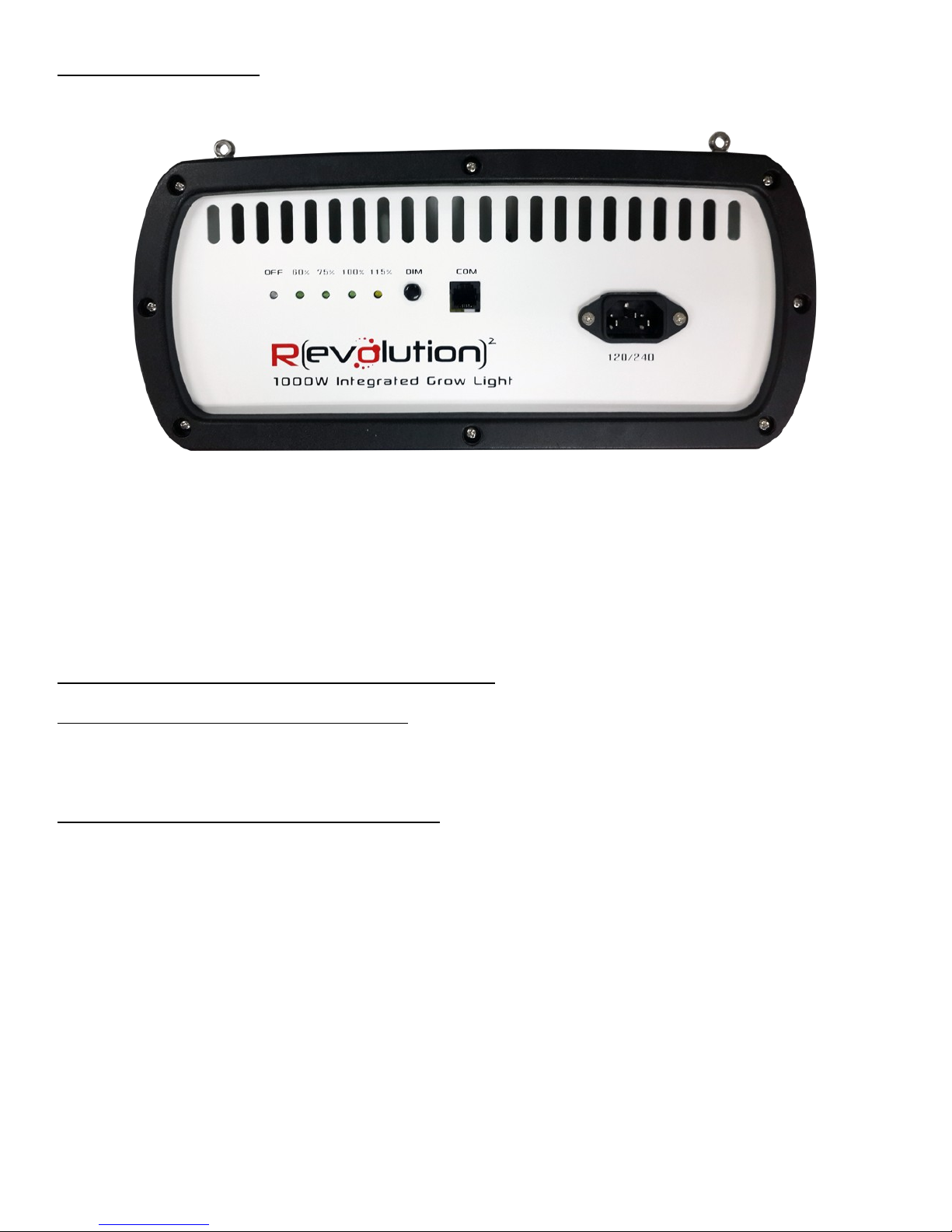
The front anel of the DEva has a ush button for setting ower level, and connector for 120/240 volt AC
ower and a connector for external control by a com uter, the Revolution RLC1 or Auto ilot PX1 Digital
Lighting Controllers.
Each button ress moves the ower setting one LED to the right. DEva waits for three (3) seconds after the
last button ress before doing anything, so you can't accidentally turn your lights off.
Blinking LEDs – What Your DEva Is Telling You
OFF Blinks Once A Second – Over Tem erature
If the DEva internal circuits reach 80 Celsius, it's way too hot and she will shut off with the OFF LED blinking
on and off once a second. Once the internal tem erature cools to 50 Celsius DEva will automatically
restart.
OFF Blinks Four Times A Second – Ignition Timeout
If the lam fails to ignite, DEva will wait and try again for 30 minutes like this:
Wait 5 minutes, try again
Wait 5 minutes, try again
Wait 10 minutes, try again
Wait 10 minutes, try again
Give u , switch off, this is not ha ening
After 30 minutes and five (5) tries to start, DEva flashes the OFF LED four (4) times a second to let you know
that she's off, and intending to stay off until reset or ower is removed.
If the OFF LED is flashing fast you can either remove and rea ly ower, or sim ly ress the button to
restart the ignition sequence. We suggest re lacing the lam first – if it doesn't light in a half hour of
trying, it robably isn't going to.
Revolution Microelectronics Co., Ltd
Page 3 of 6
Selected Power LED Blinks Once A Second – Low Voltage
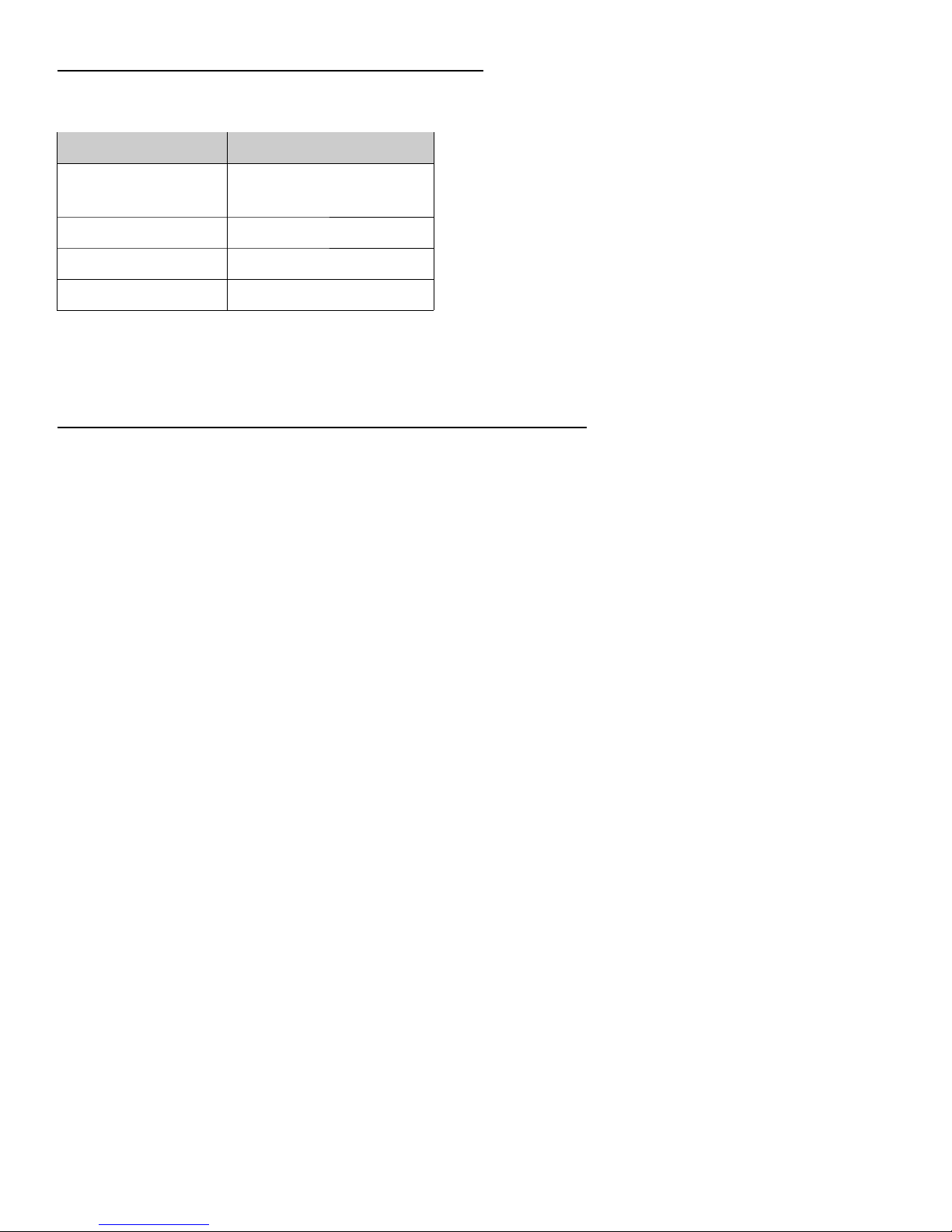
When incoming ower dro s below 115 volts the LED for your chosen ower level will blink once a second
indicating out ut ower is limited due to low incoming su ly voltage.
Incoming Voltage Maximum output power
115 VAC or more All power levels
selectable
Less than 115 VAC 1000W
Less than 110 VAC 750W
Less than 100 VAC OFF
If incoming voltage remains at or below 100 VAC (a failing generator or brownout, for exam le) DEva will
remain off until voltage rises above 110 volts. If the voltage dro s below about 90 volts, DEva will indicate
this by all lights going dark.
Selected Power LED Flickers Briefly Once a Second – External Control
The RLC1 Digital Lighting Controller can control 512 DEva lights in two zones. You can set on and off times,
sunrise and sunset ram s, dimming with tem erature and over tem erature shutdown for each zone.
When the rovided RJ-12 hone cable is lugged into the DEva and an RLC1 controller, the front anel lights
on the DEva will show the closest ower setting and the LED will blink off, very briefly, once a second to
show you that the DEva is controlled by an outside source and that ressing the button will not work.
If the cable becomes disconnected, or the RLC1 sto s working DEva will return to manual control at
whatever ower level was last selected – just as you would ex ect.
Revolution Microelectronics Co., Ltd
Page 4 of 6

Technical Speci ications
Input Voltage 120/240 or 240/277 or 347/480 volts AC, 50/60 Hz
Input Current 4.40 amperes @ 240 volts
System efficiency 94.7% @ 240 volts
Driver efficiency at full power > 98%
Power factor > 99.4%
Light Source 1000W 400v double-ended lamp
Luminous Flux > 2100 uMole/sec
External Dim Revolution or Autopilot controller
External Dim Connector RJ14 telephone interconnect type (6P6C)
Internal Dim Push button on panel
Output power 600 – 1150 dimmable in 1% steps
Dimming Pushbutton or external controller
Certifications Certified to FCC Part 18 Class B, FCC Part 15 Class B
CSA Certified to UL 1598
CE Certified
RoHS and RoHS2 Certified
Dimensions 305mm x 650mm x 135mm (about 26 x 12 x 5 inches)
Revolution Microelectronics Co., Ltd
Page 5 of 6

FCC Compliance Statement
The DEva Integrated Lighting System has been tested at FCC-certified
laboratories in the United States and conforms to FCC's Part 8B
Consumer standard for Industrial, Scientific, and Medical Equipment for
both conducted and radiated emissions. Although not required by the
FCC, the DEva has also been qualified in the same laboratory to pass
FCC Part 5B, usually reserved for computers, pro audio, and similar consumer electronic devices.
Given that all electronic equipment emits some RF energy, please note that compliance with these
standards does not mean a zero level of emission, only a very low level of emission. The FCC requires
that we also state:
This product may cause inter erence to radio equipment and should not be installed near
maritime sa ety communications equipment or other critical navigation or communication
equipment operating between 0.45-30 MHz.
This device complies with Part 18 o the FCC Rules.
Changes or modifications not ex ressly a roved by Revolution Microelectronics could void
the user's authority to o erate the equi ment.
This device com lies with Part 15 of the FCC Rules.
Revolution Microelectronics Co., Ltd
Page 6 of 6
Table of contents
Other R/Evolution Lighting Equipment manuals

Popular Lighting Equipment manuals by other brands


Qazqa
Qazqa Suplux SL 3 Black 103062 instruction manual

Commercial Electric
Commercial Electric 54568141 Use and care guide

CREE LIGHTING
CREE LIGHTING 304 Series installation instructions

Goobay
Goobay 49867 user manual

ECOMAN ITALIA
ECOMAN ITALIA LED T8 instruction manual

Alkalite
Alkalite Krypton KT-81 user manual


