
quickphones QuickPhones QA-341 User manual

QA-341/342
WiFi
P
h
o
n
e
User Manual
Product Release 1.1
Document Release 2.2
January 2009


© 2009, ATI Applied Technology, LLC. All rights reserved. Prepared in the United States of America. QuickPhones is a trademark of ATI Applied Technology,
LLC, in the United States and/or other countries.
i
Preface
1. Regulatory Information FCC Regulation
This model phone complies with part 15 of the FCC Rules. Operation is subject to the condition that this de ice does
not cause harmful interference.
This de ice complies with Part 15 of the FCC Rules. Operation is subject to the following two conditions: (1) this
de ice may not cause harmful interference and (2) this de ice must accept any interference recei ed, including
interference that may cause undesired operation.
This equipment has been tested and found to comply with the limits for a Class B digital de ice, pursuant to Part 15
of the FCC Rules. These limits are designed to pro ide reasonable protection against harmful interference in a residential
installation.
This equipment generates uses and can radiate radio frequency energy and, if not installed and used in accordance
with the instructions, may cause harmful interference to radio communications.
Howe er, there is no guarantee that interference will not occur in a particular installation if this equipment does
cause harmful interference to radio or tele ision reception, which can be determined by turning the equipment off and
on, the user is encouraged to try to correct the interference by one or more of the following measures:
Reorient or relocate the recei ing antenna.
Increase the separation between the equipment and the recei er.
Connect the equipment to an outlet on a circuit different from that to which the recei er is connected.
Consult the dealer or an experienced radio/TV technician for help.
Changes or modifications not expressly appro ed by the party responsible for compliance could oid the user's
authority to operate the equipment.
The antenna(s) used for this transmitter must not be co-located or operating in conjunction with any other antenna
or transmitter.
This EUT is in compliance with SAR for general population uncontrolled exposure limits in ANSI/IEEE C95.1-1999
and has been tested in accordance with the measurement methods and procedures specified in OET Bulletin 65
Supplement C.
2. European regulation
Products with the CE mark comply with the Radio & Telecommunication Terminal Equipment Directi e
(1999/5/EEC), the Electromagnetic Compatibility Directi e (89/336/EEC) and the Low Voltage Directi e (73/23/EEC) - as
amended by Directi e 93/68/ECC - issued by the Commission of the European Community.
Compliance with these directi es implies conformity to the following European Standards:
1999/5/EEC Radio & Telecommunication Terminal Equipment Directi e (R&TTE) EN 301 511
Specific Absorption Rate (SAR) Standard: EN50360, EN 50361
73/23/EEC Low Voltage Directi e (LVD) Standard: EN 60950:2000
89/336/EEC Electromagnetic Compatibility (EMC-Directi e) Standard: EN301489-1/7
The manufacturer cannot be held responsible for modifications made by the user and the consequences thereof,
which may alter the conformity of the product with the mark.
3. RF exposure regulation (SAR)
This model phone meets the go ernment's requirements for exposure to radio wa es. This phone is designed and
manufactured not to exceed the emission limits for exposure to radio frequency (RF) energy set by the Federal
Communications Commission of the U.S. Go ernment.
The FCC has granted an Equipment Authorization for this model phone with all reported SAR le els e aluated as
in compliance with the FCC RF exposure guidelines. SAR information on this model phone is on file with the FCC and
can be found under the Display Grant section of http://www.fcc.go /oet/fccid after searching on FCC ID: Q3MMIP200
For body worn operation, this phone has been tested and meets the FCC RF exposure guidelines for use with an
accessory that contains no metal and positions the handset a minimum of 1.5 cm from the body. Use of other
enhancements may not ensure compliance with FCC RF exposure guidelines. If you do not use a body- worn accessory
and are not holding the phone at the ear, position the handset a minimum of 1.5 cm from your body when the phone is
switched on.

ii
Table of Contents
1 OVERVIEW..................................................................................................................................1
Package Contents...........................................................................................................................1
2 PRODUCT DESCRIPTION........................................................................................................2
Inserting the Battery.......................................................................................................................4
Installing the Belt Clip...................................................................................................................4
Removing the Belt Clip..................................................................................................................4
Charging Your WiFi Phone ...........................................................................................................5
3 GETTING STARTED..................................................................................................................6
Setting the Access Point (AP)........................................................................................................6
Setting the SIP Profile....................................................................................................................8
Setup Complete..............................................................................................................................9
4 MENU ..........................................................................................................................................11
D
ISPLAY
S
CREEN
..........................................................................................................................11
M
AIN
M
ENU
..................................................................................................................................12
Phonebook....................................................................................................................................12
Call Log........................................................................................................................................13
Phone Settings..............................................................................................................................14
Select AP......................................................................................................................................19
AP Find ........................................................................................................................................19
Select Profile................................................................................................................................19
Information...................................................................................................................................20
WPS Registration.........................................................................................................................20
5 OPERATION ..............................................................................................................................21
M
AKING A
C
ALL
...........................................................................................................................21
A
NSWERING A
C
ALL
.....................................................................................................................22
C
ALL
O
PTIONS
..............................................................................................................................22
6 SPECIFICATIONS.....................................................................................................................24

Chapter 1 Overview
© 2009, ATI Applied Technology, LLC. All rights reserved. Prepared in the United States of America. QuickPhones is a trademark of ATI Applied Technology,
LLC, in the United States and/or other countries.
1
1
1
O
Ov
ve
er
rv
vi
ie
ew
w
This WiFi Phone enables you to make VoIP phone calls through IEEE 802.11 b/g (WiFi) wireless networks. Read this user
manual carefully to learn how to operate this product and take ad antage of its features.
P
Pa
ac
ck
ka
ag
ge
e
C
Co
on
nt
te
en
nt
ts
s
When unpacking the WiFi phone, ensure all the following items are present and undamaged. If anything appears to be
missing or broken, contact your dealer for a replacement.
WiFi Phone Charging Cradle* Belt Clip
QA-341/342 WiFi phone Handset battery charger
*(QA-342 only)
Can be used to clip the phone
after installation
Lithium-ion Battery AC Power Adapter Quic Start Guide
For QA-341/342 WiFi phone use
only, rechargeable.
Can be plugged directly into the
phone or plugged into the
charging cradle to charge the
phone.
Basic information for initial setup
of WiFi phone.

Chapter 2 Product Description
2
2
2
P
Pr
ro
od
du
uc
ct
t
D
De
es
sc
cr
ri
ip
pt
ti
io
on
n
This chapter describes the phone features and other accessories to familiarize you with the functions of your QA-341/342.
No. Item Description
1 Speaker Transmits oice output
2 Charger Status
Indicates charger status:
•Off—charger off
•Red—charger on
3 LCD Display Screen 112 x 64 pixel monochrome graphics display with backlight
4
Na igation Key
Na igates through menus
Left— select Profile; decrease olume during a call
Right— call log; increase olume during a call
Up—show dialed numbers
Down—Phonebook
5 Right Soft key Displays the Phonebook
Clears input / cancel or Mute during a call
6 Power/End Key Power on or power off
End con ersation; exit (back)
7 Numeric Keys Enter numbers and text
8 Pound Key Change text output in text mode. For example: AB, ab, 12, Ab.
Press and hold to enable key lock
9 USB Jack Connects mini USB / charger jack
10 Charging Pad Contacts for the charging cradle
Chapter 2 Product Description
© 2009, ATI Applied Technology, LLC. All rights reserved. Prepared in the United States of America. QuickPhones is a trademark of ATI Applied Technology,
LLC, in the United States and/or other countries.
3
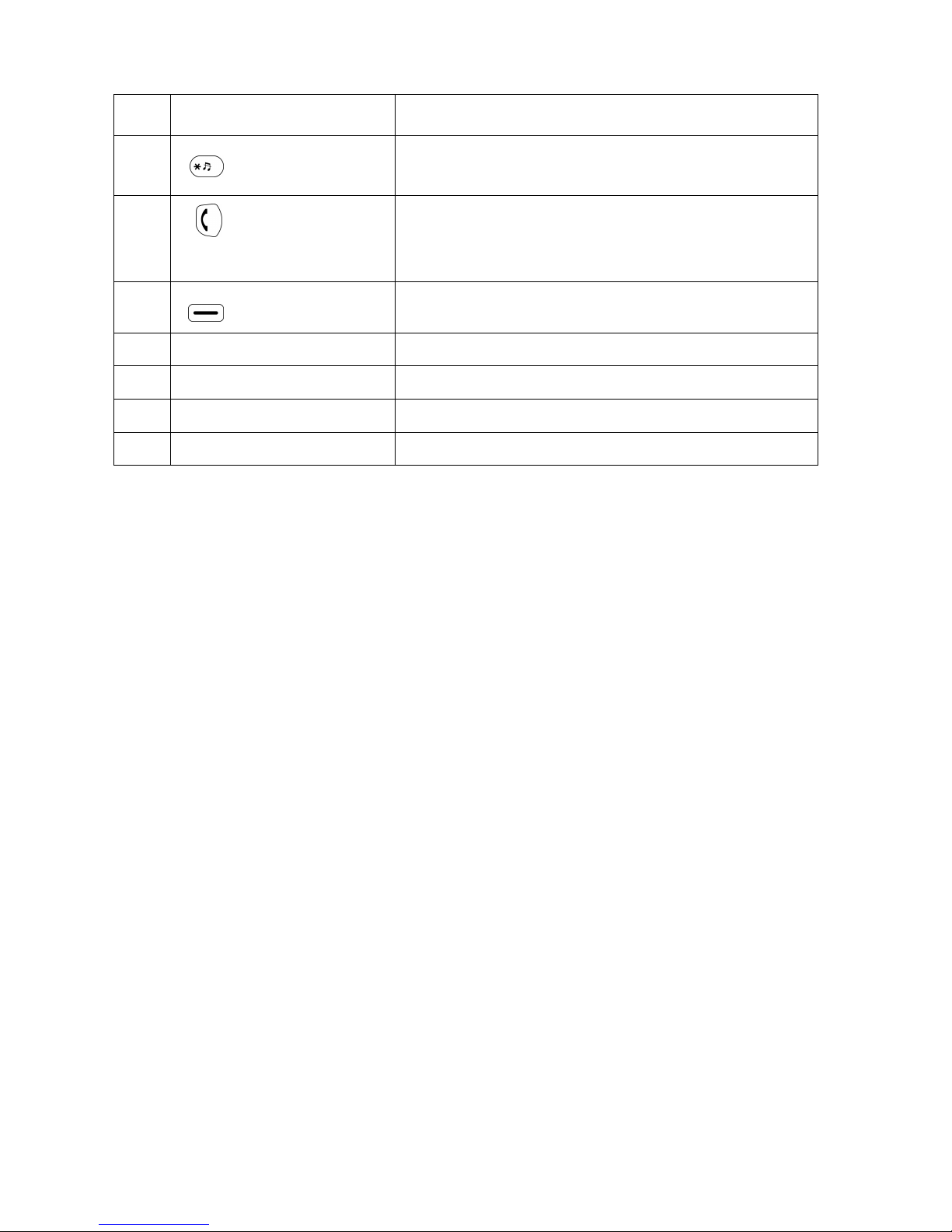
11 Microphone Recei es oice input
12 Star Key Enter symbols in text mode
Press and hold to mute ring tone
13
Call Key
Dial manually entered or Phonebook numbers
Show call history
During a Call, sends ‘Flash’ to PBX (Call Hold, Transfer, etc.)
Press and hold for 2 seconds will start WPS search
14 Left Soft key Select a menu or submenu
Confirm menu option
15 Speaker Volume Use to increase or decrease olume during a call
16 Belt Clip Gap Use to hold the belt clip
17 Speaker Transmits oice output (hands-free mode) or plays ring tone
18 Battery Compartment Contains the Lithium-ion battery.

Chapter 2 Product Description
4
I
In
ns
se
er
rt
ti
in
ng
g
t
th
he
e
B
Ba
at
tt
te
er
ry
y
To insert the battery into your QA-341/342, perform the following steps:
1. Slide off the battery compartment co er.
2. Insert the battery as shown, making sure the battery labels are facing up.
3. Replace the battery compartment co er until it clicks into place.
I
In
ns
st
ta
al
ll
li
in
ng
g
t
th
he
e
B
Be
el
lt
t
C
Cl
li
ip
p
1. Fit the belt clip lock into the gap on one side of the phone.
2. Then fit the belt clip lock into the gap on the other side of the phone. A click sound will be heard to
indicate belt is locked into place.
R
Re
em
mo
ov
vi
in
ng
g
t
th
he
e
B
Be
el
lt
t
C
Cl
li
ip
p
Gently pull the fitted lock from one side of the phone to release the belt clip.

Chapter 2 Product Description
© 2009, ATI Applied Technology, LLC. All rights reserved. Prepared in the United States of America. QuickPhones is a trademark of ATI Applied Technology,
LLC, in the United States and/or other countries.
5
C
Ch
ha
ar
rg
gi
in
ng
g
Y
Yo
ou
ur
r
P
Ph
ho
on
ne
e
To directly charge your phone using the pro ided AC power adapter, do the following:
1. Connect one end of the AC power adapter cable to the port at the bottom of the phone.
2. Plug the AC power adapter into the electrical outlet.
To charge your phone using the charging cradle, do the following:
1. Plug the USB jack of the AC power adapter into the cradle, and insert the cable wire into the rib to help
hold the cable.
2. Plug the AC power adapter into the wall socket, and place your phone on the cradle for charging to begin.
Note: 1. Charge the battery for six hours before using your QA-341/342 WiFi phone for the first time.
2. The phone is turned on automatically when charging begins.
3. When the phone is charging, the charging LED lights red.

Chapter 3 Getting Started
6
3
3
G
Ge
et
tt
ti
in
ng
g
S
St
ta
ar
rt
te
ed
d
This QA-341/342 WiFi phone has a built-in Setup Wizard for setting up the phone. It will guide you step-by-step from
wireless AP (access point) setup to SIP (session initiation protocol) account setup.
Note: The Setup Wizard can only be seen the first time the phone starts up after a master reset, but the indi idual steps
required for setup can be accessed at any time through the phone’s menu.
S
Se
et
tt
ti
in
ng
g
t
th
he
e
A
Ac
cc
ce
es
ss
s
P
Po
oi
in
nt
t
(
(A
AP
P)
)
STEP 1. When the phone is powered on for the first time, it guides you to search for a wireless network. Press
the O soft key to start.
STEP 2. There are three possible methods for connecting to a wireless network:
Pushbutton WPS (WiFi protected setup)
or
PIN Mode WPS
or
Manual
(AP Setup Method 1) Using Pushbutton WPS
When you see the display as illustrated in step 2 abo e, push the WPS button on your access point.
The phone displays the following screen:
Other manuals for QuickPhones QA-341
1
This manual suits for next models
1
Table of contents
Other quickphones IP Phone manuals


