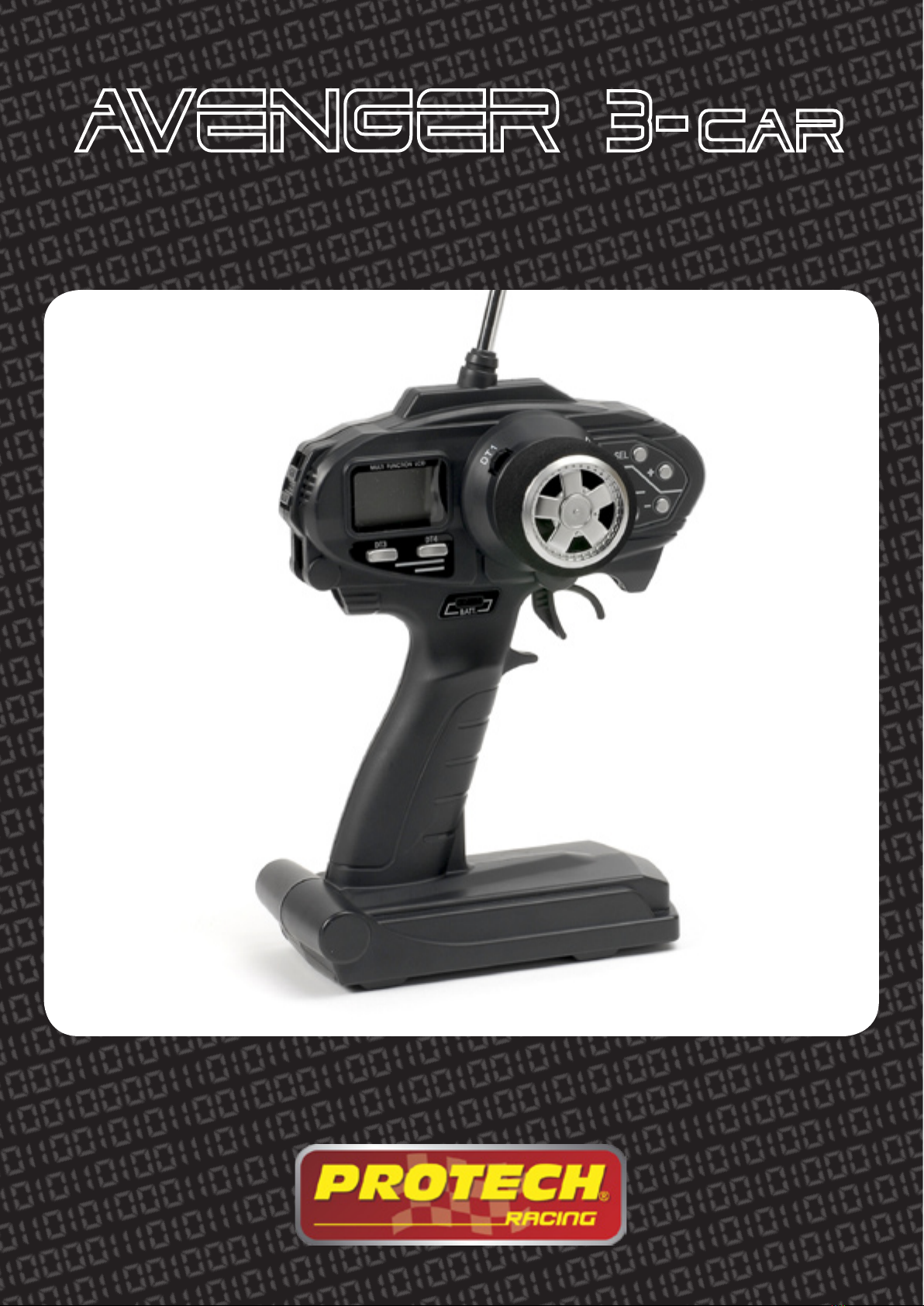
protech Avenger 3-car User manual

www.protech.be
DIGITAL PROPORTIONAL FM R/C SYSTEM
AVENGER 3-Car
T0100

2
Safety precautions
This radio control is not a toy. Therefore it is not suitable for children under the age of 8. Children under 14
should only operate the remote control system under supervision of an adult.
The radio controlled model is also not a toy. For this reason, you must observe the special safety instructions
of the model manufacturer when installing and using the recever unit.
If you are not familiar with RC models, please contact an experienced model pilot or a model construction
club.
Please check the functional safety of your model and the remote control unit before putting the device in
operation. When doing so, make sure there is no visible damage, such a defective plug connection or dama-
ged cables. All moveable parts of the model must run smoothly, but must not have any play in their bearings.
When the antenna is pressed in, the device should still work wthin a range of approx. 25>30 meters.
Do not expose the transmitter to direct sunlight or excessive heat for an extended period of time.
If the battery voltage become too low (alarm), you must immediately change the batteries or recharge the
NiCd batteries to avoid reduction of range control and lost control of the model.
Specifications
Power requirement: 9,0V ~ 12.01V DC
Current drain: 250mA max.
Modulation: FM
Working temperature: 0°C ~ 70°C
• LCD display
• LED indicator
• 10 models memory
• 3 Channels
• Digital Trim
• Steering wheel
• Charging jack
• Low battery alarm
• Tone for digital trim
• EPA (End point adjustment)
• SPD (Steering speed)
• EXP (Exponential)
• ABS (ABS function)
• ACC (Throttle acceleration)
• BMX (Brake mixing)
• TRM (Trims)
• D/R (Steering dual rate)
• ATL (Throttle ATL function)
• CH3 (Channel 3 position)
• SBT (Subtrim)
• REV (Servo reverse)
• M01 (Model select)

3
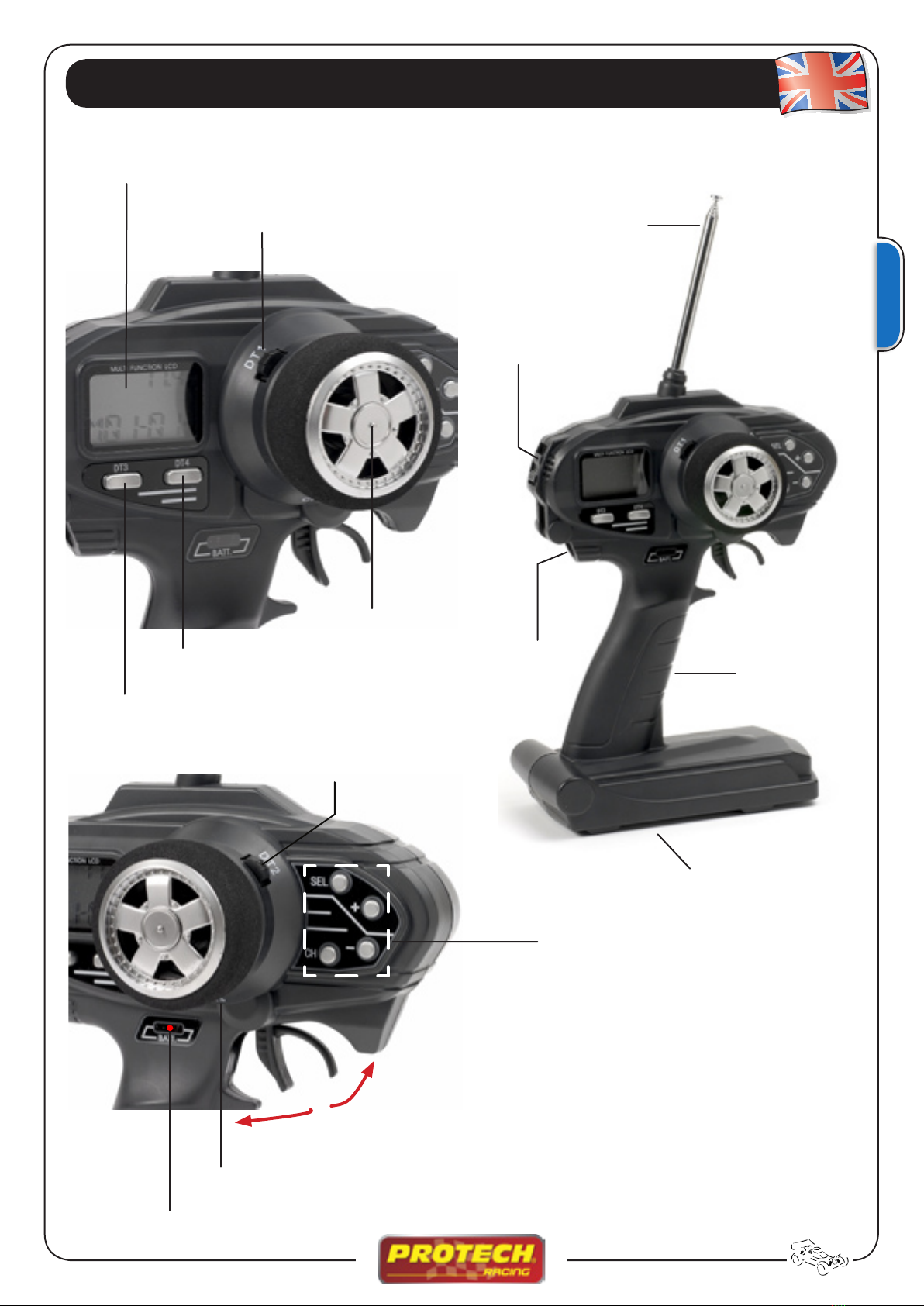
Nomenclature
Throttle trim
Multifunction LCD display
Dual Rate (DT3)
LED indicator
Edit button
Steering Trim
Steering wheel
Antenna
Grip handle
Battery holder
CH 3 button
ATL Throttle (DT4) Charging jack
Switch ON/OFF
Throttle trigger

4
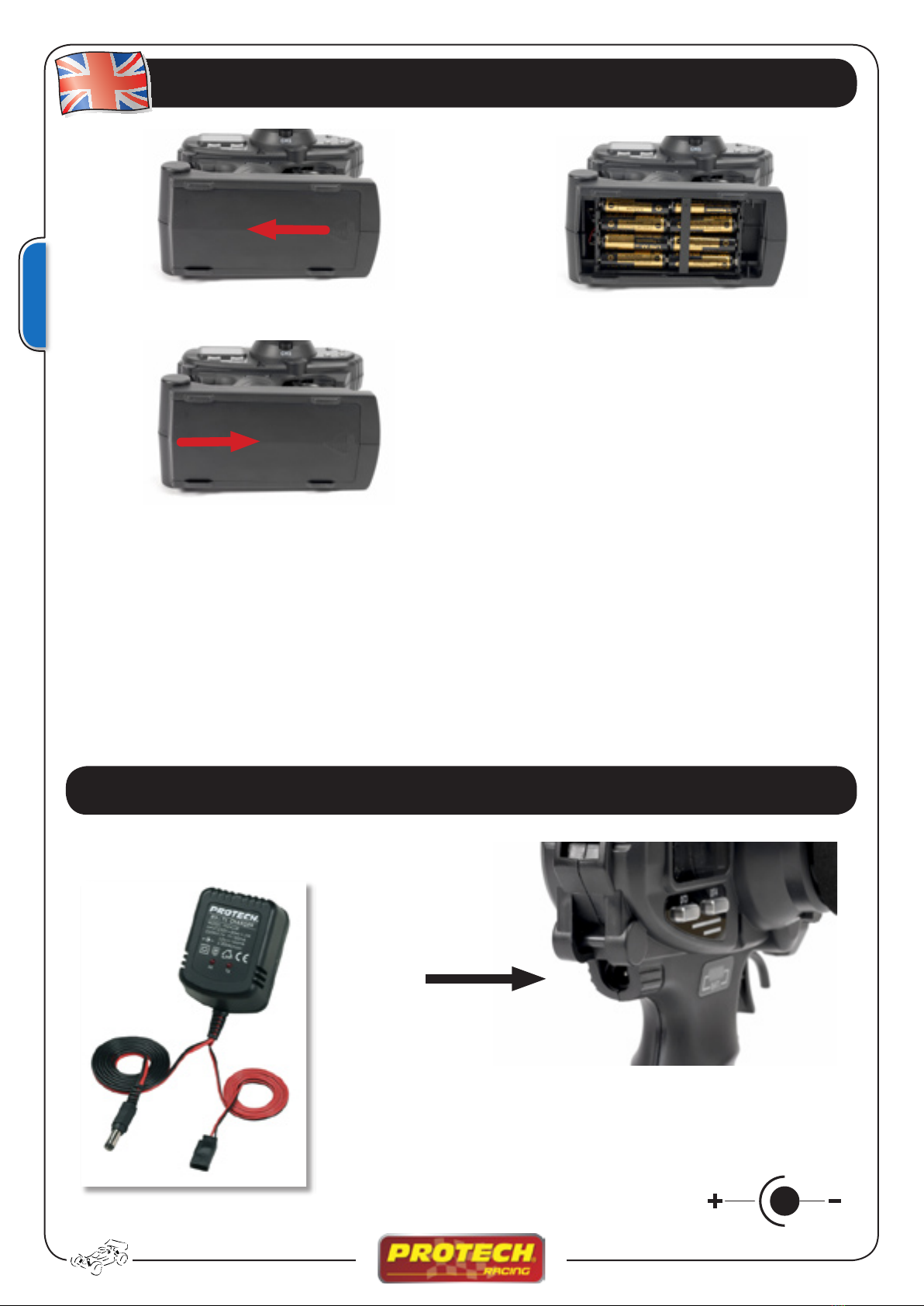
Installing the batteries
Remove the battery cover by sliding it in the direction shown (1)
Remove the used batteries and load new AA size batteries. Pay very close attention to the polarity markings. (2)
Slide the battery cover back onto the case. (3)
Turn the power switch ON and check the battery voltage display on the LCD display.
LOW BATTERY ALARM
If the transmitter battery voltage drops below 8,5V an alarm will sound and LOW BT will displayed on the
LCD display. Stop immediately when the Low Battery alarm tone to avoid loss of control.
➊➋
➌
Charging the NiCd battery
Use only a special charger for digital proportionnal R/C sets.
Plug the transmitter cable of the special charger into the charging
jack on the side of the transmitter. Respect the polarity
Charger RX-TX
Ref. T0242
Polarity

5
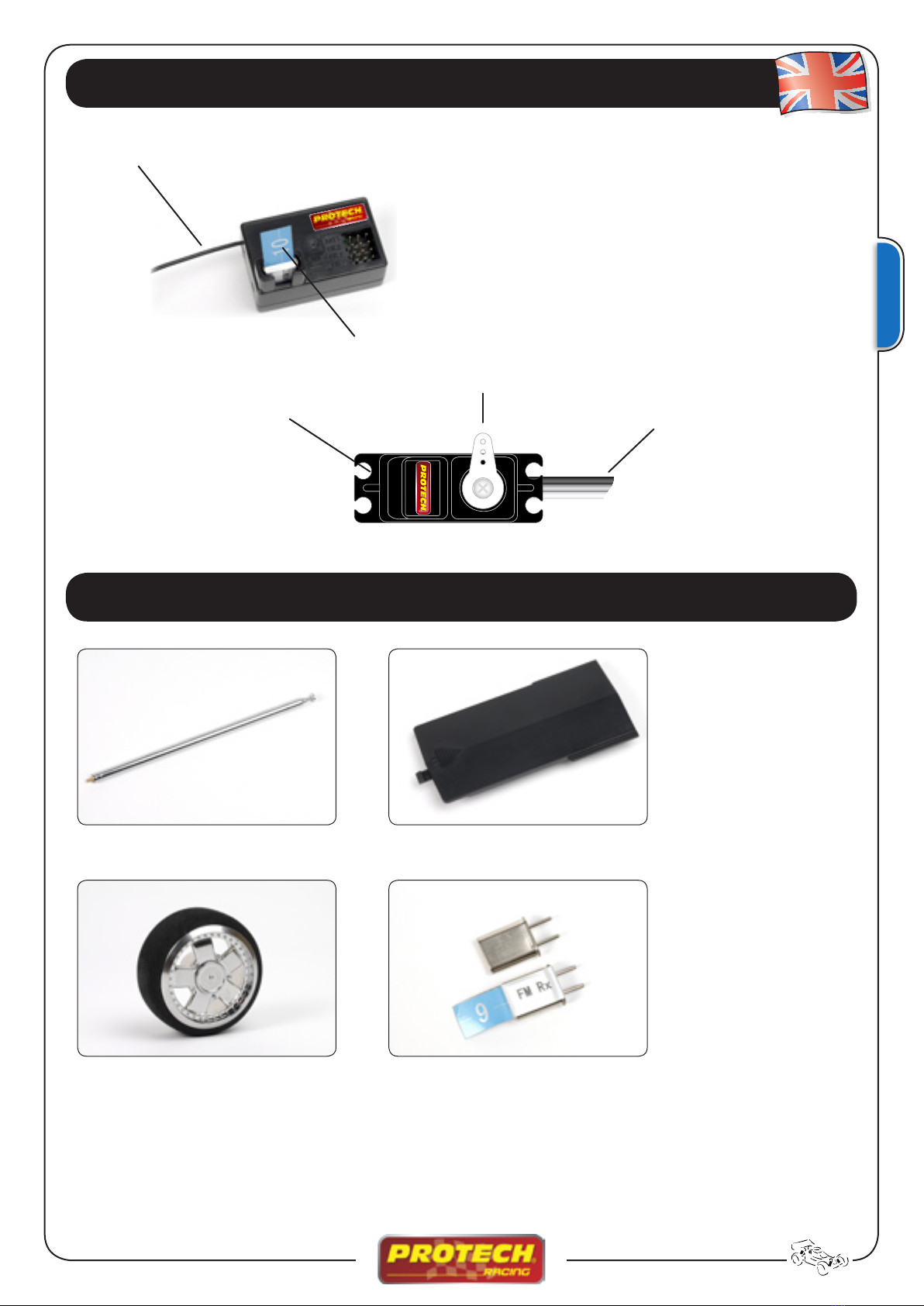
CONNECTORS
#1 : Steering servo (CH 1)
#2 : Throttle servo (CH 2)
#3 : CH3 servo (CH 3)
BATT : Battery connector
RECEIVER and SERVO
Antenna
Crystal
Spare parts
Servo horn
Servo leadMounting flange
CRYSTALS RX + TX
T0100.104 Antenna T0100.105 Battery cover
T0100.4 K4 26.995MHz
T0100.9 K9 27.045MHz
T0100.14 K14 27.095MHz
T0100.19 K19 27.145MHz
T0100.24 K24 27.195MHz
T0100.28 K28 27.235MHz (Only for FRANCE)
T0100.32 K32 27.275MHz (Only for FRANCE)
T0100.106 Steering wheel

6
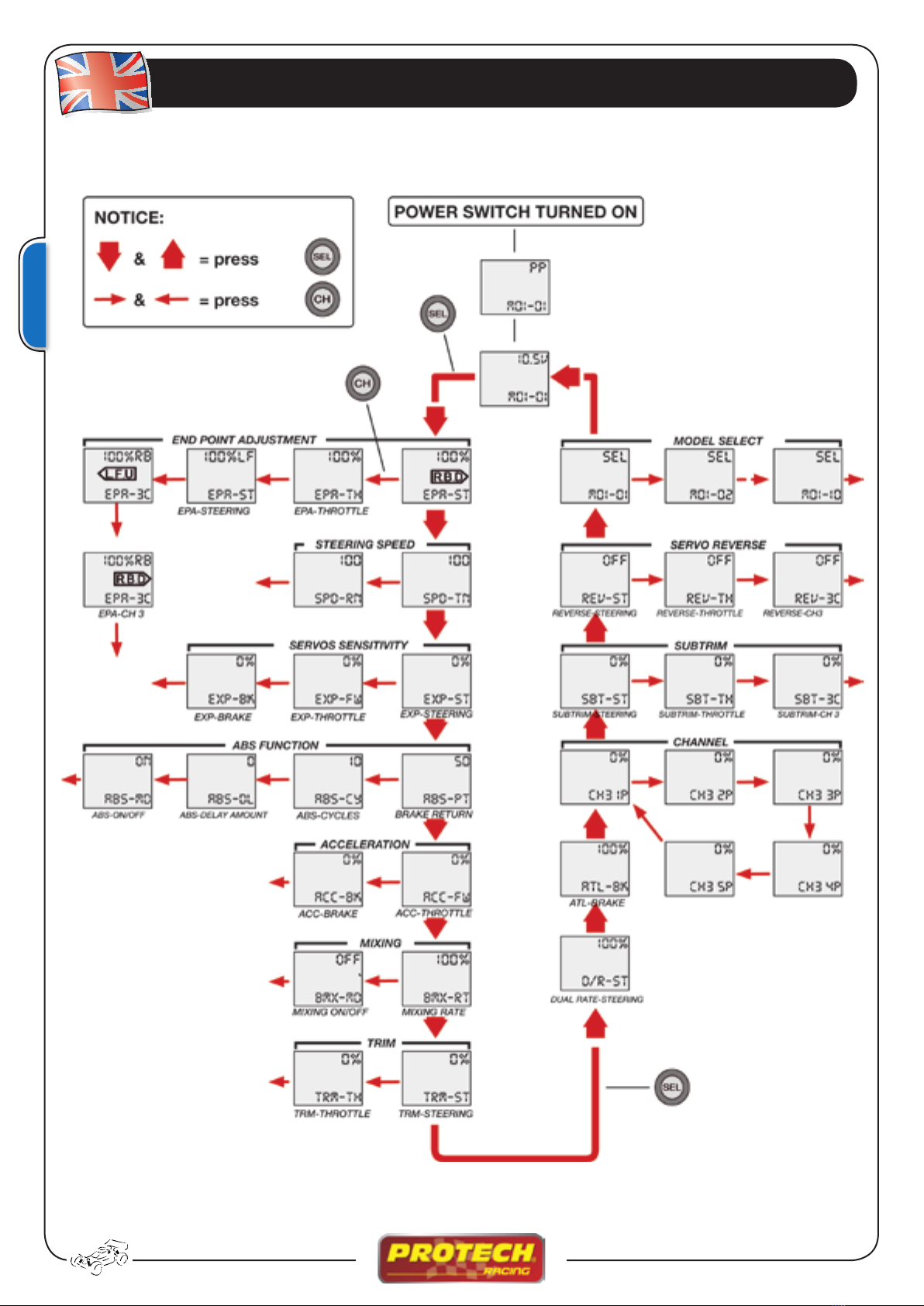
Function map

7
Functions
DISPLAYED WHEN POWER SWITCH IS TURNED ON
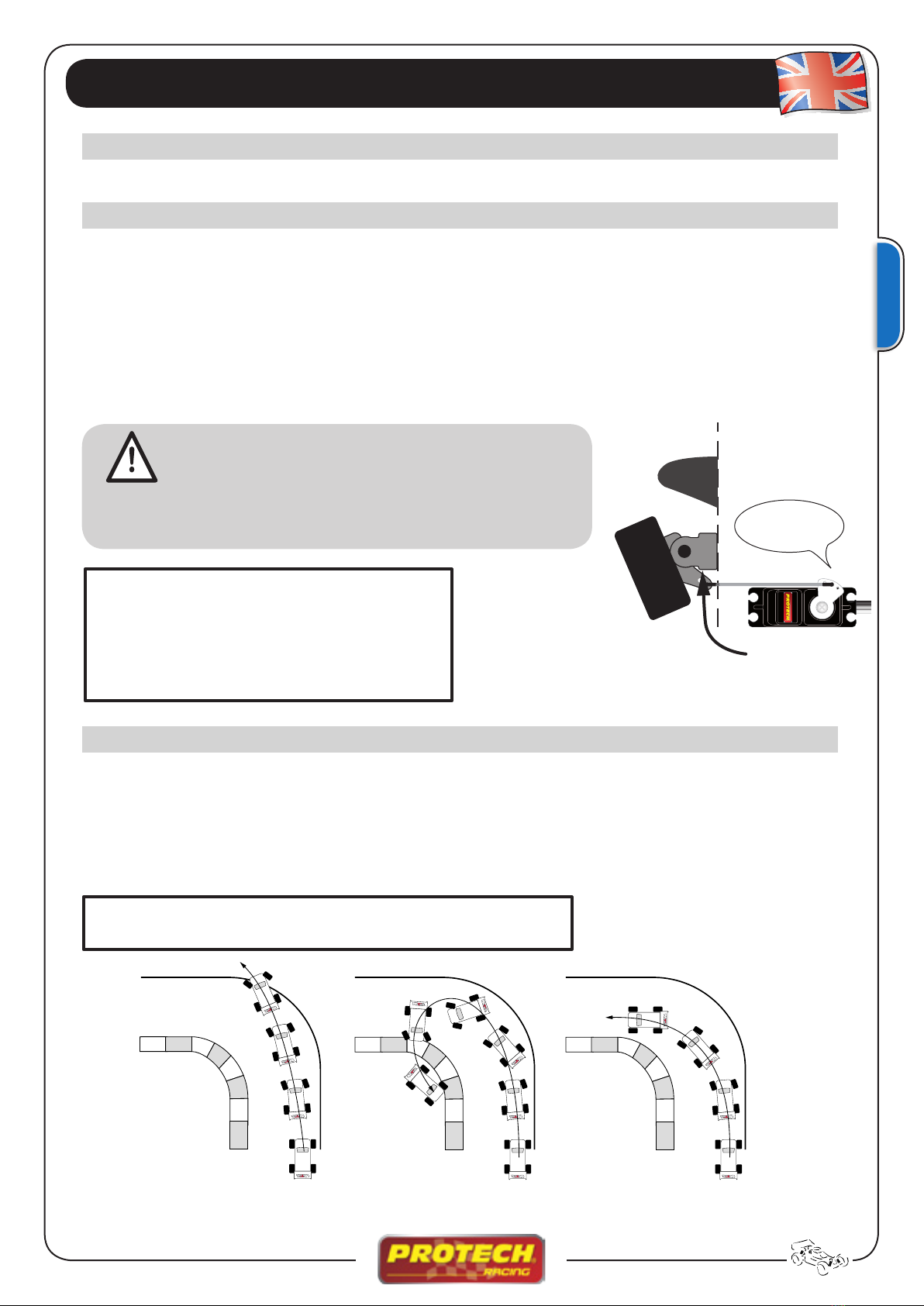
Use this function to perform the adjustment of the servos and correct the max. steering angle left and right
:Select the EPA-ST function and use (+) and (-) buttons to adjust the value.
Press (+) and (-) buttons simultaneously ± 1sec. to reset to the default value.
EPA / END POINT ADJUSTMENT
SPD / STEERING SPEED adjustment
The current selected model number and the battery voltage are displayed.
EPA-ST L.F.U. = Steering Left
EPA-ST R.B.D. = Steering Right
EPA-TH L.F.U.= Throttle
EPA-TH R.B.D. = Brake
EPA-3C L.F.U. = Channel 3 - Up
EPA-3C R.B.D. = Channel 3 - Down
SPD-TN = TURN (Adjustment from 0 ~ 100%)
SPD-RN = RETURN TO NEUTRAL (Adjustment from 0 ~ 100%)
Make sure that the knuckle arm does touch during steering operation. If the servo is submitted
to great forces during operation, it may become damagad or overheat, resulting in an uncontrol-
lable model.
ATTENTION
Set the EPA at the point of
contact.
Understeering Spin Good
Steering speed not set Steering speed not set Steering speed set
This function limits the maximum speed of the steering servo. Quick movement of the steering wheel will
cause understeering, spin or loss of speed.
:Select SPD-TN function and use the (+) and (-) buttons to adjust.
Press (+) and (-) simultaneously for ± 1sec. to reset the default value.
Be sure that the
steering servo does
not “bind”!

8
Functions
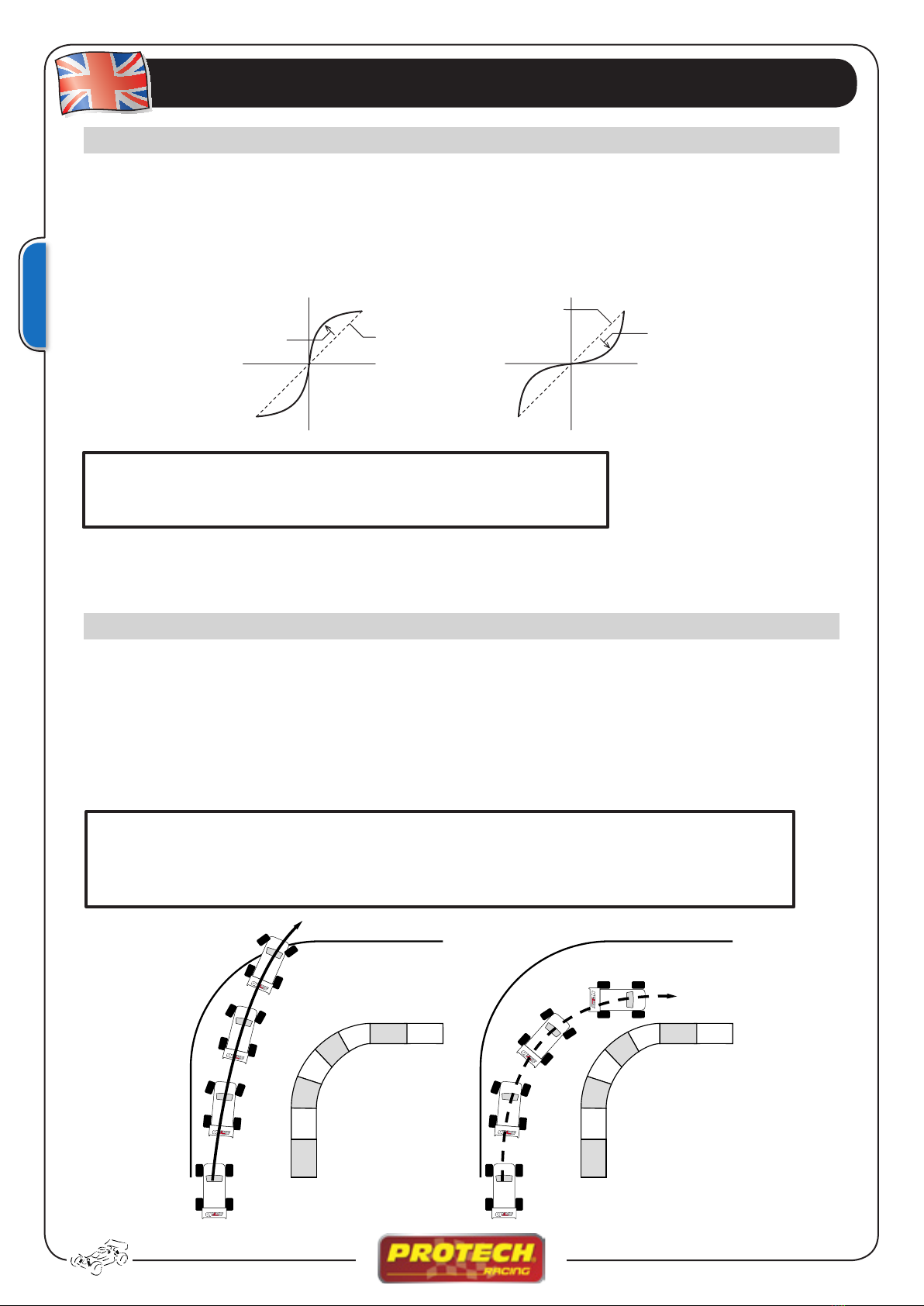
EXP / EXP-ST / EXP-FW / EXP-BK • Steering & Throttle Exponential
This function is used to change the servo sensibility around the neutral point. The throttle servo can be ad-
justed to each side for individual throttle/brake exponential.
:Select the EXP-ST function and use the (+) and (-) buttons to adjust the value.
Press (+) and (-) simultaneously for ± 1sec. to reset the default value.
EXP-ST = EXP Steering rate (adjustment from -100% ~ 0 ~ +100%)
EXP-FW = EXP Throttle rate
EXP-BK = EXP Brake rate
ABS FUNCTION
When you brake your model while cornering, it can have a tendancy to understeer. The ABS function can
smooth or eliminate this effect.
When brakes are applied, the throttle servo will pulse, this will have the same effect as pumping the brakes
on a real car. The brake return amount, pumping cycle and delay can be adjusted.
:Select ABS-PT function and use (CH), (+) and (-) buttons to adjust the values.
Press (+) and (-) simultaneously for ± 1sec. to reset the default value.
Without ABS
With ABS
Fast
Servo travel
+1% ~ +100% (Fast)
Stick movement
0% (Normal)
0% (Normal)
Slow
Servo travel
+1% ~ +100% (Slow)
Stick movement
ABS-PT = Brake force, servo return (value adjustable from 0 ~ 100)
ABS-CY = Cycle speed (Low value = Fast cycle)
ABS-DL = Delay value (0= ABS working without delay • 50= delay ±0,7s • 100= delay ± 1,4s
ABS-BK = Activation/Deactivation ABS
When you drive on a track with high grip, start with a 0% setting and increase the value gradually. When the
track is slippery, decrease the sensitivity in order to regain optimal control of the model.

9
Functions
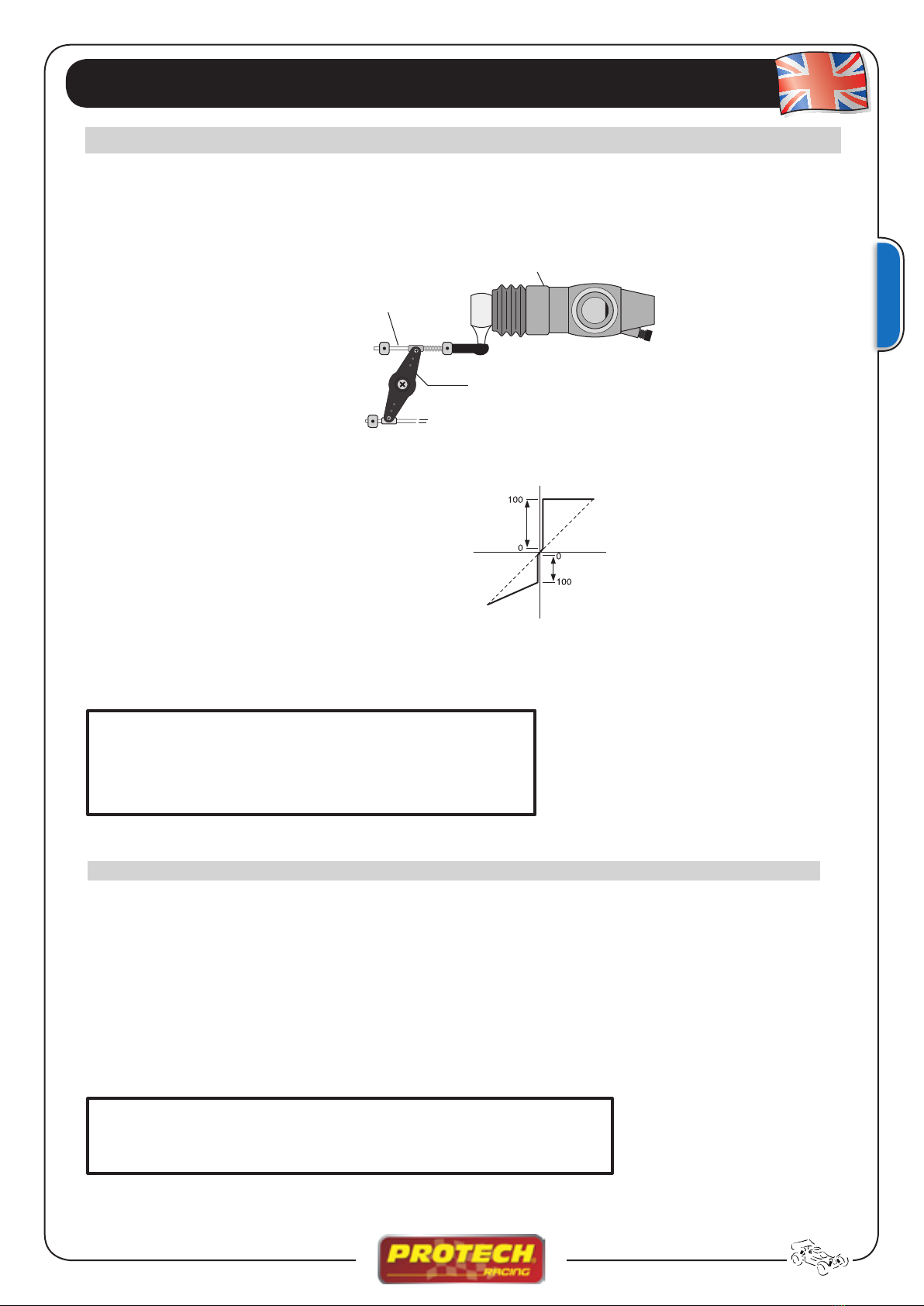
ACC / TROTTLE ACCELERATION • Fast acceleration
IC motors have a response delay between the idle and engaging of the clutch bell. This function enables you
to have a faster response of the clutch bell.
Throttle and brake side are individually adjus-
table.
BMK / BRAKE MIXING
Use this function when your front and rear brakes need to be adjusted separately, as in 1/5th scale cars.
The mixing uses the 2nd channel to control the rear brake servo and the 3d channel to control the front
brake servo.
Some play is necessary but it slows down the reaction time of
the carburator.
The ACC function results in faster reaction time.
Carburator
Servo arm
Brake lever
Throttle side
Frein
Brake side
Servo
Gaz
:Select the ACC-FW function and use the (CH), (+) and (-) buttons to adjust the values from 0 ~ 100.
Press (+) and (-) simultaneously for ± 1sec. to return to the initial page.
:Select the BMX-RT function and adjust the value using the (+) and (-) buttons.
Press the (CH) button to access the BMX-MD screen and use the (+) and (-) buttons to activate or
deactivate the mixing. The default setting is disabled.
Press (+) and (-) simultaneously for ± 1sec. to return to the initial page.
BMX-RT = Mix rate (adjustable from 0% ~ 100 ~ +120%)
Defalt value = 100
BMX-MD = BMX MODE (activation - deactivation of mixing)
ACC-FW = Adj. throttle side (adjustable from 0 ~ 100%)
Initial value = 0
ACC-BK = Adj. brake side (adjustable from 0 ~ 100%)
Initial value = 0

10
TRM / STEERING TRIM & THROTTLE TRIM
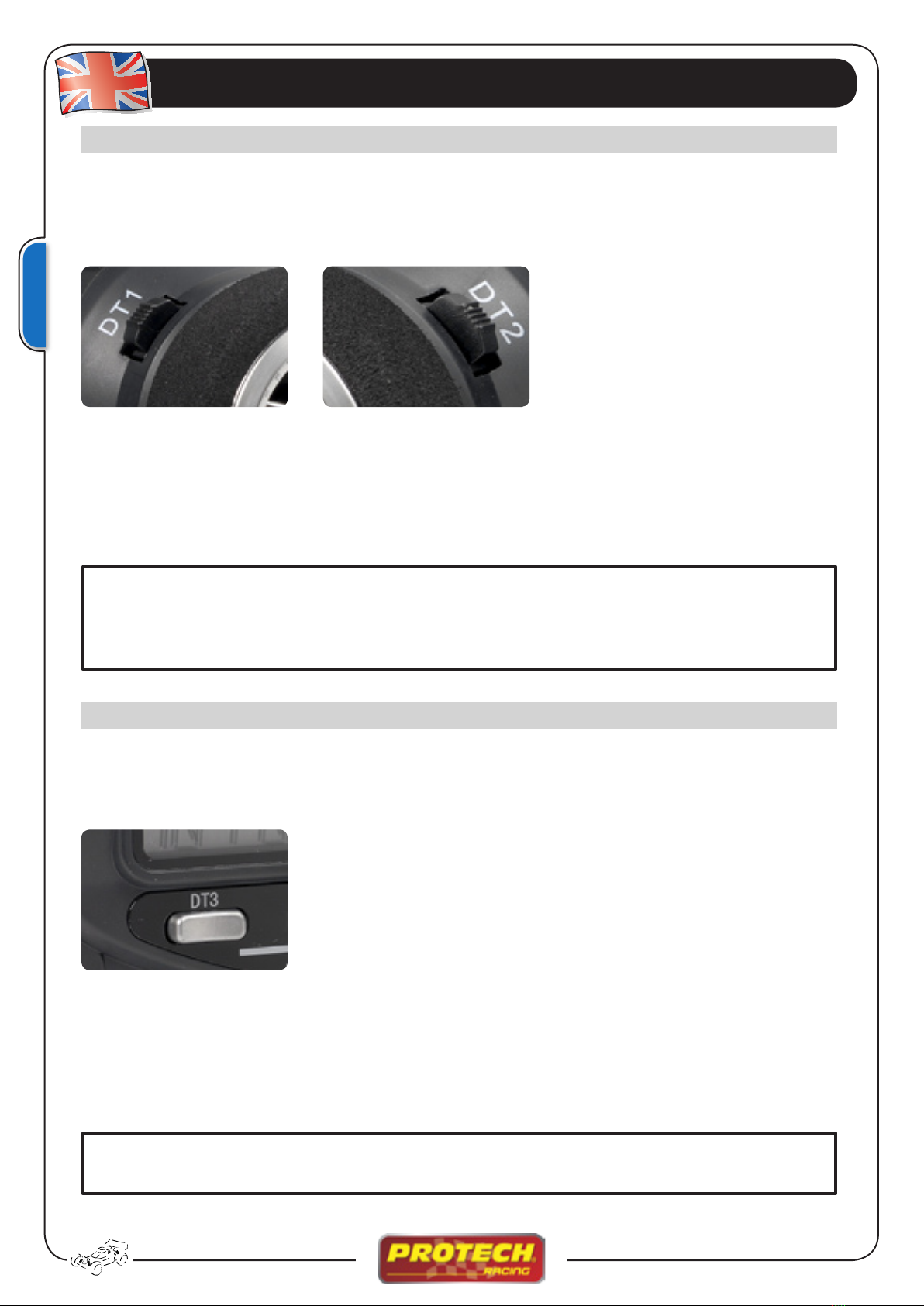
The setting of the neutral point of the steering servo and throttle/brake servo are adjustable while driving us-
ing the DT1 and DT2 buttons.
If no acceptable position can be found using the trim button, please move the servo arm on the servo spline
to obtain a neutral trim.
TRIM Throttle/Brake (DT1)
TRIM Direction (DT2)
D/R-ST / STEERING DUAL RATE
This function enables fast adjusting of the servo travel (while driving) and the setting is adjusted by button
DT3.
It affects both left and right angles simultaneously.
D/R-ST = Steering servo dual rate
Function details
:You can save a trim in memory according to the following procedure:
Select the TRM-ST function and use the (+) and (-) buttons to adjust the values.
Press the (CH) button to access the TRM-TH screen, use the (+) and (-) buttons to adjust the values
(default value = 0)
Press (+) and (-) simultaneously for ± 1sec. to return to the initial screen. The values are stored in memory
but are always adjustable through buttons DT1 and DT2.
TRM-ST = Steering trim (adjustable to the left and right: L.F.U.100% ~ 0 ~ R.B.D.100%)
Default value = 00
TRM-TH = Throttle/brake trim (adjustable both sides: L.F.U.100% ~ 0 ~ R.B.D.100%)
Default value = 00
:Select the D/R-ST function from the menu and use the (+) and (-) buttons or use the DT3 button to adjust
the values from 0 ~ 100%
The default value is 100%.
Press (+) and (-) simultaneously for ± 1sec. to return to the initial display page.
D/R-ST = Travel of the steering servo (adjustable frome 0 ~ 100%)
Default value = 100%
This manual suits for next models
1
Table of contents
Languages: