
Portwell PIVS-6104 User manual
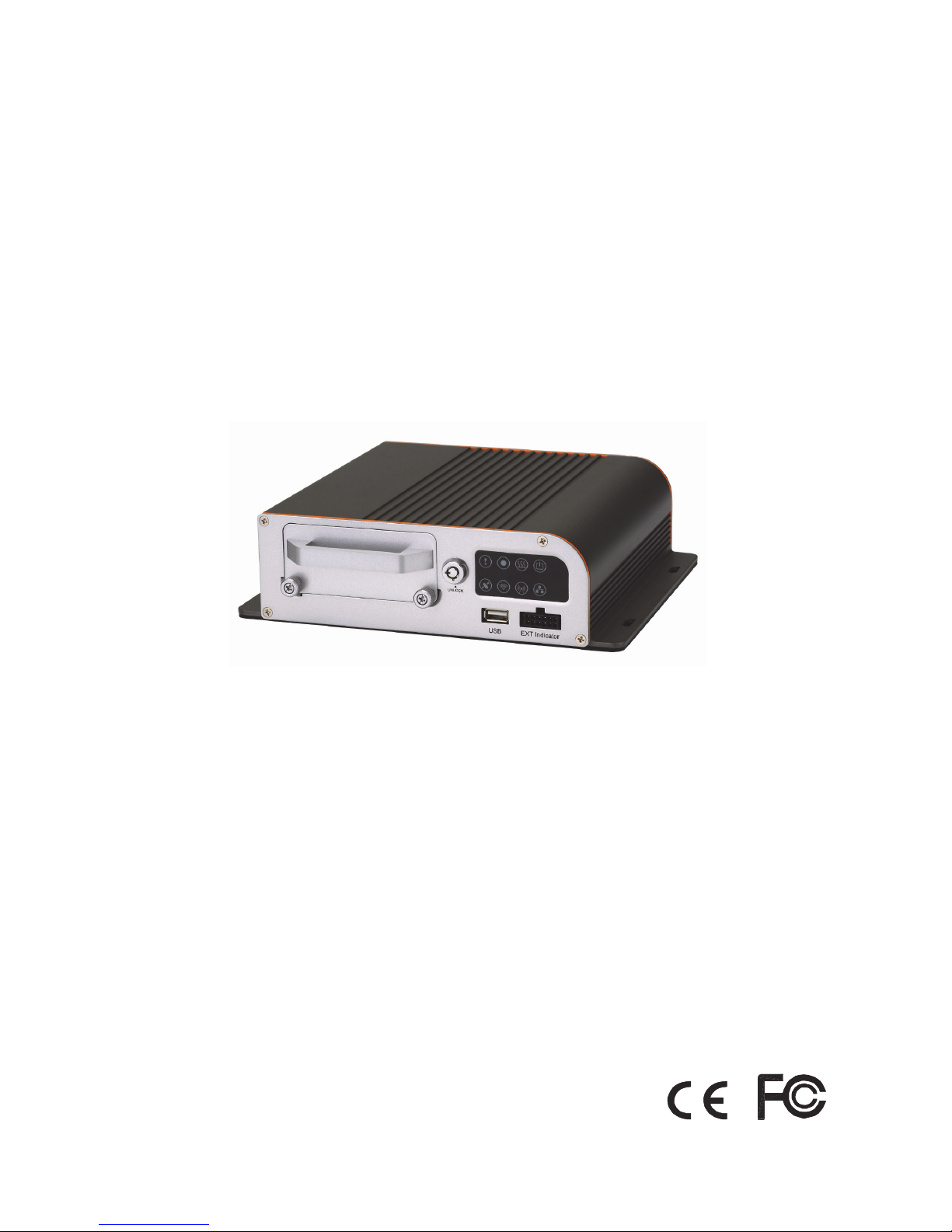
Thank you for purchasing our product.
Please read instructions before operation.
Change without Notice
4 ch Mobile DVR
User Manual
CAUTION :
To reduce the risk of electric shock, do not expose this apparatus to rain or
moisture.
Only operate this apparatus from the type of power source indicated on the
label.
The company shall not be liable for any damages arising out of any improper
use,
Even if we have been advised of the possibility of such damages.
Graphic Symbol Explanation
The lightning flash with arrowhead symbol, within an equilateral triangle, is intended to
alert the user of the presence of insulated dangerous voltage within the product’s
enclosure that may be sufficient magnitude to constitute risk of electrical shock to
persons.
This exclamation point within an equilateral triangle is intended to alert the user of the
presence of important operating and maintenance (servicing) instructions in the literature
accompanying the appliance.
All lead-free products offered by the company comply with the requirements of the
European law on the Restriction of Hazardous Substances (RoHS) directive, which
means our manufacture processes and products are strictly “lead-free”
and without the hazardous substances cited in the directive.
The crossed-out wheeled bin mark symbolizes that within the European Union the
product must be collected separately at the product end-of-life. This applies to your
product and any peripherals marked with this symbol. Do not dispose of these products
as unsorted municipal waste. Contact your local dealer for procedures for recycling this
equipment.
Attention: installation should be performed by qualified service personnel only in accordance
with the National Electrical Code or applicable local codes.
Safety Precautions
CAUTION
RISK OF ELECTRIC SHOCK
WARNING: TO PREVENT FIRE OR SHOCK HAZARD, DO NOT EXPOSE UNITS NOT
SPECIFICALLY DESIGNED FOR OUTDOOR USE TO RAIN OR MOISTURE.

FCC STATEMENT
WARNING
This device complies with Part 15 FCC Rules. Operation is subject to the following two
conditions:
(1) This device may not cause harmful interference.
(2) This device must accept any interference received including interference that may
cause undesired operation."
WARNING
This Equipment has been tested and found to comply with the limits for a Class B digital
device, pursuant to Part 15 of the FCC rules. These limits are designed to provide
reasonable protection against harmful interference in a residential installation. This
equipment generates uses and can radiate radio frequency energy and, if not installed and
used in accordance with the instructions, may cause harmful interference to radio
communications. However, there is no guarantee that interference will not occur in a
particular installation. If this equipment does cause harmful interference to radio or
television reception, which can be determined by turning the equipment off and on, the user
is encouraged to try to correct the interference by one or more of the following measures:
- Reorient or relocate the receiving antenna.
- Increase the separation between the equipment and receiver.
- Connect the equipment into an outlet on a circuit different from that to which the
receiver is connected.
- Consult the dealer or an experienced radio/TV technician for help.
You are cautioned that changes or modifications not expressly approved by the party
responsible for compliance could void your authority to operate the equipment.

TYPE A/TYPE B/TYPE C..................................................................................................... 錯誤! 尚未定義書籤。
User Manual...........................................................................................................................................................1
1. Package Contents...........................................................................................................................................1
2. Product Overview ..........................................................................................................................................3
3. Physical Connection .......................................................................................................................................7
3.1. Hard disk installation ....................................................................................................................7
3.2. Sim card installation ...................................................................................................................10
4. Setup ............................................................................................................................................................14
5. DVR operation via video out ........................................................................................................................19
5.1. Main Interface ............................................................................................................................19
5.2. Advanced ....................................................................................................................................21
5.2.1. Record Setup ..............................................................................................................................22
5.2.2. Device .........................................................................................................................................23
5.2.3. Event Setup.................................................................................................................................25
5.2.4. Network Setup............................................................................................................................29
5.2.5. Account.......................................................................................................................................32
5.2.6. System tools ...............................................................................................................................32
5.2.7. System Info .................................................................................................................................36
5.3. Search .........................................................................................................................................37
5.4. Backup ........................................................................................................................................37
5.5. Sound..........................................................................................................................................38
5.6. Display ........................................................................................................................................38
5.7. PTZ ..............................................................................................................................................38
5.8. Playback......................................................................................................................................39
6. DVR operation via browser ..........................................................................................................................40
6.1. Video ..........................................................................................................................................41
6.2. Record.........................................................................................................................................43
6.3. Camera setting............................................................................................................................45
6.4. Event...........................................................................................................................................46
6.5. Network......................................................................................................................................50
7. Configuration ...............................................................................................................................................54
7.1. Information.................................................................................................................................54
7.1.1. System ........................................................................................................................................54

7.1.2. Display ........................................................................................................................................54
7.2. Account.......................................................................................................................................55
7.2.1. Date and time .............................................................................................................................56
7.2.2. Car information ..........................................................................................................................56
7.2.3. Format ........................................................................................................................................57
7.2.4. Log ..............................................................................................................................................58
8. Vehicle Management Software (VMS) works only for TYPE A ..................................................................60
8.1. Server software installation........................................................................................................61
8.2. Client software installation.........................................................................................................62
8.3. Operation....................................................................................................................................63
8.4. Tool bar description....................................................................................................................67
8.5. Program interface.......................................................................................................................77
8.5.1. Open AVI.....................................................................................................................................78
8.5.2. Open HDD...................................................................................................................................79
8.5.3. Control bar description...............................................................................................................80
8.5.4. Snapshot.....................................................................................................................................81
8.5.5. Setting.........................................................................................................................................82
1
1. Package Contents
Description Picture Type A TYPE B TYPE C
Power cable
(6 pin/6m) +
5A fuse X 2
V V V
I/O cable
V V -
3G antenna
(Female/ 2.5
db)
V - -
G-Mouse
(Male/5m/-15
9dbm)
V VV
Wifi antenna
(Female/ 2
db)
V - -
Remote
Controller +
battery
V V V
Screw x 5
V V V
Nylon cable
tie x 10
V V V
2
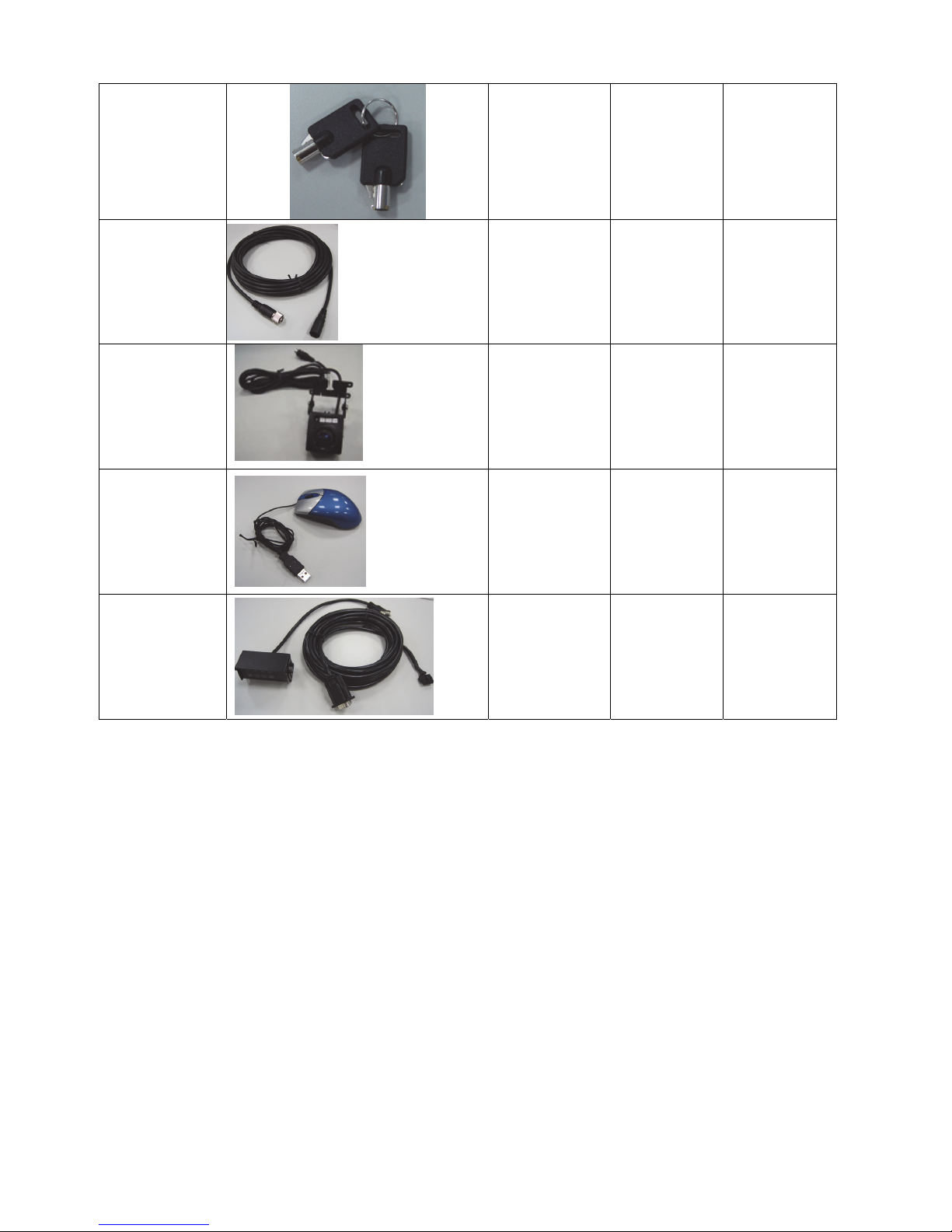
Hard disk
rack locker
key
V V V
Video cable
(6 pin/mini-
din type/
female-male/
6m)
optional optional optional
Camera CC2
042 x 4
optional optional optional
USB Mouse
optional optional optional
External
indicator +
bracket +
cable
optional optional optional
3
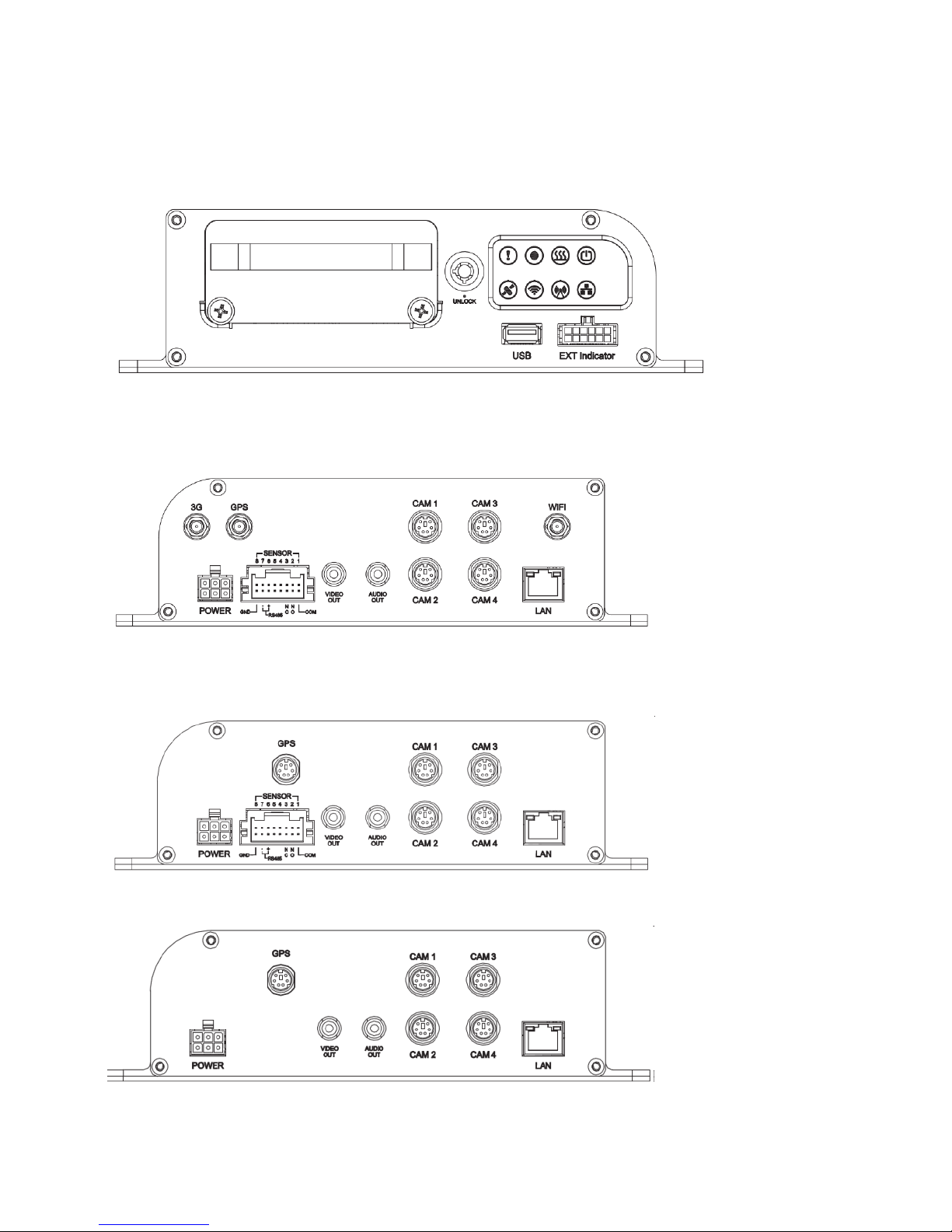
2. Product Overview
TYPE A/TYPE B/TYPE C
Front Panel
TYPE A
Back Panel
TYPE B
Back Panel
TYPE C
Back Panel
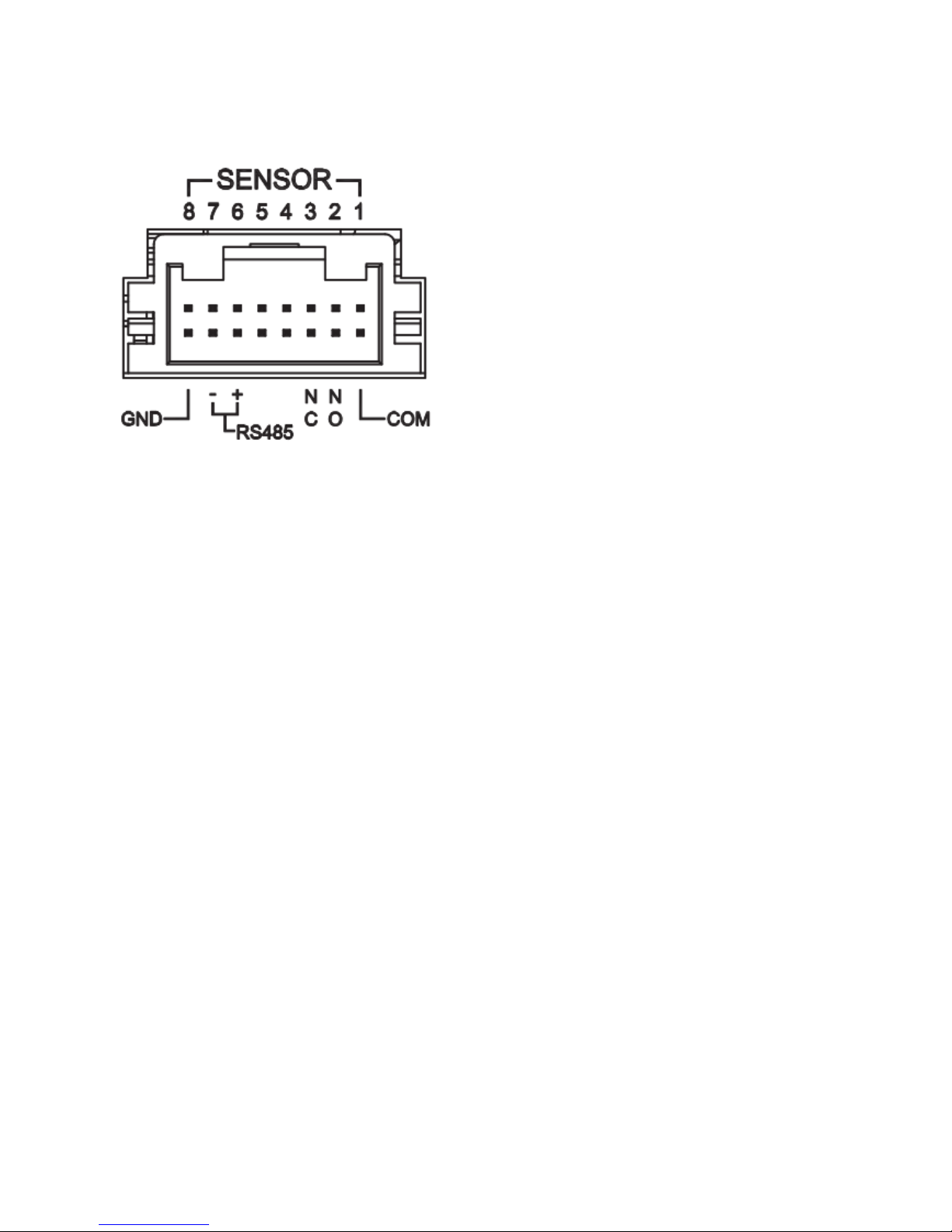
Cable pin definition
4
I/O cable pin definition
5
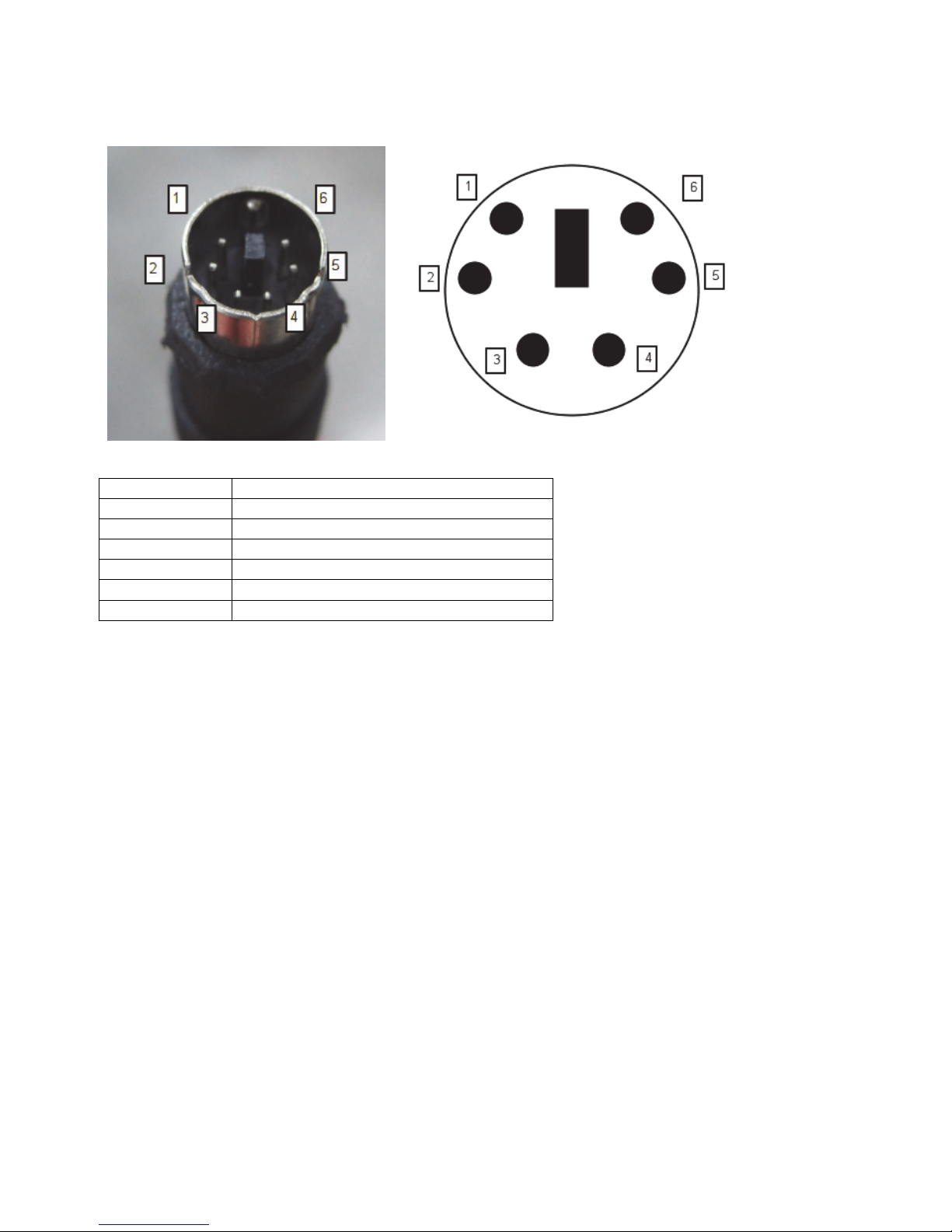
Video cable Mini din type
Pin number Description
1 Power
2 Audio
3 Not used
4 Not used
5 Ground
6 Video
Table of contents


