PNI SafeHome PT822D User manual

PNI SafeHome PT822D
EN User manual ......................................................... 2
BG Ръководство за употреба ............................. 10
DE Benutzerhandbuch .............................................. 18
ES Manual de usuario ............................................... 26
FR Manuel utilisateur ............................................... 34
HU Használati utasítás .............................................. 42
IT Manuale utente .................................................. 50
NL Handleiding ........................................................ 58
PL Instrukcja obsługi ............................................... 66
RO Manual de utilizare ............................................. 74

PNI SafeHome PT822D
2 gang WiFi relay with dimmer
User manual

3 - User manual PNI PT822D
Technical specifications
Supply voltage 230V AC 50/60Hz
Maximum load 2 x 100W
Rated current 2 x 450mA
WiFi frequency 2.4GHz
Emission power 100mW
Operating distance ≤ 200 meters
Dimensions 46x46x18 mm
Water resistance class IP20
Working temperature -26°C ~ +80°C
Warnings
• Installation of the relay should only be performed by
qualified personnel.
• Protect the product from excessive moisture and
dust.
• Install the product away from sources of
interference (such as microwave ovens) which could
aect the normal operation of the product.
• Obstacles such as concrete walls or metal materials
could reduce WiFi communication distance.
• In case of product failure, call a specialized service
center.

4 - User manual PNI PT822D
Connection diagram
L
N
L1
L2
S1
S2
L N
S
L-
N
N
L
L

5 - User manual PNI PT822D
Installation
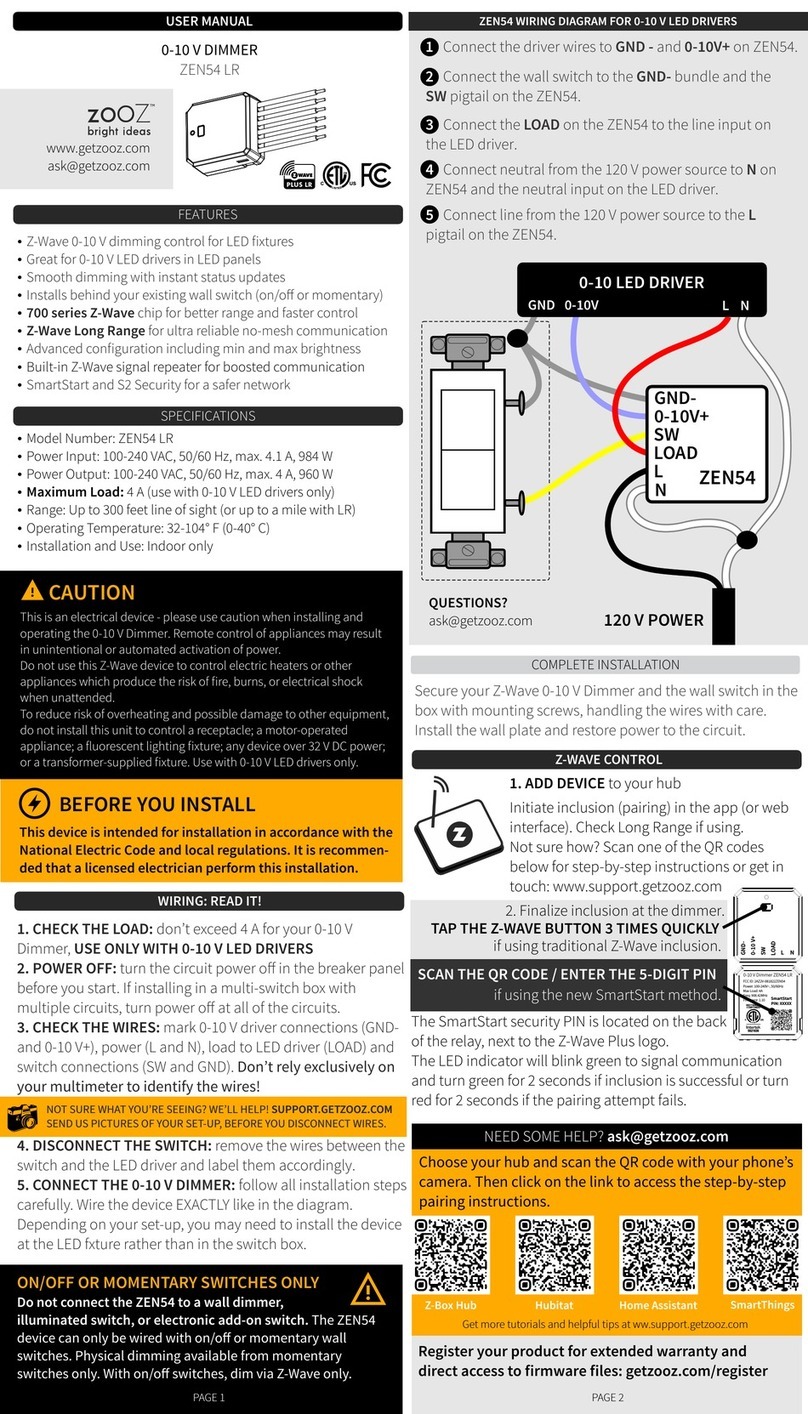
• Before installing the relay, turn o the mains.
• Connect the wires according to the connection
diagram below.
• Put the relay in the electrical junction box.
• Restart the power supply.
• Installation should only be performed by authorized
personnel.
Relay control via Tuya Smart application
1. Download and install the Tuya Smart application on
your smart phone. Search for the app in the Google
Play/App Store or scan the QR code below:
Android iOS
2. After installation, open the application, create an

6 - User manual PNI PT822D
account and log in.
3. Turn on WiFi (2.4GHz), GPS Location, and
Bluetooth on your mobile phone. Note: the relay
can be added to the application with the Bluetooth
function turned o, but it will take longer.
4. To add the relay to the application, click on the “+”
icon in the upper right corner.
5. Turn o the light (the one the relay is connected to)
from the wall switch. Note: The PNI PT822D relay is
compatible with break switches (bell).
6. Press and hold the break switches (bell) until the
light bulb flashes.
7. In the application select from the left menu
Electrical - Breaker (WiFi)
8. Select the WiFi network you want to connect to and
add the network password.
9. Click Next and wait for the application to find the
relay.
10. After identifying your relay, press the Done
button.

7 - User manual PNI PT822D

8 - User manual PNI PT822D
Simplified EU Declaration of Conformity
SC ONLINESHOP SRL declares that PNI SafeHome
PT822D Smart Relay complies with RED Directive
2014/53/EU. The full text of the EU Declaration
of Conformity is available at the following internet
address:
https://www.mypni.eu/products/8598/download/
certifications
CERTIFICATE OF QUALITY AND COMMERCIAL
WARRANTY
WARRANTY DURATION:
Products identified in this certificate by trade name
and unique serial number S/N are covered by a trade
guarantee as follows:
The warranty period for individuals is 24 months from
the date of delivery for defects in workmanship and
materials.
The warranty period for legal entities is 12 months
from the date of delivery for manufacturing and
material defects.
Cables, adapters, consumables, batteries,
accumulators, power supplies, transformers,
microphones, headphones, antennas that are part
of or supplied with the products have a commercial

9 - User manual PNI PT822D
warranty of 6 months from the date of sale of the
product to the final consumer.
The warranty period is calculated from the date of
invoicing of each product.
The average duration of use of the product is 48
months, provided that the installation and operating
instructions that accompany the product are followed.
The commercial guarantee does not aect the
consumer’s rights provided by the applicable
legislation in force, respectively the Emergency
Ordinance 140/28.12.2021 on certain aspects
regarding the contracts of sale of goods, OG 21/1992
on consumer protection with subsequent amendments
and completions and Law 296/2004 on the Consumer
Code as subsequently amended and supplemented.
Download the warranty certificate:

PNI SafeHome PT822D
2-групово WiFi реле с димер
Ръководство за употреба
This manual suits for next models
1
Table of contents
Languages: