Pinnacle PCTV USB Stick User manual

PCTV USB Stick
Hardware

PCTV USB Stick Hardware
User ’s Guide
GB January 2006
© Pinnacle Systems GmbH 2006
All rights reserved.
No part of this manual may be reproduced or transferred to other media without
the explicit written permission of Pinnacle Systems GmbH, Brunswick,
Germany.
All brand or product names are trademarks or registered trademarks of their
respective holders.
Pinnacle Systems GmbH has written this manual to the best of its ability, but
can not guarantee that the programmes/systems will satisfy the users’ intended
applications.
No guarantee is given regarding the specifications of features.
Pinnacle Systems GmbH retains the right to make alterations to the content of
the manual without the need to inform third parties.
All quotes, sales, supply and manufacturing contracts from Pinnacle Systems
GmbH, including consulting, installation and other contractual services are
subject exclusively to the General Sales and Delivery Terms of Pinnacle
Systems GmbH.

i
Table of Contents
Introduction...........................................................................................................1
Box contents .........................................................................................................2
System requirements.............................................................................................3
Processor ...........................................................................................................3
Operating memory.............................................................................................3
Hard disk ...........................................................................................................3
Graphics controller ............................................................................................3
Sound controller ................................................................................................3
USB port............................................................................................................3
CD-ROM / DVD-ROM drive or recorder .........................................................3
Operating system...............................................................................................3
Connecting the antenna.........................................................................................4
Positioning tips for the rod antenna ......................................................................5
Connecting to a computer .....................................................................................6
Using the remote control.......................................................................................7
Technical data.......................................................................................................8
Bus system.........................................................................................................8
Power consumption ...........................................................................................8
TV tuner ............................................................................................................8
DVB-T demodulator..........................................................................................8
Antenna input ....................................................................................................8
Dimensions........................................................................................................8
Weight ...............................................................................................................8
Operating temperature.......................................................................................8
Declaration of conformity in accordance with ISO/IEC Guide 22.......................9

Introduction
Congratulations! You are now the proud owner of a PCTV USB Stick!
A PCTV USB Stick allows you to receive digital terrestrial television in
accordance with DVB-T (Digital Video Broadcasting - Terrestrial) standards
and guarantees excellent picture quality on your PC.
The PCTV USB Stick has optimized reception and functions independently of
the power supply. This makes it the perfect solution for receiving digital
television on your laptop computer.
In addition to Live TV, PCTV USB Stick also makes TimeShifting available, as
well as offering you the option of recording programmes on your hard disk -
without any deterioration in sound or image quality.
You also have access to free information services, videotext and the electronic
programme guide (EPG), which allows you to simply and easily programme the
shows you want to record.
Other services, including digital radio via DVB-T, are also planned for the
future and are already available in some regions.
And now, time to have fun with your PCTV USB Stick!
More information about DVB-T can be found on the Internet at
www.dvb.org or at www.freeview.co.uk. For Australia go to www.dba.org.au.
1

Box contents
PCTV USB Stick Passive mini rod antenna with
magnetic foot
(this illustration is an example only)
Mini remote control including
batteries
(this illustration is an example only)
Installation CD
Quick Start instructions
The box contents may vary depending on your product version.
2

3
System requirements
In order for the PCTV USB Stick to function smoothly, your system must meet
the following requirements:
Processor
Minimum: Pentium III 1.0 GHz
or equivalent AMD Athlon XP processor (SD only)
Recommended: Pentium IV 2.2 GHz, Pentium M 1.3 GHz
or equivalent AMD Athlon 64 processor (SD and HD)
Operating memory
Minimum: 256 MB RAM
Recommended: 512 MB RAM
Hard disk
Minimum: IDE hard disk with master mode drivers and 5 GB of free disk space
Recommended: U-DMA hard disk with 20 GB of free disk space
Graphics controller
Minimum: DirectX 8 compatible graphics card
Recommended: DirectX 9 (or higher) compatible graphics controller
Sound controller
Minimum: DirectX 9 compatible sound controller
USB port
USB 2.0 (“hi-speed”) port
CD-ROM / DVD-ROM drive or recorder
Minimum: CD-ROM or DVD-ROM drive
Recommended: CD or DVD recorder
Operating system
Windows XP (Home Edition, Professional Edition or Media Center Edition
2005) with the latest Service Pack

Connecting the antenna
Connect the rod antenna provided, or your household antenna, to the antenna
input on the PCTV USB Stick before connecting the PCTV USB Stick to a
computer.
OR
Use a suitable cable to connect a household antenna. Please note that the
quality of the cable has a significant effect on reception.
In Great Britain, in most cases indoor reception with the provided rod
antenna will not be possible. Please connect PCTV USB Stick to your rooftop
aerial using a double shielded antenna cable in order to get the best possible
signal quality.
4

Positioning tips for the rod antenna
Should you choose to use the rod antenna (optional) contained in the box to
receive a television signal, please read the following instructions (these
instructions do not apply to other antennas):
If possible, place the antenna near a window.
In addition, position the antenna as high as possible.
The antenna should not be placed near a cathode ray tube monitor or
television or similar equipment.
To avoid possible damage caused by the magnetic field around the
antenna’s feet, ensure that the latter is placed at a sufficient distance from the
hard drive and other components that are sensitive to magnetic forces.
DVB-T reception is dependant on location and may be impaired by steel-
reinforced walls as well as tall neighbouring buildings. In this type of
environment an external/roof antenna is required. It is not generally possible to
receive DVB-T on the move, e.g. in a car or train.
5
Connecting to a computer
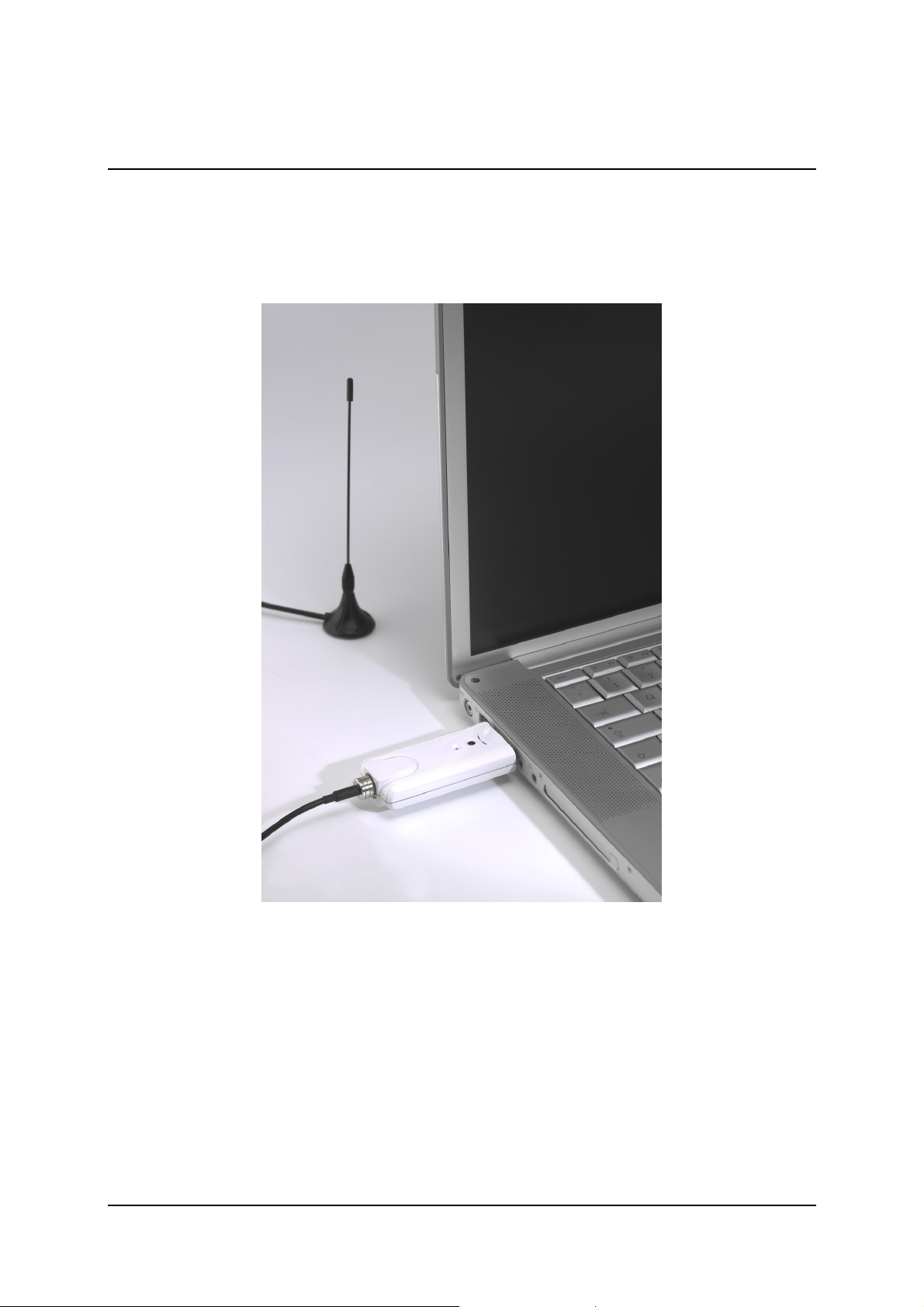
Once you have connected the antenna to the PCTV USB Stick, plug it into a
free USB 2.0 port on your PC.
6

Using the remote control
Should you wish to operate the PCTV USB Stick using the remote control,
which is supplied as an optional extra, please ensure that the remote control is
aimed as directly as possible at the PCTV USB Stick housing.
7
Table of contents
Other Pinnacle TV Receiver manuals