Phiaton BonoBuds Lite User manual
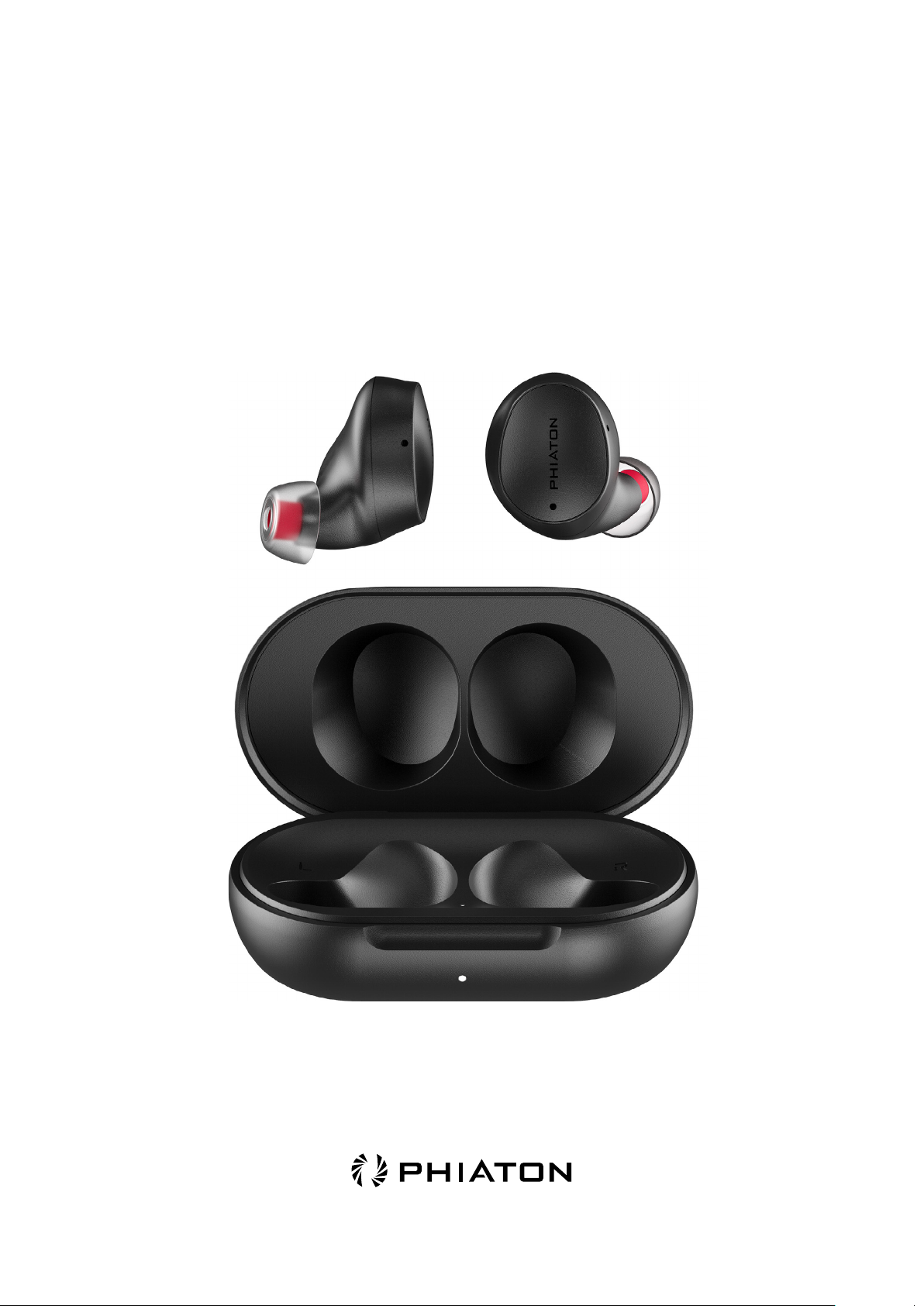
OWNER'S GUIDE
BonoBuds Lite

BonoBuds Lite
True Wireless Earbuds
Thank you for purchasing the PHIATON BonoBuds Lite
- Please read the guidelines carefully before use and keep the owner’s
guide for future reference.
- Some functions of the PHIATON BonoBuds Lite may not be available
when it is paired with certain devices.
- The specifications are subject to change without prior notice for quality
improvement.
1. Safety and General Information
2. Package Contents
3. Pairing
4. Charging
5. Power ON/OFF
6. Pairing with Another Bluetooth Device
7. Managing Music (play & control)
8. Call Function
9. Ambient Mode (Audio Transparency)
10. Using Voice Command
11. Product Reset
12. PHIATON APP
13. Specifications
14. Troubleshooting
15. Certification
CONTENTS

1. Safety and General Information
1) Use a standard USB charging cable (included), with or without a charging adapter. (5V, over 1 A)
※ Adapter not included.
2) Lower the volume before using the earbuds to prevent potential damage to eardrums caused by sudden
loud sound.
3) Listening to loud music for extended periods of time may cause hearing damage.
4) Do not store the device in places with a temperature higher than 113 ℉/ 45 ℃.
5) This device is IPX4 sweat and water resistant. It is not waterproof. Please use with caution not to
oversaturate with moisture or leave excessive moisture on the device as this can damage the inter-
nal components. In case the device gets wet, please contact our customer service for support. Visit
our FAQ page for more information.
6) Do not attempt to disassemble, modify, or repair the device.
7) Do not cause shock to the device.
8) Keep out of the reach of children and pets.
9) Do not tug on cords or touch power plugs with wet hands.
10) Do not use the device near microwave ovens or wireless LAN adaptors.
11) When the product is not being used, please keep it in the charging case.
12) When cleaning the device, use a clean dry cloth to wipe the device clean. Do not use solvents.
13) To clean the silicone ear tips, remove from the earphones, wash with warm water, dry completely,
and check for debris before reattaching.
15) Using the device while walking or driving may prevent the user from hearing important sounds
such as signals or alarms and may impose hazardous conditions on yourself and/or others. Heed
caution during use.
16) The radio waves on this device may affect electronic medical devices. If you use any electronic
medical devices, consult your doctor or the medical device company before using them together.
※ Use PHIATON BonoBuds Lite only for its intended purposes.
※ This device cannot be used for purposes related to human safety as it may cause radio interference
during operation.
2. Package Contents
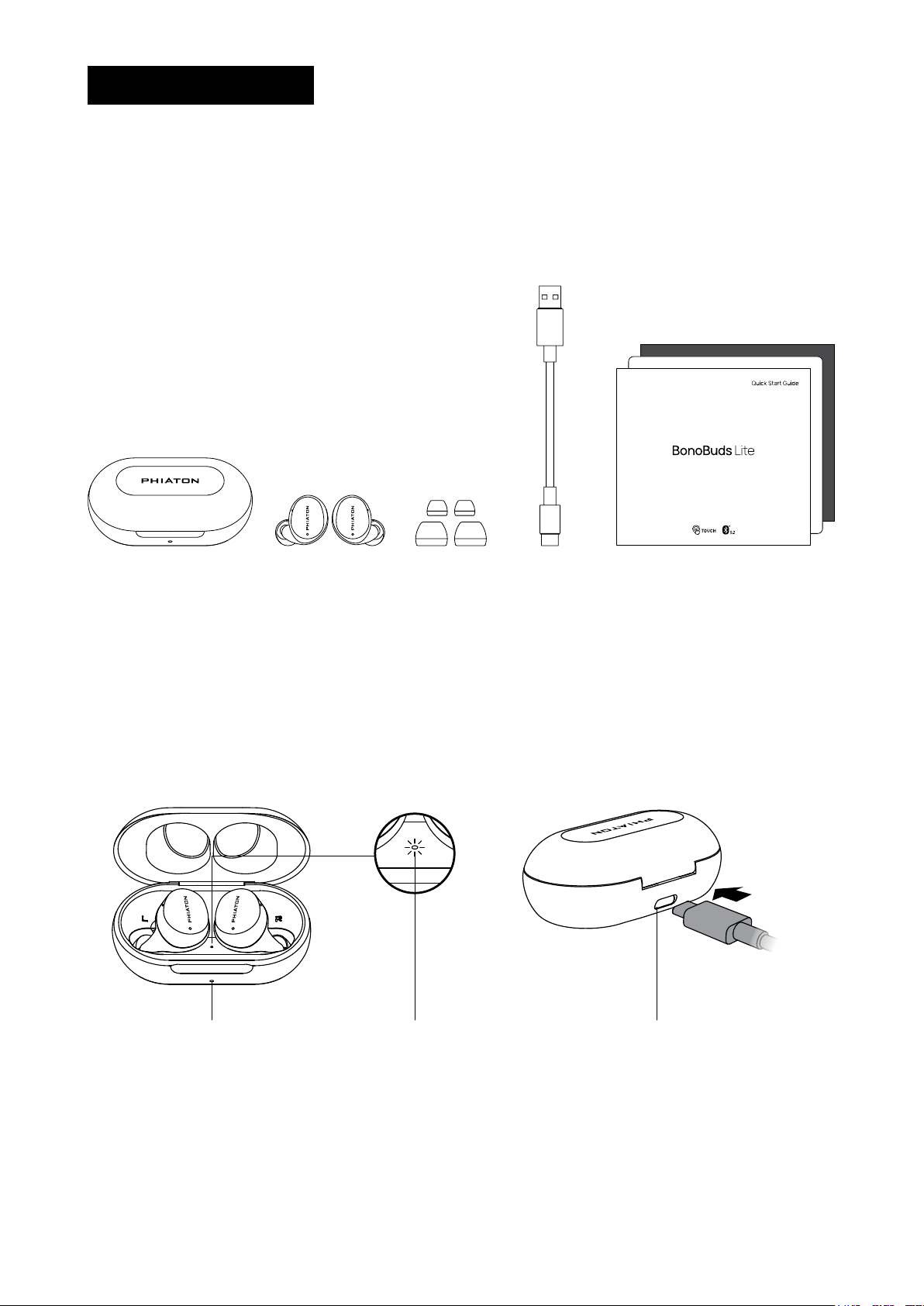
1) Package Contents
- BonoBuds Lite Earbuds
- BonoBuds Lite Charging Case
- 3 Sizes of Silicon Ear Tips (M Silicone tips come pre-attached.)
- USB - C Type Cable
- Quick Guide
- Warranty Card
- Customer Service Card
Charging Case Earbuds Ear tips Quick Guide / Warranty Card /
Customer Service Card
Charging Cable
2) Components & Features
Charging Case LED Type-C ChargingCharging Case Inner LED
3. Pairing
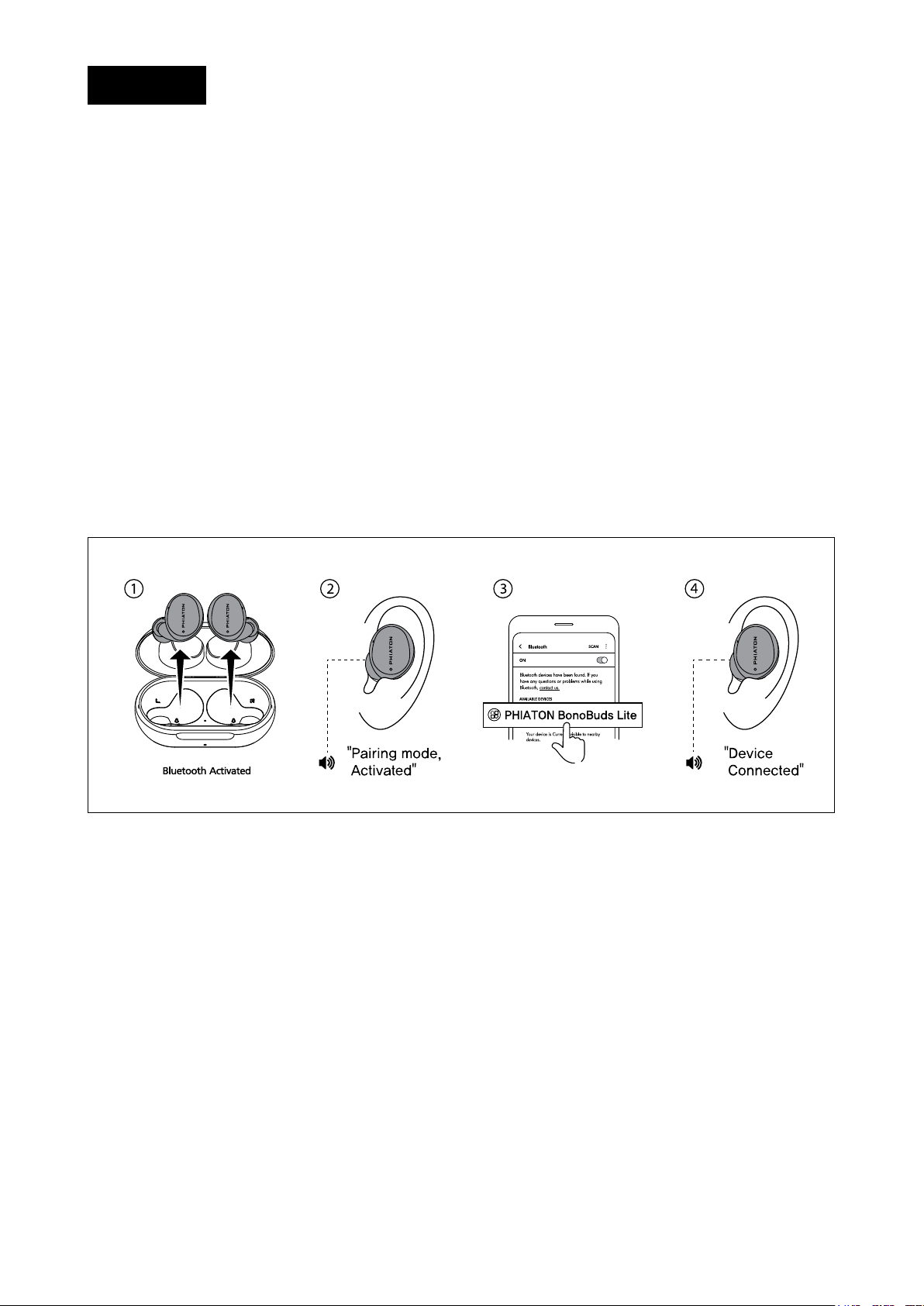
When taking the earbuds out of the case, you can proceed with ‘pairing’.
Remove the film on the earbuds and charge for at least 10 minutes before first time use.
① Turn the Bluetooth of your device on.
② When earbuds are taken out of the case, the earbuds are automatically turned on and ready for
pairing after 5 seconds.
③
When earbuds are ready for pairing, voice guidance is provided: “Pairing mode activated”
Voice guidance is provided only for the first time.
④ Select ‘PHIATON BonoBuds Lite’ from the ‘Bluetooth Settings’ of the device to be connected with the
earbuds.
⑤ When the earbuds are connected to the device, voice guidance is provided: “Device connected”
※ When you take the earbuds out of the case, they automatically connect to the most recently connected device.
※ You will need to repeat this procedure every time you pair ‘PHIATON BonoBuds Lite’ with a new device.
4. Charging
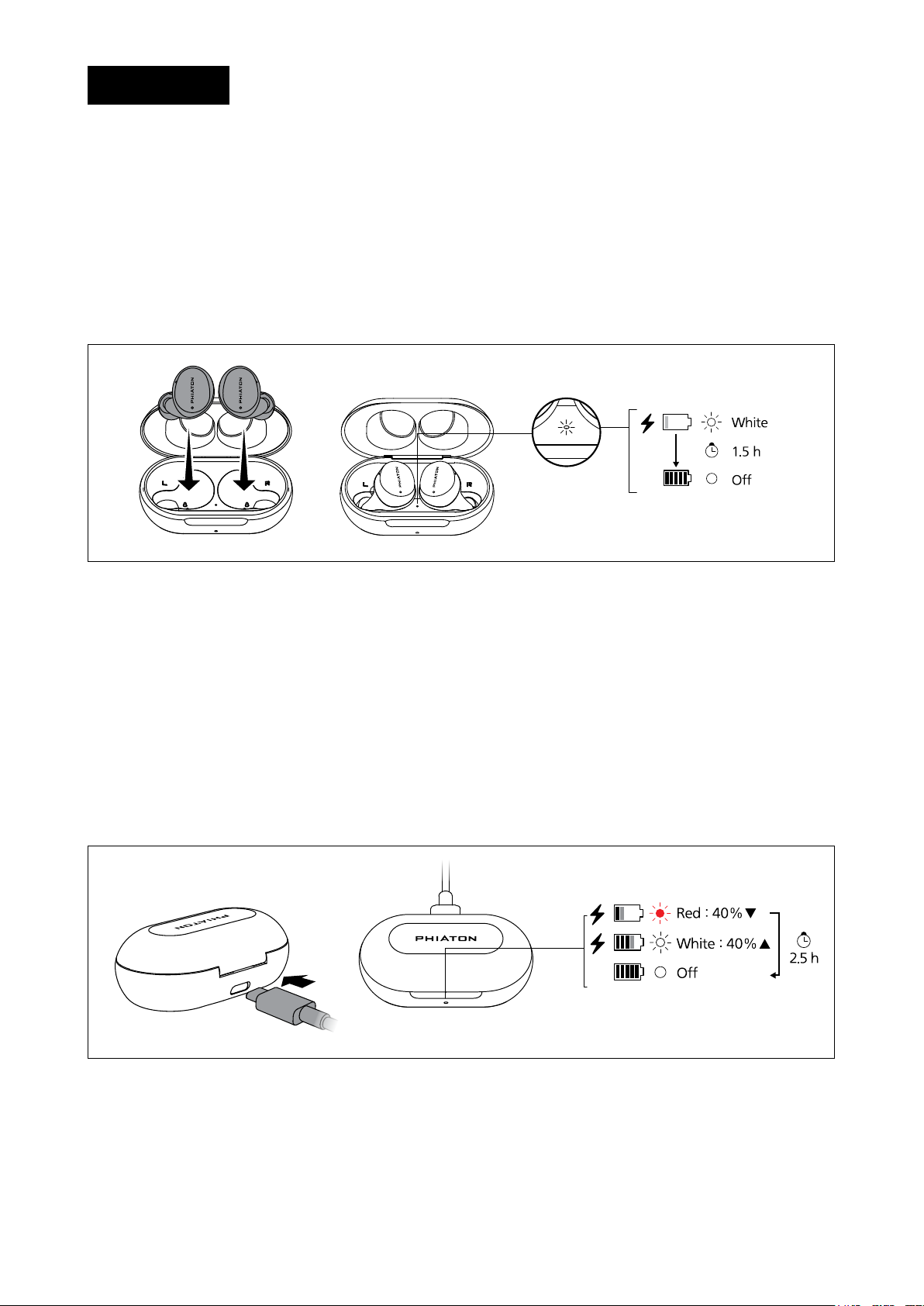
The earbuds begin charging from the moment they are stored in the case.
The case supports USB Type C charging
4-1. Charging the Earbuds
① Earbuds start charging when you put them in the case.
② When the Charging Case Inner LED turns on, the earbuds are charging.
※ When the earbuds are fully charged, the ‘Charging Case Inner LED’ on the case turns off.
4-2. Charging the Case
1) Using the charging cable
① Connect the Type-C charging cable to the port on the back of the case.
② Check that the charging status LED on the front of the case is on.
※ The red LED means the earbuds can’t be fully charged using the remaining battery of the case.
※ The white LED means the earbuds can be fully charged more than once using the remaining battery of the case.
※ When the case is fully charged, the charging status LED turns off.
4-3. Checking Battery Level
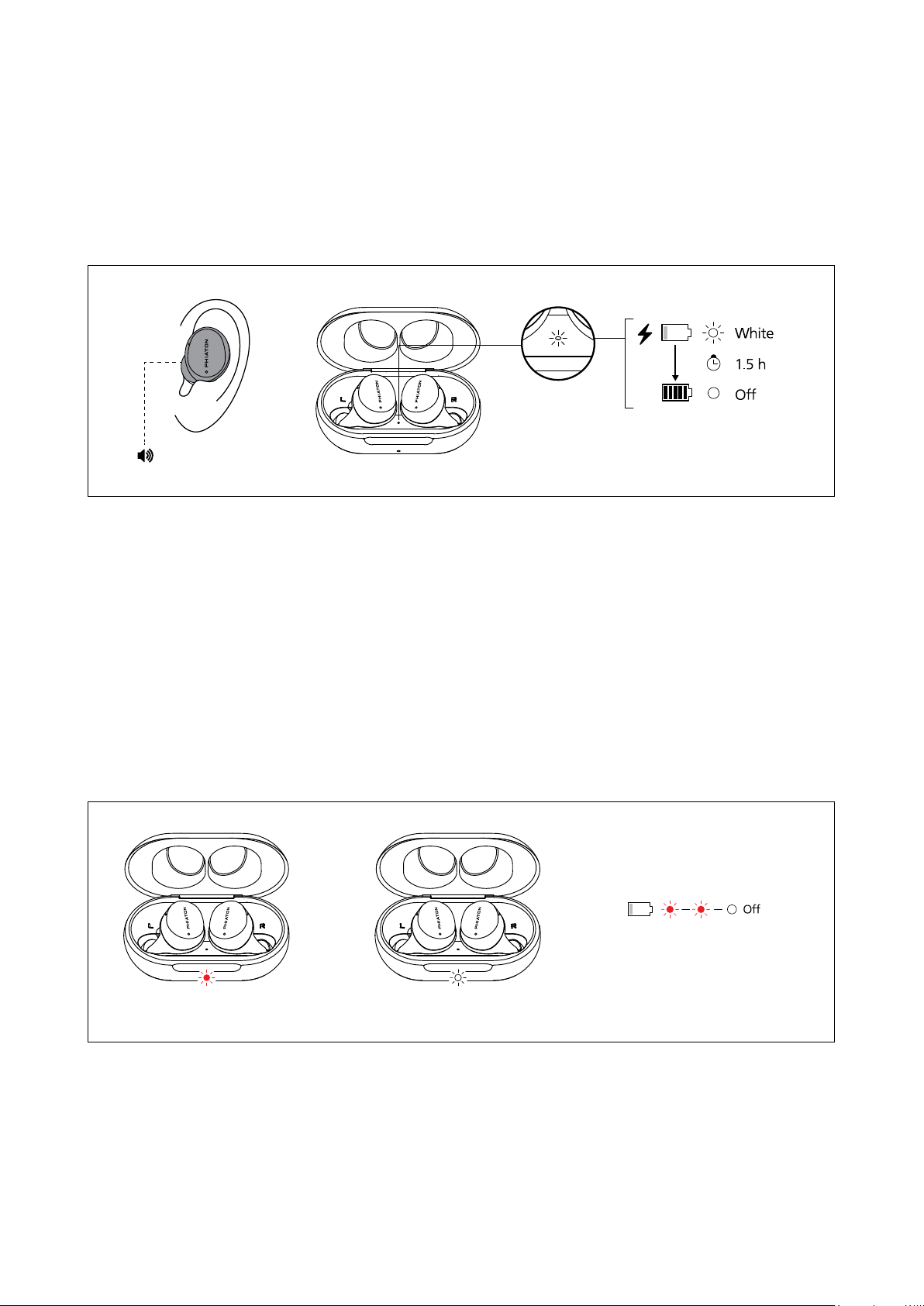
1) Checking the earbud battery level
① When wearing earbuds,
When the battery level is less than 10%, voice guidance is provided every 5 minutes: “Battery is low”
② When earbuds are stored in the charging case
When the earbuds are fully charged, the inner charging status LED on the charging case turns off.
2) Checking the case battery level
When you open the case, you can check the battery level by the charging status LED.
※ The red LED means the earbuds can’t be fully charged using the remaining battery of the case.
※ The white LED means the earbuds can be fully charged more than once using the remaining battery of the case.
※ When the case battery is below 5%, the red LED blinks twice.
“Battery is low”
Less than one full charge More than one full charge Case battery under 5%
5. Power ON/OFF
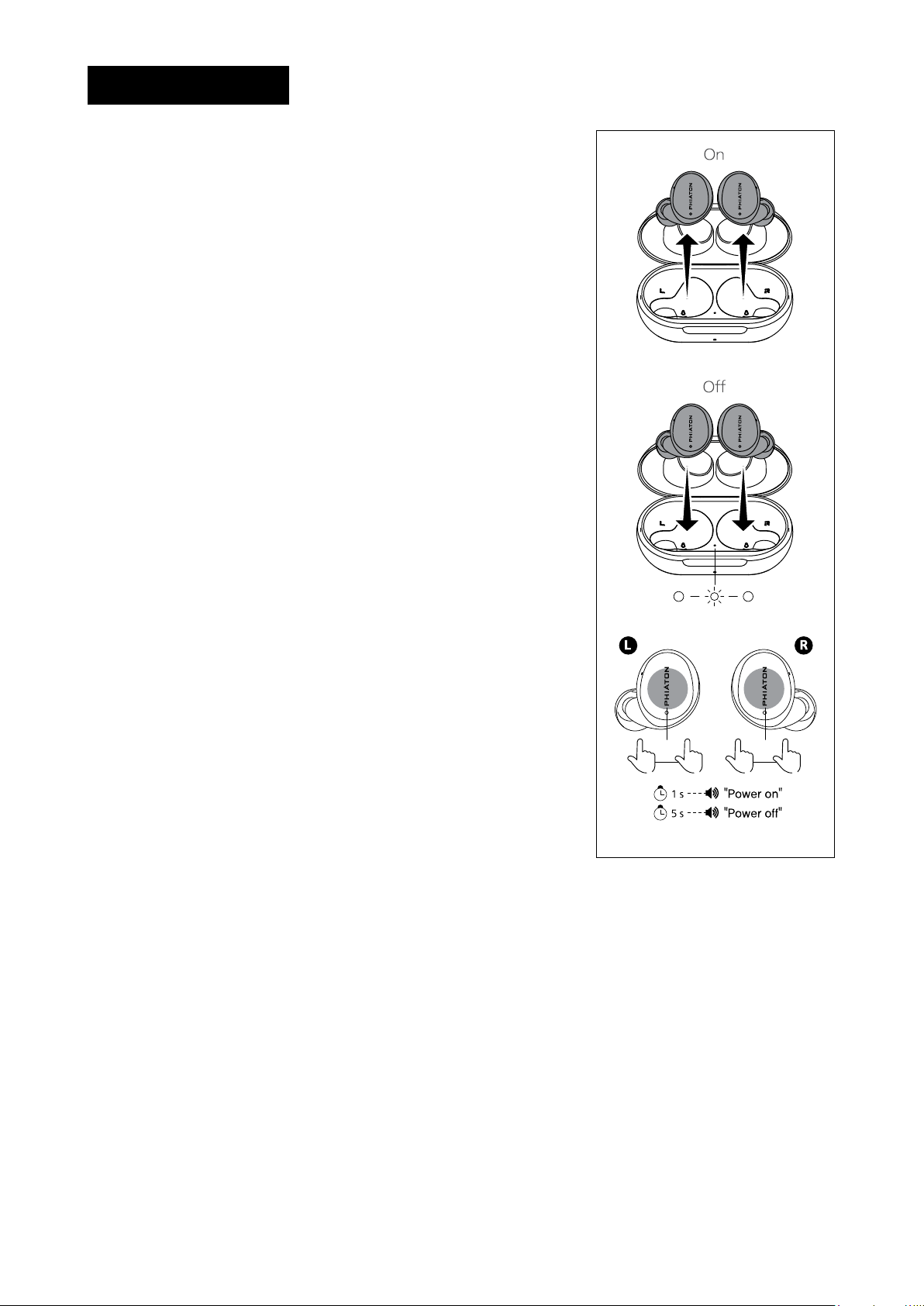
1) Turning on the earbuds
① When you take the earbuds out of the case, the earbuds turn on
automatically.
② If you’re pairing BonoBuds for the first time or a previously paired
device is not nearby, it enters ‘paring mode’ after 2 seconds.
③ If a device with connection history is nearby, the earbuds will be
connected immediately when you take them out of the case.
※ When in pairing mode, the earbuds will turn off after 3 minutes if it
hasn’t established a Bluetooth connection.
2) Turning off the earbuds
When you put the earbuds in the case, the earbuds automatically turn off.
※ You can turn on/off the earbuds only when there is remaining
battery power in the case.
3) Turn on/off earbuds manually
Press and hold the touch part of the earbuds for 1 seconds to
turn on the power. Voice guidance is provided: “Power On”
Press and hold the touch part again for 5 seconds to turn off the
power. Voice guidance is provided: “Power Off”
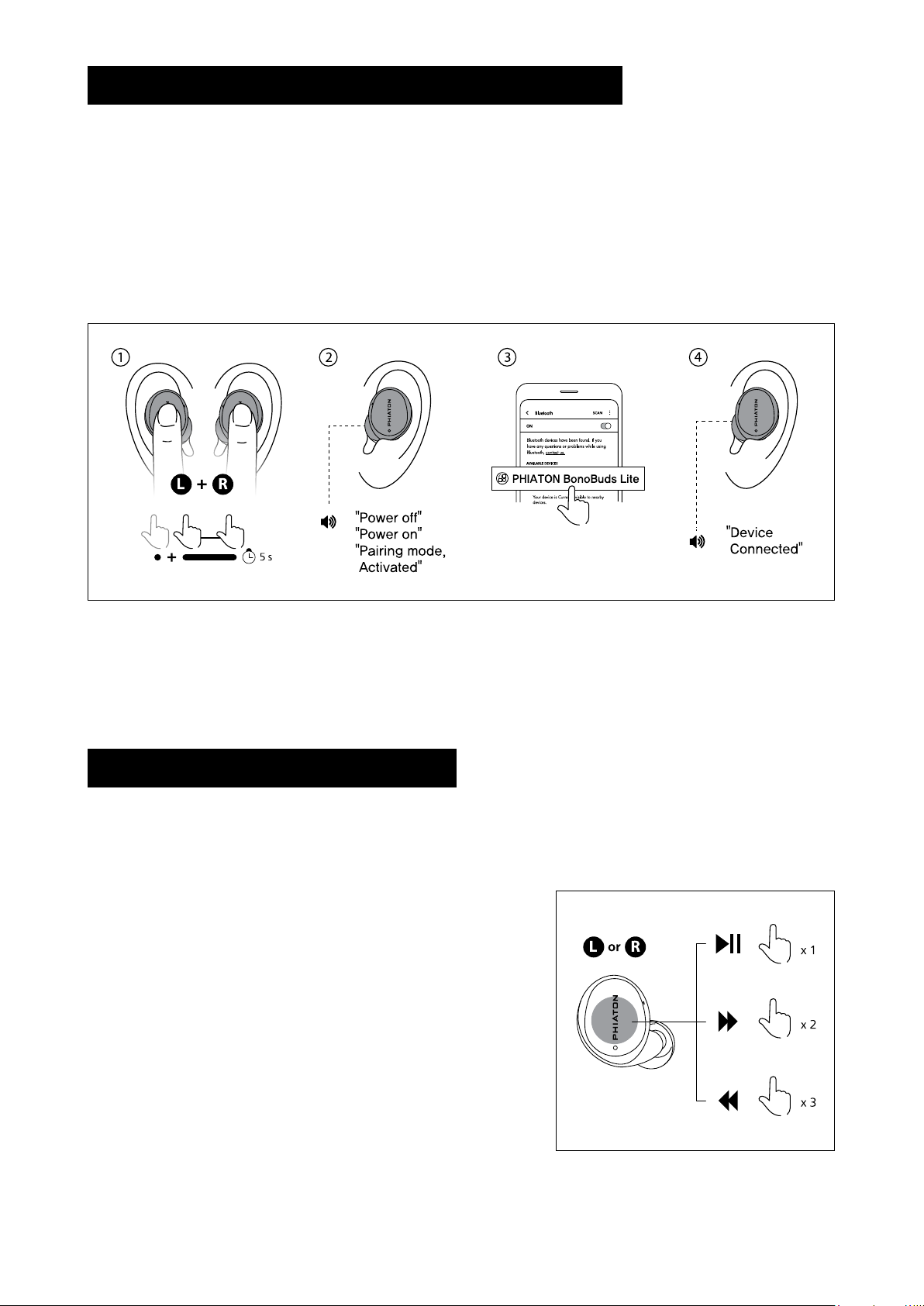
6. Connecting/Pairing with other Bluetooth Devices
① With both earbuds on, tap the both earbuds once and press and hold again for 5 seconds at the same time.
※ A beep sounds every 1 second and if another beep sounds after 5 seconds, the product has been reset.
② The earbuds automatically turn off and turn on again. It is ready for pairing right away.
③
From the ‘Bluetooth Settings’ of the device to be connected with BonoBuds Lite, select ‘PHIATON
BonoBuds Lite’ to complete pairing.
④ When the earbuds are connected to the device, voice guidance is provided. ‘Device connected’
7. Managing Music (play & control)
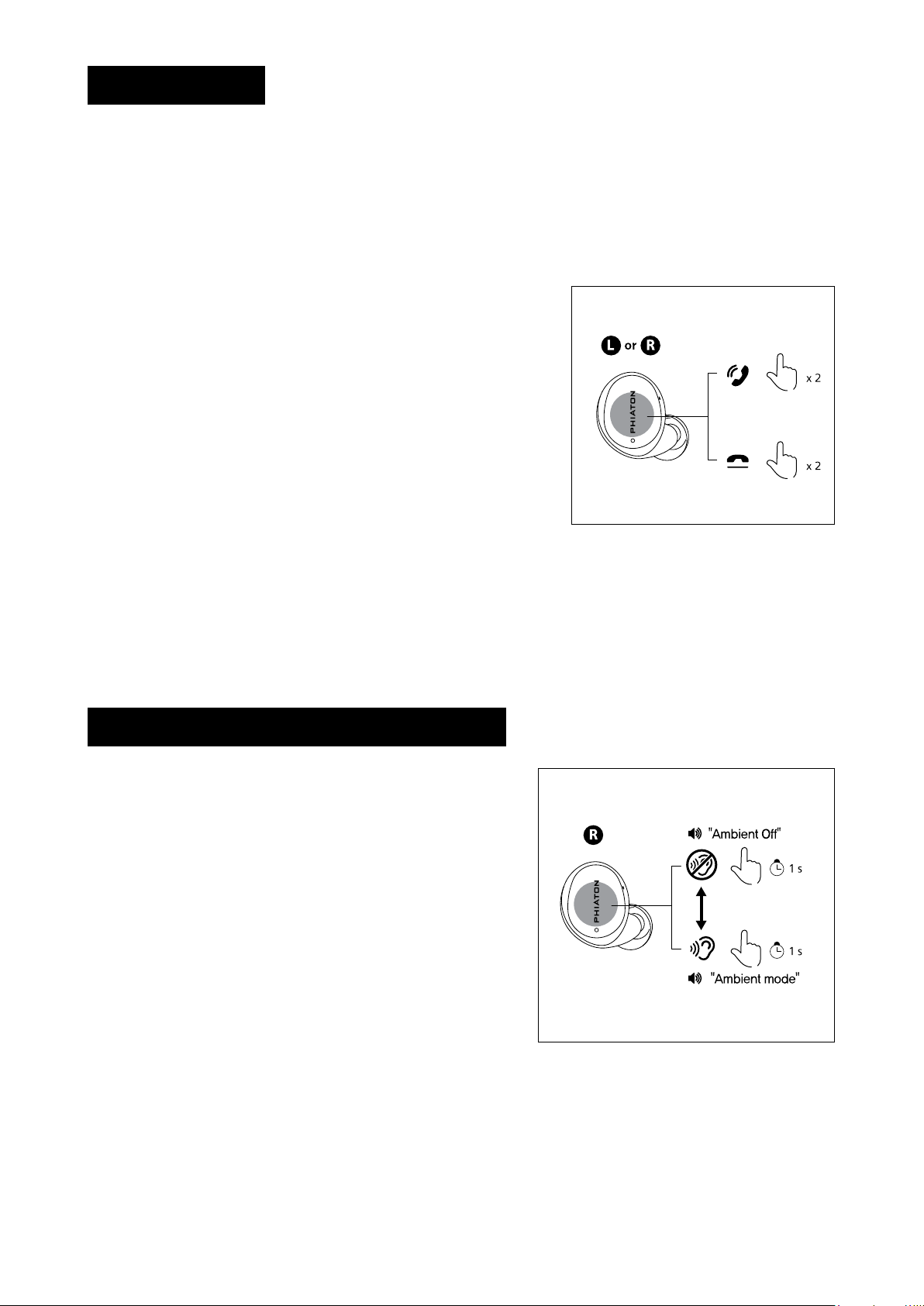
You can control the music function of the connected Bluetooth device by pressing the touch controls
of the left and right earbuds.
1) Play/stop music
① Tap the earbuds to play music from the Bluetooth device.
② Tap the earbuds to stop the music.
2) How to use the change song function
①
Double-tap the earbuds to skip to the next song.
②
Triple-tap the earbuds to go back to the previous song.
8. Call Function
If you receive a call while using, tap the earbuds to answer and end the call.
1) Answering a call
Tap earbud twice to accept / end a call.
2) Ending a call
When the call is over, double-tap the earbuds to end the call.
In the case a call is received while listening to music, the music
will automatically pause and will play again when the call ends.
※ When connecting to a call, the voice will come out of the earbuds.
※ Functions may vary depending on the paired Bluetooth device.
※ When answering a call by clicking/touching on the connected
device, the call is connected to the device.
① Ambient Mode is a feature that allows you to hear ambient
sounds without removing the earbuds from your ears.
② Press and hold the touch part of the right earbud for
1 second to hear an external sound.
Voice guidance is provided: “Ambient Mode”
③ If you press and hold the touch part of the right earbud
again for 1 second, the ambient mode is stopped. Voice
guidance provided: “Ambient Off”
9. Ambient Mode (Audio Transparency)
Table of contents
Other Phiaton Wireless Headphones manuals