Pepwave AP One User manual

COPYRIGHT &TRADEMARKS
Specifications are subject to change without notice. Copyright © 2010 Pepwave Ltd. All Rights Reserved. Pepwave and the
Pepwave logo are trademarks of Pepwave Ltd. Other brands or products mentioned may be trademarks or registered trademarks of
their respective owners.
Document Rev.3.0.1
Dec-10

User Manual
http://www.pepwave.com 2Copyright © 2010
Pepwave
Table of Contents
1INTRODUCTION AND SCOPE ................................................................................. 3
2PRODUCT FEATURES............................................................................................. 4
3PACKAGE CONTENTS ............................................................................................ 5
4PEPWAVE AP ONE OVERVIEW.............................................................................. 6
4.1 FRONT VIEW .........................................................................................................6
4.2 REAR PANEL VIEW.................................................................................................6
5INSTALLATION......................................................................................................... 7
5.1 INSTALLATION PROCEDURES ..................................................................................7
6INFORMATION.......................................................................................................... 8
6.1 SYSTEM ................................................................................................................8
6.2 WIRELESS.............................................................................................................9
7CONFIGURATION................................................................................................... 13
7.1 SYSTEM ..............................................................................................................13
7.2 WIRELESS NETWORKS .........................................................................................16
7.3 ADVANCED WIRELESS SETTINGS ..........................................................................28
7.4 WDS ..................................................................................................................31
7.5 SNMP ................................................................................................................32
7.6 WEB ADMINISTRATION .........................................................................................35
8TOOLS - DIAGNOSTIC TOOLS.............................................................................. 37
9COMMANDS ........................................................................................................... 38
9.1 ACTIVATE CHANGES ............................................................................................38
9.2 FIRMWARE ..........................................................................................................39
9.3 CONFIGURATION..................................................................................................40
9.4 MISC...................................................................................................................41
10 RESTORATION OF FACTORY DEFAULTS........................................................... 42
10.1 AP ONE ..............................................................................................................42

User Manual
http://www.pepwave.com 3Copyright © 2010
Pepwave
1Introduction and Scope
Pepwave AP One is an enterprise grade 802.11b/g/n Wi-Fi access point with centralized management
system. It is a powerful solution for building wireless networks for all business needs. Each Pepwave AP
One is loaded with essential features such as Multiple SSID, VLAN, WDS and Guest Protect.
One Pepwave AP One can masquerade up to 4 different access points. Each virtual access point can
have its own security policy (e.g. WPA, WPA2, etc.) and authentication mechanism (e.g. 802.1x, open,
captive portal, etc), to facilitate building your network much faster, easier and more cost-effective than
ever before. Pepwave AP One comes with a high-power Wi-Fi transmitter which greatly enhances
coverage and performance.

User Manual
http://www.pepwave.com 4Copyright © 2010
Pepwave
2Product Features
Key features of Pepwave AP One:
•High-power output enhances coverage and lowers cost of ownership
•Independent security policies and encryption mechanisms per virtual AP
•Centralized management via InControl
•WDS Support for secure and fast network expansion
•Guest Protect Support
•WMM (Wi-Fi Multimedia) and QoS (Quality of Service) Support

User Manual
http://www.pepwave.com 5Copyright © 2010
Pepwave
3Package Contents
The following items are the contents of a Pepwave AP One package:
•1 x Pepwave AP One unit
•1 x Omni-directional Antenna
•1 x Power Supply Unit
•1 x Instruction Sheet
User Manual
http://www.pepwave.com 6Copyright © 2010
Pepwave
4Pepwave AP One Overview
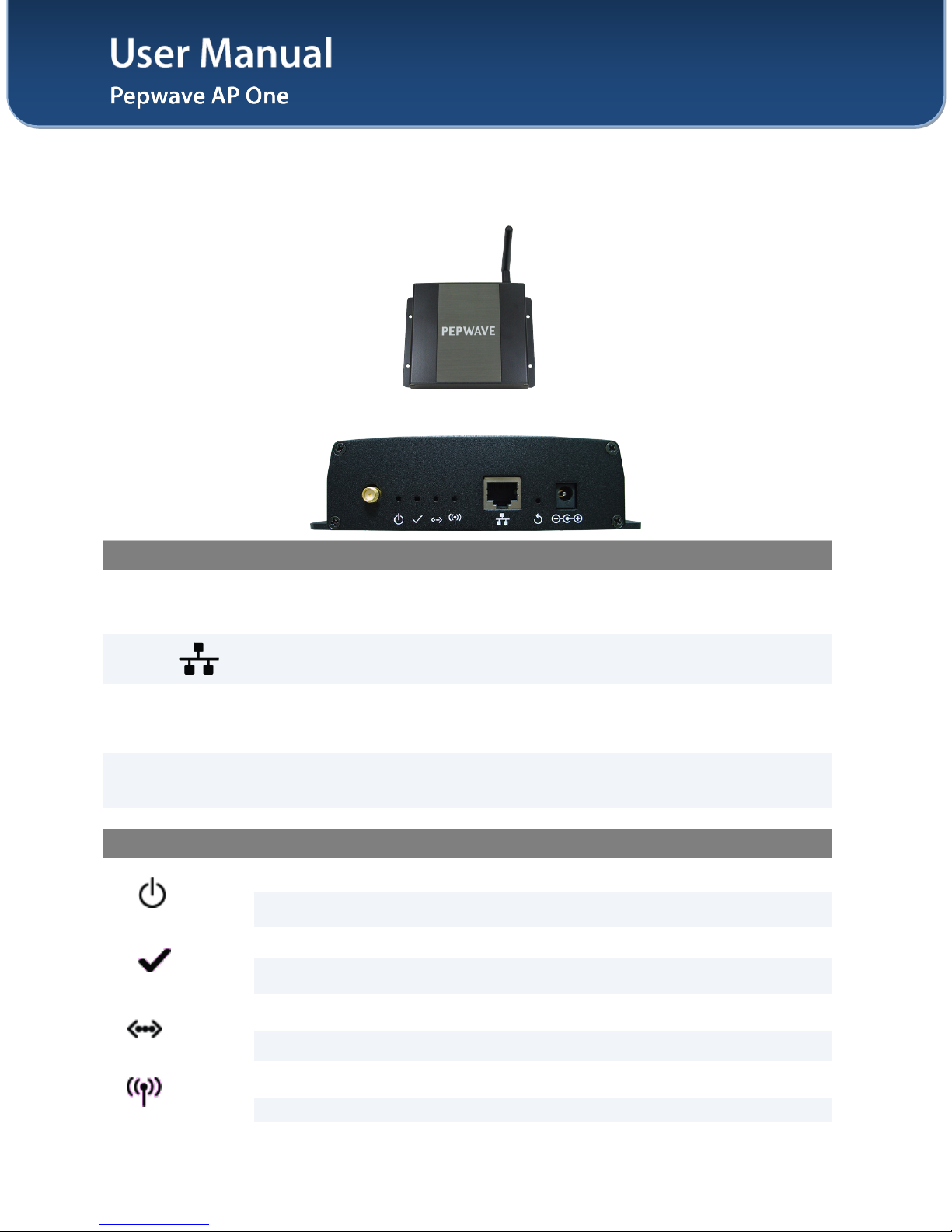
4.1 Front View
4.2 Rear Panel View
Connectors
Antenna
(Left-most
Connector)
A RP-SMA connector for connecting the antenna.
WAN A 10/100BaseT Ethernet connector, normally to be connected to back haul
network.
Reset
A reset button to be depressed with a pin. Depress and hold for at least 5
seconds to restore factory defaults.
For further details, please refer to Section 10, Restoration of Factory Defaults.
Power Connector A connector for DC 12V power input, to be connected with the supplied power
adaptor.
LED Indicators
Power
OFF – Power off
ON – Power on
Status
OFF – The unit is initializing.
ON – The unit is ready.
Ethernet
OFF – The Ethernet port is not connected.
ON – The Ethernet port is connected.
Wireless OFF – Wireless is not ready.
On – Wireless is ready.
User Manual
http://www.pepwave.com 7Copyright © 2010
Pepwave
5Installation
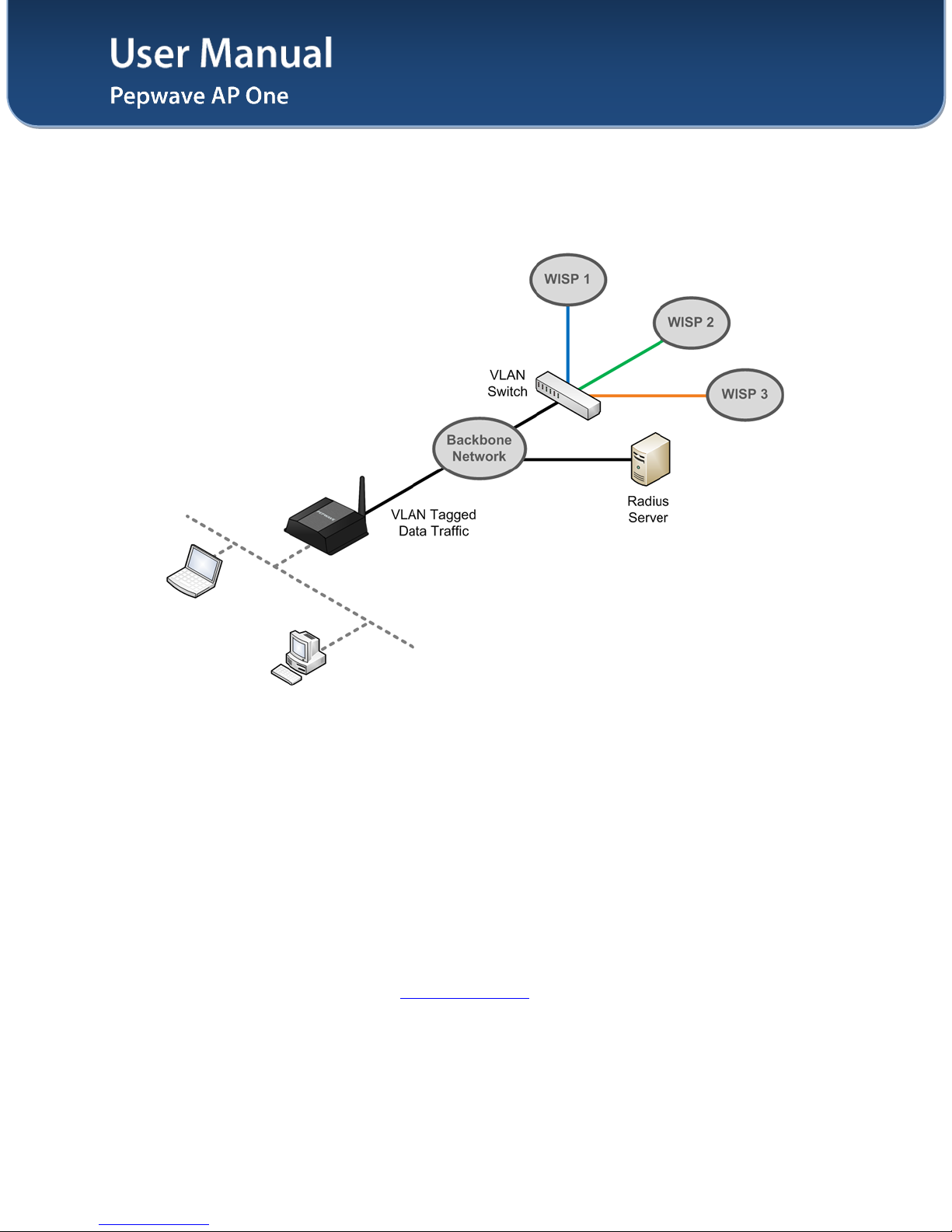
Pepwave AP One acts as a bridge between the wireless and the wired Ethernet interface. A typical setup
is as follows:
5.1 Installation Procedures
1. Attach the antenna to the Pepwave AP One unit.
2. Connect the Ethernet port on the unit with the backbone network using an Ethernet cable. The
port could auto sense the cable is straight-through or cross-over.
3. Connect the power adapter to the power connector of the unit, and then plug in the power
adapter.
4. Wait for the status LED to turn green.
5. Connect a PC to the backbone network, and configure the IP address of the PC to be any IP
address between 192.168.0.4 and 192.168.0.254, with subnet mask of 255.255.255.0.
6. With Microsoft Internet Explorer 6 or above, or Mozilla Firefox 2.0 or above, or Google Chrome
2.0 or above, connect to the URL https://192.168.0.3.
7. When asked, enter the default admin login ID and password, admin and public respectively.
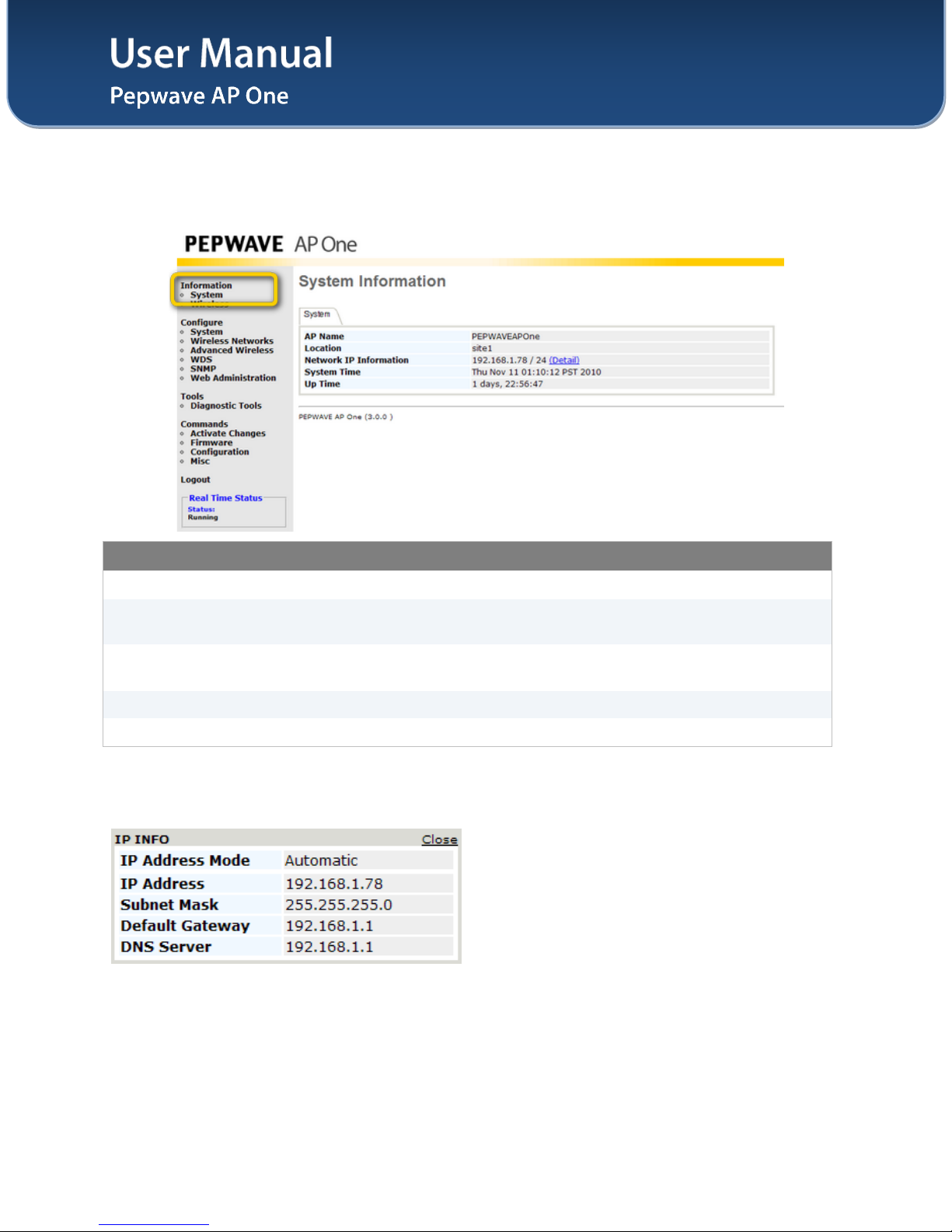
8. After logging in, the following Information main page appears. Please go to Configure > System
to facilitate further configuration of the Pepwave AP One unit.
User Manual
http://www.pepwave.com 8Copyright © 2010
Pepwave
6Information
6.1 System
System Information
AP Name This field shows the name of the AP One device defined in the configuration.
Location This field shows the location of the AP One device defined in the
configuration.
Network IP
Information This shows the current gateway IP of the AP One device.
System Time This shows the system time in respect to the time zone selected.
Up Time This shows the up time of the device since it is booted up.
Click on the Detail link next to the Network IP Information to check the following system information:
IP Address Mode, IP Address, Subnet Mask, Default Gateway, DNS Server.
User Manual
http://www.pepwave.com 9Copyright © 2010
Pepwave
6.2 Wireless
6.2.1 AP Info
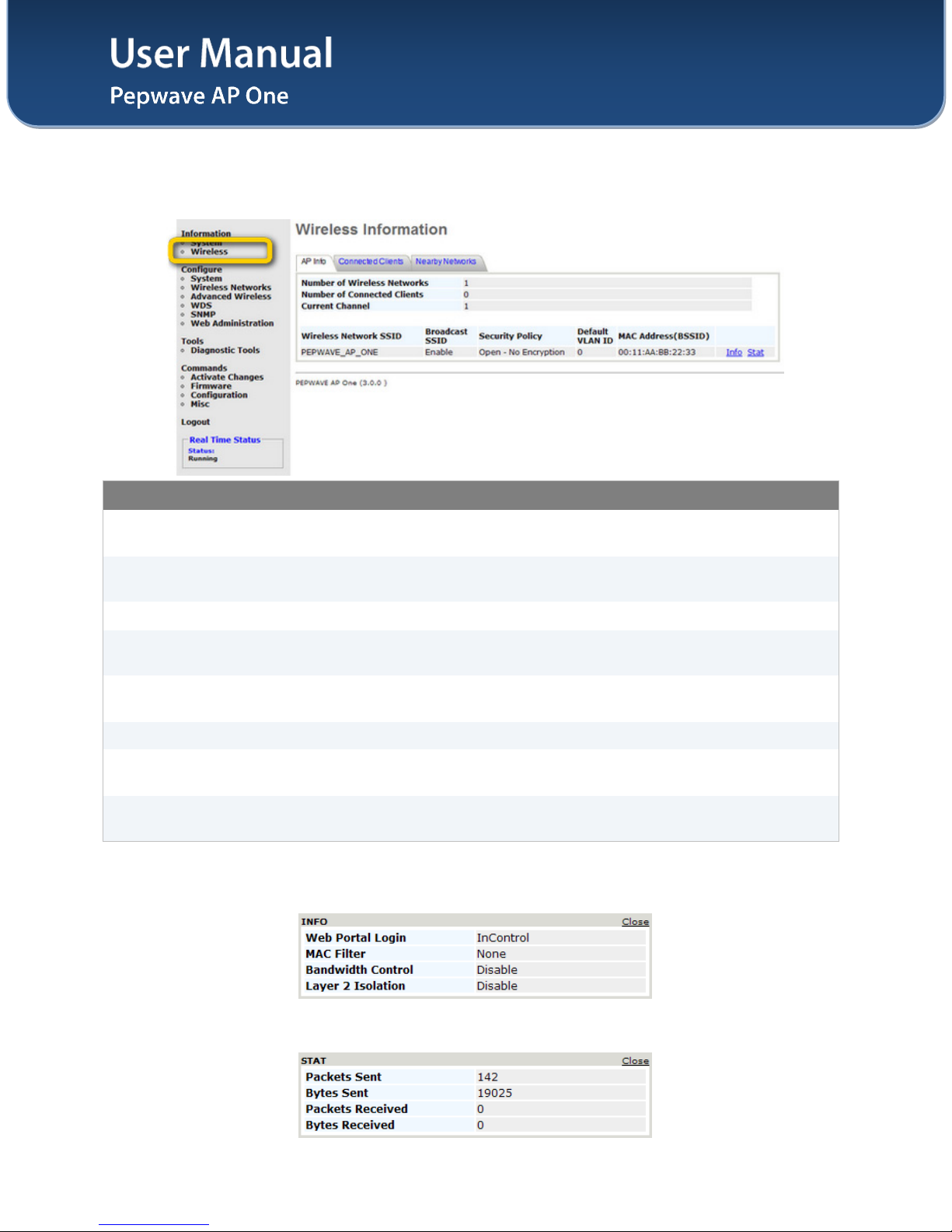
Wireless Information – AP Info
Number of Wireless
Networks This indicates the number of wireless networks.
Number of
Connected Clients This indicates the number of associated clients.
Current Channel This shows which 802.11 channel the system is using.
Wireless Network
SSID This shows which SSID the client is associated.
Broadcast SSID This setting shows whether or not the ESSID of this wireless network profile
can be scanned by Wi-Fi clients.
Security Policy This setting shows the wireless authentication and encryption methods.
Default VLAN ID This setting shows the VLAN ID tagged on all outgoing packets generated from
this wireless network profile.
MAC Address
(BSSID) This shows the detailed BSSIDs for that particular wireless network profile.
Click on the Info link to check the following wireless information: Web Portal Login, Wireless Network
Firewall, MAC Filter, Bandwidth Control,Layer 2 Isolation.
Click on the Stat link to check the following networking statistics: Packets Sent, Bytes Sent, Packets
Received, Bytes Received.
User Manual
http://www.pepwave.com 10 Copyright © 2010
Pepwave
6.2.2 Connected Clients
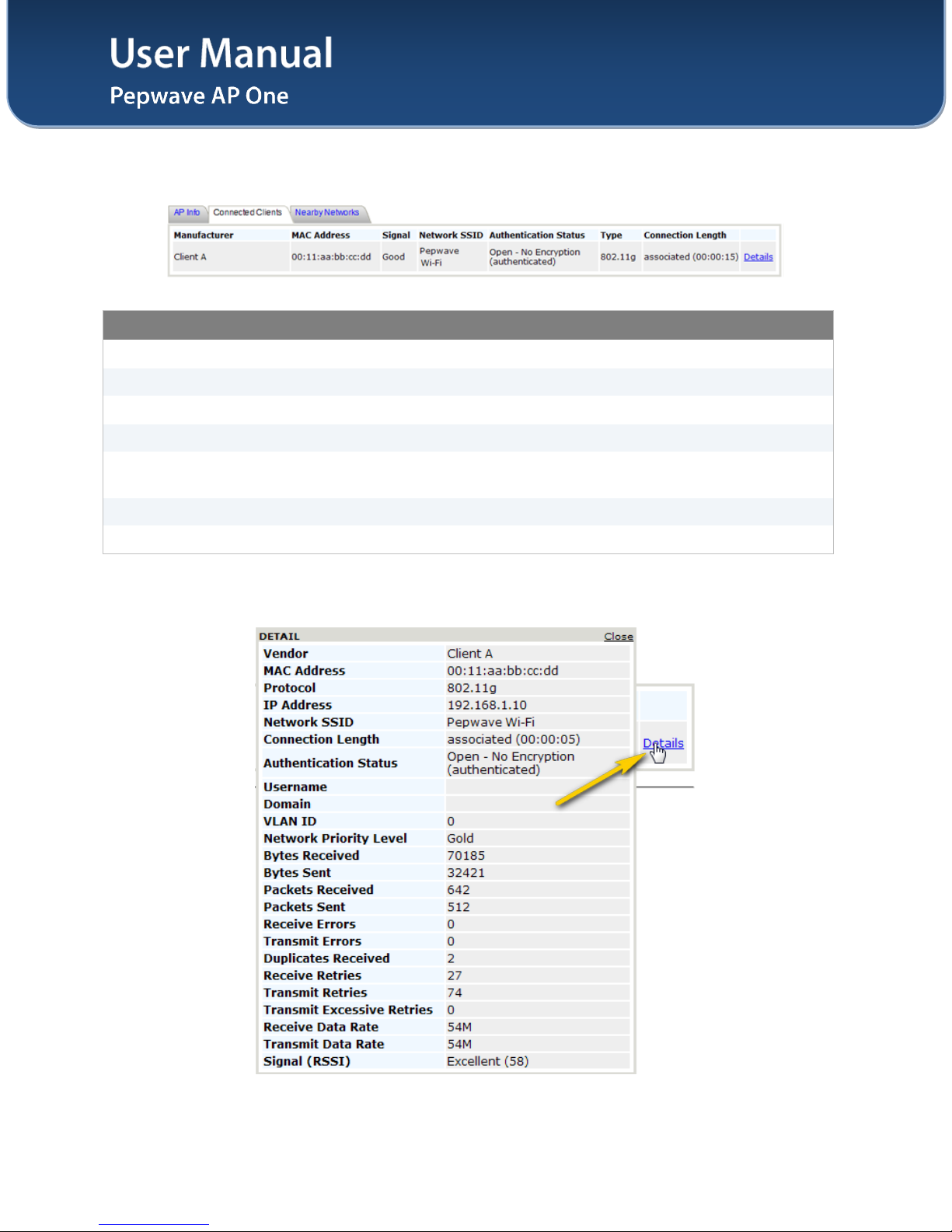
Wireless Information – Connected Clients
Manufacturer This shows the manufacturer based on the MAC prefix.
MAC address This shows the client MAC address.
Signal This shows the signal strength.
Network SSID This shows which SSID the client is associated.
Authentication
Status This shows the client authentication method(s).
Type This shows the radio mode of the client.
Connection Length This shows the associated duration.
Click on the Details link, more networking statistics will be provided.
Other manuals for AP One
1
Table of contents
Other Pepwave Wireless Access Point manuals

Pepwave
Pepwave Surf Series User manual

Pepwave
Pepwave AP One Series User manual

Pepwave
Pepwave AP One Enterprise User manual
Pepwave
Pepwave APOne User manual

Pepwave
Pepwave AP One AC mini User manual

Pepwave
Pepwave AP One Series User manual

Pepwave
Pepwave Surf 200 User manual

Pepwave
Pepwave Surf mini User manual

Pepwave
Pepwave Surf AP 200 User manual

Pepwave
Pepwave AP Pro Series User manual