peplink Pepwave Surf SOHO User manual

Pepwave Surf SOHO
User Manual
Pepwave Product:
Surf SOHO
Pepwave Firmware 8.1.3
August 2021
COPYRIGHT & TRADEMARKS
Specifications are subject to change without notice. Copyright © 2020 Pepwave Ltd. All Rights Reserved. Pepwave and the Pepwave
logo are trademarks of Pepwave Ltd. Other brands or products mentioned may be trademarks or registered trademarks of their
respective owners.

Table of Contents
Introduction and Scope 5
Glossary 6
Product Features 7
LAN 7
VPN 7
Firewall 8
Outbound Policy 8
QoS 8
Other Supported Features 8
Pepwave Surf SOHO Router Overview 9
Panel Appearance 9
LED Indicators 11
Advanced Feature Summary 12
Drop-in Mode and LAN Bypass: Transparent Deployment 12
QoS: Clearer VoIP 12
USB Modem 13
Built-In Remote User VPN Support 13
DPI Engine 13
Wi-Fi Air Monitoring 14
SP Default Configuration 14
Installation 15
Preparation 15
Constructing the Network 15
Connecting to the Web Admin Interface 15
SpeedFusion Cloud 19
Activate SpeedFusion Cloud Service 19
Enable SpeedFusion Cloud 21
Connect Clients to Cloud 29
Link Wi-Fi to Cloud 30
Optimize Cloud Application 32
Configuring the LAN Interface(s) 33
Network Settings 33
Port Settings 40
Configuring the WAN interface 41
https://www.peplink.com
2
Copyright @ 2021 Peplink

WAN > Quality Monitoring 41
WAN > Ethernet WAN 42
WAN > Physical Interface Settings 43
WAN > Health Check Settings 44
WAN > Bandwidth Allowance Monitor 45
WAN > Additional IP Address Settings 46
WAN > Dynamic DNS Settings 46
Wi-Fi WAN and USB WiFi Network connection 47
WAN > WiFi Connection Profiles 49
WAN > Signal threshold settings 51
Indication of WiFi strength values: 51
PepVPN 52
PepVPN > Send ALL traffic 56
Outbound Policy Management 57
Port Forwarding 60
UPnP / NAT-PMP Settings 62
NAT Mappings 63
QoS 65
Bandwidth Control 65
Application Prioritization 65
Firewall 67
Outbound and Inbound Firewall Rules 68
Intrusion Detection and DoS Prevention 72
Content Blocking 73
Routing Protocols 74
OSPF & RIPv2 74
BGP 77
Remote User Access 80
L2TP with IPsec 80
OpenVPN 80
PPTP 81
Authentication Methods 81
Miscellaneous Settings 83
RADIUS Server 83
Certificate Manager 85
Service Forwarding 85
Service Passthrough 87
Grouped Networks 88
https://www.peplink.com
3
Copyright @ 2021 Peplink

SIM Toolkit 89
AP 92
Wireless SSID 92
Settings 97
AP > Status 99
Access Point 99
Wireless SSID 102
Wireless Client 103
Mesh / WDS 105
Nearby Device 106
Event Log 106
System Settings 108
Admin Security 108
Firmware 111
Time 112
Schedule 113
Email Notification 114
Event Log 117
SNMP 117
InControl 120
Configuration 120
Feature Add-ons 121
Reboot 121
Tools 121
Ping 122
Traceroute Test 123
Wake-on-LAN 123
WAN Analysis 124
Status 126
Device 127
Active Sessions 129
Client List 131
OSPF & RIPv2 132
BGP 132
PepVPN Status 132
Event Log 135
WAN Quality 136
Usage Reports 137
Appendix A: Restoration of Factory Defaults 141
https://www.peplink.com
4
Copyright @ 2021 Peplink

Introduction and Scope
The Surf SOHO is a professional-grade router that is secure, reliable, and easy to use.
With the Surf SOHO, you can connect to the Internet using a USB cellular modem, Ethernet, or Wi-Fi. Hook the Surf
SOHO up to Ethernet and Cellular connections, and it will automatically fail over from one to the other as needed. That
way, you can stay connected even when a connection breaks
This manual covers setting up a Surf SOHO router and provides an introduction to their features and usage.
Tips
Want to know more about Pepwave routers? Visit our YouTube Channel for a video introduction.
https://www.peplink.com
6
Copyright @ 2021 Peplink

Glossary
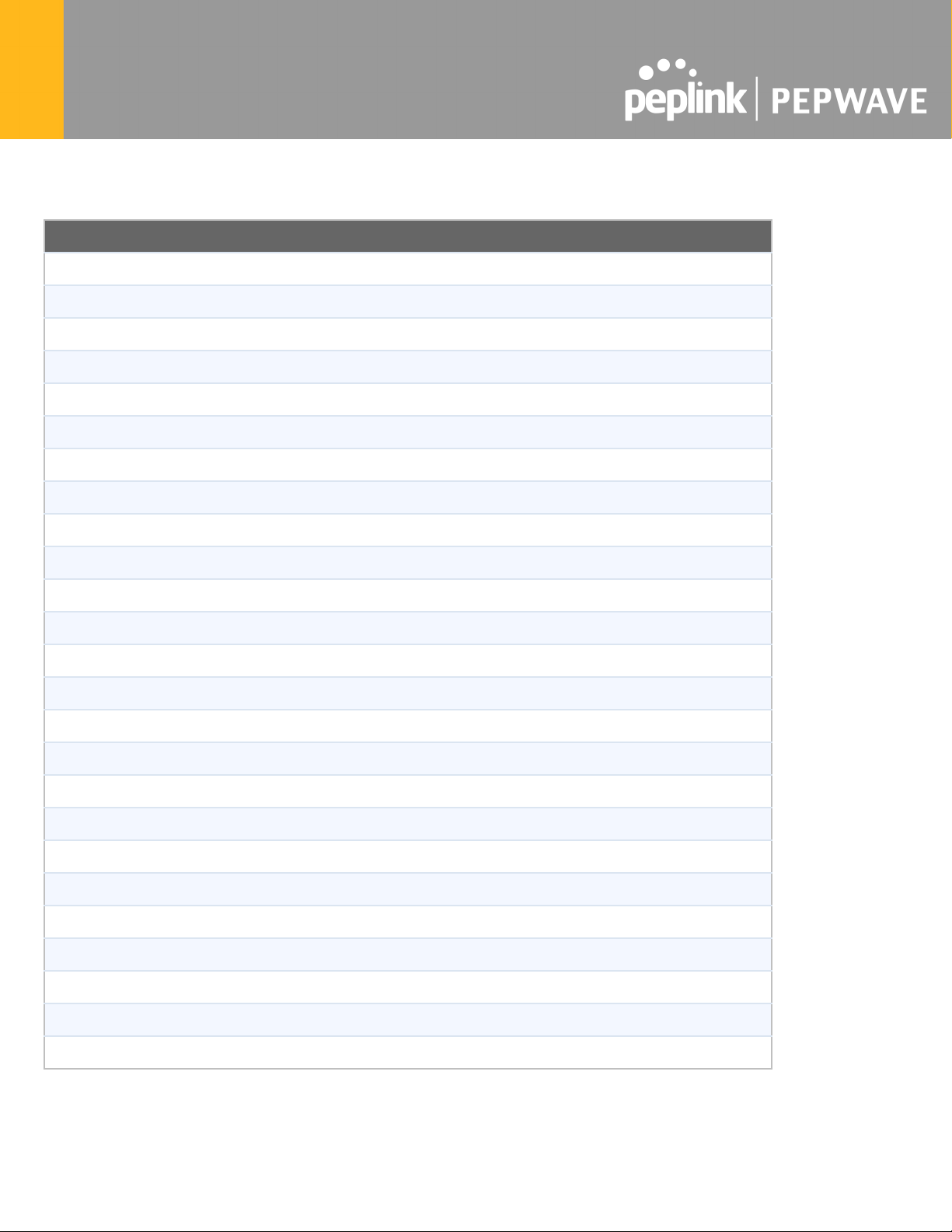
The following terms, acronyms, and abbreviations are frequently used in this manual:
Term
Definition
3G
3rd generation standards for wireless communications (e.g., HSDPA)
4G
4th generation standards for wireless communications (e.g., LTE)
DHCP
Dynamic Host Configuration Protocol
DNS
Domain Name System
EVDO
Evolution-Data Optimized
FQDN
Fully Qualified Domain Name
HSDPA
High-Speed Downlink Packet Access
HTTP
Hyper-Text Transfer Protocol
ICMP
Internet Control Message Protocol
IP
Internet Protocol
LAN
Local Area Network
MAC Address
Media Access Control Address
MTU
Maximum Transmission Unit
MSS
Maximum Segment Size
NAT
Network Address Translation
PPPoE
Point to Point Protocol over Ethernet
QoS
Quality of Service
SNMP
Simple Network Management Protocol
TCP
Transmission Control Protocol
UDP
User Datagram Protocol
VPN
Virtual Private Network
VRRP
Virtual Router Redundancy Protocol
WAN
Wide Area Network
WINS
Windows Internet Name Service
WLAN
Wireless Local Area Network
https://www.peplink.com
7
Copyright @ 2021 Peplink

Product Features
PepwaveSurf SOHO routers enable all LAN users to share broadband Internet connections, and they provide advanced
features to enhance Internet access. Our Surf SOHO routers support one Ethernet, one USB 4G LTE/3G WAN, and
Wi-Fi as WAN for failover
It also includes three SMA dual-band antennas that allows better reliability, larger bandwidth, and increased wireless
coverage.
Below is a list of supported features on Pepwave routers. Features vary by model.
For more information, please visit our website.
WAN
● Ethernet WAN connection in full/half duplex
● Static IP support for PPPoE
● USB mobile connection(s)
● Wi-Fi WAN connection
● Network address translation (NAT)/port address translation (PAT)
● Inbound and outbound NAT mapping
● IPsec NAT-T and PPTP packet pass through
● Intelligent Failover
● MAC address clone and passthrough
● Customizable MTU and MSS values
● WAN connection health check
● Dynamic DNS
● Ping, DNS lookup, and HTTP-based health check
LAN
● Wi-Fi AP
● Ethernet LAN ports
● DHCP server on LAN
● Extended DHCP option support
● Static routing rules
● VLAN on LAN support
VPN
● Site-to-Site VPN
● 256-bit AES Encryption
● Dynamic Routing
● Pre-shared key authentication
● PPTP/L2TP/Open VPN - VPN server
https://www.peplink.com
8
Copyright @ 2021 Peplink

Firewall
● Outbound (LAN to WAN) firewall rules
● Inbound (WAN to LAN) firewall rules per WAN connection
● Intrusion detection and prevention
● Specification of NAT mappings
● Outbound firewall rules can be defined by destination domain name
Outbound Policy
● Link load distribution per TCP/UDP service
● Persistent routing for specified source and/or destination IP addresses per TCP/UDP service
● Traffic prioritization and DSL optimization
● Prioritize and route traffic to VPN tunnels with Priority and Enforced algorithms
QoS
● Quality of service for different applications and custom protocols
● User group classification for different service levels
● Bandwidth usage control and monitoring on group- and user-level
● Application prioritization for custom protocols and DSL/cable optimization
Other Supported Features
● User-friendly web-based administration interface
● HTTP and HTTPS support for web admin interface
● Configurable web administration port and administrator password
● Firmware upgrades, configuration backups, ping, and traceroute via web admin interface
● Remote web-based configuration (via WAN and LAN interfaces)
● Time server synchronization
● SNMP
● Email notification
● Read-only user for web admin
● Shared IP drop-in mode
● Authentication and accounting by RADIUS server for web admin
● Syslog
● SIP passthrough
● PPTP packet pass through
● Event log
● Active sessions
● Client list
● UPnP / NAT-PMP
● Real-time, hourly, daily, and monthly bandwidth usage reports and charts

https://www.peplink.com
9
Copyright @ 2021 Peplink

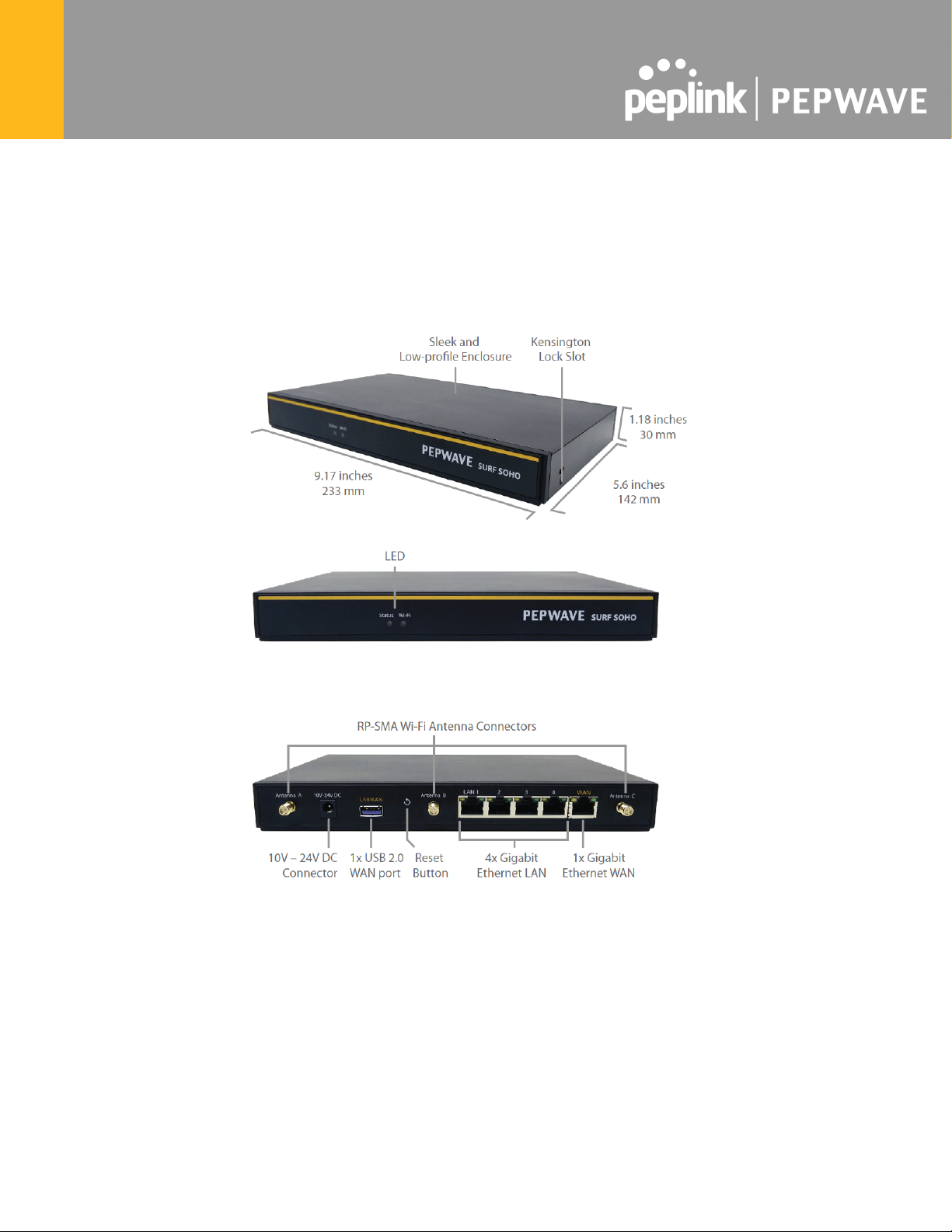
Pepwave Surf SOHO Router Overview
Panel Appearance
https://www.peplink.com
10
Copyright @ 2021 Peplink
Table of contents
Other peplink Wireless Router manuals

peplink
peplink MAX BR1 Mini User manual

peplink
peplink 210 User manual

peplink
peplink Pepwave MAX Series User manual

peplink
peplink PEPWAVE HD2 Dome Operating instructions

peplink
peplink Pepwave MAX Series User manual

peplink
peplink PePLink Surf User manual

peplink
peplink PEPWAVE AP Pro Series User manual

peplink
peplink Pepwave MAX BR1 IP67 Operating instructions