Pelican G40 User manual

PELICAN GO™
G40 Charge Case
Wireless Charging Tray
Instruction Manual
Please read instructions before first use. Visit www.pelican.com/warranty
REFERENCE ONLY
OVERVIEW
The G40 Charge Case not only stores and protects your belongings from
the elements, but it charges your mobile devices as well. Equipped with
a removable wireless charging tray, the G40 Charge Case can power all QI
enabled devices on the go.
Storage of product for end users:
If the product is stored for a long time (more than 3 months), the battery
should be maintained at 50% of the rated capacity (to be charged every 3
months) and stored in a cool and dry place at a temperature range of -10°C
to +30°C. Avoid contact with corrosive substances and keep away from fire
& heat.
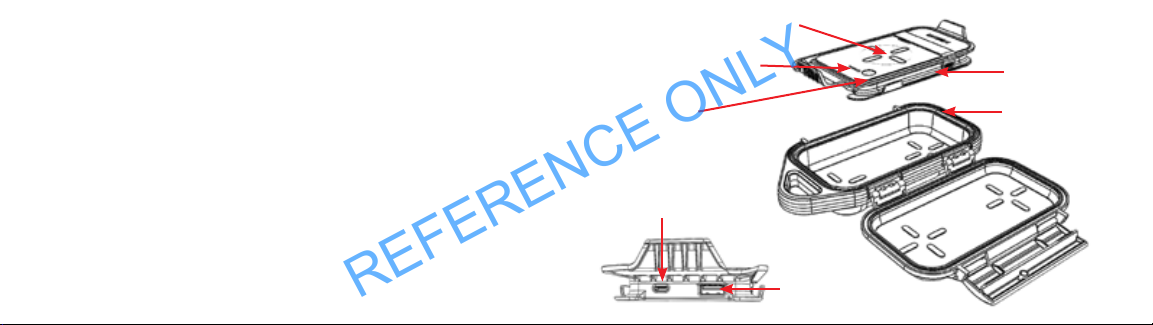
Wireless Charging Tray
Charging Cable
Protective Case
‘On’ button
LED Status Indicator
Micro Type B
USB port
Type A USB port
REFERENCE ONLY
CHARGING THE G40 TRAY
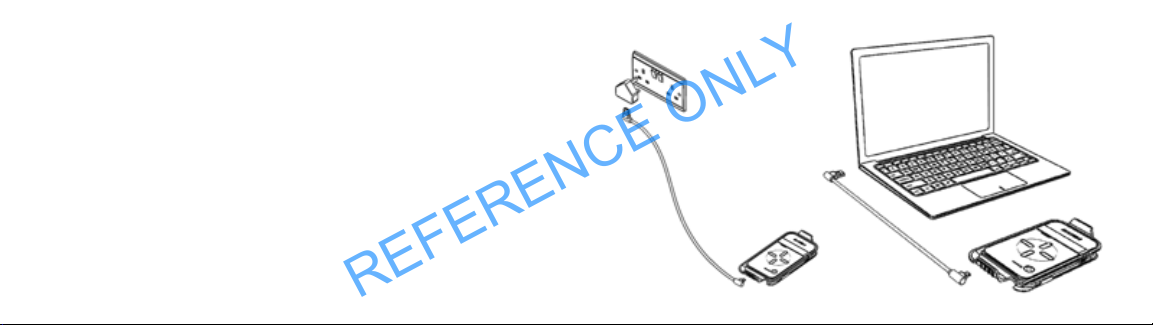
1. Open the case and remove the Wireless Charging Tray.
2. Remove the charging cord.
3. Using the supplied cord, connect the Type A USB plug to a
suitable power source – either a 5V power adaptor or a laptop etc.
4. Plug the Micro Type B USB plug into the Micro Type B
USB port on the Wireless Charging Bank.
REFERENCE ONLY

CHARGING THE G40 TRAY
While charging, the green LED will stay illuminated and the white LED
status indicator will flash as follows:
TABLE 1
White LED Flash Charge Level
1 < 25%
1-2 25 - 50%
1-2-3 50 - 75%
1-2-3-4 75 - 99%
All 4 LEDs on 100%
To check battery charge level, press the ‘on’ button. The number of LEDs
displayed represent the charge level in the battery. (Reference TABLE 1)
The Wireless Charging Tray will switch off automatically within 45 seconds
if charging a device does not begin.
The Wireless Charging Tray can also charge a device while it is
being charged, but only when charging a device wirelessly.
REFERENCE ONLY
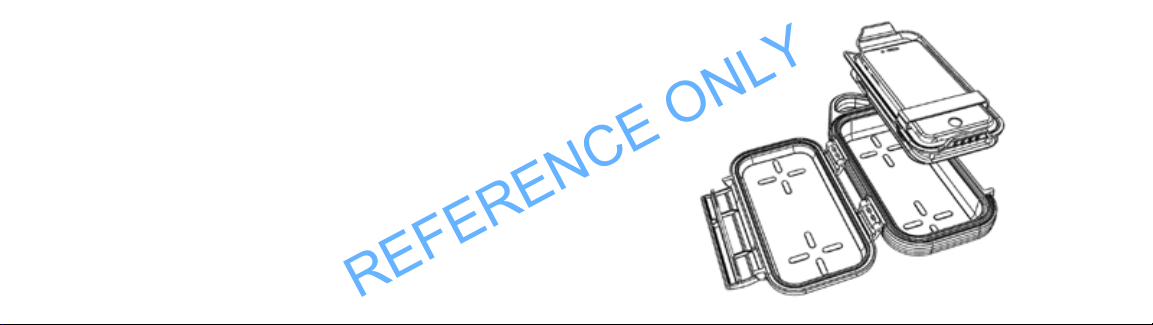
CHARGING A DEVICE WIRELESSLY
1. Open the case.
2. Press the ‘on’ button once. Green LED indicates stand-by.
White LEDs indicate battery charge level.
3. Place device on the Wireless Charging tray and secure with strap.
Device will automatically start charging. Blue LED indicates wireless
charging mode is active.
NOTE: The Wireless Charging tray will switch off automatically within
45 seconds if charging does not begin.
REFERENCE ONLY
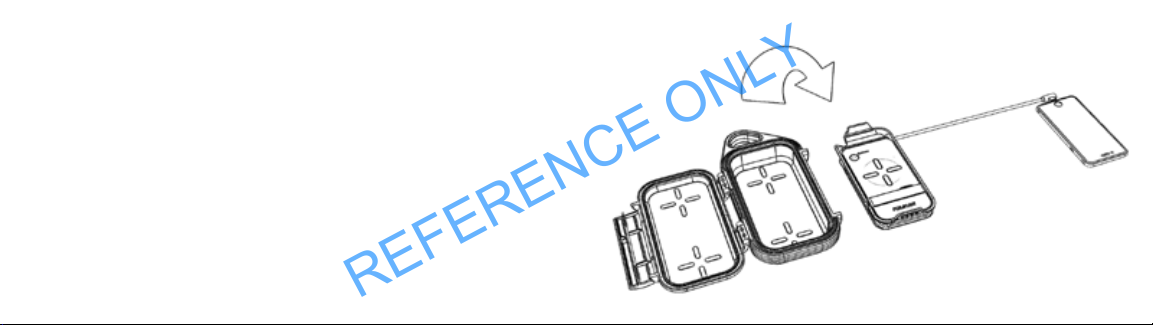
CHARGING A DEVICE VIA A USB LIGHTNING CORD
1. Open the case.
2. Remove the Wireless Charging tray.
3. Using your lightning USB charging cord (not supplied), plug the Type A
USB plug into the Type A USB port on the Wireless Charging tray and the
other end into your device.
4. Press the ‘on’ button once. Green LED will illuminate then switch off
White LEDs indicate battery charge level. Device will start charging.
NOTE: The Wireless Charging tray will switch off automatically within
45 seconds if charging does not begin.
REFERENCE ONLY

WARNING:
• Do not submerge the product in water or allow it to get wet.
• Do not use or store the product near sources of heat such as
a fire or heater.
• Do not reverse the positive (+) & negative (-) terminals.
• Do not connect the product directly to wall outlets or car
cigarette-lighter sockets.
• Do not put the product into a fire or apply direct heat to it.
• Do not short-circuit the product by connecting wires or other
metal objects to the positive (+) and negative (-) terminals.
• Do not strike, throw or subject the product to physical shock.
• Do not pierce the product casing with a nail or other sharp object,
break it open with a hammer or step on it.
• Do not directly solder onto the product terminals.
• Do not attempt to disassemble or modify the product in anyway.
• Do not charge the product under fire or hot conditions.
• If the battery inside the product leaks or smells, remove the product
from near an open flame immediately.
• Leaking electrolyte may cause fire or explosion.
• If the battery inside the product leak electrolyte into the eyes, do not rub.
Apply water, rinse and immediately seek medical assistance. If not treated,
eyes can be damaged.
REFERENCE ONLY

CAUTION:
• Do not use or store the product where it is exposed to extreme heat, such as in the
window of a car in direct sunlight on a hot day. Otherwise, the product may overheat,
which could reduce performance and/or shorten service life.
• Use the product only under the specification of product. Failure to do so can result
in reduced performance or a shorten service life. Using the product outside this
temperature range may cause overheating, explosion, or fire.
• When children use the product, they should follow the instructions and pay close
attention to them to ensure proper use of the product.
• If the battery inside the product leaks or the electrolyte gets on the skin or clothing,
immediately wash the affected area with running water or it may cause inflammation
of the skin.
• Read the instructions of the product for correct use, installation and
removal of the product.
FCC
This device complies with Part 18 of the FCC Rules.
CAUTION: Changes or modifications not expressly approved by the party responsible for
compliance could void the user’s authority to operate the product.
NOTE: This equipment has been tested and found to comply with the limits for a wireless
power charger, pursuant to Part 18 of the FCC Rules. These limits are designed to provide
reasonable protection against harmful interference in a residential installation. This
equipment generates, uses and can radiate radio frequency energy and, if not installed
and used in accordance with the instructions, may cause harmful interference to radio
communications. However, there is no guarantee that interference will not occur in a
particular installation. If this equipment does cause harmful interference to radio or tele-
vision reception, which can be determined by turning the equipment off and on, the user is
encouraged to try to correct the interference by one or more of the following measures:
REFERENCE ONLY

UL2056
CAUTION: Risk of fire and burns. Do not open, crush, heat above 45C or incinerate.
Follow manufacturer’s instructions.
INSTRUCTIONS PERTAINING TO RISK OF FIRE OR INJURY TO PERSONS
IMPORTANT SAFETY INSTRUCTIONS
WARNING ®C When using this product, basic precautions should always be followed,
including the following:
a) Read all the instructions before using the product.
b) To reduce the risk of injury, close supervision is necessary when the product
is used near children.
c) Do not put fingers or hands into the product.
d) Do not expose power bank to rain or snow.
e) Use of a power supply or charger not recommended or sold by power pack manufacturer
may result in a risk of fire or injury to persons.
- Reorient or relocate the receiving antenna.
- Increase the separation between the equipment and receiver.
- Connect the equipment into an outlet on a circuit different from that to
which the receiver is connected.
- Consult the dealer or an experienced radio/TV technician for help.
IC-ID
This device contains licence-exempt transmitter(s)/receiver(s) that comply with
Innovation, Science and Economic Development Canada’s licence-exempt RSS(s).
Operation is subject to the following two conditions: (1)This device may not cause
interference. (2)This device must accept any interference, including interference that
may cause undesired operation of the device.
This equipment complies with FCC/IC RSS‐102 radiation exposure limits set forth for
an uncontrolled environment. This equipment should be installed and operated with
minimum distance 0cm between the radiator and your body.
REFERENCE ONLY

SPECIFICATIONS
Input: 4.75V 5.25V / 2A Max
Output: 5V/2A, Wireless:5W
Wireless Charge Distance: <5mm
Dimensions: 235 x 198 x 52mm
Weight: 585g
CONTENTS
1x G40 Wireless Charging Bank
1x USB Charging cord
1x User Manual
f) Do not use the power bank in excess of its output rating. Overload outputs above rating
may result in a risk of fire or injury to persons.
g) Do not use the power bank that is damaged or modified. Damaged or modified batteries
may exhibit unpredictable behavior resulting in fire, explosion or risk of injury.
h) Do not disassemble the power bank. Take it to a qualified service person when service
or repair is required. Incorrect reassembly may result in a risk of fire or injury to persons.
i) Do not expose a power pack to fire or excessive temperature. Exposure to fire or tem
perature above 100°„C may cause explosion.
j) Have servicing performed by a qualified repair person using only identical replacement
parts. This will ensure that the safety of the product is maintained.
k) Switch off the power bank when not in use.
SAVE THESE INSTRUCTIONS
REFERENCE ONLY
Table of contents
Languages: