PeakDo PK-5M23-TX User manual

60GHz Wireless HDMI
Transceiver 2.0
User Manual
V2.0
Note: Thank you for choosing this product. If the product’s
appearance or structure changes due to upgrades, please refer
to the actual product.
PK-5M23-TX/PK-5M23-RX
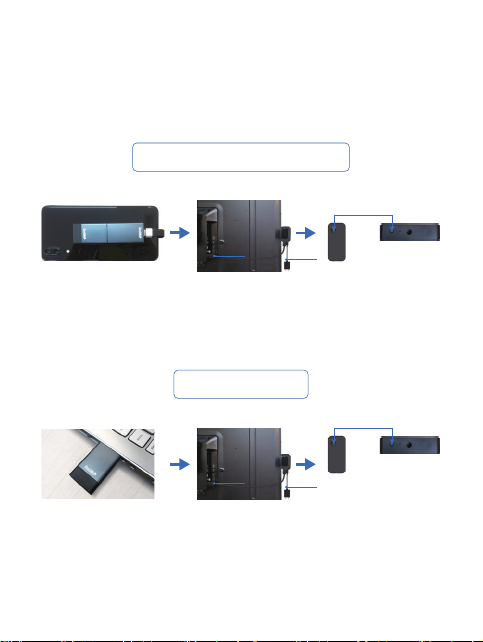
Quick Setup
Mobile Phone Projection
PC Projection
Step1: Mobile phone
connection
Step2: Receiving end
connection
Step3: Long press the
reset button to connect
Step1: PC connection Step2: Receiving end
connection
Step3: Long press the
reset button to connect
Reset Button
Reset Button
USB
HDMI
USB
HDMI
Wireless transmitter uses 60GHz frequency band signal for transmission. It
supports 1080p 60Hz lossless display, theoretical latency as low as 2.5ms
and ultra-high frequency band anti-interference. No APP needed, just plug
and play.
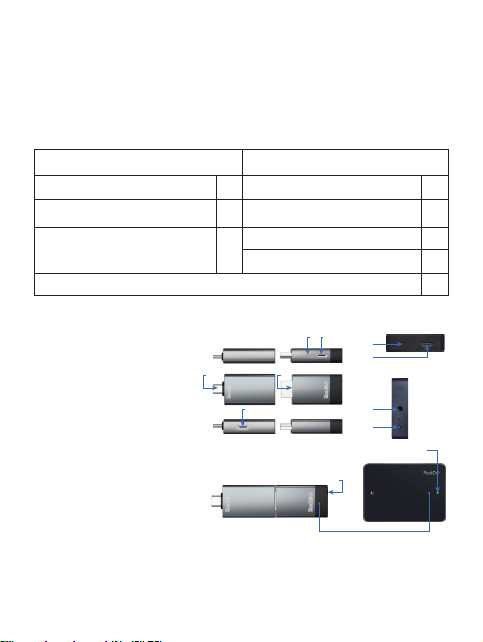
2. Accessories
TX HDMI Receiver
3. Interface Description
A:Type-C Data Interface
B:HDMI Interface
C:Type-C Power Supply Port
D:Type-C Power Supply Port
E:Standard HDMI Interface
F:Type-C Power Supply Port
G:Receiver’s Reset Key
H:Receiver’s Indicator
I:Transmitter’s Indicator
J:Transmitter Reset Key
K:1/4" BSW Thread Hole
O:Antenna
Note: Do not block the antenna position under any circumstances,
otherwise the signal quality may be affected.
1. Product Description
A B
C
D
I
J
O
C2H H-TX
C2H H-TX
1
1
1
TX Transmitting side
F
RX Receiving side
1
RX Receiver
RX Clip
Type-C Male to Male Cable
Standard HDMI Male to Male Cable
1
1
1
1
E
H
G
K
User Manual
Type-C Male to Female Flex Cable
TX Type-C to HDMI Converter

4. Technical Information
Product Model
Transmission Tech
Frequency Band
Transmission Rate
Transmission Range
Simultaneous Transmission Angle
Picture Quality
Picture Latency
Product Dimensions
Working Voltage-Current
Support Interface
Connection Methd
Weight
Working Temperature
Storage Temperature
Relative Humidity
Power Consumption
Interface Type
PK-5M23-RX
Wireless HD
60GHz
3.96Gbps
5m
60 degrees
1080P@60Hz
≤2.5ms
RX:100*70*19mm
5V-600mA
HDMI Output
Plug and Play
106.0g
0℃~60℃
-20℃~60℃
20~90% RH
3W
Standard HDMI
PK-5M23-TX
Wireless HD
60GHz
3.96Gbps
5m
60 degrees
1080P@60Hz
≤2.5ms
TX:81*25*10.5mm
5V-100mA
Type-C with DisplayPort,HDMI
Plug and Play
32.0g
0℃~60℃
-20℃~60℃
20~90% RH
0.52W
Type-C/HDMI

5. Operation Manuals
1) Connection Method of Transmitter
Connect with mobile phone: insert H-TX
into HDMI port of C2H, and connect C2H
through Type-C data cable of soft head and
Type-C port of mobile phone with DP output,
as shown in the figure. Attention: The tran
smitter’s antenna is on the side with Peak-
Do logo, which must be faced outside, as
shown in the left figure.
Connect with computer: H-TX trans-
mitter is directly inserted into HDMI
output port of computer.
Due the characteristics of the 60GHz millimeter wave, the antennas of trans-
mitter and receiver need to have a correct alignment, smaller than 60 degrees.
A smaller alignment angle results in a stronger signal. As shown in the foll-
owing figure.
Up to 5 Meters
Logo side to Logo Side
Use the mobile phone
charger
❌
(schematic diagram of HDMI
connection between transmi-
tter and computer)
Connect while charging: The transmitter
can be powered by the mobile phone. When
projecting for a long duration, or the
battery of the mobile phone is insufficient,
it can be charged while projecting according
to the connection method as shown in the
left figure.

Connection using an USB auxiliary power
supply cable: the HDMI port power supply of
some laptops or computers (especially old
machines) is not enough to supply the
working current of the transmitter. In this
case, a short USB-A to Type-C power supply
cable can be used to provide sufficient
working current for the transmitter.
Indicator lights of transmitter and receiver:
After the power is plugged in, the indicator lights will display the connection
status in red, blue and green, and the status of indicator lights of transmitter
and receiver will be synchronized.
Long distance projection via computer: for
long distance projection (for example: 5m),
the antenna of transmitter and receiver
should be within the direction angle of 60° to
achieve the best signal reception. In
this circumstance a 360° HDMI adapter can
be used to adjust the antenna direction of
transmitter, as shown in the left figure.
Red: power on Blue: Searching for signal Green: connection successful
If the transmitter or receiver continues to display blue light, it means that
the device is not connected. Please press the reset key of the transmitter
once, wait for 5-6 seconds to establish connection. If the connection still
cannot be established, please reset the device. Method: press and hold the
reset key of the transmitter and receiver for 10 seconds simultaneously. After
the indicator is off, release the reset key, and the device will reconnect.
Reset Button
(Connection Method for using a
USB auxiliary power supply cable)
(Long Distance Projection Method)
Reset Button
Reset Button

Transmitter
2) Setup of receiving end:
HDMI
HDMI transmitter Type-C to HDMI
Type-C
Note:
When pairing, make sure that the transmitting end and the receiving end
are unobstructed and is within the visible range of 5 meters.
After successful pairing, there is no need for a second setup even if power
supply has turned off, unless a different transmitter or receiver is replaced.
The sending end is composed of HDMI transmitter (H-TX) and type-c to HDMI
(C2H). When the mobile phone needs to cast on the big screen,
insert the H-TX into the HDMI bus of C2H according to the above figure. When
laptop, Nintendo Switch, play station or camera needs to cast on the big
screen, insert the H-TX into the HDMI-out bus of the device (if the power
supply of the HDMI-out port of the device is insufflcient, use the USB
auxiliary power supply cable).
USB cable auxiliary
power supply
(1) (2) (3)
B

The side where the indicator light of the receiver is located is the front of the
antenna. Please ensure that this side is visible to the signal transmitting side
of the transmitter (Fig. (3) B: antenna position), and try to avoid obstacles
between the transmitter and receiver. The receiver should not be installed
on the back of the display device, otherwise it may block the signal and
affect the signal. It is recommended to clip the receiver to the outer edge of
the TV frame with an attached bracket.
Caution:
When using external power supply, please confirm that the power output is
DC 5V/2A+ power supply. Otherwise the equipment may be damaged!
The optimal working distance of this product is within 5 meters. The signal
transmission requires the receiving and transmitting antenna to be aligned
within 60 degrees without shielding. Adjust the placement position to reach
the optimum experience.
The receiver USB port need to connect the supplied USB charger power
adapter. If use the third party power supply, make sure the output voltage of
the supply port is DC 5V and the current is at least 2A.

6. Supported Devices
Device with Type-C interface DP protocol
to HDMI interface
Computers
Apple
MacBook Air2018, iPad Pro2018,
MacBook Pro2016/2017/2018,
MacBook 12inch
(All Type-C interfaced ipad or MAC)
MateBook 14/13, E/E, 2019 version
MagicBook
Google PixelBook
Huawei
Hono
Xiaomi
ASUS
Lenovo
HP
Dell
Google
Air12.5/13.3 inch, Pro 15.6 inch, Xiaomi Game Book
Lingyao 3 / 3Pro, Lingyao X series,
U4100UN, U5100UQ, ROG series
Y7000/Y7000P/Y9000K, YOGA6 Pro
ThinkPad X1, Carbon/Yoga
Shadow Elves 4Pro, Elitebook
1050 G1, Elitebook Folio G1
G3/G5/G7series,
Lingyue5000/7000
Apple
Mobile phones
RongYaoV20, RongYaoNote10
R17Pro
Black Shark 2, 3/3pro, 4/4pro
Red Magic 5
R1, R2, Pro2S, Pro3
Microsoft950XL, Microsoft950
G5/V300L
One plus7/7Pro, One plus8/8Pro, One plus9/9Pro
Hono
OPPO
Black Shark
Samsung
Red Magic
JmGO
Microsoft
LG
One plus
Note8, Note 9, Note10,S8/S8+, S9/S9+,
S10/S10+, S20/S20+
P20、P20Pro, P30, P30Pro,
P40 /P40Pro, Mate10/Mate10pro,
Mate20/Mate20pro, Mate30/Mate30Pro,
Mate40, Mate40Pro
Huawei
All series (adapter required)
More models are being continuously updated, please refer
to the mobile phones user manual.
This manual suits for next models
1
Table of contents